Introduction
Gearroom's market desk offers a main sign-in page and a mobile sign-in page. Both open the same member's loan record. The policy already counts by account, but the two pages keep separate counters. A member limited on one page can still authenticate on the other.
Use bounded Hydra attempts to demonstrate that gap, then put both entries in one shared account limit. Prove both directions, preserve another member's normal sign-in and confirm recovery after natural cooldown. You will deliver a live effective policy with real request history and unchanged records, not a report.
This guided lab builds on Limit Attempts by Account: you should recognize its Hydra form argument, known positive marker, JSON policy, curl diagnostics and deskctl commands. Those mechanisms stay the same. This environment is freshly initialized with different members and records; no previous files, sessions or processes carry over. Workstation is the prepared terminal; Equipment Desk is the website. Both interfaces belong to one isolated training container. All accounts and data are synthetic local resources.
Allow about 50 minutes, including reading and ordinary mistakes; this is an author estimate, not measured novice timing. Only the declared test member may receive repeated wrong passwords. The reference member must use its known correct password. Keep the original service, accounts, records and training values intact.
Confirm One Account Has Two Entry Points
In this step, establish that the two pages really authenticate the same member and open the same loan record. Similar labels alone would not establish a shared identity.
Open Equipment Desk, then Review brief. The permitted test member is samplemember, password Sample24. The normal reference member is deskteam, password Desk24.
Select Member sign-in, submit the test member's credentials and select Open your record. Check samplemember, loan LN-318, Jules Chen, Workshop camera kit, collection Friday 09:30, return Monday 16:00, and the labelled-pouch note for both batteries. Select Sign out.
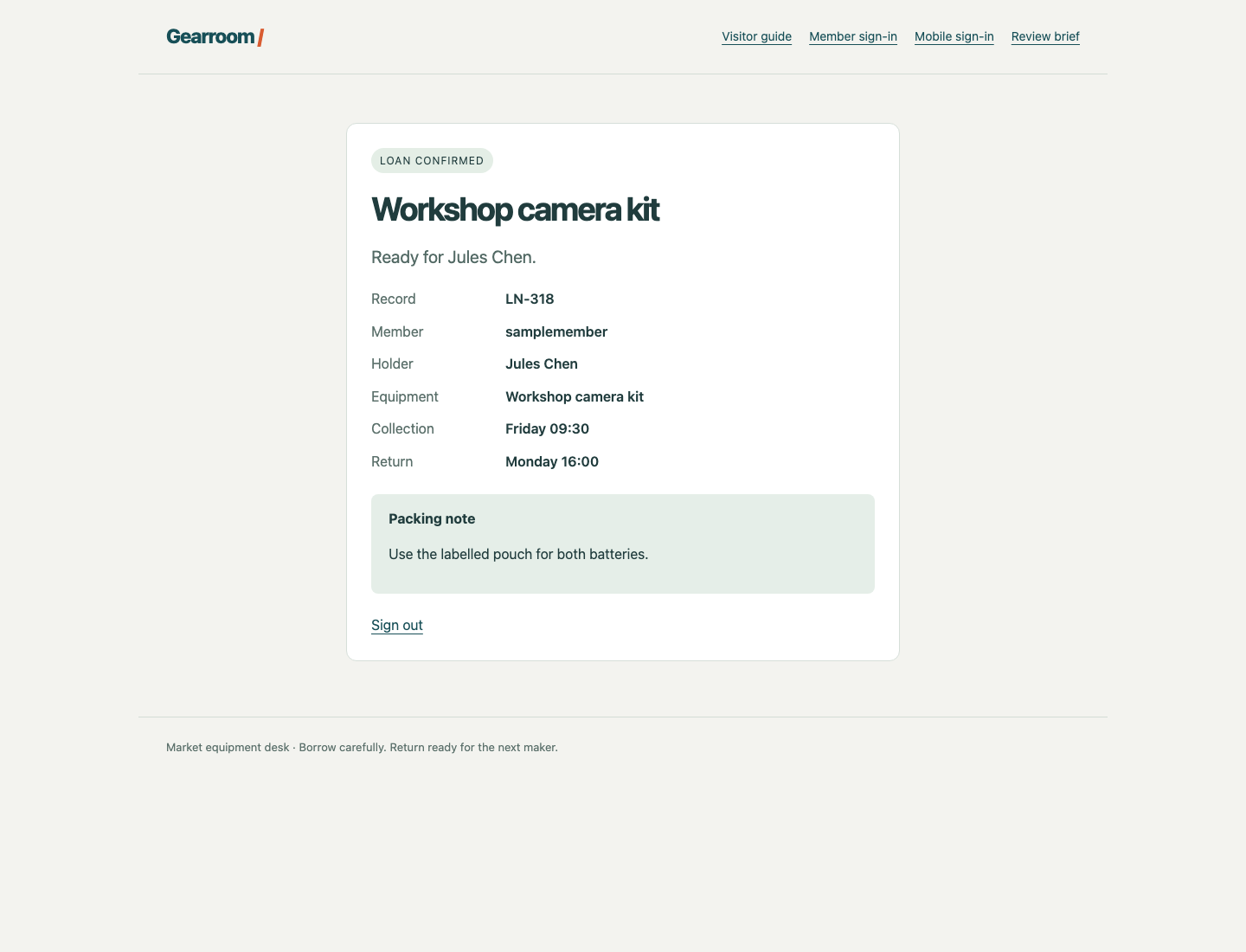
Compare the Member and Record fields, both times and the packing note after each real login. Both pages should open this same record.
Select Mobile sign-in, use the same test credentials and open the record. Check the same identity, loan and complete details, then sign out. These are two entry points to one member directory, not separate accounts or hosts.
Select Member sign-in, use deskteam / Desk24, then open its record. It is LN-087, Ari Lane, Folding projection screen, with the note to keep the screen dry before packing. Sign out again.
Switch to Workstation. The interface starts in /home/labex/project/login-limits; pwd shows the location:
pwd
If you are elsewhere, use the same directory-changing command as before:
cd /home/labex/project/login-limits
Read the prepared policy and actual active policy:
cat policy.json
deskctl status
The key is already account. In entry_groups, /signin belongs to desktop, while /mobile/signin belongs to mobile. A group identifies which entry points share a counter for that account. Different group labels currently give the same member separate counters. Keep the three-failure, 30-second-window and 12-second-cooldown values.
Observe the Alternate Entry Gap
In this step, limit the main entry and demonstrate a genuine login through the mobile entry during that same cooldown.
Stay in Workstation. The prepared file still contains only five deliberately wrong candidates for the permitted test member:
cat wrong-passwords.txt
The actual POST paths are shown below the two visible forms. They use the same username and password fields. The loopback address 127.0.0.1 and port 8080 reach this local training service. Hydra's -l now selects samplemember; -P, -s, -t 1, -I, the quoted POST argument and S=Signed in as have the same meanings as in the first guided lab. Every candidate is wrong, so a completed run should report 0 valid password found; that output alone cannot prove that an alternate entry is protected.
Let previous attempts expire naturally:
deskctl wait
Run the following four commands together, without pausing to read between them. The curl probes use known correct passwords; -o saves each response body, and -w prints its HTTP status:
hydra -I -l samplemember -P wrong-passwords.txt -s 8080 -t 1 127.0.0.1 http-post-form '/signin:username=^USER^&password=^PASS^:S=Signed in as'
curl -s -o main-probe.html -w 'Main HTTP %{http_code}\n' --data 'username=samplemember&password=Sample24' http://127.0.0.1:8080/signin
curl -s -o mobile-probe.html -w 'Mobile HTTP %{http_code}\n' --data 'username=samplemember&password=Sample24' http://127.0.0.1:8080/mobile/signin
curl -s -o reference-probe.html -w 'Reference HTTP %{http_code}\n' --data 'username=deskteam&password=Desk24' http://127.0.0.1:8080/mobile/signin
Expect Main HTTP 429, Mobile HTTP 200, and Reference HTTP 200. The same test member is limited on the main entry but can authenticate on mobile. Confirm the mobile identity rather than trusting 200 alone:
grep -o 'Signed in as samplemember' mobile-probe.html
Read the genuine server decisions:
deskctl events
Look for a samplemember threshold on /signin, a limited main login, and an authenticated login on /mobile/signin under the same revision. A single entry's limited event cannot demonstrate a cross-entry limit. The reference member remains a separate account; its success does not repair this gap.
The history remains available after the cooldown. If you missed the observation window, let deskctl wait finish and repeat this same bounded block. For a connection or Hydra syntax error, correct the complete argument, address, port and declared path first. HTTP 400 means the submitted field names or structure are wrong; 404 means the path is wrong. An ordinary typo does not require resetting the VM.
Put Both Pages in One Account Group
In this step, make both POST paths use one counter for the same member. Accounts must remain separate from each other.
Stay in Workstation. Replace your policy file with the complete object below. The quoted here-document preserves the JSON literally; its closing EOF must stand alone without leading spaces. As before, > overwrites this local file:
cat > policy.json <<'EOF'
{
  "key": "account",
  "entry_groups": {
    "/signin": "members",
    "/mobile/signin": "members"
  },
  "failed_attempts": 3,
  "window_seconds": 30,
  "cooldown_seconds": 12
}
EOF
Both routes now have the same group label. The label is a short nonempty name, not a special keyword: an equivalent shared name is allowed. Labels can contain at most 48 characters. Keep the account key, both actual route keys and the agreed numeric values. Removing a route, disabling a form or returning to a global counter would not meet the task.
Apply the file explicitly:
deskctl apply policy.json --wait
Changed policies wait for existing attempt state to expire naturally. No active counter, history or member record is cleared, and the process is not restarted. Reapplying the same policy remains a no-op. A missing JSON comma or incorrect field leaves the previous policy active; correct your file before retrying.
deskctl status
Confirm the live account key and matching group labels under a new revision. A correctly written local file is insufficient until the running service uses it. You now need evidence from this revision, rather than the earlier split-group events.
Test Both Directions and Preserve Member Access
In this step, prove that either page's failures limit the other page, while the reference member can still work and the test member recovers naturally.
Stay in Workstation. First test main-to-mobile:
deskctl wait
Run this complete block together:
hydra -I -l samplemember -P wrong-passwords.txt -s 8080 -t 1 127.0.0.1 http-post-form '/signin:username=^USER^&password=^PASS^:S=Signed in as'
curl -s -o mobile-probe.html -w 'Mobile HTTP %{http_code}\n' --data 'username=samplemember&password=Sample24' http://127.0.0.1:8080/mobile/signin
curl -s -o reference-probe.html -w 'Reference HTTP %{http_code}\n' --data 'username=deskteam&password=Desk24' http://127.0.0.1:8080/mobile/signin
Expect zero Hydra findings, Mobile HTTP 429, and Reference HTTP 200. The two saved bodies should agree:
grep -o 'Too many attempts' mobile-probe.html
grep -o 'Signed in as deskteam' reference-probe.html
deskctl events
The current revision must show the main threshold, mobile refusal and normal reference authentication. Wait for natural recovery:
deskctl wait
Switch to Equipment Desk, select Mobile sign-in, use samplemember / Sample24 and select Open your record. Check the unchanged LN-318 camera record and battery-pouch note, then Sign out. This new mobile login confirms recovery from the main entry's limit.
Return to Workstation. Now reverse the direction:
deskctl wait
Run this complete block together:
hydra -I -l samplemember -P wrong-passwords.txt -s 8080 -t 1 127.0.0.1 http-post-form '/mobile/signin:username=^USER^&password=^PASS^:S=Signed in as'
curl -s -o main-probe.html -w 'Main HTTP %{http_code}\n' --data 'username=samplemember&password=Sample24' http://127.0.0.1:8080/signin
curl -s -o reference-probe.html -w 'Reference HTTP %{http_code}\n' --data 'username=deskteam&password=Desk24' http://127.0.0.1:8080/signin
Expect zero findings, Main HTTP 429, and Reference HTTP 200:
grep -o 'Too many attempts' main-probe.html
grep -o 'Signed in as deskteam' reference-probe.html
deskctl events
This time the mobile threshold must be followed by the main refusal. It is a different direction, not a renamed copy of the first result. If a diagnostic command ran too late, naturally settle and repeat that bounded direction; do not enlarge the candidate set or reset counters.
deskctl wait
Switch to Equipment Desk, select Member sign-in, use samplemember / Sample24, then open the original LN-318 record. That main login demonstrates recovery from the mobile entry's limit. Sign out, then use Member sign-in with deskteam / Desk24 and reopen LN-087, checking the screen and its dry-packing note. Sign out again and open Visitor guide.
The browser creates its own session after each real login; the diagnostic curl responses do not sign it in. If a record gives 403, correct the actual browser login and use Open your record. Correct ordinary password or path mistakes without restarting the scene.
Both actual entry points now follow one limit for each account, with current-policy evidence in both directions, preserved reference access, natural recovery and unchanged business records. Assessment reads these existing facts and public pages; it does not perform missing tests or recovery. This proves the stated local single-process behavior, not a distributed production limit or a defense against every kind of automated login.
Summary
You confirmed that two real sign-in pages share one identity, reproduced a gap caused by separate entry groups, and applied a shared account counter. Bounded Hydra tests then demonstrated both directions, normal reference access and natural recovery to unchanged records. Neither a single page's refusal nor old-policy history could establish the complete result.