Introduction
A community desk has a small lost property collection. Its prepared webpage can display items, but the example API returns only one record. You will connect real Go records to list and detail responses so visitors can find the right collection location.
You should already know Go functions, structures, slices, maps, and modules, plus basic terminal paths. HTTP, JSON, and handler tests are introduced here. The browser environment includes Go and a ready page. This unit starts independently; it needs no files from another lab. Allow about 55 minutes including reading and ordinary mistakes; this is an author estimate.
Select One Item Without Breaking the List
In this step, keep a working one-card collection while adding real item details. Begin in the Workspace tab. Its shell enters /home/labex/project/lost-found; the following cd restores that location if you return later.
Go is installed in /usr/local/go/bin. export adds that directory to this shell's command search path, keeping the existing $PATH. This applies to the current terminal session; repeat it in a new shell. No global shell setting changes.
cd /home/labex/project/lost-found
export PATH=/usr/local/go/bin:$PATH
curl sends a request. -i includes response headers, and single quotes keep the URL together. GET asks to read a resource. /api/items identifies the collection; 127.0.0.1:8080 is the service on this same machine. First use the normal example:
curl -i 'http://127.0.0.1:8080/api/items'
Expect 200 OK, a Content-Type: application/json header and an array containing LF-101, the blue umbrella at the library. HTTP status describes the request outcome; the body carries data. JSON uses brackets for arrays and braces for objects. A 200 alone does not prove a complete collection. Switch to Lost and Found and see its one card, then return to Workspace.
cat displays a file without editing it. Read the source records, the input structure and your small starting handler:
cat items.json
cat main.go
cat handler.go
There are six records. Item groups ID, Name, Category and Location; exported capitalized fields can be encoded. Tags such as `json:"id"` select lowercase JSON keys. main.go loads the collection, serves the prepared page and passes its item slice to catalogHandler. Preserve main.go, go.mod, items.json, serve.py and web/; edit handler.go and any additional Go files or tests only.
Before changing code, predict the difference between a request for LF-101 and one for LF-103. Both names are Blue umbrella, but the locations are Library desk and Cafe counter. Which field can select just one record? Now request the second ID:
curl -i 'http://127.0.0.1:8080/api/items/LF-103'
The starter still returns its first-record array. That is a received response, but not a correct detail. Your task is to return the object selected by the ID while keeping the current list response available. Do not solve it by returning the first object for every path.
A handler is Go code called for each request. r *http.Request points to the incoming request. w http.ResponseWriter is the destination: Header sets headers and writes send the body. http.Handler describes that behavior; http.HandlerFunc adapts a function to it. The returned anonymous function remembers the supplied items. You do not need to write an HTTP parser.
Before editing, save a copy. cp copies the file; the .backup extension deliberately avoids .go, which would create duplicate definitions when Go compiles the package.
cp handler.go handler.go.backup
Open the actual file in the terminal editor. The command-scoped LC_ALL=C.UTF-8 makes nano interpret text as UTF-8, including accented characters. It affects only this editor invocation, not global shell settings:
LC_ALL=C.UTF-8 nano handler.go
In nano, Ctrl means hold Control while pressing the named key. Use arrow keys to move. Press Ctrl+W, type catalogHandler, then Enter to find the function; Ctrl+C cancels an unfinished search. Edit with ordinary typing, Backspace and Delete. Ctrl+K cuts the current line; use it only on a line you intend to replace. The shortcut labels at the bottom use ^ to mean Control. You are editing the existing handler, not creating a second program.
Implement the following decisions inside the returned function, after its existing content-type header. Work on one branch at a time:
First, read r.URL.Path. If it equals /api/items, keep the starter's items[:1] array encoding and return immediately. This preserves the normal one-card list while you work on details.
Next, otherwise, recognize the /api/items/ prefix. Add the strings standard-library import beside the existing imports. strings.HasPrefix(path, prefix) checks a prefix, and strings.TrimPrefix(path, prefix) removes it. Store the remaining ID in a local variable.
Then, traverse the supplied slice with for _, item := range items. Compare item.ID to that requested ID, not the name. For the match, encode that item object and immediately return. json.NewEncoder(w).Encode(value) writes the chosen Go value as JSON; a slice becomes an array and one structure becomes an object. The loop must inspect every record, not just items[0].
After that, if no ID matched, or the path is outside those routes, set 404 before writing a JSON error. w.WriteHeader(http.StatusNotFound) sets the status. A small JSON-compatible error value is map[string]string{"error": "item not found"}; the error string must be nonempty. Encode that map. Do not write another list after an error.
A response's first write normally commits 200, so set a different status before encoding. Encode returns an error: nil means no failure. In this example all values are JSON-compatible strings. A disconnected client can still make writing fail; sending a second response after the body has started cannot repair the connection. Early returns also prevent two answers being appended.
Save with Ctrl+O, confirm the existing filename handler.go with Enter, then exit with Ctrl+X. Inspect your saved file:
cat handler.go
If you opened the wrong file, exit without saving: Ctrl+X, then N if asked to save. Run pwd to inspect your location, restore the first cd and reopen the right filename. If a save prompt shows an unintended name, Ctrl+C cancels it. Do not overwrite the source data to compensate for an editing mistake.
gofmt -w formats the named Go file in place. The prepared serve.py builds your code before replacing only this workspace's recorded server. It provides no handler implementation. A build error keeps the previous working process, so an old browser response does not prove the new code compiled.
gofmt -w handler.go
python3 serve.py
Expect Lost and Found ready on port 8080. If formatting or compilation fails, read the filename and line number. Reopen nano handler.go, find the nearby expression with Ctrl+W, repair just that region, save, exit and repeat both commands. Preserve already working logic; do not restore the initial backup over later progress. If No such file appears, restore the first cd. Service diagnostics are in .work/server.log, readable with cat .work/server.log; a typo is not a reason to reset the VM.
curl -i 'http://127.0.0.1:8080/api/items/LF-103'
Expect one object whose id is LF-103 and location is Cafe counter, not an array or the library's umbrella. Check that your normal list still returns its sample array:
curl -i 'http://127.0.0.1:8080/api/items'
You have added selection while keeping the working page's collection format. The next step deliberately expands that list to all records.
Return the Complete Collection
In this step, turn the one-record list into a complete read-only catalog without losing the details you wrote. Start in Workspace, in /home/labex/project/lost-found.
Before editing, read the slice expression in your collection branch. items[:1] selects a prefix ending before index one, so it hides the other five records. Predict the response if the encoder receives items itself. Unlike a hard-coded six-item array, that argument also works for another supplied slice.
LC_ALL=C.UTF-8 nano handler.go
Search for items[:1] with Ctrl+W and Enter. Change only the collection's encoded value to the complete input slice. Keep the JSON header, detail loop, missing-ID error and early returns. Save to the same filename with Ctrl+O and Enter, then Ctrl+X.
An empty collection must encode as [], never null. An empty non-nil slice encodes as []; a nil slice would encode as null. This unit's independent empty input is []Item{}. Do not replace an empty result with a missing-item error: a list and a detail have different meanings. Array order and object-key order are flexible, but the name, category and location belonging to each ID must stay together.
gofmt -w handler.go
python3 serve.py
Request the collection and then both umbrellas by their separate IDs:
curl -i 'http://127.0.0.1:8080/api/items'
curl -i 'http://127.0.0.1:8080/api/items/LF-101'
curl -i 'http://127.0.0.1:8080/api/items/LF-103'
Expect all six complete records in the array. LF-101 still belongs to Library desk and LF-103 to Cafe counter, even though both names are Blue umbrella. If either detail moved, inspect the ID comparison and which loop value you encode.
The next request deliberately uses a missing ID. Expect HTTP 404 and a JSON object containing a nonempty error string, rather than an empty list. curl normally still exits successfully for a received HTTP error response: receiving a response differs from failing to connect.
curl -i 'http://127.0.0.1:8080/api/items/no-such-id'
This handler has no filtering yet and does not enforce the HTTP method; the next guided lab introduces those behaviors. Do not treat a normal homepage or an arbitrary 200 as proof of a working detail endpoint. You have now preserved the list and details together while changing the collection's scope.
Write a Test That Distinguishes Identities
In this step, design your own focused handler test without running a second live server, then use the real page. Start in Workspace in the same directory.
First decide what a test must catch: a handler might return the first matching name instead of the requested ID. Choose two small records of your own with the same name but different IDs and locations, outside the webpage's collection. Request the second ID. Write down which status, ID and location should be returned. This independent fixture makes a fixed live response fail and makes the test useful beyond the six prepared records.
Go discovers tests in files ending _test.go. A test function starts with Test and accepts t *testing.T. Create your test file with nano:
LC_ALL=C.UTF-8 nano handler_test.go
Start with package main. Import encoding/json, net/http/httptest and testing. Add a function such as func TestSecondIdentity(t *testing.T) { ... }, replacing the dots with your test statements. The function body has four parts:
First, construct your two-record []Item fixture using the exported field names from main.go. Give it to catalogHandler, rather than loading or changing items.json.
Next, make a request for the second record's detail. httptest.NewRequest("GET", path, nil) builds a request; the last argument means no request body. httptest.NewRecorder() returns a response recorder. Calling your handler's ServeHTTP(recorder, request) runs the real handler and captures its headers, status and body.
Then, declare var got Item. Decode with json.Unmarshal(recorder.Body.Bytes(), &got). &got is the address where the fields will be stored. Check the returned error first: invalid JSON must not be mistaken for a valid empty structure. For example, if err != nil { t.Fatal(err) } stops the test with a readable failure.
After that, assert the expected status and identity. recorder.Code contains the status, and got.ID and got.Location contain decoded fields. Compare them to the second fixture record. Use if and t.Fatalf to fail with the actual values. %d displays a number and %+v shows structure fields. Do not merely assert that some JSON exists.
Use your chosen IDs and locations consistently in the request and assertions. Keep fixture data, execution and assertions in the same test function so the reasoning is easy to follow. Save with Ctrl+O and Enter, then Ctrl+X. The environment does not supply a passing test for you.
go test -v . runs this package's tests: -v shows test names, and . selects the current package.
gofmt -w handler_test.go
go test -v .
Expect your test name followed by PASS. A failure should print the real status or item. If it fails, decide whether your expected fixture relationship or the handler is wrong; correct only that part with nano and rerun the test. A compiler error identifies a file and line to inspect. Rebuild with python3 serve.py after any handler correction so the browser also uses the current code. Keep at least one passing Go handler test in this workspace; the final check runs your tests in isolation and checks the API with other supplied input records.
Switch to Lost and Found and reload. Expect 6 items found. Open View item on LF-103 and read its reference and collection location, then choose Back to collection. The two umbrellas must remain distinguishable. This unit supplies collection and detail browsing; the next guided lab adds search controls together with their API filtering behavior.
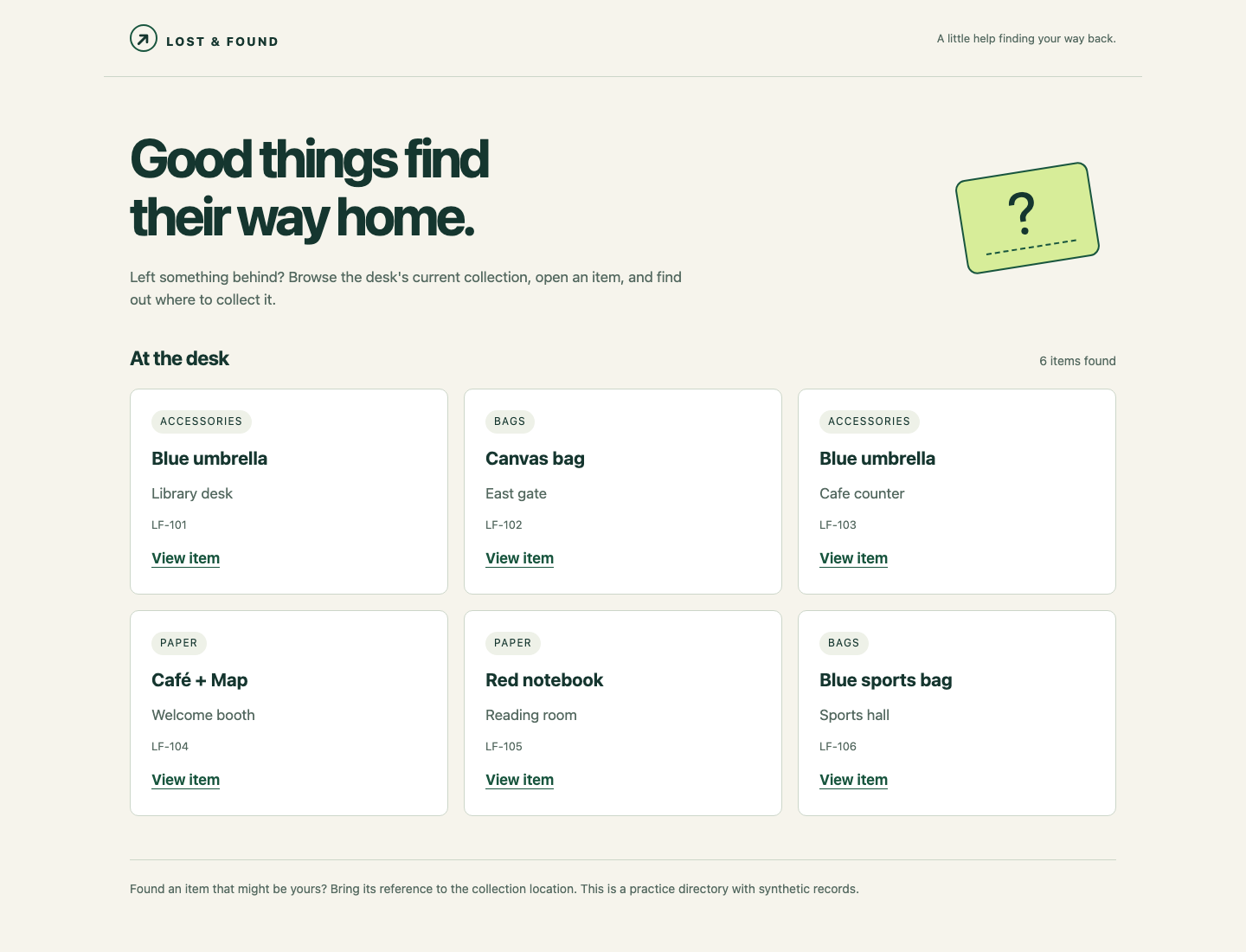
Look for six cards and their individual references. The page consumes your running API and contains no backup collection. Return to Workspace if a correction is needed. You now have a usable catalog and a test whose fixture and assertions you chose to expose a real identity mistake.
Summary
You encoded Go records as JSON, selected list and detail responses by path, kept duplicate names linked to their own IDs, and returned a real missing-item status. You also wrote an isolated httptest test and used the live webpage. Search and stricter error handling are the next guided lab's independent task.