Introduction
The Common Archive keeps four neighborhood records in PostgreSQL. Its reference site works, but the new archive tried to import its catalog before the database could accept connections. Make first startup reliable by distinguishing a running container from a usable database.
You should know basic Docker, container logs, published ports and terminal paths. This lab teaches YAML relationships, the small Compose file, a database health check and dependency conditions. No SQL, PostgreSQL administration or application coding is required. The complete database image, importer, website and data are provided.
Use Workstation, Reference Archive, Your Archive and Collection Notes. All materials are synthetic teaching records. The deliberate database and import delays make startup states visible; they are not claims about production timings. Allow about 45 minutes including reading and ordinary mistakes; this is an author estimate.
Wait for a Usable Database
In this step, you will repair one dependency in a small, complete application. Work through the observations before replacing the configuration.
Use the Normal Archive
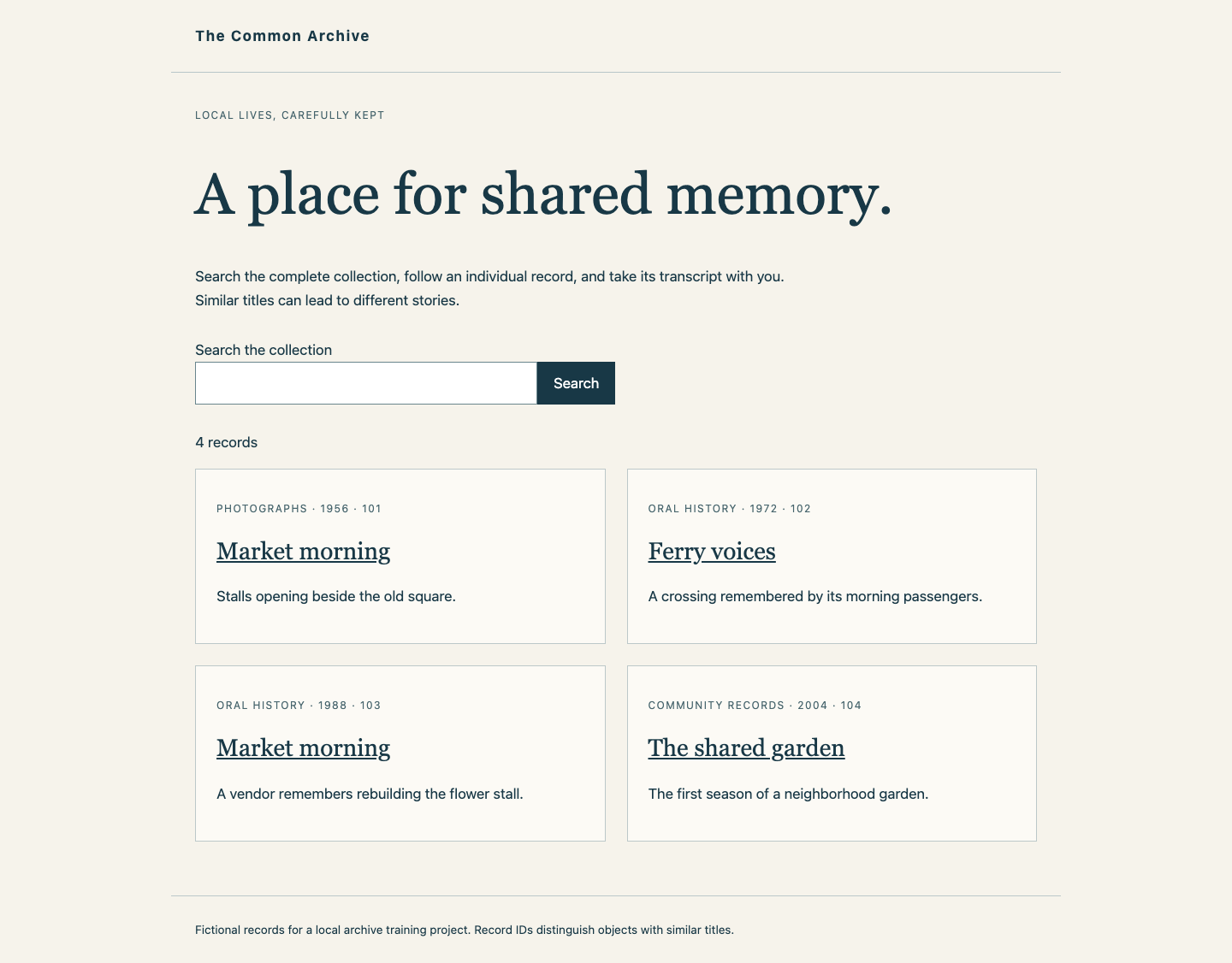
Begin in Reference Archive. Search for Market morning with Search the collection and Search. Two records share that title, but represent different stories. Open both, inspect their IDs, years and categories, and use Download transcript. Return with Back to collection, clear the search and inspect Ferry voices. Downloads are real text from the database records, not completion markers.
Switch to Your Archive. It explains that the catalog is not running; it does not borrow the reference. Collection Notes already works because that welcome service reads no database rows. A container being Up does not prove that the catalog is complete.
Read the Actual Failed Startup
The reference collection contains four records; both Market morning entries have separate identities:
Switch to Workstation, which starts in /home/labex/project/archive-startup. cd returns to that folder if needed. cat displays files:
cd /home/labex/project/archive-startup
cat compose.yaml
Compose reads YAML. Indentation groups each service's properties; use spaces, not tabs. The four entries under services: are:
| Service | Real work | Successful state |
|---|---|---|
db |
PostgreSQL stores the records | Running and accepting TCP connections |
importer |
A single transaction imports the supplied CSV | Exited with status 0 |
catalog |
Searches and serves records and transcripts | Running after import succeeds |
welcome |
Serves Collection Notes without reading the database | May run before import |
image selects a prepared image. entrypoint starts a supplied program; you do not edit it. environment passes named settings to that program. PGHOST, PGUSER, PGPASSWORD and PGDATABASE tell the clients which database and training account to use. These scoped credentials are supplied for this lab. POSTGRES_* prepares that account in a new data store. Do not change authentication or substitute another database.
The data volume retains this project's database files. Relative ./scenario binds the provided input folder into the importer read-only, indicated by :ro. The database also reads its supplied first-start training-delay script. Published port 8090:8080 connects Your Archive to the catalog. The welcome page uses a separate port. A Compose project groups resources; -p archive below always targets your student archive, while the reference uses a different project and volume.
ps -a includes stopped and never-started containers. logs reads their actual output:
docker compose -p archive ps -a
docker compose -p archive logs db importer
The database eventually says it is ready, but the importer has already failed to connect. A later-ready database does not rerun a failed import automatically. The catalog remains unstarted because its provided dependency already waits for importer success.
PostgreSQL briefly uses a temporary initialization server before starting its final TCP listener. A check of only its local Unix socket can become ready too early for another container. pg_isready reports whether a server is accepting connections; it does not prove credentials or catalog contents are correct.
The following read-only probe intentionally uses the wrong TCP port. exec runs the probe in db, -T disables terminal allocation, -h chooses the address, -p chooses the port, and -U/-d name the supplied user/database. Port 6543 has no server, so expect no response and native exit status 2:
docker compose -p archive exec -T db pg_isready -h 127.0.0.1 -p 6543 -U archivist -d archive
This is a probe failure, not lost catalog data. The final database listens on its normal TCP port 5432. A health check must address that actual service.
Express Readiness and Start with New Data
Keep application settings and supplied files unchanged. Add a real healthcheck to db, and change the importer's database condition from service_started to service_healthy. test is the command Docker runs inside the database container. The JSON-like array uses CMD to run the named program directly, with no shell. -h 127.0.0.1 selects the final TCP listener; the default port is 5432. interval: 1s, timeout: 2s and retries: 40 provide repeated bounded probes, not a fixed wait that pretends the database is ready.
The catalog's service_completed_successfully condition remains in place: a successful one-shot import exits 0 and need not stay Running. Its failure must block the catalog. The welcome page has no import dependency because it does not need imported data.
The following literal here-document writes the full configuration so indentation is reproducible. cat supplies the lines, > replaces only compose.yaml, and the quoted COMPOSE marker prevents shell expansion until its closing line. All other application settings are preserved:
cat > compose.yaml <<'COMPOSE'
services:
  db:
    image: dk04-postgres:16
    environment:
      POSTGRES_USER: archivist
      POSTGRES_PASSWORD: training-archive
      POSTGRES_DB: archive
      TRAINING_DB_DELAY: "8"
    volumes:
      - data:/var/lib/postgresql/data
      - ./scenario/slow-init.sh:/docker-entrypoint-initdb.d/10-training-delay.sh:ro
    healthcheck:
      test: ["CMD", "pg_isready", "-h", "127.0.0.1", "-U", "archivist", "-d", "archive"]
      interval: 1s
      timeout: 2s
      retries: 40
  importer:
    image: dk04-archive:1
    entrypoint: ["python3", "-B", "/app/importer.py"]
    environment:
      PGHOST: db
      PGUSER: archivist
      PGPASSWORD: training-archive
      PGDATABASE: archive
      TRAINING_IMPORT_DELAY: "6"
    volumes:
      - ./scenario:/scenario:ro
    depends_on:
      db:
        condition: service_healthy
  catalog:
    image: dk04-archive:1
    entrypoint: ["python3", "-B", "/app/archive.py", "catalog"]
    environment:
      PGHOST: db
      PGUSER: archivist
      PGPASSWORD: training-archive
      PGDATABASE: archive
      ARCHIVE_TITLE: "The Common Archive"
    ports:
      - "8090:8080"
    depends_on:
      importer:
        condition: service_completed_successfully
  welcome:
    image: dk04-archive:1
    entrypoint: ["python3", "-B", "/app/archive.py", "notes"]
    environment:
      ARCHIVE_TITLE: "The Common Archive"
    ports:
      - "8091:8080"
volumes:
  data:
    labels:
      labex.course: dk04
COMPOSE
Parse the configuration before changing runtime resources:
docker compose -p archive config
If YAML fails, read the reported line, restore the displayed block with spaces and parse again. Do not repeatedly restart a malformed file.
Now test a first startup with an empty course data store. This intentionally deletes only your disposable training database, not the source CSV or reference archive. Inspect the actual volume labels first:
docker volume inspect archive_data --format '{{json .Labels}}'
Confirm com.docker.compose.project is archive and labex.course is dk04. If either differs, stop and inspect the project rather than deleting another resource. down --volumes removes only this named Compose project's containers, network and declared data volume:
docker compose -p archive down --volumes
up -d starts services in the background. --pull never uses the prepared images; --no-build prevents replacing them with new builds:
docker compose -p archive up -d --pull never --no-build
docker compose -p archive ps -a
docker compose -p archive logs importer
Expect a healthy database, an importer Exited 0 and a Running catalog and welcome page. The supplied first-start delay and import delay are explicitly for training. No fixed sleep in your Compose file replaces actual readiness or successful import. If a previous attempt left failed containers, inspect their logs, correct the configuration, verify the course volume labels and repeat this scoped fresh-data startup.
Use the Completed Catalog
Switch to Your Archive and reload. Search for Market morning: two records should appear with different IDs, years, categories and stories. Open each and use Download transcript, returning with Back to collection. Search for Ferry, open Ferry voices and download its transcript. Clear the search to show all four records. Also inspect The shared garden and its download. An unknown record URL should show Record not found, distinct from a connection failure or unavailable catalog.
Switch to Collection Notes: its independent welcome page must remain available. Reference Archive should still offer the original complete collection. Keep your final archive running. Checks first observe your live database, completed import and complete business results. They then run your unchanged health/dependency choices in separate, disposable new data stores with different disclosed training delays and an invalid import sample. Those fixtures never initialize or repair your live archive. A separate isolated test also runs your unchanged health command without any database server; it must reject that unavailable endpoint.
Summary
You distinguished database container startup from final TCP readiness, configured a real health check and required the importer to wait for it. A new data store then received the full catalog before its consumer opened, while the independent notes page remained available.