Introduction
Marsh House is sending Along the waterline, River edition 1, to a receiving kiosk that cannot reach an image registry. The exhibition has a web service, a records API and a directory of collection files. Prepare a folder that contains everything needed to run this exact release elsewhere.
You should know basic Docker build/run, published ports and terminal paths. This lab teaches the small Compose file, image archives and portable file collection. Programming and museum knowledge are not required. Docker and the two application images are prepared. The records and original schematic illustrations are fictional teaching materials.
Use Workstation for commands and Source Exhibition for the working example. Receiving Exhibition starts empty; you will use that delivery boundary in the next independent lab. This lab's result is a complete packet, rather than a running receiver. Allow about 45 minutes including reading and ordinary mistakes; this is an author estimate.
Establish the Complete Exhibition
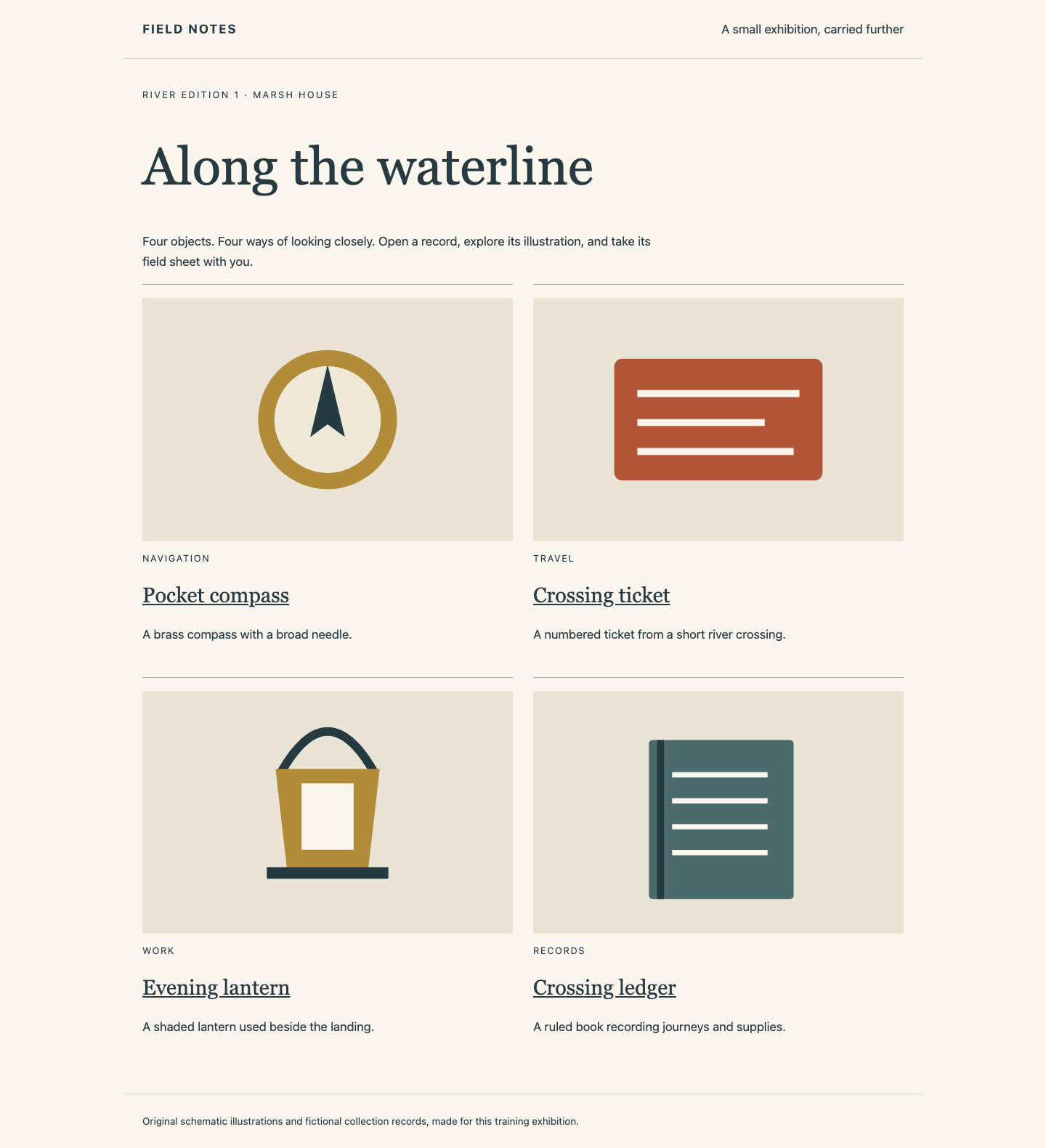
In this step, you will identify what must survive the handoff and save its exact image pair. Begin in Source Exhibition. The page shows four objects. Open Pocket compass, inspect its illustration and story, and select Download field sheet. This downloads a real text record with an edition, object ID and description. Use Back to collection, open Crossing ledger, and download that field sheet too. These are distinct objects with their own records and files.
The collection links each object to its own detail page and field-sheet download:
Switch to Workstation. It starts in /home/labex/project/exhibition-release. pwd shows the current folder, ls lists it, and cd returns here if you navigate away:
cd /home/labex/project/exhibition-release
ls
compose.yaml describes the two running services. release.json identifies this edition and the immutable image IDs behind its tags. collection/ contains the published JSON records, original SVG illustrations and text downloads. author-notes/ contains unpublished drafts and must stay out of the packet. Keep all supplied materials and the running source services unchanged.
cat displays a text file. Read the release record:
cat release.json
Find the web and api entries. Their tags are field-notes/web:pack and field-notes/api:pack; each also has an image ID beginning sha256:. A tag is a name that can move. The ID identifies these particular image contents. Deliver the release entries together; a working web image alone cannot supply the records or files.
mkdir creates a directory; -p creates missing parents and accepts an existing directory. If packet already exists from your own earlier attempt, inspect it with ls packet and continue filling it; do not delete supplied source folders.
mkdir -p packet
--context default explicitly targets the source Engine. A context names a connection to a Docker daemon; it is not a second physical machine. docker image save writes image configuration, tags and filesystem layers. -o names the output file. Include both release tags in this single archive:
docker --context default image save -o packet/images.tar field-notes/web:pack field-notes/api:pack
This may take a moment and normally prints nothing on success. docker container export is different: it exports a container filesystem, omits image metadata and does not collect bind-mounted files. It cannot replace this image handoff.
Read the Runtime File Relationships
In this step, you will connect the Compose file to the exhibition you just used and copy its portable configuration. Begin in Workstation and display it:
cat compose.yaml
YAML uses indentation to express relationships. services: contains gallery and records. Each image: selects a prepared image; this file has no build recipe. gallery serves the browser pages and requests its collection from records, the API that reads the published materials.
Both services use network_mode: host: they share their Engine host's network namespace. Here the web service listens on port 9100 and its API on 9101. The source Engine uses the Workstation network. The receiving Engine runs in its own isolated container network namespace, so the same numbers there do not address the source. This is a deliberately small, local teaching arrangement, not a general network-security recipe.
API_ORIGIN is an environment variable, a named value passed to the gallery program. Its http://127.0.0.1:9101 points at the API in that same namespace. records.volumes binds ./collection to /collection read-only, shown by :ro. The ./ path is relative to the Compose project directory, beside compose.yaml. It is an external runtime dependency: the images do not contain it.
Ask Compose to parse the file without starting or changing services:
docker --context default compose config
--context default explicitly selects the prepared source Engine; a context is a named connection to a Docker daemon, not a second physical computer. The output expands the collection's relative path to the current absolute source folder. Keep the original file's relative path for delivery: copying that expanded source path into the packet would still depend on the old Workstation location.
The closed set is now clear: two image contents, one Compose configuration and the complete published collection. The compiler, source build directory, drafts and running source containers are not needed to start the received edition.
cp copies a file; -r recursively copies a directory and its children. Copy the original portable configuration and published collection:
cp compose.yaml packet/compose.yaml
Assemble a Portable Packet
In this step, you will complete the packet with its published collection and inspect it as a movable delivery. Begin in Workstation. Create the packet collection folder, then copy the source directory’s contents recursively. The /. means its contents, so repeating this command does not nest another collection directory:
mkdir -p packet/collection
cp -r collection/. packet/collection/
Inspect the result:
ls packet
ls packet/collection
cat packet/compose.yaml
The top level has exactly compose.yaml, images.tar and collection. The collection contains exhibits.json, art/ and download/. The Compose mount still starts with ./collection, never the source's absolute path. Do not copy author-notes or release.json into the runtime packet: the latter is your source-side selection evidence.
A file existing or an archive being large cannot prove completeness. The check loads your two saved images into a disposable independent image store and runs the packet there, with no network, source mounts, pull or build. It reads all records, illustrations and downloaded bytes, then removes its isolated test resources. It does not start or alter your live receiving exhibition.
If the check reports a missing image, read release.json again and rerun the same save command with both tags. If a collection file is missing, compare the two ls results and copy the published directory correctly. If a path is wrong, restore packet/compose.yaml from the supplied portable file. Keep the packet here for this lab; the next lab starts with its own independent files.
Summary
You identified a two-service application's complete runtime, saved its exact image pair and collected its external collection beside a portable Compose file. The packet can start in an independent image store without borrowing the source directory. Image layers alone were only one part of that deliverable.