Introduction
Marsh House is delivering A river remembered, River edition 2, to a registry-isolated receiving Engine. A handoff packet already exists, but it saves only the web image. Repair it, load both images on the receiver and use the complete exhibition after its source has stopped.
This independent lab prepares its own source, files and receiver; it needs nothing from the previous VM. You should have learned packet assembly, the supplied Compose relationships and image tags versus IDs in Pack the Exhibition, or have equivalent knowledge. Docker and Compose are ready. You will learn explicit contexts, receiving-side load and offline startup.
Use Workstation, Source Exhibition and Receiving Exhibition. The two Engines have distinct sockets, containerd processes and image storage but share this VM's kernel; this is a controlled receiving boundary, not two physical machines or a claim of complete disaster recovery. Allow about 45 minutes including reading and ordinary mistakes; this is an author estimate.
Inspect the Receiving Boundary
In this step, you will distinguish the two Engines before changing either. Begin in Source Exhibition. Open Pocket compass and Crossing ledger, read their records and download their field sheets. Note River edition 2 on the collection page. Receiving Exhibition currently says Exhibition not running, with HTTP 503: it does not borrow the source page.
Switch to Workstation, starting in /home/labex/project/exhibition-handoff:
cd /home/labex/project/exhibition-handoff
cat release.json
The required tags are field-notes/web:receive and field-notes/api:receive. The prepared packet has the collection and relative-path Compose file, but only one image in images.tar.
A Docker context names a connection to a daemon. context create below records a connection to the receiver's Unix socket; it does not create a new Engine or change the active default. unix:// is the local socket protocol, and the remaining path belongs only to this course's isolated receiver:
docker context create receiver --docker host=unix:///opt/labex/dk03/receiver-socket/docker.sock
If the name already exists from your attempt, inspect it with docker context inspect receiver rather than switching global context or creating another receiver. Use --context on each operation to keep its target clear.
docker --context default info --format '{{.ID}}'
docker --context receiver info --format '{{.ID}}'
docker --context receiver image ls
The Engine IDs differ. The receiver has a Python base image used by its unrelated receiving-desk reference service, but neither required exhibition tag. Keep that service and the receiving Engine itself intact.
The receiving Engine is inside the course container dk03-receiver. The next two read-only commands run tools inside that container through the source Engine. ip route shows connected routes with no default route. wget attempts a real registry request; -T 5 bounds its network wait, -O /dev/null discards any response body. This attempt is expected to fail with a nonzero status because this receiving namespace has no route to the registry:
docker --context default exec dk03-receiver ip route
docker --context default exec dk03-receiver wget -T 5 -O /dev/null https://registry-1.docker.io/v2/
Read the connection error. A network connection failure differs from an application HTTP 404 or 503. Do not add a route, enable registry access or mount the source Docker socket to work around it: the packet must close the handoff.
Repair, Copy and Load the Packet
In this step, you will bring both required images and the local collection into the receiving folder. Begin in Workstation. The earlier packet lab taught image save, cp and relative Compose paths. Replace the incomplete archive with the exact pair listed in this lab's release record:
docker --context default image save -o packet/images.tar field-notes/web:receive field-notes/api:receive
cat packet/compose.yaml
Confirm the mount is ./collection:/collection:ro and the service tags end in :receive. Its relative path will resolve beside the received configuration. Copy the complete packet, not just its image archive:
cp -r packet /home/labex/project/receiving/packet
ls /home/labex/project/receiving/packet
On a first attempt that destination does not exist. If you are repeating your own copy, copy the contents with cp -r packet/. /home/labex/project/receiving/packet/ rather than nesting another packet directory. The receiving parent also contains desk/, which belongs to the preserved reference service. Do not remove or overwrite it.
image load -i imports image configurations, layers and tags from a saved archive into the selected Engine:
docker --context receiver image load -i /home/labex/project/receiving/packet/images.tar
docker --context receiver image ls
Both required tags should now appear. This receiver did not share the source Engine's image store; saving a tag on the source alone could not make it available here. If only one tag appears, return to release.json, repair the source packet's save archive and recopy its contents before loading again.
Open the Receiver Without Its Source
In this step, you will start only from receiving-side files and demonstrate independence. Begin in Workstation. --project-directory sets where Compose resolves its relative files, -p exhibition names only this course's application resources, up -d starts them in the background, --pull never forbids registry pulls, and --no-build forbids building missing images:
docker --context receiver compose --project-directory /home/labex/project/receiving/packet -p exhibition up -d --pull never --no-build
docker --context receiver compose --project-directory /home/labex/project/receiving/packet -p exhibition ps
Both gallery and records should run. If Compose says an image is absent, repair and load the packet instead of pulling. If the page reports Collection unavailable, inspect the records service's logs with the same Compose prefix followed by logs records, compare the receiving collection folder and its :ro mount, then correct the packet and copy it again. If a previous partial attempt needs replacement, use that same prefix followed by down, then repeat the displayed start command. This removes only the application's containers, not the receiving desk or its Engine.
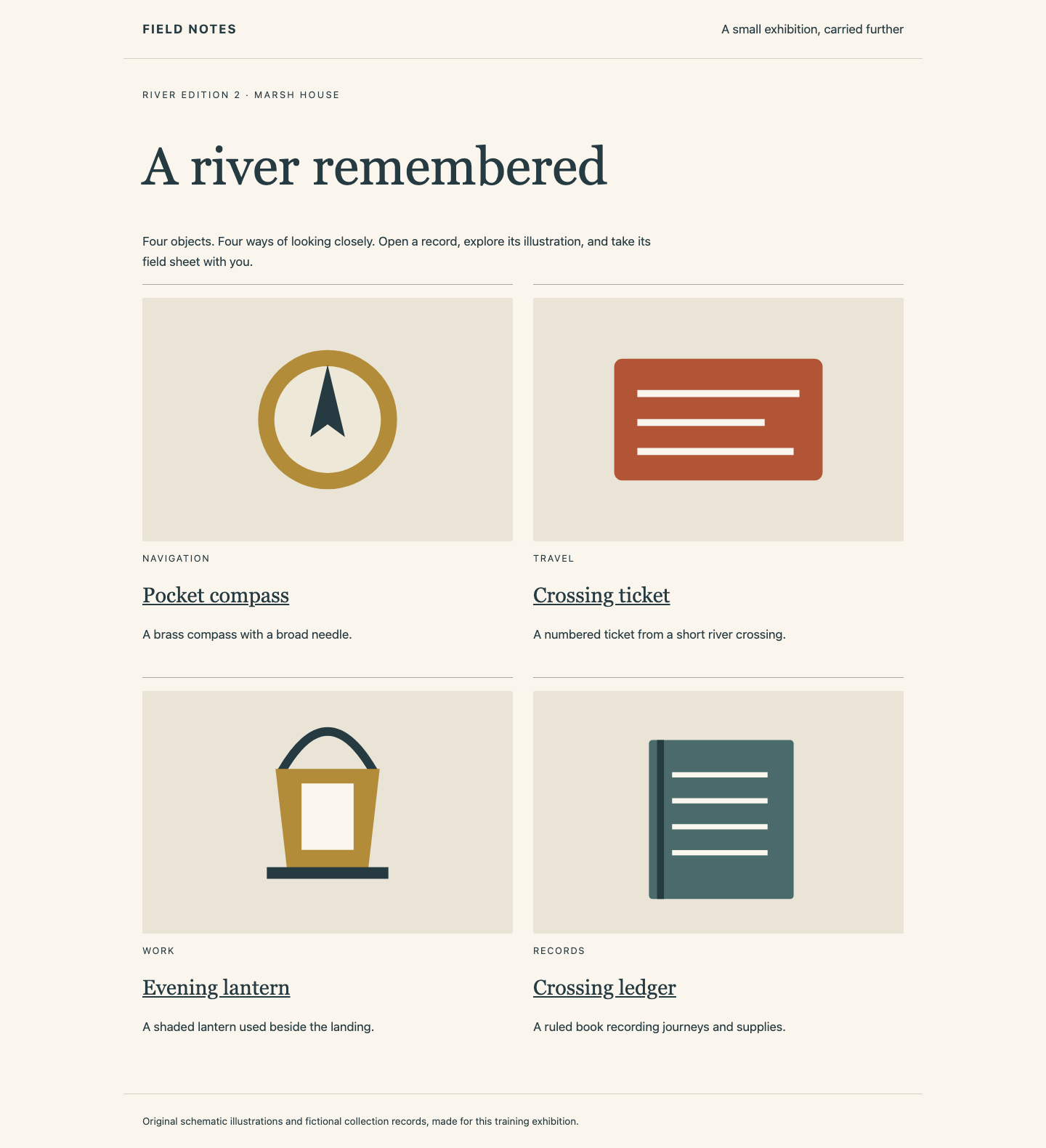
Switch to Receiving Exhibition, reload and use the four objects, their illustrations, details and field-sheet downloads. This is the receiving service, not a copy of the source page.
Switch to Workstation. docker stop requests that a named container stop. Stop only these two source services, leaving the receiving Engine and receiving-desk running:
docker --context default stop dk03-source-web dk03-source-api
Switch to Source Exhibition and reload: it should now say Exhibition not running. Switch to Receiving Exhibition, reload, open Pocket compass and Crossing ledger, and download their field sheets again. The receiver must still have the correct edition, all four objects, every illustration and complete download. Its reader has no fallback to the source. A fresh browser session should work too, without previously cached pages.
This is the received River edition 2 collection, still available after the source stops:
Leave the received application running. Checks observe this live state and preserve it; an additional isolated replay loads your unchanged packet into a new, networkless store to check repeatable delivery. No check fills missing live files or images for you.
Summary
You used explicit contexts to target independent Docker Engines, repaired a two-image packet and loaded it on the registry-isolated receiver. Compose started using receiving-side configuration and materials with pulling and building disabled. The complete exhibition continued after both source services stopped.