Introduction
The Riverside Archive can connect to PostgreSQL, but its catalog website starts before the one-shot import finishes. Add the missing business dependency: the catalog may open only after successful import, and must remain unstarted if the input is invalid.
Complete Wait for the Archive Database first or know its YAML, health checks, Compose projects, logs and scoped fresh-data restart. No SQL or application programming is required. This lab prepares an independent database, source data and reference; previous VM files are not needed. The supplied initial database already has the correct final-TCP health check.
Use Workstation, Reference Archive, Your Archive and Collection Notes. The records are synthetic. Disclosed delays expose training states; actual readiness and import exit statuses govern the result. Allow about 45 minutes including reading and ordinary mistakes; this is an author estimate.
Open Only After a Successful Import
In this step, you will gate the catalog on a completed import, prove a real failure blocks it, and recover with the original input.
Compare Database and Business Readiness
Begin in Reference Archive. Search Market morning, open both matching records and download their distinct transcripts. Return with Back to collection and inspect Ferry voices. Your Archive is unavailable, while Collection Notes can already explain the collection without reading any imported rows.
Switch to Workstation, starting in /home/labex/project/archive-opening:
cd /home/labex/project/archive-opening
cat compose.yaml
docker compose -p archive ps -a
docker compose -p archive logs importer catalog
The database becomes healthy and the importer finishes its real work. But the catalog tried to read the table too soon and exited with an error such as relation "entries" does not exist. A database accepting connections does not mean that the application data exists. The website deliberately has no hidden startup retry, so the dependency must express this requirement.
This environment uses the same four roles and port relationships as the previous guided lab. db already has a TCP health check, and importer waits for service_healthy. The remaining problem is catalog.depends_on.importer.condition: service_started. It permits the catalog to launch as soon as the import process begins, while its disclosed six-second training delay and real transaction are still ahead.
Gate the Actual Consumer
Replace that condition with service_completed_successfully. This checks successful completion, not simply that the process ended: nonzero import status must block the catalog. A one-shot importer Exited 0 is correct and should not be kept Running or assigned an endless restart policy. Keep welcome independent because its static collection notes need no imported table.
The full literal here-document preserves all supplied settings and the existing database health check. As in the previous lab, > replaces only compose.yaml; the quoted marker keeps the content literal:
cat > compose.yaml <<'COMPOSE'
services:
  db:
    image: dk04-postgres:16
    environment:
      POSTGRES_USER: archivist
      POSTGRES_PASSWORD: training-archive
      POSTGRES_DB: archive
      TRAINING_DB_DELAY: "8"
    volumes:
      - data:/var/lib/postgresql/data
      - ./scenario/slow-init.sh:/docker-entrypoint-initdb.d/10-training-delay.sh:ro
    healthcheck:
      test: ["CMD", "pg_isready", "-h", "127.0.0.1", "-U", "archivist", "-d", "archive"]
      interval: 1s
      timeout: 2s
      retries: 40
  importer:
    image: dk04-archive:1
    entrypoint: ["python3", "-B", "/app/importer.py"]
    environment:
      PGHOST: db
      PGUSER: archivist
      PGPASSWORD: training-archive
      PGDATABASE: archive
      TRAINING_IMPORT_DELAY: "6"
    volumes:
      - ./scenario:/scenario:ro
    depends_on:
      db:
        condition: service_healthy
  catalog:
    image: dk04-archive:1
    entrypoint: ["python3", "-B", "/app/archive.py", "catalog"]
    environment:
      PGHOST: db
      PGUSER: archivist
      PGPASSWORD: training-archive
      PGDATABASE: archive
      ARCHIVE_TITLE: "The Riverside Archive"
    ports:
      - "8090:8080"
    depends_on:
      importer:
        condition: service_completed_successfully
  welcome:
    image: dk04-archive:1
    entrypoint: ["python3", "-B", "/app/archive.py", "notes"]
    environment:
      ARCHIVE_TITLE: "The Riverside Archive"
    ports:
      - "8091:8080"
volumes:
  data:
    labels:
      labex.course: dk04
COMPOSE
docker compose -p archive config
If parsing fails, fix the reported indentation using the displayed block before starting services. Keep the supplied app, importer, CSV, authentication and ports unchanged.
Prove a Failed Import Cannot Open the Catalog
compose.bad.yaml is a supplied override that points the importer at a separate invalid CSV. Its record ID contains text where the real PostgreSQL table requires an integer. The importer uses a real transaction and propagates the database's nonzero status; it does not pretend success. The original valid scenario stays intact.
First inspect the student volume and confirm the project/course labels as taught previously:
docker volume inspect archive_data --format '{{json .Labels}}'
Expect com.docker.compose.project: archive and labex.course: dk04. The next command deliberately removes only this project's disposable training data so the bad-input test cannot borrow a previously imported table:
docker compose -p archive down --volumes
Two -f arguments merge the normal configuration and this provided override, in that order. This next startup is deliberately expected to fail with native status 1 because the importer exits nonzero:
docker compose -f compose.yaml -f compose.bad.yaml -p archive up -d --pull never --no-build
docker compose -f compose.yaml -f compose.bad.yaml -p archive ps -a
docker compose -f compose.yaml -f compose.bad.yaml -p archive logs importer
Read the invalid-integer error. The database can remain healthy, the importer is Exited with a nonzero code, and the catalog should be Created, never started. The welcome service still runs. A catalog that starts and then crashes is a different result: it was allowed to consume a failed import.
Switch to Your Archive and reload: no catalog should be available. Switch to Collection Notes: its independent page still works. These are real service states, not a staged success display.
Recover with the Valid Input and Use the Records
Switch to Workstation. Verify the same course volume labels again before cleanup:
docker volume inspect archive_data --format '{{json .Labels}}'
docker compose -f compose.yaml -f compose.bad.yaml -p archive down --volumes
Start without the override to return to the original valid input. This new data store must import from scratch:
docker compose -p archive up -d --pull never --no-build
docker compose -p archive ps -a
docker compose -p archive logs importer
Expect database Healthy, importer Exited 0 and both web roles Running. For an ordinary missing-path or YAML mistake, return to the stated working directory, read compose config or the service log, correct the editable configuration and repeat only this course's scoped restart. Do not edit source rows, suppress errors or reset the VM to conceal the problem.
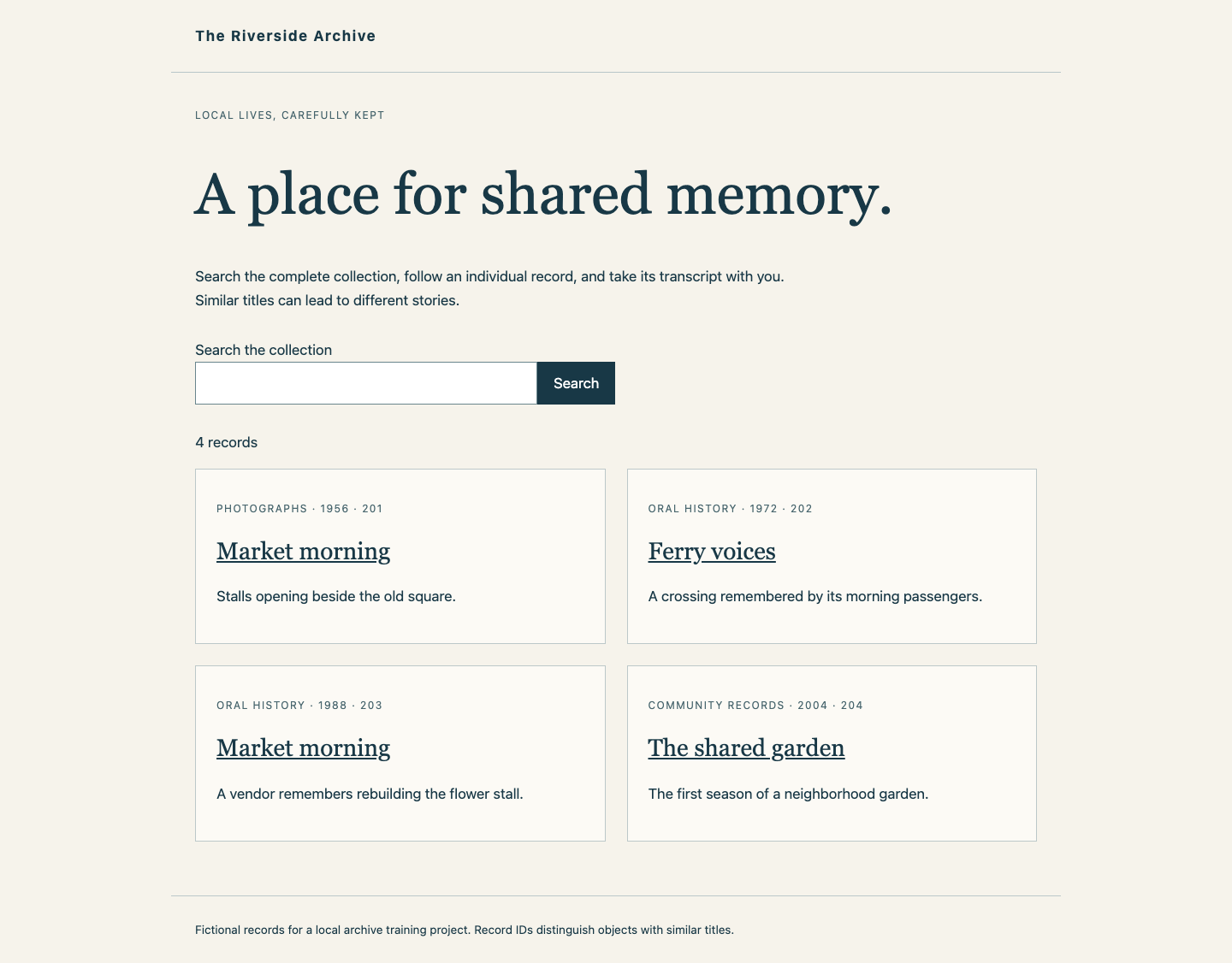
Switch to Your Archive and reload. Search for Market morning: two records should appear with different IDs, years, categories and stories. Open each and use Download transcript, returning with Back to collection. Search for Ferry, open Ferry voices and download its transcript. Clear the search to show all four records. Also inspect The shared garden and its download. An unknown record URL should show Record not found, distinct from a connection failure or unavailable catalog.
The completed catalog retains all four identities, including the two different Market morning records:
Switch to Collection Notes: its independent welcome page must remain available. Reference Archive should still offer the original complete collection. Keep your final archive running. Checks first observe your live database, completed import and complete business results. They then run your unchanged health/dependency choices in separate, disposable new data stores with different disclosed training delays and an invalid import sample. Those fixtures never initialize or repair your live archive. A separate isolated test also runs your unchanged health command without any database server; it must reject that unavailable endpoint.
Summary
You separated a usable database from a successfully produced catalog. The consumer now waits for importer exit status 0, stays unstarted after a real import failure and opens a complete new catalog after restoring the valid input. The independent welcome page remains useful throughout.