Introduction
Paper & Pine now needs to finish a twelve-page community programme before stopping. Its entry already delivers SIGTERM correctly, but a one-second Compose grace cuts the worker off before its real PDF is complete. Set a finite, reusable grace with enough headroom, without starting the next job.
Complete Deliver the Stop Signal first or know its entry shell, PID 1, TERM/KILL distinction, job observations and basic Compose commands. This independent lab prepares its own programme, earlier PDF, practice queue and delivery queue. No previous VM files, Python programming or physical printer are required.
Use Workstation and Print Desk. The first-page pause and 0.5-second remaining-page throttle are disclosed training behavior. The stop grace begins with the stop request, not when the worker first enters its pause. Allow about 45 minutes including reading and ordinary mistakes; this is an author estimate.
Give the Current Programme Time to Finish
In this step, you will distinguish successful signal delivery from sufficient completion time, then finish the original delivery job within a finite Compose grace.
Establish the Work and the Current Budget
Begin in Print Desk. Under Delivery attempt, preview and download the completed Morning welcome handout. The current Community open day programme needs twelve actual PDF pages; Volunteer notes is a later job that must stay pending. Practice and delivery are separate training queues with separate files.
Switch to Workstation, starting in /home/labex/project/print-grace:
cd /home/labex/project/print-grace
cat entry.sh
cat compose.yaml
The entry already uses exec python3 -B /app/worker.py, so the supplied worker replaces the shell and receives Docker's TERM request. The problem is stop_grace_period: 1s. Once the training pause ends, eleven remaining intervals at 0.5 seconds each plus PDF finalization need more than that. Waiting longer before requesting stop will not add to the grace: the worker deliberately waits for TERM before it drains.
Keep the prepared image, user IDs, mounts, input programme and other Compose settings unchanged. You will adjust only the finite stop budget; an unlimited wait is not the desired result.
See a Real Truncated Practice Attempt
Start the supplied practice project:
docker compose -f compose.trial.yaml -p print-trial up -d --pull never --no-build
Switch to Print Desk, reload and wait for Practice attempt to show its first-page training pause. Switch back to Workstation and request its one-second stop:
docker compose -f compose.trial.yaml -p print-trial stop worker
docker inspect print-trial --format '{{.State.ExitCode}}'
docker logs print-trial
The Docker stop operation can return 0, while the worker exit code is 137. Unlike the previous lab's wrong-shell failure, this log includes stop-received and may include some remaining page events, but no complete twelve-page PDF and normal completion. Signal delivery worked; the grace expired during the real remaining work.
Switch to Print Desk and reload. Practice has no finalized current programme download. The earlier PDFs and untouched delivery queue remain intact. Do not fill the missing result with a second processor.
Save a Finite Compose Override Before Delivery Starts
Switch to Workstation. A small override lets you preserve the provided base file and change only the stop budget. Two -f arguments combine the files in order; the later services.worker.stop_grace_period overrides that one property. Use the same pair for configuration inspection, startup and stop.
Choose a finite whole-second grace of at most 30 seconds. Fifteen seconds gives this disclosed training programme room for its remaining pages and ordinary scheduling overhead. It is a practical margin, not a claim that every production PDF completes within that time.
Use the literal here-document taught in the first guided lab to save compose.stop.yaml:
cat > compose.stop.yaml <<'COMPOSE'
services:
  worker:
    stop_grace_period: 15s
COMPOSE
docker compose -f compose.yaml -f compose.stop.yaml -p print-delivery config
Find stop_grace_period: 15s in the effective configuration. The prepared image, numeric user, entry script and read-only input remain the same. If YAML indentation is wrong, correct the small block and parse again before starting. A changed file does not rewrite an already created container's defaults, so save this budget before starting the delivery.
Start the delivery with that same file pair:
docker compose -f compose.yaml -f compose.stop.yaml -p print-delivery up -d --pull never --no-build
Switch to Print Desk, reload and wait for Delivery attempt to show the training pause. Then switch to Workstation and use the same effective configuration to stop it:
docker compose -f compose.yaml -f compose.stop.yaml -p print-delivery stop worker
docker inspect print-delivery --format '{{.State.ExitCode}}'
docker logs print-delivery
The worker should exit 0 after stop-received, all twelve page events, current-job completed and worker-stopped. Its run and process identity stay the same through receiving the request and finishing the programme. Retain this stopped container; do not remove it as a cleanup shortcut.
Use the Full PDF and Preserve Other Work
Switch to Print Desk, reload and select the current programme's Preview text under Delivery attempt. It decodes the actual saved PDF. Inspect the first and last pages and all intervening section headings and page numbers. Download the programme and open its twelve pages. Return to the desk and confirm the morning handout is unchanged and Volunteer notes is still pending without a PDF.
Delivery now has a normally stopped worker and a real twelve-page download. Practice remains visibly unsuccessful, while the later job is pending:
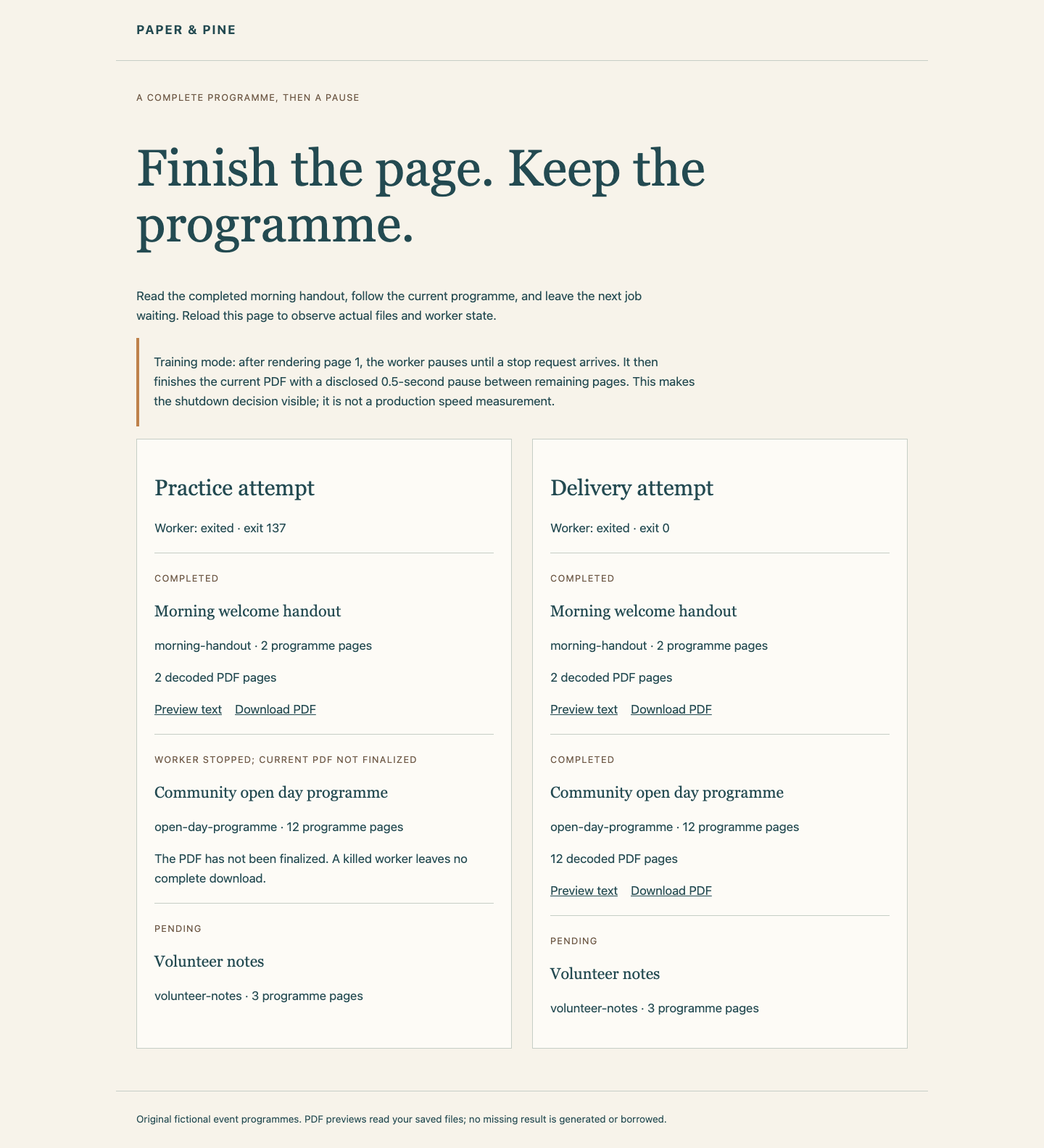
The checks join real Docker TERM/exit facts, the original worker's identity, actual decoded page content and queue preservation. A disposable replay tests the saved entry and effective finite grace on another programme. It does not signal or repair your live worker.
Recover an Unsuccessful Delivery
If your delivery attempt fails, keep the stopped container long enough to read its logs and exit status. Correct only the entry or grace configuration. The provided recovery action refuses a running or successfully finished container; for an unsuccessful stopped course worker, it requeues only the current job and keeps failed artifacts in delivery/attempt-history/. It preserves the earlier PDF, original inputs and later pending job:
python3 /opt/labex/dk05/source/retry.py
After that explicit recovery, remove only the failed delivery project's containers with docker compose -p print-delivery down, then repeat the displayed delivery start, wait-for-pause and stop sequence. No source PDF is regenerated, and this recovery is never run by a tab or score check. Do not reset the VM or change queue JSON to conceal a failed attempt.
Summary
You distinguished a received stop request from enough time to drain a job. A saved, finite Compose grace let the original worker finish all twelve PDF pages, exit normally and preserve both earlier output and the later pending job.