Introduction
Paper & Pine turns queued event programmes into real PDFs. Before pausing production, it must finish the current three-page handout, leave the next job pending and preserve the completed morning PDF. The supplied Python worker already knows how to finish its current job after a stop request, but its entry shell currently prevents that request from reaching it.
You should know terminal paths, basic Docker and container logs. The small Compose file and the shell behavior used here are explained before use. Python programming and a physical printer are unnecessary: the product is a downloadable, decodable PDF.
Use Workstation and Print Desk. Independent practice and delivery queues let you inspect one controlled failure without losing delivery progress. Training mode pauses after the first rendered page until a stop request arrives, then adds a disclosed 0.5-second pause between remaining pages. These pauses make the decision visible, not a production speed benchmark. Allow about 45 minutes including reading and ordinary mistakes; this is an author estimate.
Deliver the Stop Request to the Worker
In this step, you will observe a failed practice stop, repair the entry shell and complete a real delivery in the same worker that receives its stop request.
Start with a Real Completed Programme
Begin in Print Desk. Under Delivery attempt, open Preview text for Morning welcome handout and select Download PDF. The preview is decoded from that saved two-page PDF, not reconstructed from source text. Return with Back to Print Desk. The current Community open day handout is pending; Volunteer notes must remain pending after this handoff.
The desk separates practice from delivery and starts with only the earlier handouts available:
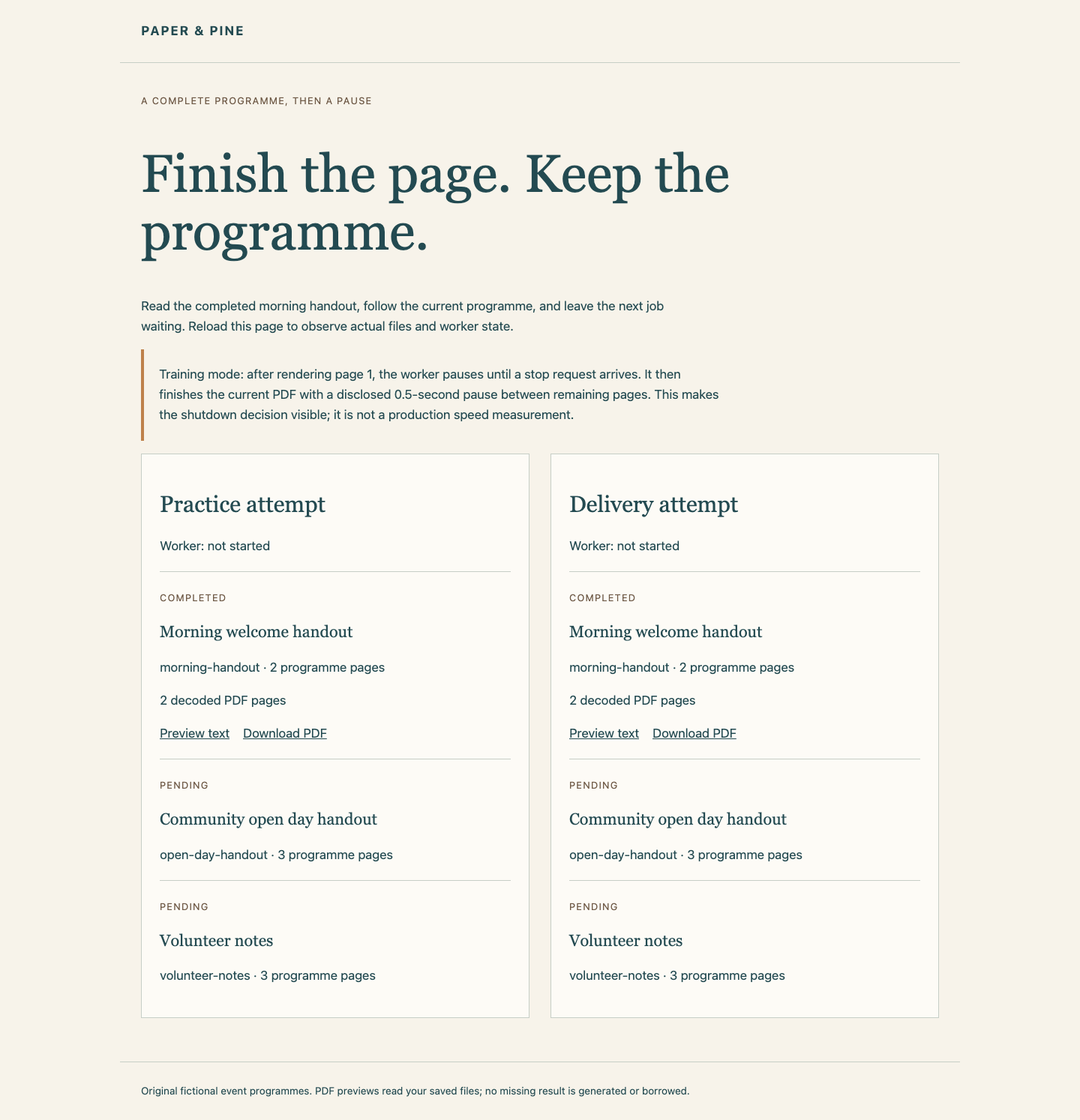
The Practice attempt column is a separate copy of the training queue, not a second machine. Each column has its own output and worker state. A current PDF only becomes downloadable after the whole document is finalized. Rendering page 1 internally does not yet produce a complete PDF file.
Observe Why a Practice Stop Fails
Switch to Workstation, starting in /home/labex/project/print-signal. cd returns there and cat reads a file:
cd /home/labex/project/print-signal
cat compose.trial.yaml
Compose groups settings under services.worker. Its prepared image contains the worker and PDF libraries. user already matches your actual numeric account IDs, so output remains editable; do not replace those values. The read-only /input contains original jobs, /work is this attempt's writable state/output, and /entry.sh is its read-only entry script. :ro means read-only. entrypoint: ["/bin/sh", "/entry.sh"] starts that shell directly as container process 1, called PID 1. A container shares the VM's kernel but has its own process view.
stop_grace_period: 10s gives the application a finite ten-second shutdown window. Docker first sends SIGTERM, the normal request to terminate. After the grace expires it can send SIGKILL, which forcibly ends the processes and cannot be handled to finish work. Sending a signal to PID 1 does not automatically forward it to every child.
The existing practice entry starts Python as a background child with &, then wait waits for it. The shell remains PID 1. Read that supplied script:
cat trial-entry.sh
The shell has no forwarding handler. A container's PID 1 has special default signal behavior, so this shell can stay alive while Python never receives the TERM request.
Start only the practice project. -f selects its file, -p groups its resources, up -d starts it in the background, and the last options use prepared images without pulls or builds:
docker compose -f compose.trial.yaml -p print-trial up -d --pull never --no-build
Switch to Print Desk, reload and wait until Practice attempt shows Training pause after page 1; waiting for stop request. The worker has actually rendered page 1 and is deliberately waiting. There is no narrow timing window.
Switch to Workstation. docker exec runs a command in an existing container. Linux exposes process information under /proc; /proc/1/comm inside this container names its PID 1 command. This read-only observation should show sh:
docker exec print-trial cat /proc/1/comm
stop requests this service to stop using its configured grace:
docker compose -f compose.trial.yaml -p print-trial stop worker
The stop command itself can exit 0 even when the worker was forcibly killed: it means Docker handled the stop operation, not that the programme finished. docker inspect reads the retained container. The single-quoted template selects its worker exit code:
docker inspect print-trial --format '{{.State.ExitCode}}'
docker logs print-trial
Expect exit code 137 and no worker stop-received or completed event. In this controlled trial the grace expired and Docker forced the stop; 137 alone is not a general diagnosis of every container failure. The log is one JSON event per line: event names the observation, job identifies the programme and page records actual rendering progress.
Switch to Print Desk and reload. Practice has no finalized current PDF, while its earlier handout and the untouched delivery queue remain available.
Replace the Shell with the Worker
Switch to Workstation. Edit only the delivery entry.sh, leaving trial-entry.sh, the programme input, existing PDFs and other settings intact. Shell exec replaces the current shell process with the named programme. Python therefore becomes PID 1 and its supplied TERM handler receives Docker's request.
This literal here-document writes the complete short script. > replaces entry.sh; the quoted SH marker prevents shell expansion until the closing line. The file needs no executable bit because the configured /bin/sh reads it:
cat > entry.sh <<'SH'
#!/bin/sh
exec python3 -B /app/worker.py
SH
cat entry.sh
Start the independent delivery project, whose ten-second grace is already sufficient for this three-page handout:
docker compose -p print-delivery up -d --pull never --no-build
Switch to Print Desk, reload and wait for the Delivery attempt training-pause message. Return to Workstation and read PID 1 again:
docker exec print-delivery cat /proc/1/comm
Expect python3, rather than the waiting shell. Request a normal stop:
docker compose -p print-delivery stop worker
docker inspect print-delivery --format '{{.State.ExitCode}}'
docker logs print-delivery
Expect exit code 0. The same worker logs stop-received, remaining page-completed events, completed for the current programme and worker-stopped. A new process that later fills the missing PDF would not prove that this worker drained its job.
Inspect the Delivered File and Retained Queue
Switch to Print Desk, reload and open the current handout's Preview text under Delivery attempt. All three decoded pages, their section headings, programme ID and page numbers should be present. Download the actual PDF and open it. Return to the desk: Morning welcome handout must still have its original two pages, and Volunteer notes must remain pending with no generated PDF. Keep the normally stopped print-delivery container for its native inspection evidence.
If a name is misspelled, read the error and use the stated container name; for example, docker logs print-workr cannot find this delivery, while the displayed docker logs print-delivery reads it. Do not create a replacement PDF by hand. Checks read the live stop facts and decode every page, then replay your saved entry in an isolated programme fixture without changing live progress.
Recover an Unsuccessful Delivery
If your delivery attempt fails, keep the stopped container long enough to read its logs and exit status. Correct only the entry or grace configuration. The provided recovery action refuses a running or successfully finished container; for an unsuccessful stopped course worker, it requeues only the current job and keeps failed artifacts in delivery/attempt-history/. It preserves the earlier PDF, original inputs and later pending job:
python3 /opt/labex/dk05/source/retry.py
After that explicit recovery, remove only the failed delivery project's containers with docker compose -p print-delivery down, then repeat the displayed delivery start, wait-for-pause and stop sequence. No source PDF is regenerated, and this recovery is never run by a tab or score check. Do not reset the VM or change queue JSON to conceal a failed attempt.
Summary
You saw how a waiting PID 1 shell can hide a stop request from its child, then used exec to let the supplied worker receive TERM directly. The original delivery worker finished its three-page PDF, exited normally, preserved the morning document and left the next job pending.