



Introduction
The studio team has changed how Sign out this browser handles sessions. Ending every session would make the old cookie fail, but it would also interrupt another browser that the member still wants to use. Acceptance must cover both the security result and the promised normal behavior.
You will retain Browser A's original account and booking requests in Burp Repeater, establish a distinct Browser B session for the same member, and test both after signing out A. Your handoff combines private HTTP evidence and a password-free acceptance decision. The environment is independent: no earlier files, sessions or Burp tabs carry over.
Complete Replay a Booking Request After Sign-Out first. You should know how to start Burp's temporary project, keep interception off, send history rows to Repeater, read HTTP status and save an XML item. This lab repeats the operational path and adds an independent-session comparison. All accounts and bookings are synthetic. Allow about 60 minutes including reading and ordinary mistakes; this is an author estimate.
Establish Browser A's Normal Booking
In this step, you will establish the normal workflow in this new deployment. Open Auditor and read the supplied identity, address and authorization:
cat scope.json
Use only http://members.test:8080/autumn, username morgan and password PaperDay!47. The booking belongs to Morgan Reed: Printmaking, seat P12. Preserve the supplied scope, target configuration, data and processes.
If a GUI workspace shows Disconnected, click its Reconnect button at the top. This reconnects the existing window and keeps its browser cookies, Burp requests and target progress.
Open Burp. Keep Temporary project selected, click Next, keep Use Burp defaults selected and click Start Burp. If Burp Suite is out of date appears, click OK to continue with the prepared training version. In the main window choose Proxy → Intercept and ensure the button reads Intercept is off. If it says Intercept is on, click it once so normal requests are not paused.
Switch to Browser A. Click the Chromium address bar, enter this URL and press Enter:
http://members.test:8080/autumn/
Choose View my booking, enter morgan in Username and PaperDay!47 in Password, then click Sign in. Choose Never if Chromium offers to save the password. Confirm Morgan Reed, Printmaking and seat P12 on Your next day of making, then click Download booking. The actual CSV contains that member, workshop and seat.
A typo in the credentials produces Sign-in unsuccessful; use try again and correct the supplied values. For a wrong path, return to the exact base URL. A browser connection error is not an HTTP refusal: finish Burp's wizard, check interception and the exact address, then navigate again. Closing a LabEx tab does not reset the scene.
Retain Browser A's Successful Requests
In this step, you will preserve Browser A's original session before another browser is introduced. Switch to Burp, then Proxy → HTTP history. Find the GET /autumn/account row for members.test:8080, right-click it and choose Send to Repeater. Repeat for GET /autumn/booking.csv. If a history filter hides the CSV, open the filter bar and enable Show all.
Open the main Repeater tab. In the first request tab, confirm the account path and original Cookie: studio_session=... header, then click Send. Read the Raw response: HTTP 200 with Morgan Reed's booking. Select the second request tab and click Send. It must return HTTP 200 with the actual CSV booking row.
The two requests use Browser A's same original session cookie. Keep them unchanged, including their host, paths and cookies. Repeater's numbered tabs identify requests, while the LabEx Browser A and Browser B tabs identify independent browser profiles. Switching a LabEx tab does not change which request is selected inside Repeater.
These successful responses are the baseline. A cookie that never worked cannot establish whether sign-out later invalidated a real session. If you selected the wrong history row, send the correct path to Repeater and use that request tab instead; use the path to identify it rather than guessing a tab number.
Test the Current-Session Boundary
In this step, you will check that signing out one browser ends only its session. An independent browser profile has its own cookie storage. A second tab inside Browser A would share A's cookie and would not provide this comparison.
Switch to the LabEx Browser B tab. In its Chromium address bar, navigate to:
http://members.test:8080/autumn/login
Sign in as the same member, morgan, with PaperDay!47. Choose Never if asked to save the password. Confirm the booking and click Download booking. Leave Browser B signed in. Its successful account and download requests must happen before A signs out.
For a direct identity comparison, switch to Burp → Proxy → HTTP history. Select B's most recent /autumn/account request and inspect its Raw request. Its studio_session value differs from the value retained in A's original Repeater tabs. Both sessions represent Morgan Reed, but they are distinct authentication states. Do not copy either cookie into your report or replace A's retained cookie with B's.
Switch to Browser A and click Sign out this browser. The sign-in page appears. Then switch to Burp → Repeater and click Send on A's original account request. Expect 401 Unauthorized and Sign in required. Send A's original booking request too: expect HTTP 401, with no member booking CSV. Keep both original cookies intact; an empty-cookie request would not test invalidation of A's old session.
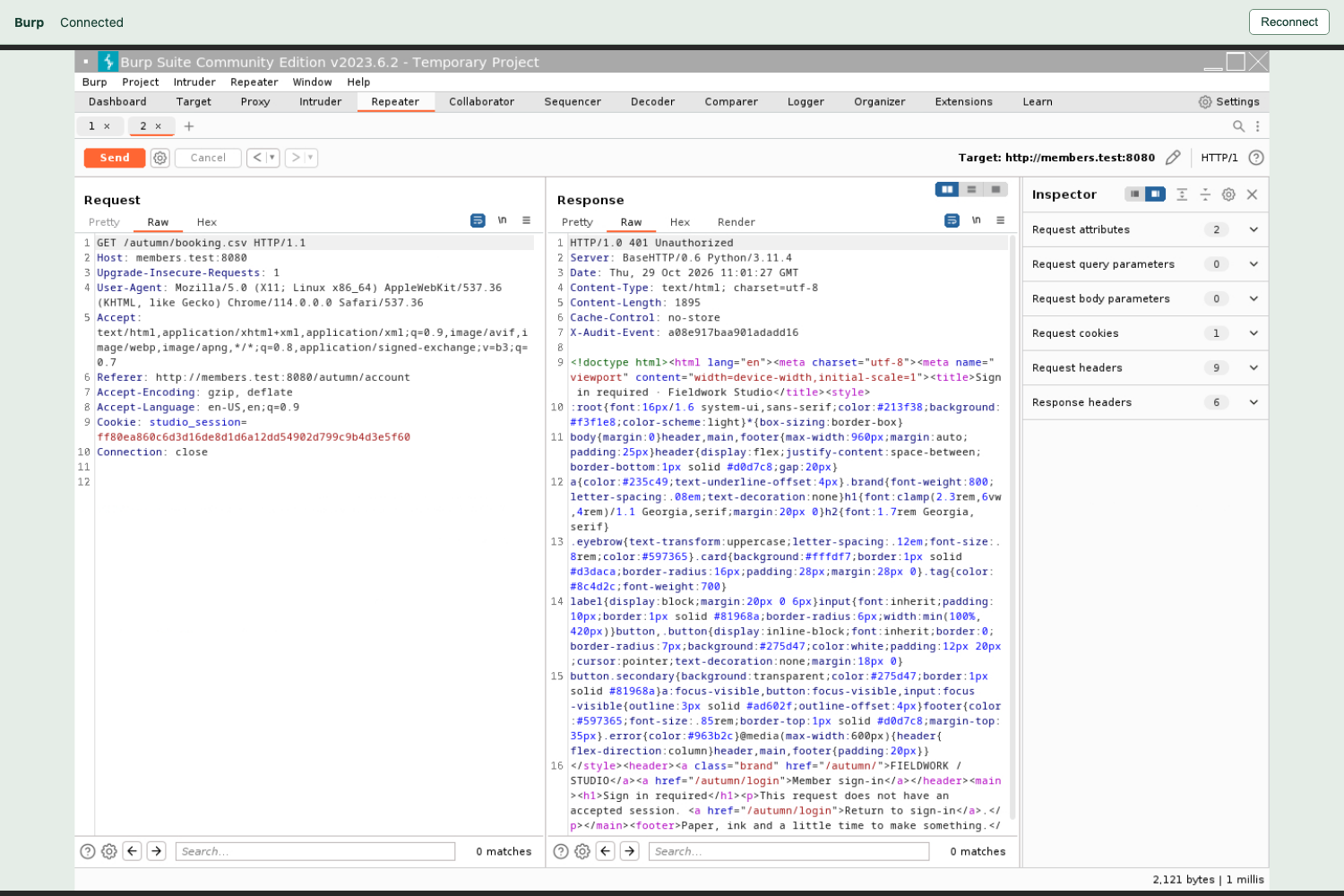
Read the unchanged Cookie in the left pane and 401 Unauthorized with Sign in required in the right pane. This is a refusal of A’s previously working session.
Now switch to Browser B. Click Chromium's reload button beside its address bar. Its booking page must still show Morgan Reed's booking. Click Download booking again and confirm a real download. These fresh requests establish continued access; a page left on screen without refreshing could be stale. If B also lost access, ending all sessions would violate this course's explicit this browser contract, even if A's old cookie was rejected. Other products may intentionally offer a separate sign-out-everywhere action; that is a different contract.
Finally, switch to Browser A, sign in again with the supplied credentials, view the booking and click Download booking. A fresh session still works. Switch back to Burp without changing A's original Repeater requests. Their latest responses remain the two post-sign-out HTTP 401 responses.
You can accept this bounded change: A's old session fails on both protected resources, B's already established independent session still works, and a new sign-in works. This does not establish every aspect of session security.
If you accidentally signed out B or replaced A's old cookie, establish two new independent sessions and repeat the complete sequence: baseline both resources in both browsers, retain A's requests, sign out A, replay A, refresh/download in B, then confirm fresh sign-in in A. Reopening a tab alone does not create a substitute session.
Preserve the Accepted Test Evidence
In this step, you will deliver private evidence and the supported acceptance decision. Switch to Auditor, which starts at /home/labex/project. As taught previously, umask 077 restricts new files in this shell, mkdir -p creates the evidence directory, and chmod 700 makes that directory private.
umask 077
mkdir -p evidence
chmod 700 evidence
Switch to Burp → Repeater. Select A's original account request and confirm its latest response is the post-sign-out HTTP 401. Right-click the Request editor, select Save item, and enter this absolute File Name:
/home/labex/project/evidence/account-after.xml
Leave Base64-encode requests and responses checked and click Save. Close an OK success notice if present. Repeat for A's original booking request, whose latest response must also be HTTP 401:
/home/labex/project/evidence/booking-after.xml
These XML items contain A's original cookie. Base64 is an encoding, not encryption. Switch to Auditor and restrict the files to their owner:
chmod 600 evidence/account-after.xml evidence/booking-after.xml
ls -l evidence
Expect -rw------- on both files. Use the same literal here-document format as before for a password-free report. > replaces assessment.json; the closing JSON must be on its own line.
cat > assessment.json <<'JSON'
{
  "decision": "accept",
  "account_after_logout": 401,
  "booking_after_logout": 401,
  "independent_browser_preserved": true,
  "fresh_sign_in_works": true
}
JSON
cat assessment.json
Deliver the original XML pairs and this report, keeping passwords, cookies and raw requests out of the report. Existing server facts support B's independent access and fresh sign-in; verification does not perform missing sign-ins, sign-outs or replay requests. Its public-page preservation request can append an access record, and repeated scoring preserves your files.
For a wrong filename, export the same real response to the correct path and reapply chmod 600. If your shell is elsewhere, use pwd to inspect it and cd /home/labex/project to return. Keep the normal public site and all target resources intact.
Summary
You tested a corrected current-browser sign-out against both the account page and booking download. The old cookie was rejected, a distinct pre-existing browser session retained access, and fresh sign-in still worked. Private Burp XML pairs and a password-free assessment preserve the supported acceptance decision.
The independent challenge changes the member, deployment address and booking. Apply the same complete contract and let both real resource responses determine the decision.


