



Introduction
A shop's invoice records what a customer bought, the price, and their billing address. Customers should read their own invoices or invoices explicitly shared with them. Knowing an invoice ID is not permission to read it.
You are authorized to test a synthetic Invoice Desk as customer Alex. Start with normal access, compare a shared invoice with a private one, and save the private response to demonstrate a broken ownership boundary. This lab ends at validation; you will not repair the server. Only the supplied training objects are in scope.
Establish Your Normal Access
In this step, sign in as Alex and retrieve your own invoice before testing another account.
Select the Invoice Desk tab in the lab interface to begin this step.
Switch to the Invoice Desk tab. The diagram shows a client, which sends requests, and an API server, which answers them. An API is the application's request interface. The status API: ready comes from a real health request. The reference table describes the intended access rules:
| Invoice ID | Owner | Shared with | Alex should read? |
|---|---|---|---|
inv-104 |
alex |
Nobody | Yes: owner |
inv-208 |
morgan |
Nobody | No: private |
inv-315 |
riley |
alex |
Yes: explicit sharing |
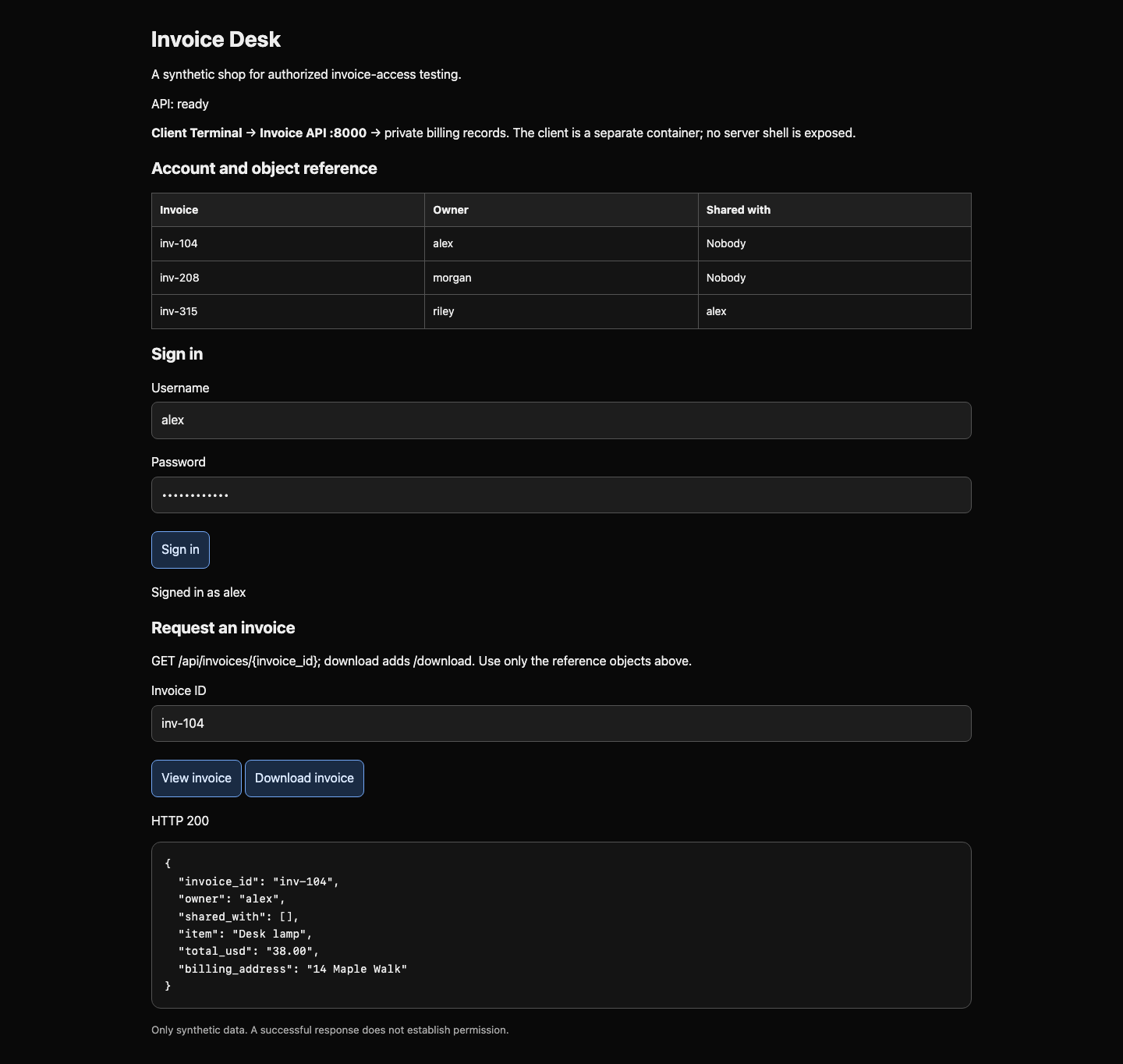
In the portal, enter username alex and password shop-alex-42, then select Sign in. Expect Signed in as alex. Enter inv-104 in Invoice ID and select View invoice. The owner field should be alex.
Switch to the Client Terminal tab. It is an isolated customer workspace at /home/student/project, not the server. The address invoice-api:8000 names the server inside this training network; it is not a public target. curl sends HTTP requests from the terminal. HTTP is the request/response protocol used here; GET asks to read a resource. The path after the address identifies that resource. -i includes the response status and headers.
Without a session, expect 401 Unauthorized, meaning sign-in is required:
Switch to the Client Terminal tab before running the following command.
curl -i http://invoice-api:8000/api/invoices/inv-104
Sign-in in the browser does not sign in curl. A session is a server-side record of who signed in; its random cookie links later requests to that record. The next command sends a JSON object, a format of named fields. -H sets a request header describing JSON, -d sends the credentials and selects POST, and -c saves the returned cookie in session.txt. Single quotes keep spaces and double quotes together as one shell argument.
curl -sS -c session.txt -H 'Content-Type: application/json' -d '{"username":"alex","password":"shop-alex-42"}' http://invoice-api:8000/api/login
-sS hides the progress meter but shows connection errors. Expect account to be alex. -b sends the saved cookie. Check the session identity:
curl -sS -b session.txt http://invoice-api:8000/api/me
Request your own invoice:
curl -sS -b session.txt http://invoice-api:8000/api/invoices/inv-104
Read invoice_id, owner, item, and total_usd: Alex bought a Desk lamp for 38.00. An empty shared_with list, [], means nobody else was granted access. This is normal behavior. The checkpoint checks the server's real response to Alex, whether requested with the terminal or portal.
If you see 401 after login, repeat the login command in this terminal, then retry with -b session.txt. A connection error is different: no HTTP response reached you; check the address and API: ready.
Ask for a Different Invoice
In this step, compare explicit sharing with a private invoice while keeping the same signed-in identity.
Select the Client Terminal tab in the lab interface to begin this step.
Authentication answers “Who are you?” Authorization answers “May this person read this invoice?” A successful login establishes only the first. First download the legitimate shared invoice. A download is still a GET request; /download selects a response intended to be saved, with the same JSON invoice fields.
Switch to the Client Terminal tab before running the following command.
curl -sS -b session.txt http://invoice-api:8000/api/invoices/inv-315/download
The owner is riley, but shared_with contains alex. This access is permitted. A different owner alone does not prove a flaw.
Next predict the private case: inv-208 belongs to Morgan and is shared with nobody, so Alex should receive a denial, commonly 403 Forbidden. A service may instead use 404 Not Found to conceal a private object's existence. Here 404 also identifies an unknown ID. 200 OK means a request succeeded; the response body tells you what was exposed.
-v displays the actual outgoing request and incoming headers. It also shows your training session cookie, so do not share its output outside this lab. Run:
curl -v -b session.txt http://invoice-api:8000/api/invoices/inv-208
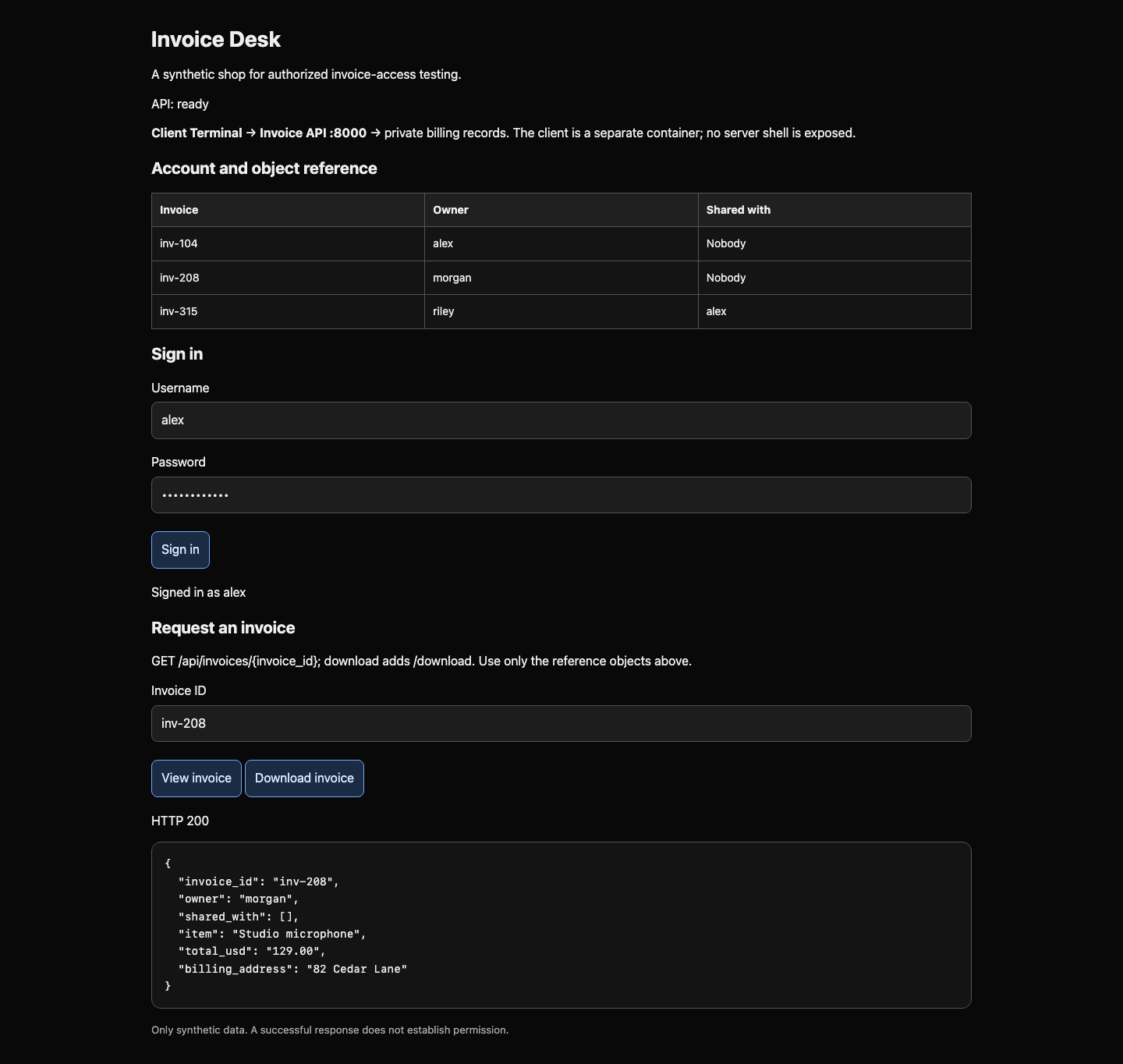
Find GET /api/invoices/inv-208 and HTTP/1.0 200 OK. The body names owner morgan, an empty sharing list, a Studio microphone, and billing address 82 Cedar Lane. The server served a private object to Alex. You changed the object path, not the session identity. Predictable IDs made the test convenient; the missing permission check caused the exposure.
Switch to the Invoice Desk tab to repeat both requests using Download invoice for inv-315 and View invoice for inv-208. The browser client saves download responses into the same client workspace. The checkpoint requires the allowed shared download and the private view, not an explanation file.
Verify the Exposure
In this step, preserve the actual private download and connect the exposed data to its business impact.
Select the Client Terminal tab in the lab interface to begin this step.
Use /download for the private invoice. -o writes the response bytes to a file instead of printing them. Save the full response as private-invoice.json in the current client workspace:
Switch to the Client Terminal tab before running the following command.
curl -sS -b session.txt -o private-invoice.json http://invoice-api:8000/api/invoices/inv-208/download
cat prints a file so you can read it:
cat private-invoice.json
Expect the same Morgan invoice, including invoice_id inv-208, owner morgan, total 129.00, and billing address. If you saved a 401 error or the shared invoice, repeat login if needed and download the designated private invoice again; -o replaces the file.
Alternatively, switch to the Invoice Desk tab. While signed in as Alex, enter inv-208 and select Download invoice. This browser client forwards the real API request and saves its unmodified response to /home/student/project/private-invoice.json, which you can read after switching back to the Client Terminal tab. Either method satisfies the same outcome.
Run the checkpoint. It compares the saved response bytes to the designated invoice and checks the server recorded that download under Alex's session. A copied claim, invented invoice, permitted shared invoice, or file without a matching customer download does not demonstrate the result.
The practical impact is disclosure of another customer's purchases and billing address. A server should check the current person's ownership or explicit sharing permission for every requested object, including downloads. Hiding links or making IDs harder to guess cannot replace this check. This is the object-level authorization problem described by OWASP BOLA. Your authorized test is complete; leave server repair for a separate task.
Summary
You established a customer session, read your own invoice, distinguished explicit sharing from private access, and saved a real cross-account response. You verified both the exposed data and the identity that received it, without server access or victim credentials.


