



Introduction
Fieldwork Studio members can view a reserved workshop and download its booking confirmation. The team has added Sign out this browser. Returning to the sign-in page looks convincing, but it does not establish whether a previously captured session still works.
You will use Kali's Burp Suite Community Edition as an HTTP proxy and Repeater, retain the original requests, and test both protected resources after signing out. Your deliverable is private request/response evidence and a short password-free acceptance decision. You assess the application; you do not repair its server.
Only basic terminal entry and switching tabs are assumed. The lab introduces HTTP responses, cookies and Burp's controls. All identities and bookings are synthetic, and the supplied environment is isolated. Use only your supplied account and course target. Allow about 65 minutes including reading and ordinary mistakes; this is an author estimate, not a beginner trial measurement.
Establish a Real Member Booking
In this step, you will establish normal use before testing sign-out. Open Auditor, the Kali terminal. It begins at /home/labex/project. cat displays a text file. Read the supplied authorization, identity and service address:
cat scope.json
The base URL is http://members.test:8080/autumn. Use username morgan and password PaperDay!47. Your member is Morgan Reed, with Printmaking seat P12. The exclamation mark is part of the password; type it into the browser form. Do not test other identities or external sites, and do not modify target data, code or processes.
If a GUI workspace shows Disconnected, click its Reconnect button at the top. This reconnects the existing window and keeps its browser cookies, Burp requests and target progress.
Open Burp. Burp Community is already installed. In its startup wizard, keep Temporary project selected and click Next. Keep Use Burp defaults selected, then click Start Burp. If Burp Suite is out of date appears, click OK to continue with the prepared training version. Wait for the main window. A temporary project keeps the live workspace in memory; this course uses explicit XML exports for the evidence files rather than a paid disk-project feature.
Burp is a proxy: the prepared browsers send their HTTP requests through it so you can inspect the actual conversation. In Burp, choose the Proxy main tab and Intercept subtab. The button must read Intercept is off. If it reads Intercept is on, click it once. Interception would pause requests; you want them to flow normally while recording history.
Switch to the LabEx Browser A tab. This is a prepared Chromium browser inside the same audit container as Burp. Click its address bar, enter the following URL, and press Enter:
http://members.test:8080/autumn/
Read the public workshop page and choose View my booking. Fill in Username and Password with the supplied credentials and click Sign in. If Chromium offers to save the password, choose Never. You should reach Your next day of making, showing Morgan Reed, Printmaking and seat P12.
Click Download booking. The actual fieldwork-booking.csv contains the member, workshop and seat. Chromium's download shelf at the bottom shows the downloaded file; Show all opens its download list. Public workshop browsing, viewing your booking and this download are the normal functions you will preserve.
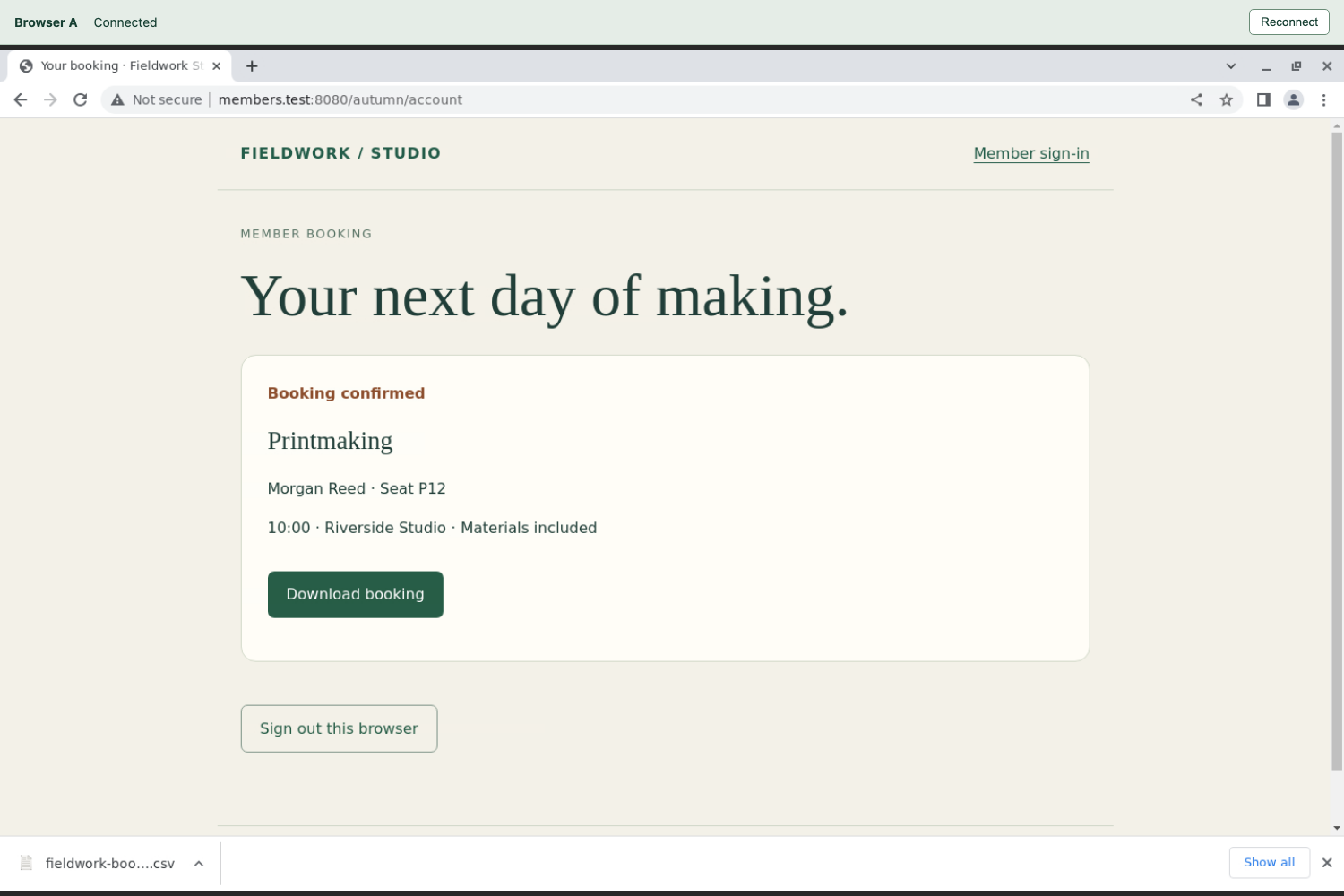
Check the member, workshop and seat in the booking card before downloading.
A wrong password produces Sign-in unsuccessful, with a try again link. Follow that link and re-enter the supplied values. A Page not found response means the path is wrong; return to the exact base URL above. A browser connection error means no application response was obtained: check the URL, finish Burp's wizard and make sure interception is off. Do not treat a connection failure as a security refusal.
Browser B is an independent browser profile for the next lab; leave it unused here. The two browser tabs and Burp are windows in one audit container, not separate virtual machines. Switching LabEx tabs does not reset the target or your work.
Keep the Original Requests in Repeater
In this step, you will preserve requests that already worked. Switch to Burp, select Proxy, then HTTP history. Find the GET request to /autumn/account at members.test:8080. A request is what the browser sends; a response is what the server returns. GET reads a resource. HTTP 200 OK means this request received a successful response.
Click the account row. In its request editor, choose Raw and locate the Cookie header. Signing in issued a session cookie named studio_session: the browser sends this value to identify its authenticated session. Possessing the old cookie is the condition you are testing. Clearing a browser cookie and trying a new empty-cookie request would ask a different question.
Right-click the account row and choose Send to Repeater. Repeater lets you send a retained request again and inspect the new response. Then find the GET request to /autumn/booking.csv, right-click it and choose Send to Repeater. If a history filter hides the CSV request, click the filter bar above the table and enable Show all, then close the filter dialog and find the exact path again. Use the host and path, not only the row position.
Choose the main Repeater tab. The first numbered request tab, 1, is the account request; 2 is the booking request, in the order you sent them. In 1, confirm the target is http://members.test:8080, the request line reads GET /autumn/account HTTP/1.1, and the original studio_session cookie remains present. Click Send. In the response pane, choose Raw to read HTTP/1.0 200 OK and the booking page content.
Select 2 and click Send. Expect 200 OK, a text/csv content type and the real booking rows. The server's HTTP version can differ from the request's; the meaningful observations are the status and actual member booking content.
Both retained requests must use the same session cookie. Compare the values in Burp without copying them into a report. Keep these two Repeater requests unchanged throughout sign-out: do not remove or replace their cookies, replace the target, or send a sign-out request through these tabs. Their successful baseline makes the later comparison meaningful.
If you sent the wrong history row, close only that Repeater request tab and send the correct row. Identify the correct request by its path; the tab numbers may then differ. Closing a request tab is different from closing Burp or resetting the VM.
Test the Old Cookie After Sign-Out
In this step, you will distinguish a browser's visible sign-out from server-side session invalidation. Switch to Browser A. On the booking page, click Sign out this browser. The browser returns to Welcome back, the sign-in page.
This page change alone does not prove that the server stopped accepting the old cookie. Switch to Burp, open Repeater, select your original account request and click Send again. Keep its cookie unchanged. Expect 200 OK and Morgan Reed's booking content. The old session still grants account access after sign-out.
Select your original booking request and click Send again. Expect 200 OK, text/csv, and the same member's booking row. This is a real successful download response obtained with the old cookie; a success-looking browser page or an HTTP 200 containing only a sign-in form would not establish it.
For a working current-browser sign-out, both retained protected requests should instead receive 401 Unauthorized, meaning the application rejects that session. Here, the server still accepts it on both resources. Reject the sign-out change on the evidence you observed. You have demonstrated this particular session failure, not every possible weakness in the application.
Confirm that ordinary use remains possible. Switch to Browser A, sign in again with morgan and PaperDay!47, view the booking and click Download booking. This issues a new session and keeps the normal member workflow working. Return to Burp without replacing the cookies in your two original Repeater requests. Their most recent responses must still be the post-sign-out responses you will export next.
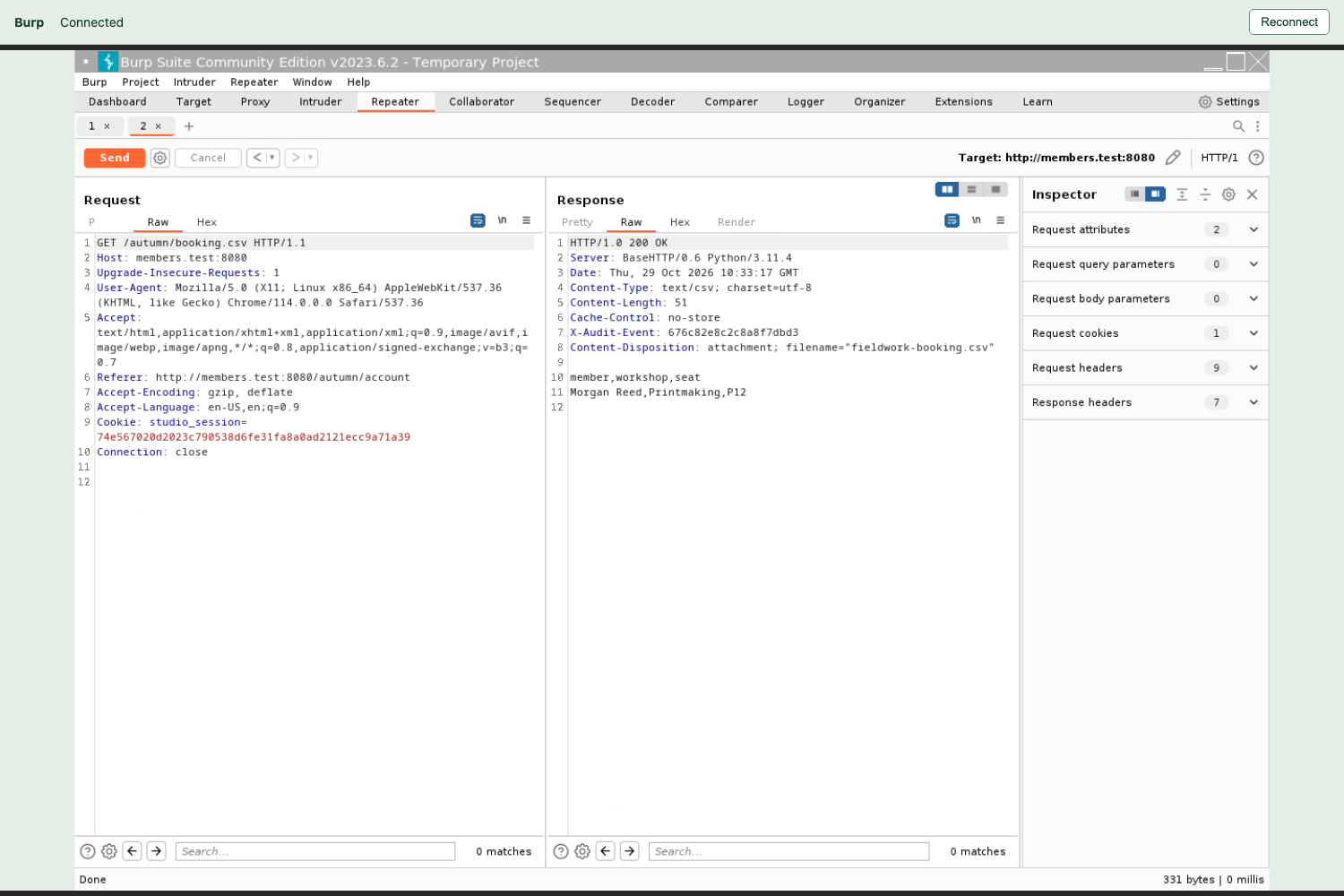
Compare the unchanged Cookie in the left Request pane with 200 OK and the real member row in the right Response pane. A successful status by itself would not prove access to this booking.
If you accidentally overwrite an original cookie or close both retained requests, repeat a complete test: capture a new successful session on both resources, retain its requests, sign out that session, and replay those exact requests afterward. A fresh sign-in cookie is not a substitute for the cookie from the session you signed out.
Deliver Private Evidence and a Clear Decision
In this step, you will save the actual HTTP evidence while keeping credentials out of the assessment. Switch to Auditor. Request/response evidence contains a usable session cookie, so restrict access before saving it.
umask 077 makes newly created files and directories private to your user. It applies to this terminal session, not every future shell. mkdir -p creates the named directory if needed. chmod 700 gives its owner read, write and directory-entry access, with no group or other access.
umask 077
mkdir -p evidence
chmod 700 evidence
Switch to Burp and select the original account request in Repeater. Confirm that its current response is the post-sign-out 200 OK booking page. Right-click inside the Request editor and choose Save item. This saves the request and response together; Copy to file would save different material.
In the Select a file dialog, enter this absolute path in File Name:
/home/labex/project/evidence/account-after.xml
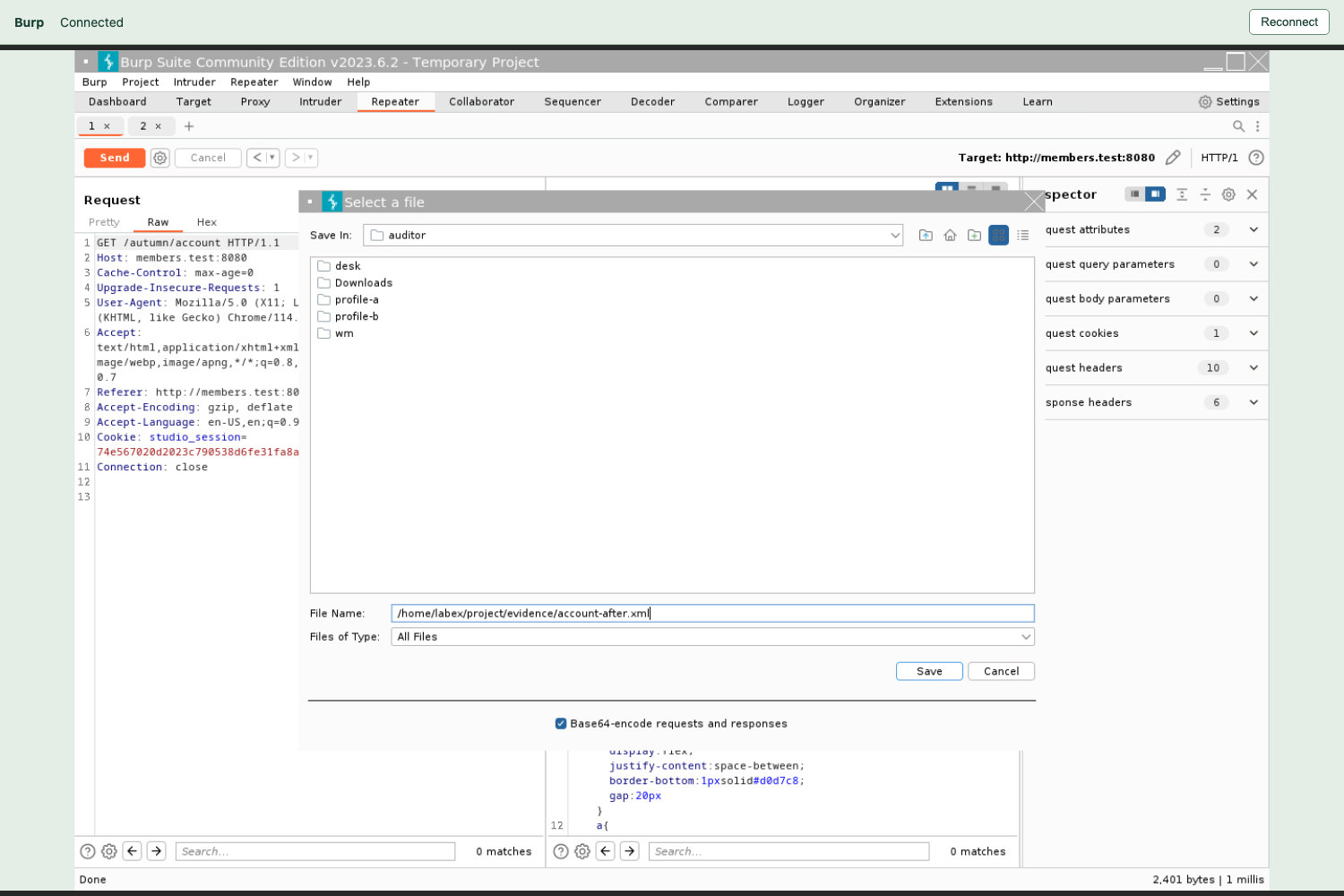
Use the File Name field near the bottom; the checked Base64 option is below it.
Leave Base64-encode requests and responses checked, then click Save. Base64 represents the original bytes safely inside XML; it does not encrypt the cookie. Close a success notice with OK if one appears. Repeat Save item for the original booking request, using:
/home/labex/project/evidence/booking-after.xml
Switch to Auditor. chmod 600 allows only the owner to read and write each file. ls -l shows permissions; expect -rw------- for both XML files.
chmod 600 evidence/account-after.xml evidence/booking-after.xml
ls -l evidence
Write the password-free assessment below. > replaces the named file. <<'JSON' starts a here-document: the shell copies the following lines literally until the closing JSON on its own line. Numeric status values are unquoted; JSON true is a Boolean value. Keep cookies, passwords and raw requests out of this report.
cat > assessment.json <<'JSON'
{
  "decision": "reject",
  "account_after_logout": 200,
  "booking_after_logout": 200,
  "fresh_sign_in_works": true
}
JSON
Read your assessment to catch ordinary typing mistakes:
cat assessment.json
Your handoff is the two private XML items and this assessment. The items preserve original-cookie requests and their real responses; the report communicates the supported decision without repeating secrets. Verification checks these relationships against existing server facts. It does not create missing logins, sign-outs or replay traffic for you, and it leaves your files unchanged. Its ordinary public-page preservation request can append an access record.
If a filename is wrong, repeat Save item into the stated absolute path and reapply chmod 600. If you changed directories, pwd shows the current directory and cd /home/labex/project returns to the workspace. Do not replace missing evidence with a hand-written success line or screenshot.
Summary
You established a real booking baseline, retained two original-cookie requests in Burp Repeater, signed out, and demonstrated that the server still accepted both requests. A browser returning to its sign-in page did not establish session invalidation. You preserved the normal workflow and delivered private HTTP evidence with a password-free rejection decision.
The next lab examines a corrected deployment. An independent browser will help distinguish ending the current session from unnecessarily ending every session for the same member.


