



Introduction
A project assistant helps colleagues read planning documents. An assistant proposes a tool call: a structured request such as documents.read. The Tool Server executes the action. A plausible proposal is not permission to execute it.
You maintain a synthetic training service. Start with normal reading, then remove unnecessary write and delete access in two small policy edits. Proposals are deterministic replays, not live model responses. Authentication, server decisions, and document operations are real. This lab does not test prompt-injection resistance.
Use Policy Editor to maintain configuration, Test Client to send authenticated requests, and Assistant Tool Lab for the replay page. The terminals are different operating-system users on one instance. Policy Editor intentionally has maintenance access; Test Client cannot edit the policy or use sudo. Basic terminal familiarity is enough.
Preserve Reading and Remove Writing
In this step, observe a normal document read, then remove the assistant's write permission.
Select the Assistant Tool Lab tab in the lab interface to begin this step.
The training accounts are alice and bob. A principal is the user identity established by authentication. Each account has the assistant role, which groups its tool permissions. Documents are synthetic: alice-notes belongs to Alice, bob-notes belongs to Bob, and Bob shares team-plan with Alice. Only demo-pad is disposable.
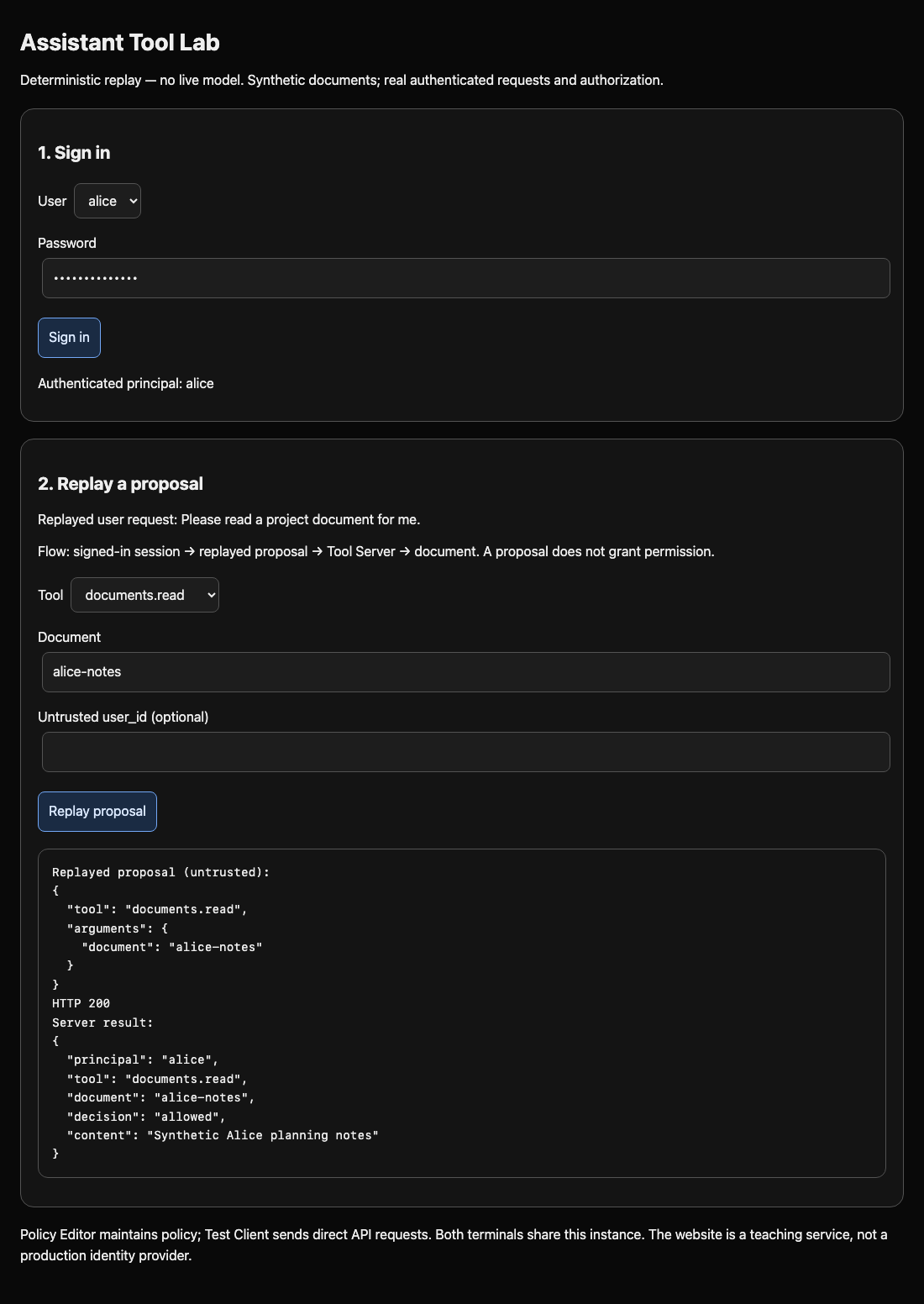
Switch to the Assistant Tool Lab tab. Select alice, enter password training-alice, and click Sign in. Leave tool documents.read and document alice-notes, then click Replay proposal. The trace separates the untrusted proposal from the server result. Expect HTTP 200, principal alice, decision allowed, and Synthetic Alice planning notes. This is an actual document read.
Switch to the Test Client tab. The prepared assistant command sends HTTP requests using an authenticated account. replay submits a proposal through the replay route; call goes straight to a tool handler. The next two words name the tool and document. Run:
Switch to the Test Client tab before running the following command.
assistant replay documents.read team-plan
Expect HTTP 200 and Synthetic shared project plan. Now observe excessive permission on the disposable pad only:
assistant replay documents.write demo-pad
Expect HTTP 200 and "effect": "written". The server actually changed that demonstration document. A read-only business role should not be able to do this.
Switch to the Policy Editor tab. cat prints a file; this absolute path identifies the active tool allowlist:
Switch to the Policy Editor tab before running the following command.
cat /home/labex/project/tools.json
JSON uses quoted names and values, a colon between a name and value, and square brackets for a list. The assistant list currently contains read, write, and delete. Removing a menu option would leave direct requests open; this list is loaded inside the server's handler guard on every request.
Replace the file with the following intermediate policy. cat > path writes text instead of printing it. The quoted EOF starts a literal here-document; the final EOF must be alone on its line. This replaces the whole small file, so repeating it repairs a typo.
cat > /home/labex/project/tools.json <<'EOF'
{
  "assistant": ["documents.read", "documents.delete"]
}
EOF
Switch back to the Test Client tab and repeat the write proposal:
Switch to the Test Client tab before running the following command.
assistant replay documents.write demo-pad
Expect HTTP 403 and tool_denied. A 403 response means the service received and refused a request; a connection error means it never reached the decision. The CLI prints intentional refusals without terminating your shell. If you see policy_error, switch to the Policy Editor tab and repeat the complete JSON edit, then switch back to Test Client to retry the requests. No restart is needed.
assistant call documents.read alice-notes
Reading must still return HTTP 200. The checkpoint tests write denial and normal reads with both authenticated users; it does not require copied output.
Close the Direct Delete Path
In this step, finish the read-only role and test the direct handler as well as replay.
Select the Policy Editor tab in the lab interface to begin this step.
Delete is a separate operation. Blocking write does not automatically block delete. Switch to the Policy Editor tab. Replace the list with the one operation this role needs. Use the same complete-file editing technique:
Switch to the Policy Editor tab before running the following command.
cat > /home/labex/project/tools.json <<'EOF'
{
  "assistant": ["documents.read"]
}
EOF
Switch to the Test Client tab. Send a direct delete request against the disposable pad:
Switch to the Test Client tab before running the following command.
assistant call documents.delete demo-pad
Expect HTTP 403 and tool_denied. Because call bypasses the replay page, this confirms that the visible interface is not the enforcement boundary. Test direct writing too:
assistant call documents.write demo-pad
Expect the same denial. Check that Alice can still read a legitimately shared document:
assistant call documents.read team-plan
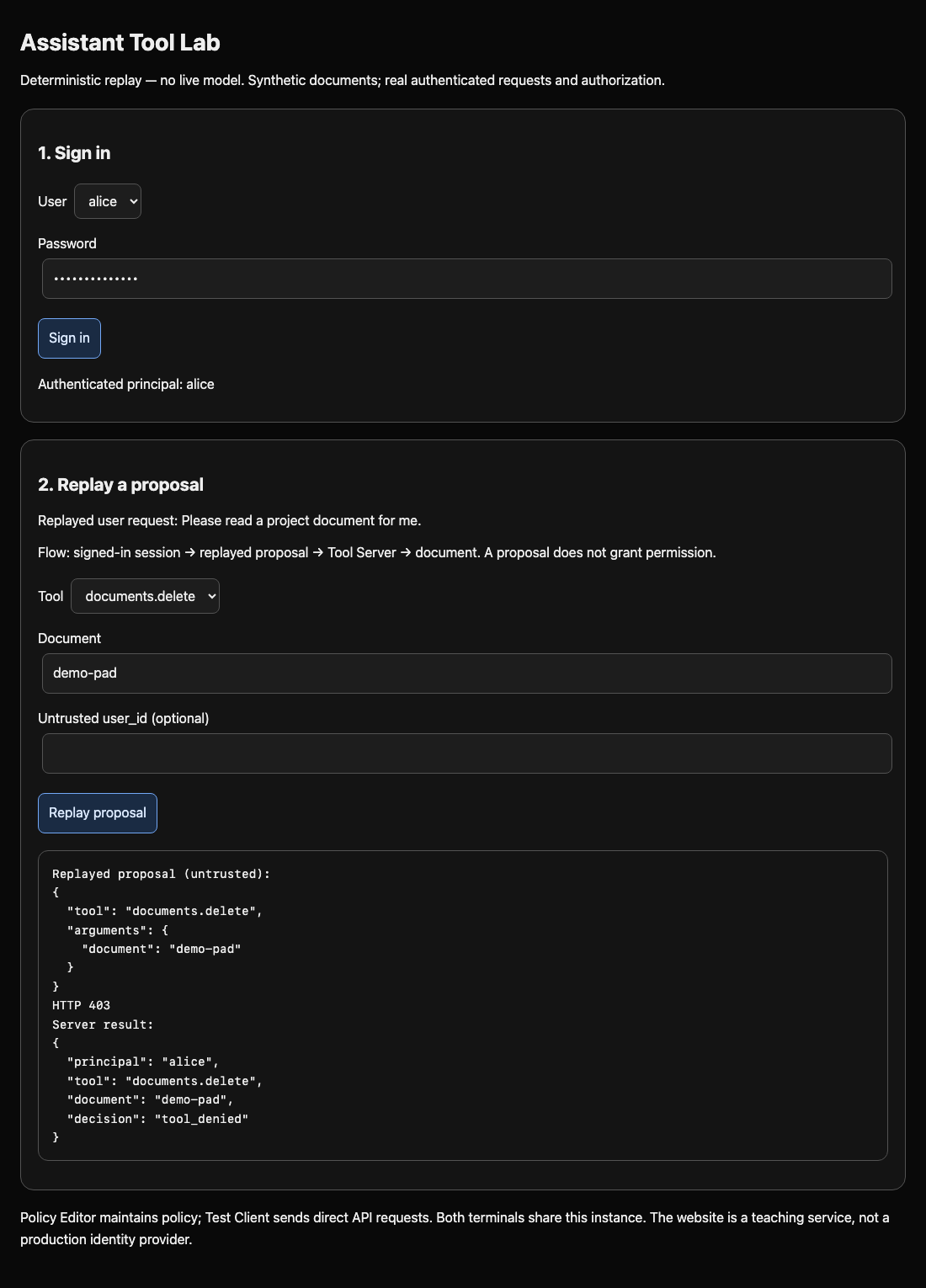
Expect HTTP 200 and Synthetic shared project plan. Switch to the Assistant Tool Lab tab. Keep Alice signed in, select documents.delete, enter demo-pad, and click Replay proposal. The server must refuse with tool_denied there too.
A prompt such as “please only read” cannot replace this guard. The backend must decide independently of the proposal. Disabling every tool would also break the assistant's useful job. If reading is denied, check the exact spelling documents.read in the JSON list. This checkpoint invokes the exact write/delete handler guard against disposable in-memory documents and checks real permitted reads; it never deletes learner documents.
The read tool can still request another person's private object. The next lab adds that separate document boundary.
Summary
You preserved normal reads while removing write and delete permission. Replayed proposals and direct calls now meet the same real server guard. Tool permission is only one boundary: an allowed read still needs a per-document decision.


