



Introduction
The document team's route detector flags every POST to collector.example.test/collect. Some are allowed public demonstrations. Your task is to focus alerts on the internal-document uploads while preserving those allowed exchanges.
This independent environment includes broad.rules, the route detector from the previous lab, plus synthetic complete TCP/HTTP captures. Use the Analyst tab for commands and select the Traffic Reference tab for the recorded request view; it opens directly. The same examples are in traffic/requests.txt. No prior VM files are needed. Body inspection applies to this plain HTTP capture, not encrypted HTTPS traffic.
Find the Sensitive Document Context
In this step, see why a request-body clue is useful but insufficient on its own. classification=internal is a synthetic business field describing a document's handling category; it is not a completion marker.
Select the Analyst tab in the lab interface to begin this step.
Switch to the Traffic Reference tab to compare the request bodies, then switch back to the Analyst tab. Read the reference and replay the provided detector. The command options are the same as before: exclusive rules with -S, input PCAP with -r, and output directory with -l.
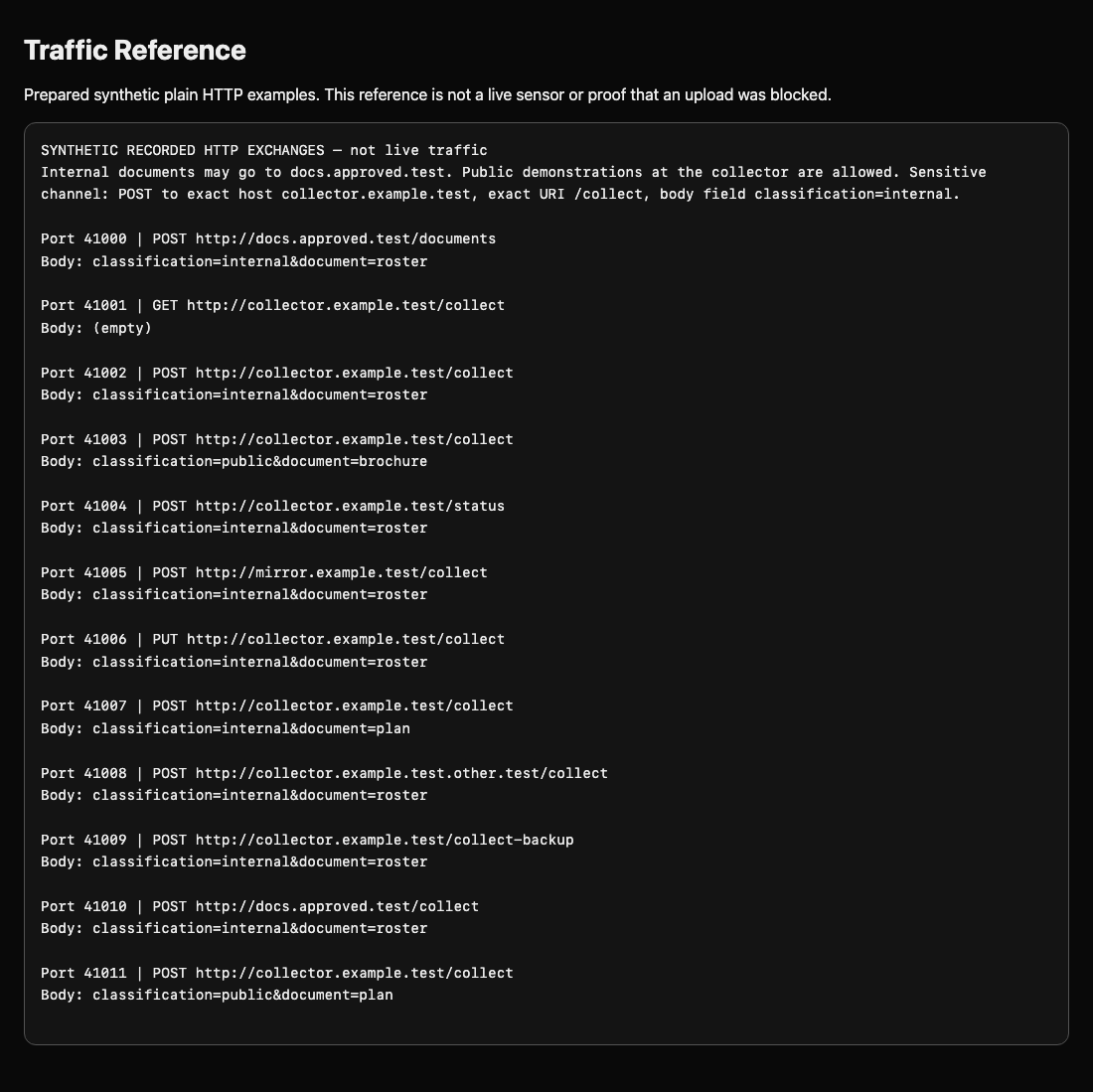
Switch to the Analyst tab before running the following command.
cat traffic/requests.txt
mkdir -p broad-output
suricata --runmode single -c suricata.yaml -S broad.rules -r traffic/core.pcap -l broad-output --init-errors-fatal
python3 /opt/c09/read-alerts.py broad-output/eve.json
Expect four alerts, including two public documents. classification=public means their document content is suitable for public demonstration at this route. The policy concerns the combination of method, destination, route and internal classification.
Try a body-only detector to learn the new buffer. http.request_body makes subsequent content inspect the reconstructed body, even when its bytes cross TCP packets. The engine performs that reassembly; a packet-by-packet text search would not be equivalent. We do not add whole-buffer boundaries because the classification is one field within a longer body.
Use literal multiline input as before: > replaces this file, and the closing RULE must be on its own line.
cat > body.rules <<'RULE'
alert http any any -> any any (msg:"Review document upload"; flow:established,to_server; http.request_body; content:"classification=internal"; sid:1000001; rev:1;)
RULE
mkdir -p body-output
suricata --runmode single -c suricata.yaml -S body.rules -r traffic/core.pcap -l body-output --init-errors-fatal
python3 /opt/c09/read-alerts.py body-output/eve.json
Expect Alerts: 9. Internal documents at approved destinations now alert too, along with PUT requests and other collector routes. This shows why matching a sensitive word anywhere is too broad. Keep the result as an experiment, not the final policy detector.
python3 /opt/c09/check.py body.rules body
Both corpora should match nine body-containing exchanges. A syntax error is recoverable: rewrite the block and retry using a new output directory so appended events do not confuse the count.
Combine Conditions and Test the Balance
In this step, combine the four taught HTTP fields into a useful detector. Keep POST, the exact collector host, and the exact upload route; add the internal classification condition.
Select the Analyst tab in the lab interface to begin this step.
Create local.rules, your final deliverable. Conditions in different sticky buffers combine as AND: all must be satisfied by the transaction. sid:1000001 remains a unique local identifier; one active rule is sufficient.
Switch to the Analyst tab before running the following command.
cat > local.rules <<'RULE'
alert http any any -> any any (msg:"Review document upload"; flow:established,to_server; http.method; content:"POST"; startswith; endswith; http.host; content:"collector.example.test"; startswith; endswith; http.uri; content:"/collect"; startswith; endswith; http.request_body; content:"classification=internal"; sid:1000001; rev:1;)
RULE
Before replay, test syntax with -T. The directory and -l provide a writable output location for the syntax test too. This loads the configuration and rules without reading packets. A successful syntax test does not establish detection quality.
mkdir -p syntax-output
suricata -T -c suricata.yaml -S local.rules -l syntax-output --init-errors-fatal
mkdir -p final-output
suricata --runmode single -c suricata.yaml -S local.rules -r traffic/core.pcap -l final-output --init-errors-fatal
python3 /opt/c09/read-alerts.py final-output/eve.json
Expect Alerts: 2, for ports 41002 and 41007. In each, an internal document goes by POST to the unapproved collector route. Public demonstrations, approved document uploads, health requests, other methods and other routes stay quiet. Alerts still report action: allowed: offline alerting observes traffic; it does not prevent an upload.
Now run the balanced regression checker. A regression test repeats known required and forbidden matches after a change. It runs a clean replay with different document names and source ports as well as the displayed corpus. It checks the rule itself, not the old event count.
python3 /opt/c09/check.py local.rules final
Expect both lines to report two intended exchanges with comparison exchanges quiet. Run it again; the results should be the same and your capture unchanged. Missing alerts suggest an over-specific condition or the wrong buffer; unexpected alerts suggest a missing or loose condition. Rewrite local.rules and retry. Do not disable the engine or remove the legitimate comparison traffic.
This demonstrates a bounded policy detector, not universal data-loss detection. Larger bodies, encrypted content, encodings and other protocols require separate design and testing. The next challenge changes the policy facts while using these same four buffers.
Summary
You compared a route-only detector with a body-only experiment, then combined all four HTTP fields. You tested the submitted rule against balanced corpora in clean output directories and kept the visibility limits explicit.


