



Introduction
The assistant is already limited to documents.read, but an allowed tool can still request a forbidden document. You maintain a fresh training instance whose object policy currently allows every read.
Add a small Python rule in two stages: first protect ownership, then preserve explicit sharing. The server obtains identity from authenticated sessions, not from proposal arguments. All documents are synthetic and all proposals are disclosed replays; actual reads and authorization are real. You need only the terminal skills from the previous lab; the Python syntax is explained here.
Bind Reads to the Authenticated Owner
In this step, stop a permitted tool from crossing into another user's private document.
Select the Test Client tab in the lab interface to begin this step.
Use this access table. owner and shared_with are stored document fields, not values supplied by a proposal.
| Document | Owner | Shared with | Alice may read | Bob may read |
|---|---|---|---|---|
alice-notes |
alice |
nobody | yes | no |
bob-notes |
bob |
nobody | no | yes |
team-plan |
bob |
alice |
yes | yes |
In Test Client, --as bob selects Bob's prepared authenticated credential. Omitting it selects Alice. First confirm normal owner reading:
Switch to the Test Client tab before running the following command.
assistant call documents.read alice-notes
Expect HTTP 200 and Alice's content. Now reproduce the missing object check:
assistant call documents.read bob-notes
It incorrectly returns HTTP 200 and Synthetic Bob private budget. No real private information is used here. Tool allowlisting alone did not protect the object.
Switch to the Policy Editor tab. Inspect the tiny policy:
Switch to the Policy Editor tab before running the following command.
cat /home/labex/project/policy.py
def can_read(principal, doc): defines a function with two inputs. The indented return True currently permits everyone. A Python dictionary stores named fields: principal["id"] reads the authenticated identity, and doc["owner"] reads stored ownership. == compares values and returns a Boolean, either true or false. Four leading spaces keep the return inside the function.
Replace the function with an owner comparison. The same literal here-document editing method from the previous lab writes the whole file:
cat > /home/labex/project/policy.py <<'EOF'
def can_read(principal, doc):
    return doc["owner"] == principal["id"]
EOF
Switch to the Test Client tab. Repeat the private-other-user request:
Switch to the Test Client tab before running the following command.
assistant call documents.read bob-notes
Expect HTTP 403 and document_denied. This differs from tool_denied: reading is allowed as an operation, but this object is forbidden to Alice. Test the reverse direction:
assistant --as bob call documents.read alice-notes
That must also be denied. Bob's own document must remain readable:
assistant --as bob call documents.read bob-notes
Expect HTTP 200. If all reads fail with policy_error, switch to the Policy Editor tab and repeat the edit with indentation and quotes intact; switch back to Test Client before retrying reads. The server reloads the function on each request. This intermediate owner rule intentionally does not yet restore sharing; the next step does.
Restore Sharing Without Trusting a Claimed User
In this step, allow stored sharing while rejecting a forged identity in a proposal.
Select the Policy Editor tab in the lab interface to begin this step.
The owner rule blocks Alice from the shared team-plan, although Bob explicitly granted access. In Python, in tests membership in a list, and or accepts either condition. Combine ownership with membership in the stored sharing list. In Policy Editor:
Switch to the Policy Editor tab before running the following command.
cat > /home/labex/project/policy.py <<'EOF'
def can_read(principal, doc):
    return doc["owner"] == principal["id"] or principal["id"] in doc["shared_with"]
EOF
Switch to the Test Client tab. Check legitimate sharing:
Switch to the Test Client tab before running the following command.
assistant call documents.read team-plan
Expect HTTP 200 and Synthetic shared project plan. Now submit a forged identity. --claim bob adds user_id: bob to the untrusted tool arguments. It does not select Bob's authenticated credential:
assistant replay documents.read bob-notes --claim bob
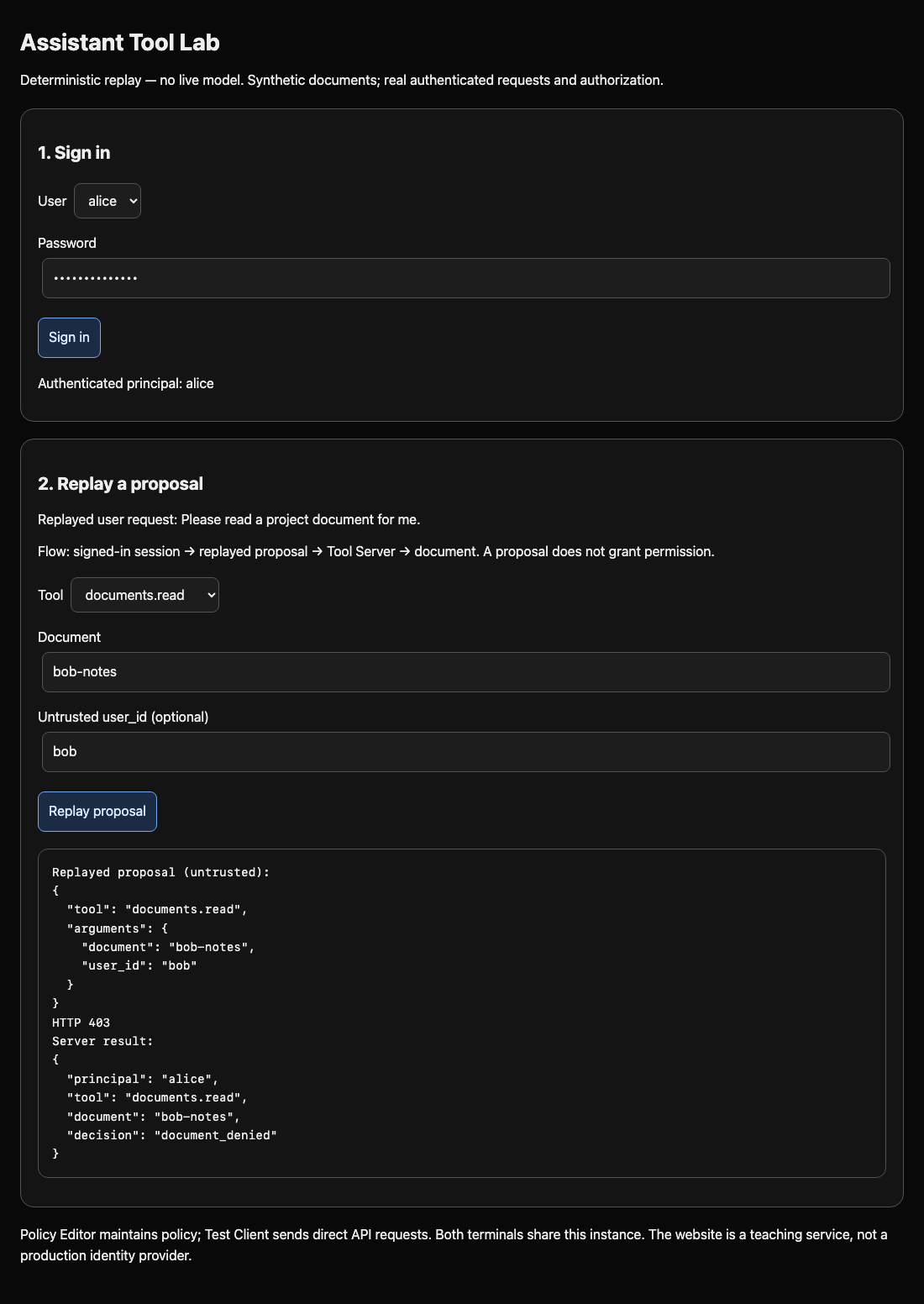
Expect HTTP 403, principal alice, and document_denied. The server maps the real credential to Alice before calling the policy; it ignores the argument's identity claim. Try the direct handler too:
assistant call documents.read bob-notes --claim bob
It must refuse in the same way. --as bob and --claim bob have deliberately different meanings: the first uses a prepared Bob credential, while the second is merely text in a proposal.
Switch to the Assistant Tool Lab tab, sign in as alice with training-alice, choose documents.read, enter bob-notes, put bob in Untrusted user_id (optional), and click Replay proposal. Confirm that the server result still identifies alice and denies the private document. Change the document to team-plan, clear the claim, and replay again: useful shared reading must succeed.
Keep the read-only tools.json policy. The checkpoint tests both accounts, both routes, owner/shared/private cases, and unseen disposable documents. Hardcoded document IDs, allowing everything, trusting a proposed user, or denying everything cannot satisfy that matrix. A typo is recoverable by rewriting the complete small function and retrying a read.
Summary
You enforced document access with authenticated identity and stored ownership or sharing. A forged proposal field cannot become authority. The server still serves useful owner and shared reads, while denying private objects and unnecessary operations. This demonstrates deterministic tool authorization, not live-model reliability.


