



Introduction
A document team normally uploads files to docs.approved.test. A small recorded capture also contains uploads to another destination. You are authorized to build an offline detector for these synthetic exchanges.
A packet capture (PCAP) stores network packets. Suricata reconstructs their HTTP requests and tests detection rules. It will read files here, not contact these hostnames. All names and documents are fictional. Plain HTTP makes the body visible; this exercise does not demonstrate reading encrypted HTTPS traffic.
Use the Analyst tab for commands. Select the Traffic Reference tab to view the same prepared requests as traffic/requests.txt; the reference page opens directly. These are recorded examples, not a live topology. You need only basic terminal entry and tab switching. No IDS experience is assumed.
Recognize Upload Requests
In this step, build a first rule that finds POST requests, including normal uploads. An alert means a rule matched; it does not prove a compromise and does not block traffic.
Select the Analyst tab in the lab interface to begin this step.
HTTP is a request-and-response protocol. The method names the requested action: POST sends content; GET requests a resource. The Host header names the destination site, the URI identifies its route, and the body carries the submitted document fields. Switch to the Traffic Reference tab to see the prepared HTTP exchanges in the browser. The page is a reference, not a live packet monitor. Then switch back to the Analyst tab to read the same exchanges and run all commands below. cat prints a file; paths identify its location.
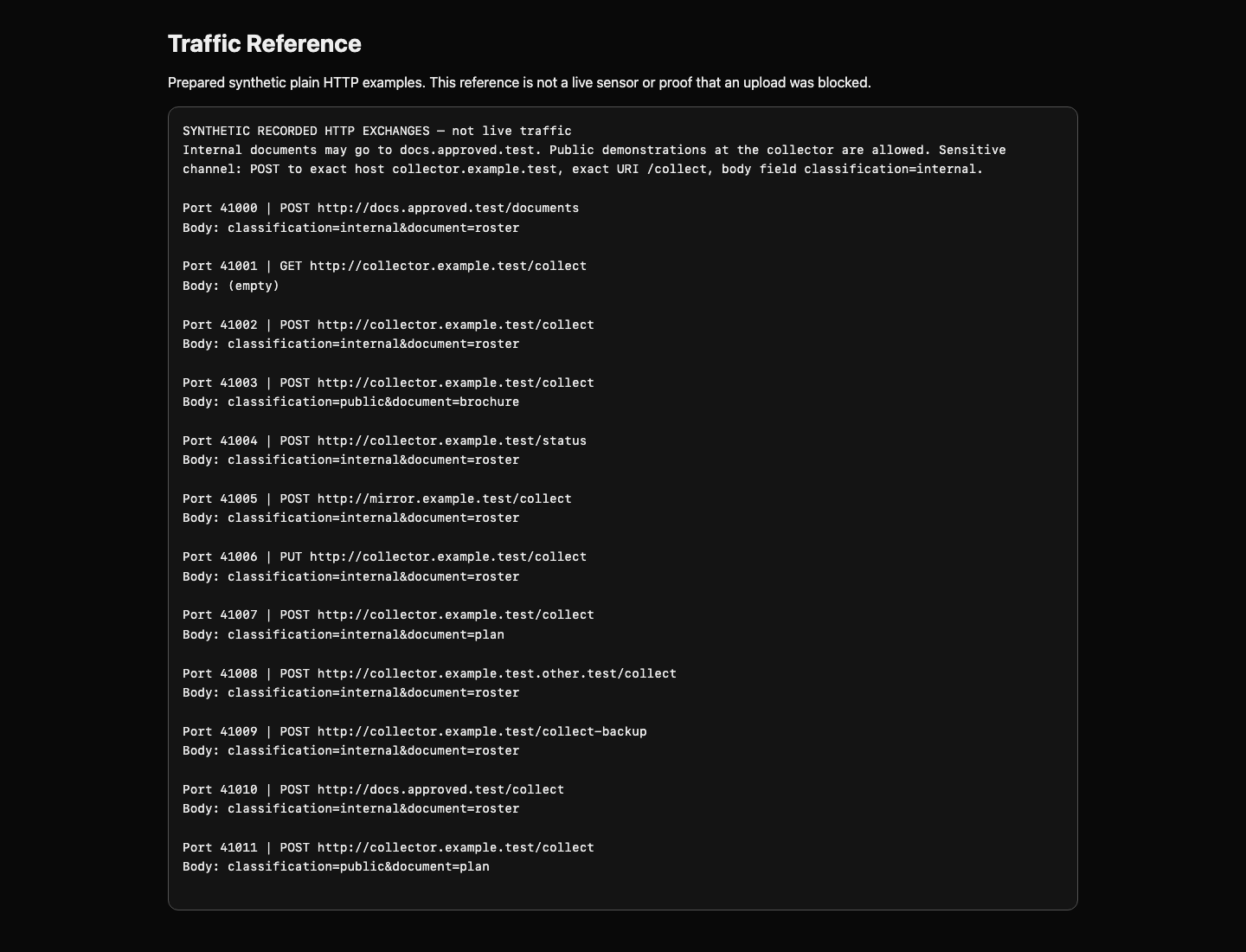
Switch to the Analyst tab before running the following command.
cat traffic/requests.txt
Compare the legitimate POST to docs.approved.test, the collector GET, and the POST containing classification=internal. The organization allows internal documents at the approved document service. The collector route can receive public demonstration documents, but internal documents there are unapproved. Destination plus content matters; an unfamiliar hostname alone is not proof.
A Suricata rule has a header and parenthesized options. alert http chooses an alert on parsed HTTP. The two any any pairs accept any source/destination address and port; -> means source to destination. flow:established,to_server restricts inspection to a connected client's requests. Semicolons finish options. msg describes the match, sid is your numeric signature identifier, and rev is the revision. One rule uses one unique sid.
A sticky buffer selects the HTTP field inspected by subsequent content. http.method selects the method. content:"POST" looks for that text; startswith and endswith make it the whole field rather than a substring. Use the supplied rule below.
cat > method.rules writes a file, replacing an old copy. <<'RULE' starts literal multiline input; the final RULE must stand alone. This is a simple editing method. If you mistype, run the entire block again.
cat > method.rules <<'RULE'
alert http any any -> any any (msg:"Review document upload"; flow:established,to_server; http.method; content:"POST"; startswith; endswith; sid:1000001; rev:1;)
RULE
Replay the capture. mkdir -p creates the output directory and accepts an existing directory. --runmode single uses one packet-processing thread; -c selects configuration; -S exclusively loads your rule file; -r reads the PCAP; -l chooses output. --init-errors-fatal stops if a rule cannot load. The prepared configuration inspects at most 64 KB of each request body; all supplied bodies fit. Real deployment limits need separate assessment.
mkdir -p method-output
suricata --runmode single -c suricata.yaml -S method.rules -r traffic/core.pcap -l method-output --init-errors-fatal
python3 /opt/c09/read-alerts.py method-output/eve.json
Suricata's stopping message is normal after it reaches the end of this offline file. eve.json contains one JSON object per event. JSON uses named fields; event_type: alert identifies a match, signature_id identifies its rule, and HTTP fields identify the request. The supplied Python reader prints source port, method, host, URI, and signature ID for each alert. The source port links an exchange to the reference list; it is not a policy condition.
Expect Alerts: 10. Both the normal document POST and collector POSTs appear. GET and PUT stay quiet. This intentionally broad first detector teaches method matching.
The supplied checker executes your unchanged rule on two small independent corpora in disposable output directories. It ignores your saved logs and leaves your rule/captures unchanged. Check this first method detector:
python3 /opt/c09/check.py method.rules method
Both lines should say they matched 10 intended exchanges. If Suricata reports a syntax error, compare quotes, semicolons and the closing parenthesis, rewrite the file and retry. Replaying into the same output directory appends events; use a new directory when comparing counts. The checker always starts clean.
Select the Collector Destination
In this step, exclude normal document-service uploads by combining method and host conditions. Multiple buffers in one rule must all match the same HTTP transaction.
Select the Analyst tab in the lab interface to begin this step.
The destination site's name belongs in http.host, not in a body search. A document could mention the collector without being sent there. The host buffer is normalized to lowercase by Suricata. The reference includes collector.example.test.other.test: that is a different host. Whole-field matching keeps it separate.
Create a new file, preserving your first detector for comparison. The header and method condition remain; the new host buffer adds the destination condition.
Switch to the Analyst tab before running the following command.
cat > destination.rules <<'RULE'
alert http any any -> any any (msg:"Review document upload"; flow:established,to_server; http.method; content:"POST"; startswith; endswith; http.host; content:"collector.example.test"; startswith; endswith; sid:1000001; rev:1;)
RULE
mkdir -p destination-output
suricata --runmode single -c suricata.yaml -S destination.rules -r traffic/core.pcap -l destination-output --init-errors-fatal
python3 /opt/c09/read-alerts.py destination-output/eve.json
Expect Alerts: 6. The approved document service and similarly named host disappear. POSTs to /status and /collect-backup still match, because this rule does not yet distinguish routes. These are useful known false positives: a match outside the behavior you intend to investigate.
python3 /opt/c09/check.py destination.rules destination
Both corpora should match six intended method-and-host exchanges. If a permitted host still alerts, check whether startswith; endswith; follow the host content. Changing a saved JSON event cannot fix the detector; change the rule and replay.
Bound Detection to the Upload Route
In this step, make a working route detector while keeping its remaining content limitation visible. The URI is the request's route, such as /collect; it differs from the host.
Select the Analyst tab in the lab interface to begin this step.
Use http.uri and whole-field matching to select exactly /collect. /collect-backup is a different route. Keep the method and destination restrictions so health requests and legitimate destinations stay quiet.
Switch to the Analyst tab before running the following command.
cat > upload.rules <<'RULE'
alert http any any -> any any (msg:"Review document upload"; flow:established,to_server; http.method; content:"POST"; startswith; endswith; http.host; content:"collector.example.test"; startswith; endswith; http.uri; content:"/collect"; startswith; endswith; sid:1000001; rev:1;)
RULE
mkdir -p route-output
suricata --runmode single -c suricata.yaml -S upload.rules -r traffic/core.pcap -l route-output --init-errors-fatal
python3 /opt/c09/read-alerts.py route-output/eve.json
Expect Alerts: 4: ports 41002, 41003, 41007, and 41011. Compare their bodies in the reference. Two contain internal documents; two contain public demonstration documents. All four are POSTs to the selected host and route. The detector works as a route monitor, but it overstates sensitive uploads.
python3 /opt/c09/check.py upload.rules route
Both corpora should match four intended route exchanges. The checker tests different document names and source ports too: those incidental values should not decide detection. Keep this rule's purpose clear when sharing its alerts. In the next lab you will add document context and test noise reduction in a fresh environment.
Summary
You built method, destination and route detectors with real Suricata replay. You related alerts to recorded requests and identified public-document false positives before claiming sensitive-upload detection.


