


Introduction
This Lab will guide you through the process of setting up a basic Flask application. Flask is a lightweight web application framework for Python. It's designed to make getting started with web development quick and easy.
Note: You need to create the code file yourself and run it in the environment. You can preview the Flask service status on Web 5000.
Creating the Application Directory
First, you need to create a directory for your application. This will serve as the main folder where all the necessary files for your application will be stored.
cd ~/project
mkdir flaskr
Setting up the Application Factory
Next, create an __init__.py file in the flaskr directory. This file serves two purposes: it will contain the application factory, and it signals to Python that the flaskr directory should be treated as a package.
In your __init__.py file, import the necessary modules and define a function, create_app(), that will instantiate and configure your application.
## flaskr/__init__.py

import os
from flask import Flask

def create_app(test_config=None):
    ## create and configure the app
    app = Flask(__name__, instance_relative_config=True)
    app.config.from_mapping(
        SECRET_KEY='dev',
        DATABASE=os.path.join(app.instance_path, 'flaskr.sqlite'),
    )

    ## More code to be added here...

    return app
Configuring the Application
In the same __init__.py file, add the necessary configuration details for your application. This includes setting up a secret key and specifying the location of your database file.
## flaskr/__init__.py

## More code above...

if test_config is None:
    ## load the instance config, if it exists, when not testing
    app.config.from_pyfile('config.py', silent=True)
else:
    ## load the test config if passed in
    app.config.from_mapping(test_config)

## ensure the instance folder exists
try:
    os.makedirs(app.instance_path)
except OSError:
    pass

## a simple page that says hello
@app.route('/')
def hello():
    return 'Hello, World!'
Running the Application
With your application set up and configured, you can now run it using the flask command. Be sure to run this command from the top-level directory, not the flaskr package.
flask --app flaskr run --debug --host=0.0.0.0
You should see output similar to this:
 * Serving Flask app "flaskr"
 * Debug mode: on
 * Running on all addresses (0.0.0.0)
 * Running on http://127.0.0.1:5000/ (Press CTRL+C to quit)
 * Restarting with stat
 * Debugger is active!
 * Debugger PIN: nnn-nnn-nnn
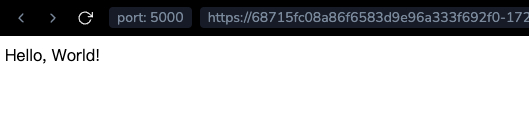
Then, open the tab Web 5000, and you should see the following:
Summary
Congratulations, you've successfully created and run your first Flask application! This basic application can serve as a starting point for more complex projects. Flask's flexibility and simplicity make it a great choice for web development in Python.