



Introduction
In this challenge, you will apply your newly acquired skills with Wireshark to capture and analyze network traffic specifically related to Google. This task simulates a real-world scenario where you might need to investigate traffic to a particular website or service. By completing this challenge, you'll demonstrate your ability to use Wireshark for targeted network analysis.
Capture Google Traffic
Please be patient; the startup time will be longer than usual.
In this step, you'll use Wireshark to capture network traffic while accessing Google, then analyze the captured data to identify specific information about the communication.
Tasks
- Use Wireshark to capture network traffic while accessing <www.google.com>.
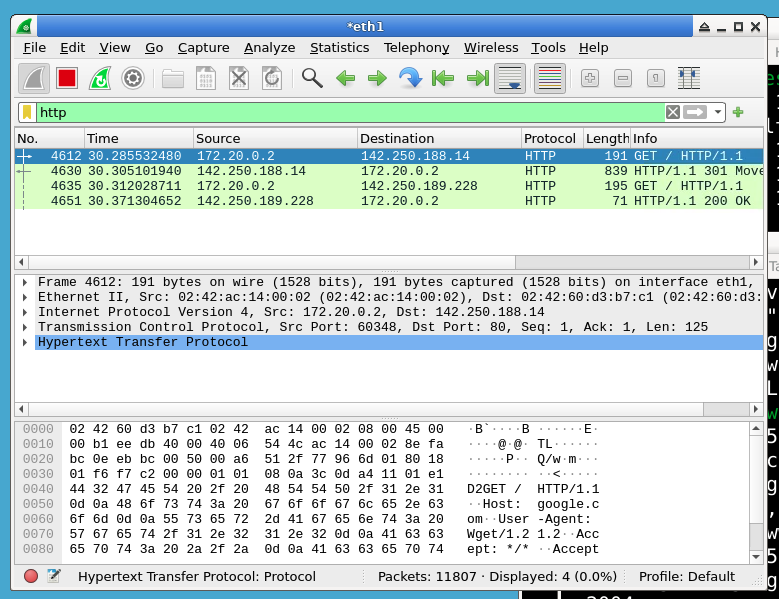
- Analyze the captured traffic to find the IP address of the Google server you connected to.
- Identify the HTTP or HTTPS request method used to access Google.
- Save the capture file for further analysis.
Requirements
- All operations must be performed in the
~/projectdirectory. - Use Wireshark to capture the network traffic.
- Access Google using the
curlcommand:curl www.google.com. - Filter the Wireshark capture to isolate the Google traffic.
- Save the Wireshark capture as
google_traffic.pcapngin the~/projectdirectory. (Try to export the specific packets related to Google only.)
Example
After completing the challenge, your terminal output for the curl command might look like this:
curl www.google.com
And in Wireshark, you might see packets with information like:
Summary
In this challenge, you applied your Wireshark skills to capture and analyze network traffic specifically related to Google. You learned how to:
- Use Wireshark to capture targeted network traffic
- Apply filters to isolate specific traffic in Wireshark
- Analyze captured packets to extract relevant information
- Save Wireshark captures for further analysis
This exercise reinforces the practical application of network analysis in a real-world scenario, where you might need to investigate traffic to a specific website or service. As you continue to develop your skills, remember that this type of analysis is crucial for network troubleshooting, security investigations, and understanding network behavior.

