Introduction
An AI model can answer with prose, but an application sometimes needs structured information before it can do useful work. Tool calling lets the application describe an operation, such as looking up one catalog item, and lets the model propose a tool name and arguments. The model does not receive permission to run arbitrary code. It produces data that your Worker must treat as untrusted input.
This lab builds POST /catalog-help. A Cloudflare-hosted Llama model receives a short question such as “Is SKU KB-101 in stock?” and can propose the read-only lookup_catalog_item tool. Your Worker accepts exactly one known tool, validates an exact { sku } argument object, and only then reads a tiny synthetic catalog. Unknown tools, missing or extra fields, malformed SKUs and multiple calls never reach the executor.
You will use traditional function calling so the security boundary stays visible: inference proposes, validation decides, and application code executes. The returned result is bounded to a few public fixture fields. Nothing in this exercise grants write access, calls an external service or lets the model choose executable code.
This is the fifth lab in the course. If you entered directly, first complete Connect LabEx to Your Cloudflare Account so you know how to use the VM terminal, authorize Wrangler, confirm your learning account and configure its account ID.
The selected @cf/meta/llama-3.3-70b-instruct-fp8-fast model supports function calling and is available through the standard Workers AI allocation. Workers Free currently includes 10,000 Neurons per day. This lab sends only one short live request locally and one after deployment, so Workers Paid is not required while free allocation remains. Local inference still reaches Cloudflare and consumes account usage; stop instead of repeatedly retrying if the model or allocation is unavailable.
Setup installs Node.js 22.22.0 and project-local Wrangler 4.132.0 in /home/labex/project/tool-call-guard. It also supplies deterministic model fixtures and independent checks. Setup does not authorize Wrangler, create the Worker source, invoke a model, deploy or create a cloud resource.
Authorize the VM and Configure the Tool-Call Worker
In this step, you will authorize this fresh VM and configure one disposable Worker. Your browser may already be signed in to the Cloudflare Dashboard, but Wrangler inside a new VM still needs its own limited authorization.
Enter the prepared project and confirm the pinned CLI version:
cd /home/labex/project/tool-call-guard
npx wrangler --version
Expect 4.132.0. Request only the permissions needed for an AI-bound Worker. Wrangler 4.132.0 also checks KV dependencies during deletion, so the cleanup path needs the KV permission even though this lab creates no KV data.
npx wrangler login --device --browser=false --scopes account:read user:read workers_scripts:write workers_kv:write ai:write
Open the displayed link, enter the current code, inspect the account and permissions, and authorize your learning account. Never send the code, password or token to another person. Then inspect structured identity data:
npx wrangler whoami --json
Confirm loggedIn: true, then generate a unique name so cleanup can target only this lab's Worker:
RUN="labex-c07-a05-$(openssl rand -hex 6)"
printf '%s\n' "$RUN"
The here-document below writes ordinary JSON configuration. Replace YOUR_ACCOUNT_ID with the actual ID for the intended learning account:
cat > wrangler.jsonc <<JSON
{
  "\$schema": "./node_modules/wrangler/config-schema.json",
  "name": "$RUN",
  "account_id": "YOUR_ACCOUNT_ID",
  "main": "src/index.js",
  "compatibility_date": "2026-09-16",
  "workers_dev": true,
  "preview_urls": false,
  "observability": { "enabled": true, "head_sampling_rate": 1 },
  "ai": { "binding": "AI", "remote": true }
}
JSON
The AI binding gives code a safe env.AI handle without putting a model API key in source. remote: true means local development still calls the account-backed model rather than simulating inference offline.
Understand the Tool Boundary
In this step, you will connect the platform binding to the boundary your application must enforce.
Generate environment types from wrangler.jsonc, then inspect the generated interface:
npx wrangler types
grep -A4 'interface __BaseEnv_Env' worker-configuration.d.ts
Look for AI: Ai. A tool description is structured data sent to the model: a name, a plain-language purpose and a schema for possible arguments. It helps the model propose a call, but it is not authorization and it is not executable code.
This lab permits one read-only tool, lookup_catalog_item, with one argument such as { "sku": "KB-101" }. After inference, the application requires exactly one proposed call and the exact allowed name. It then requires arguments to be an object containing only sku, checks the lab's short public SKU format, and passes the validated value only to the application's fixed read-only function.
Inspect the supplied rejection fixtures:
grep -nE 'unknown tools|missing, extra|zero or multiple' test/worker.test.mjs
The fixtures are deliberate fake model responses. They prove the security boundary without spending Neurons or hoping that a live model produces a malformed call.
Build the Validated Catalog Tool
In this step, you will describe the tool to the model, validate the model's proposal and execute only the application's read-only catalog function.
Create the Worker entrypoint:
cat > src/index.js <<'JS'
const MODEL = "@cf/meta/llama-3.3-70b-instruct-fp8-fast";
const TOOL_NAME = "lookup_catalog_item";
const MAX_QUESTION = 240;
const SKU_PATTERN = /^[A-Z]{2}-[0-9]{3}$/;
const CATALOG = [
  { sku: "KB-101", name: "Compact Keyboard", priceUsd: 49, inStock: true },
  { sku: "MS-205", name: "Wireless Mouse", priceUsd: 29, inStock: false }
];

const TOOLS = [{
  name: TOOL_NAME,
  description: "Read one public catalog item by the exact SKU stated in the user's question.",
  parameters: {
    type: "object",
    properties: { sku: { type: "string", description: "An exact catalog SKU such as KB-101" } },
    required: ["sku"]
  }
}];

function json(data, status = 200) { return Response.json(data, { status }); }

async function readQuestion(request) {
  if (!(request.headers.get("content-type") || "").toLowerCase().includes("application/json")) {
    return { error: json({ error: "json_required" }, 415) };
  }
  let body;
  try { body = await request.json(); } catch { return { error: json({ error: "invalid_json" }, 400) }; }
  const question = typeof body?.question === "string" ? body.question.trim() : "";
  if (!question) return { error: json({ error: "invalid_question" }, 400) };
  if (question.length > MAX_QUESTION) return { error: json({ error: "question_too_large" }, 413) };
  return { question };
}

export function validateToolSelection(toolCalls) {
  if (!Array.isArray(toolCalls) || toolCalls.length !== 1) throw new Error("exactly one tool call is required");
  const call = toolCalls[0];
  if (!call || call.name !== TOOL_NAME) throw new Error("unknown tool");
  const args = call.arguments;
  if (!args || typeof args !== "object" || Array.isArray(args)) throw new Error("arguments must be an object");
  if (Object.keys(args).length !== 1 || !Object.hasOwn(args, "sku")) throw new Error("unexpected arguments");
  if (typeof args.sku !== "string" || !SKU_PATTERN.test(args.sku)) throw new Error("invalid sku");
  return { name: TOOL_NAME, arguments: { sku: args.sku } };
}

export function executeCatalogTool(argumentsValue) {
  const item = CATALOG.find((candidate) => candidate.sku === argumentsValue.sku);
  return item ? { ...item, found: true } : { sku: argumentsValue.sku, found: false };
}

export async function handleCatalogHelp(request, env, execute = executeCatalogTool) {
  const parsed = await readQuestion(request);
  if (parsed.error) return parsed.error;
  const requestId = crypto.randomUUID();
  let inference;
  try {
    inference = await env.AI.run(MODEL, {
      messages: [
        { role: "system", content: "Use exactly one provided read-only tool. Copy only the exact SKU from the user. Do not answer from memory." },
        { role: "user", content: parsed.question }
      ],
      tools: TOOLS,
      max_tokens: 128,
      temperature: 0
    });
  } catch {
    console.error(JSON.stringify({ event: "tool_inference_failed", requestId, model: MODEL }));
    return json({ error: "model_unavailable", requestId }, 502);
  }
  let selected;
  try { selected = validateToolSelection(inference?.tool_calls); }
  catch {
    console.error(JSON.stringify({ event: "tool_call_rejected", requestId, model: MODEL }));
    return json({ error: "invalid_tool_call", requestId }, 502);
  }
  const result = execute(selected.arguments);
  console.log(JSON.stringify({ event: "tool_call_executed", requestId, model: MODEL, tool: selected.name, found: result.found }));
  return json({ model: MODEL, tool: selected.name, arguments: selected.arguments, result, requestId });
}

export default { async fetch(request, env) {
  const url = new URL(request.url);
  if (request.method === "GET" && url.pathname === "/health") return json({ status: "ok" });
  if (request.method === "POST" && url.pathname === "/catalog-help") return handleCatalogHelp(request, env);
  return json({ error: "not_found" }, 404);
} };
JS
Notice the order: env.AI.run() returns data, validateToolSelection() narrows it to one allowed shape, and only then does executeCatalogTool() run. The model never supplies JavaScript, chooses a URL or gains access to a write operation. Logs record lifecycle metadata but omit the user's question and catalog result.
Run the five deterministic tests, then ask Wrangler to bundle without deployment:
node --test test/worker.test.mjs
npx wrangler deploy --dry-run
The tests should report five passes. The dry run should list env.AI as an AI binding. Together they prove the validation code and Worker configuration fit before a live model call consumes usage.
Exercise One Live Tool Selection
In this step, you will run the Worker locally while its AI binding performs one real remote inference. Only the catalog lookup runs locally; the model still runs on Cloudflare.
Start Wrangler in the background and wait for the non-AI health route. & creates a background job, $! is its process ID, and the bounded loop stops waiting as soon as /health succeeds:
npx wrangler dev --port 8787 > .labex/dev.log 2>&1 &
echo $! > .labex/dev.pid
for attempt in $(seq 1 30); do
  if curl --silent --fail http://127.0.0.1:8787/health; then break; fi
  sleep 1
done
Send a short question containing one exact synthetic SKU:
curl --silent --show-error http://127.0.0.1:8787/catalog-help \
  --header 'Content-Type: application/json' \
  --data '{"question":"Is SKU KB-101 in stock and what does it cost?"}'
Expect the exact Llama model, tool: "lookup_catalog_item", arguments containing only KB-101, and the bounded Compact Keyboard fixture. Generated wording is not graded because the application consumes the structured tool proposal instead of free-form prose.
Reject an empty question before inference:
curl --silent --show-error --write-out '\nHTTP %{http_code}\n' http://127.0.0.1:8787/catalog-help \
  --header 'Content-Type: application/json' --data '{"question":""}'
Expect {"error":"invalid_question"} and HTTP 400. This proves ordinary request validation happens before model usage.
Deploy and Inspect Tool Evidence
In this step, you will deploy the same endpoint and connect its runtime behavior to visible Cloudflare evidence.
Stop only the saved development process, wait for it to exit, and deploy:
kill "$(cat .labex/dev.pid)"
wait "$(cat .labex/dev.pid)" 2>/dev/null || true
npx wrangler deploy
Save the exact URL printed by Wrangler and send one public question:
WORKER_URL="https://YOUR_WORKER_URL"
curl --silent --show-error "$WORKER_URL/catalog-help" \
  --header 'Content-Type: application/json' \
  --data '{"question":"Is SKU KB-101 in stock and what does it cost?"}'
Confirm the public result uses the exact model and allowed tool, returns only the validated SKU argument, and contains the same bounded read-only fixture fields.
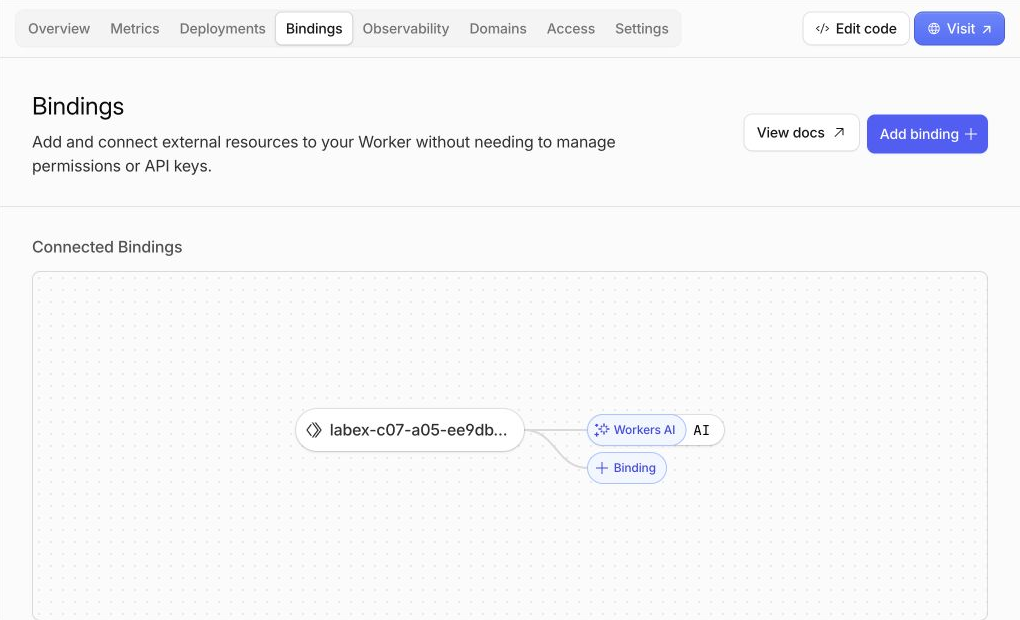
Open Workers & Pages → your labex-c07-a05-... Worker → Bindings. A binding is the named connection that makes a Cloudflare service available to Worker code. Confirm one Workers AI connection with the name AI; that name is why the program can call env.AI.run(...).
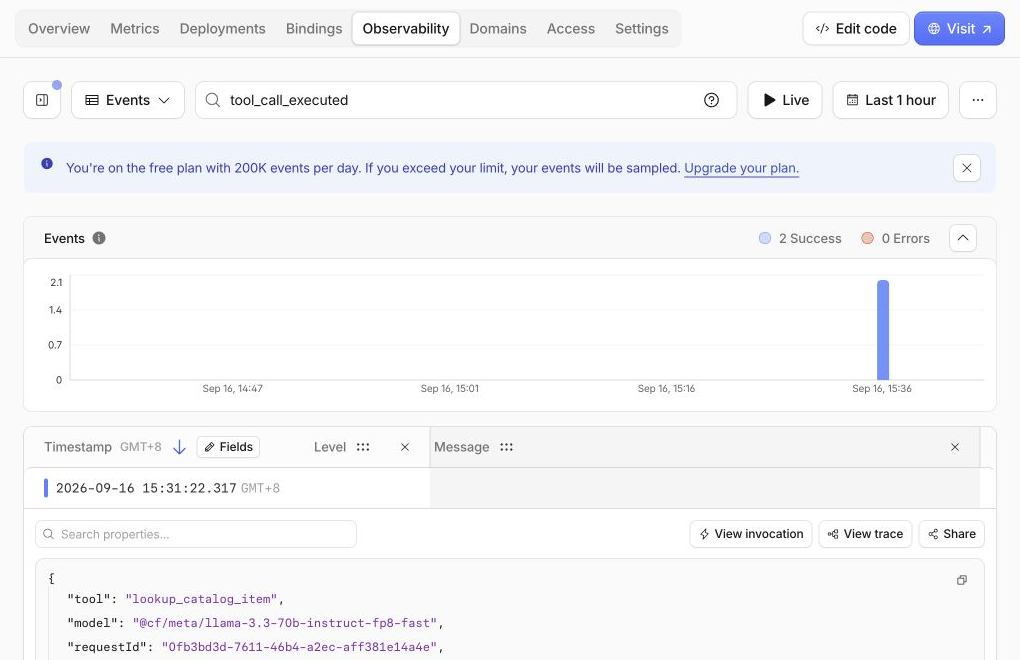
Next open Observability. This page collects invocation records and application logs. The example below shows four successful events and zero errors after the public request and independent checks. Your count may differ because each request can contribute an invocation record and an application event, and Dashboard delivery can lag.
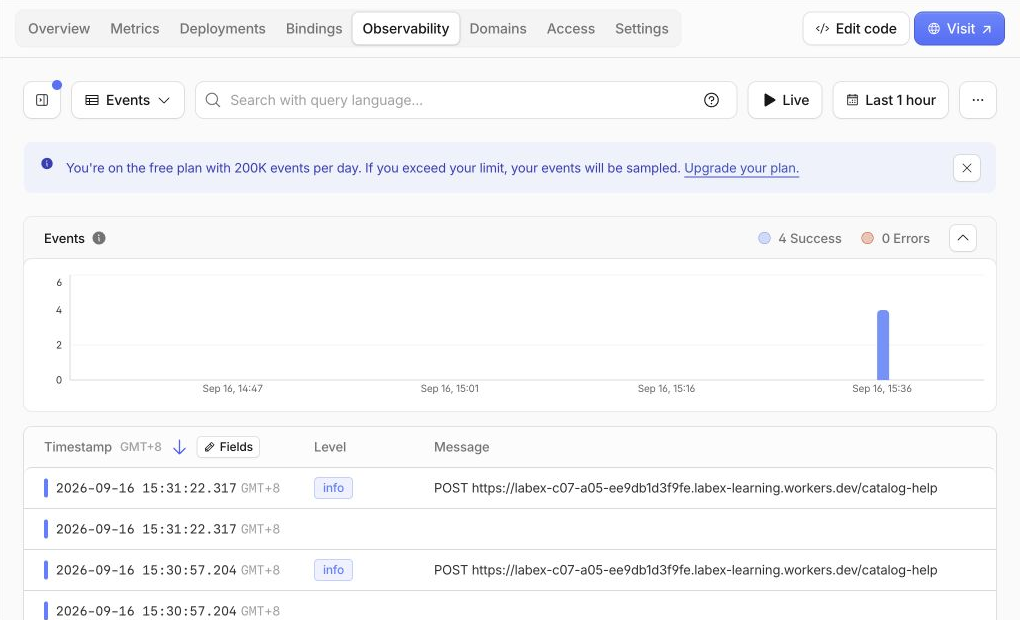
The blue Free-plan notice on this page refers to the Workers Logs event allowance, not to AI inference. In the search field, enter tool_call_executed, then expand one matching row. The focused example shows two successful matches and the deliberately limited fields at the start of the event: lookup_catalog_item, the exact Llama model and a request ID. The complete event also contains event: "tool_call_executed" and found: true, but it does not log the user's question, the model's raw response or the returned catalog record.
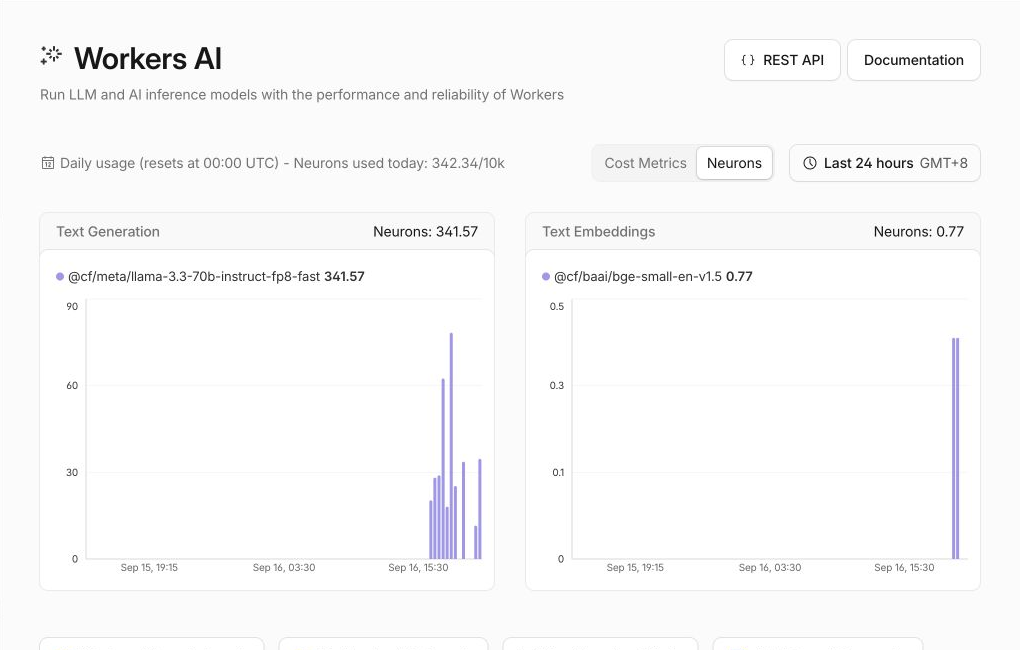
Finally open AI → Workers AI and keep the Neurons tab selected. A Neuron is Cloudflare's unit for Workers AI computation. The example account used 342.34/10k Neurons that day; its Llama row shows 341.57, while an earlier embedding exercise appears separately. These are shared account examples, not a promised cost for one request. Find the exact Llama row in your account and confirm that today's total remains within the 10k Workers Free allocation.
Dashboard pages help you connect configuration, traffic and usage to the command-line result. Do not repeat inference merely to force a chart update. The JSON response and independent verification remain authoritative because charts and logs can arrive later.
Remove the Worker and Log Out
In this step, you will remove the disposable public endpoint and then remove this VM's authorization. Workers AI usage remains account history; deleting the Worker does not erase the usage record.
Delete the exact Worker named in wrangler.jsonc:
npx wrangler delete
Confirm only when Wrangler shows this lab's unique labex-c07-a05-... name. Require Successfully deleted, then run the independent cloud absence check while authorization is still available:
python3 .labex/verify.py deleted
Only after it reports PASS: deleted, log out and inspect structured state:
npx wrangler logout
npx wrangler whoami --json
Require loggedIn: false. Closing a browser tab or deleting local source would not prove that the public Worker is gone.
Summary
You separated model selection from application authority. Workers AI proposed one structured catalog lookup, your Worker validated the exact tool name and argument object, and only then did fixed read-only code execute. Deterministic fixtures proved that unknown tools, malformed arguments and multiple calls cannot act, while live inference demonstrated the real model exchange. You also inspected privacy-bounded evidence and removed the disposable Worker and VM authorization.