Introduction
An AI endpoint depends on more than your JavaScript. A learner can send invalid input, a selected model can reject a request, an account can reach a quota or rate limit, capacity can be temporarily unavailable, or your own application code can fail. These situations need different responses. Treating all of them as “AI failed” makes an application hard to operate and can encourage wasteful retries.
In this lab, you will build POST /draft-reply. A Cloudflare-hosted Llama model drafts one short support reply. Your Worker rejects invalid input before inference, recognizes documented model and limit errors, retries a transient failure no more than once, validates the model response, and reports an application defect separately. A bounded retry means the maximum number of extra attempts is fixed in advance; it cannot loop until the account's free allocation is exhausted.
You will prove most failure paths with deterministic fixtures. A fixture is a controlled substitute that returns a chosen result or error, so quota and outage behavior can be tested without deliberately consuming quota or causing a real outage. Only one short local request and one deployed request use the live model.
This is the sixth guided lab in the course. If you entered directly, first complete Connect LabEx to Your Cloudflare Account so you know how to use the VM terminal, authorize Wrangler, confirm your learning account and configure its account ID.
The selected @cf/meta/llama-3.3-70b-instruct-fp8-fast model is available through the standard Workers AI allocation. Workers Free currently includes 10,000 Neurons per day. This lab does not require Workers Paid while free allocation remains. The visible exercise and independent check each make one short healthy request locally and after deployment. Local inference still reaches Cloudflare and consumes account usage, so do not repeatedly retry a live failure.
Setup installs Node.js 22.22.0 and project-local Wrangler 4.132.0 in /home/labex/project/resilient-ai-reply. It also supplies deterministic fixtures and independent checks. Setup does not authorize Wrangler, create the Worker source, invoke a model, deploy or create a cloud resource.
Authorize the VM and Configure the Resilient Worker
In this step, you will authorize this fresh VM and configure one disposable Worker. A browser login to Cloudflare does not automatically authorize Wrangler inside a new LabEx VM.
Enter the prepared project and confirm the pinned CLI:
cd /home/labex/project/resilient-ai-reply
npx wrangler --version
Run the device authorization flow:
npx wrangler login --device --browser=false --scopes \
  account:read user:read workers_scripts:write workers_kv:write ai:write
Open the displayed authorization URL in the browser, confirm the intended learning account and approve the listed access. The KV compatibility scope is needed by this Wrangler version while deleting a Worker; this lab does not create or change KV data.
Confirm the authorization using structured output:
npx wrangler whoami --json
Require "loggedIn": true, confirm the account name, and copy that account's real ID into the next configuration. Generate a unique name and create wrangler.jsonc:
RUN="labex-c07-a06-$(openssl rand -hex 6)"
printf 'Worker name: %s\n' "$RUN"
cat > wrangler.jsonc <<EOF
{
  "name": "$RUN",
  "main": "src/index.js",
  "compatibility_date": "2026-09-16",
  "account_id": "PASTE_YOUR_ACCOUNT_ID_HERE",
  "workers_dev": true,
  "preview_urls": false,
  "observability": {
    "enabled": true,
    "head_sampling_rate": 1
  },
  "ai": {
    "binding": "AI",
    "remote": true
  }
}
EOF
The AI binding gives Worker code an account-backed env.AI interface. remote: true also means local Wrangler requests use the real Workers AI service and count against the shared allocation.
Separate Failure Categories
In this step, you will turn several very different failure causes into a small public contract before writing the recovery code.
An HTTP status tells the client what kind of outcome occurred. It should not expose raw provider messages, account details or stack traces. This lab uses five boundaries:
400 invalid_request: the learner's input is missing or outside the allowed size, so inference never starts.502 model_incompatibleorincompatible_model_response: the selected model or returned shape does not match the application contract. Repeating the same request will not repair compatibility.503 model_quota_exhaustedormodel_rate_limited: the account or model limit says to stop. An immediate automatic retry would consume another request and add load.503 model_temporarily_unavailable: timeout or temporary capacity failed twice. The response includesRetry-Afterso a client can wait before a later request.500 application_failure: model inference returned usable data, but the application's own formatting step failed.
Cloudflare documents internal code 3036 for an exhausted daily free allocation, 3040 for temporary capacity, 3007 for timeout and 5035 for a model that requires Workers Paid. The application maps known signals to stable public errors and logs only the category, attempt count and trace ID.
Generate TypeScript declarations and inspect the AI binding:
npx wrangler types
grep -nE 'interface Env|AI: Ai' worker-configuration.d.ts
The generated declaration proves that env.AI is available to the Worker. It does not prove that a model call will succeed; authorization, quota, model compatibility and service health are runtime conditions.
Build Bounded Recovery
In this step, you will implement the classification, one-retry limit and separate model-response and application boundaries.
Create the Worker entrypoint:
cat > src/index.js <<'WORKER'
const MODEL = "@cf/meta/llama-3.3-70b-instruct-fp8-fast";
const MAX_MESSAGE = 500;
const RETRY_DELAY_MS = 25;
const RETRY_AFTER_SECONDS = 30;

function json(data, status = 200, headers = {}) {
  return Response.json(data, { status, headers });
}

async function readMessage(request) {
  if (request.method !== "POST") return { error: json({ error: "method_not_allowed" }, 405) };
  let body;
  try { body = await request.json(); }
  catch { return { error: json({ error: "invalid_request" }, 400) }; }
  if (typeof body?.message !== "string") return { error: json({ error: "invalid_request" }, 400) };
  const message = body.message.trim();
  if (!message || message.length > MAX_MESSAGE) return { error: json({ error: "invalid_request" }, 400) };
  return { message };
}

function numeric(value) {
  const number = Number(value);
  return Number.isFinite(number) ? number : undefined;
}

export function classifyModelError(error) {
  const code = numeric(error?.code ?? error?.cause?.code);
  const status = numeric(error?.status ?? error?.cause?.status);
  if ([5004, 5005, 5007, 5016, 5018, 5035, 3042].includes(code) ||
      [400, 403, 404, 405, 413].includes(status)) {
    return { kind: "model_incompatible", status: 502, retryable: false };
  }
  if (code === 3036) return { kind: "model_quota_exhausted", status: 503, retryable: false };
  if (code === 3040 || code === 3007 || status >= 500) {
    return { kind: "model_temporarily_unavailable", status: 503, retryable: true };
  }
  if (status === 429) return { kind: "model_rate_limited", status: 503, retryable: false };
  return { kind: "model_unavailable", status: 503, retryable: false };
}

export async function runWithBoundedRecovery(run, input, traceId, sleep) {
  for (let attempt = 1; attempt <= 2; attempt += 1) {
    try {
      return { result: await run(input), attempts: attempt };
    } catch (error) {
      const failure = classifyModelError(error);
      if (failure.retryable && attempt === 1) {
        console.log(JSON.stringify({
          event: "model_retry_scheduled",
          kind: failure.kind,
          attempt,
          traceId
        }));
        await sleep(RETRY_DELAY_MS);
        continue;
      }
      return { failure, attempts: attempt };
    }
  }
}

function formatReply(reply) {
  return reply.trim();
}

export async function handleDraftReply(request, env, options = {}) {
  const parsed = await readMessage(request);
  if (parsed.error) return parsed.error;

  const traceId = crypto.randomUUID();
  const run = options.run ?? (input => env.AI.run(MODEL, input));
  const sleep = options.sleep ?? (ms => new Promise(resolve => setTimeout(resolve, ms)));
  const outcome = await runWithBoundedRecovery(run, {
    messages: [
      { role: "system", content: "Draft one concise support reply under 80 words. Do not invent account actions." },
      { role: "user", content: parsed.message }
    ],
    max_tokens: 120
  }, traceId, sleep);

  if (outcome.failure) {
    console.log(JSON.stringify({
      event: "model_request_failed",
      kind: outcome.failure.kind,
      attempts: outcome.attempts,
      retryable: outcome.failure.retryable,
      traceId
    }));
    const headers = outcome.failure.retryable ? { "retry-after": String(RETRY_AFTER_SECONDS) } : {};
    return json({ error: outcome.failure.kind, retryable: outcome.failure.retryable },
      outcome.failure.status, headers);
  }

  if (typeof outcome.result?.response !== "string" ||
      !outcome.result.response.trim() ||
      outcome.result.response.length > 1200) {
    console.log(JSON.stringify({
      event: "model_response_rejected",
      attempts: outcome.attempts,
      traceId
    }));
    return json({ error: "incompatible_model_response", retryable: false }, 502);
  }

  let reply;
  try {
    reply = (options.format ?? formatReply)(outcome.result.response);
  } catch {
    console.log(JSON.stringify({ event: "application_failure", traceId }));
    return json({ error: "application_failure", retryable: false }, 500);
  }

  console.log(JSON.stringify({
    event: "reply_generated",
    model: MODEL,
    attempts: outcome.attempts,
    traceId
  }));
  return json({ model: MODEL, reply, attempts: outcome.attempts, traceId });
}

export default {
  async fetch(request, env) {
    const url = new URL(request.url);
    if (url.pathname === "/health") return json({ ok: true });
    if (url.pathname === "/draft-reply") return handleDraftReply(request, env);
    return json({ error: "not_found" }, 404);
  }
};
WORKER
The retry loop permits two total attempts: the initial call and one extra call only for a known transient category. Quota, rate-limit and compatibility failures stop immediately. Notice also that the model call, response validation and application formatting are separate, which lets operators tell a provider problem from an application defect.
The public response never includes the raw exception. Logs omit the support message and generated reply; they retain only lifecycle metadata needed to investigate the failure category.
Prove the Failure Matrix Without Spending Quota
In this step, you will exercise every failure category with controlled fixtures before making any live model request.
Run the deterministic suite:
node --test test/worker.test.mjs
The nine cases use fixtures rather than live inference. Confirm that invalid input makes zero model calls, quota and rate-limit errors make one call, temporary capacity makes at most two calls, malformed output becomes a compatibility failure, and a formatting defect becomes an application failure.
Now bundle the exact Worker:
npx wrangler deploy --dry-run --outdir /tmp/a06-dry-run
The dry run checks that Wrangler can bundle the module and should list the AI binding. It does not deploy or call the model.
Exercise Healthy Inference and Inspect Evidence
In this step, you will make one local and one deployed healthy request, then connect their results to Cloudflare's read-only Dashboard evidence.
Start local Wrangler in the background and wait for the non-AI health route. The bounded loop prevents an endless wait:
npx wrangler dev --port 8787 > .labex/dev.log 2>&1 &
echo $! > .labex/dev.pid
for attempt in $(seq 1 30); do
  curl --silent --fail http://127.0.0.1:8787/health >/dev/null && break
  sleep 1
done
curl --silent --show-error http://127.0.0.1:8787/draft-reply \
  -H 'content-type: application/json' \
  --data '{"message":"My keyboard stopped working after the latest update."}'
The response should contain a nonempty reply, the exact model, a trace ID and attempts equal to 1 in the usual healthy case. A value of 2 means one temporary failure recovered within the bound.
Run the independent local check, stop the saved process and deploy:
./.labex/verify.py local
kill "$(cat .labex/dev.pid)"
wait "$(cat .labex/dev.pid)" 2>/dev/null || true
npx wrangler deploy
Copy the exact workers.dev URL from the deploy output and test the public endpoint:
WORKER_URL="https://YOUR_WORKER_URL"
curl --silent --show-error "$WORKER_URL/draft-reply" \
  -H 'content-type: application/json' \
  --data '{"message":"My keyboard stopped working after the latest update."}'
curl --silent --show-error --include "$WORKER_URL/draft-reply" \
  -H 'content-type: application/json' \
  --data '{"message":""}'
./.labex/verify.py deployed
The empty message should return HTTP 400 before inference. This proves input protection without spending another model request.
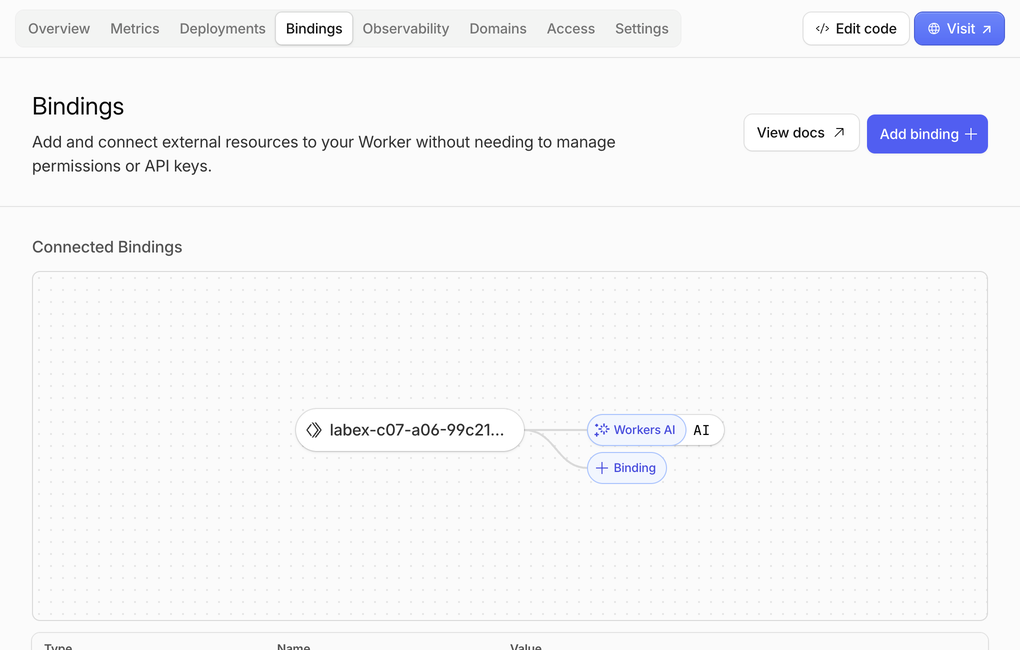
Open Workers & Pages, select the exact Worker name and inspect Bindings. A binding is the named connection that lets Worker code reach another Cloudflare service without storing an API key. Confirm one Workers AI connection named AI; the example Worker name below belongs to the test run, while yours will contain a different random suffix.
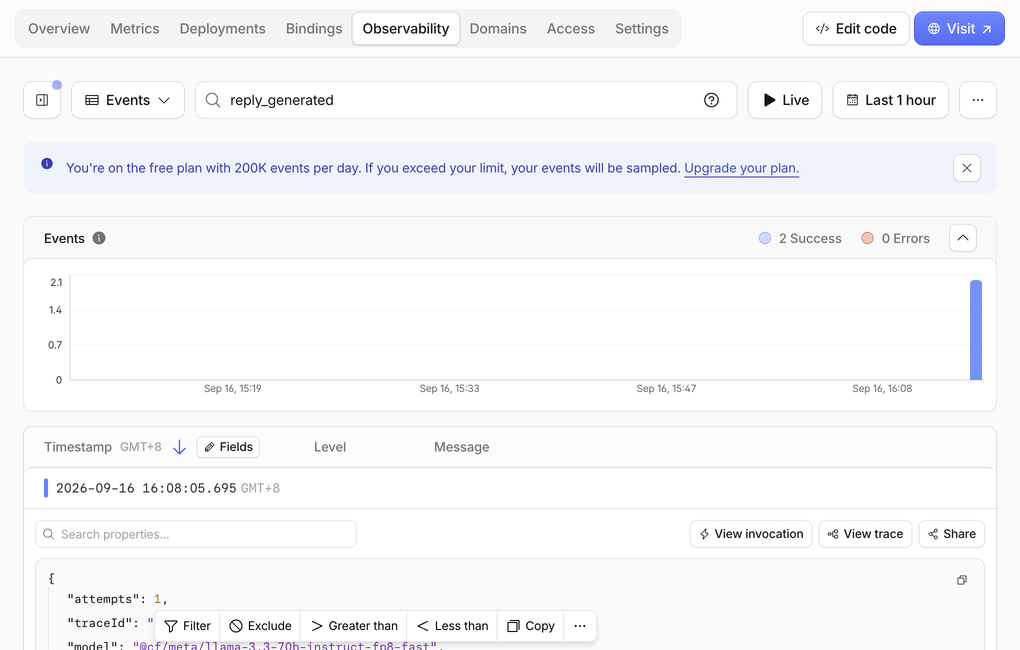
Next open Observability. The example run produced six successful events and zero errors. Counts can differ because a request can create both an invocation record and an application log, and saved logs can arrive after the response.
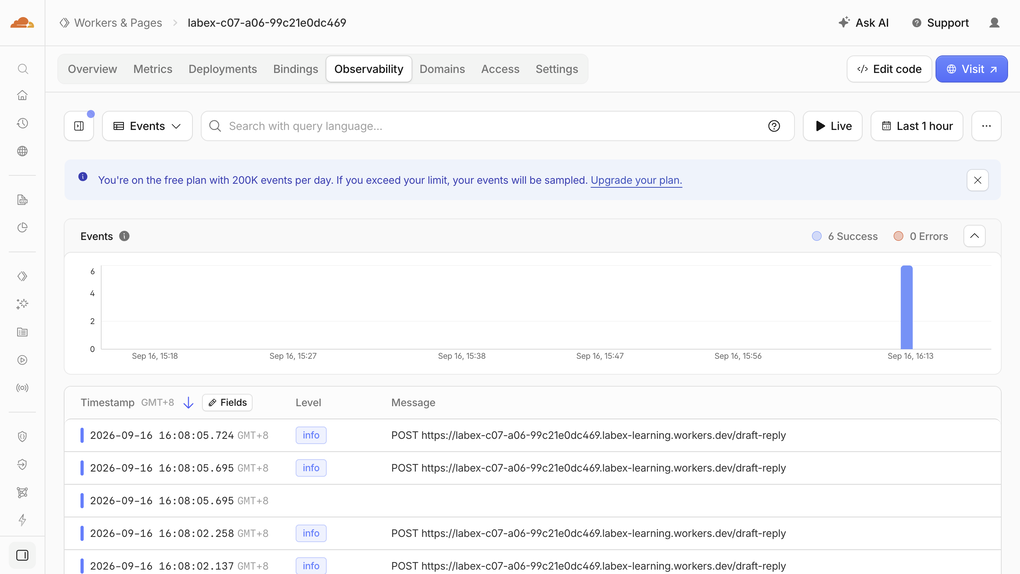
The blue Free-plan notice here describes the Workers Logs event allowance, not AI inference usage. Search for reply_generated and expand one result. The focused example shows two successful matches and the application's deliberately limited fields: one attempt, a trace ID and the exact model. The complete event also contains event: "reply_generated", but the application does not log the support message, generated reply or raw provider error.
Finally, open AI > Workers AI and keep the Neurons tab selected. A Neuron is Cloudflare's unit for AI computation. The shared example account showed 428.59/10k Neurons used that day, with 427.82 attributed to the Llama model and 0.77 to an earlier embedding lab. These totals include other course exercises and can update after a delay; they are not the cost of one request.
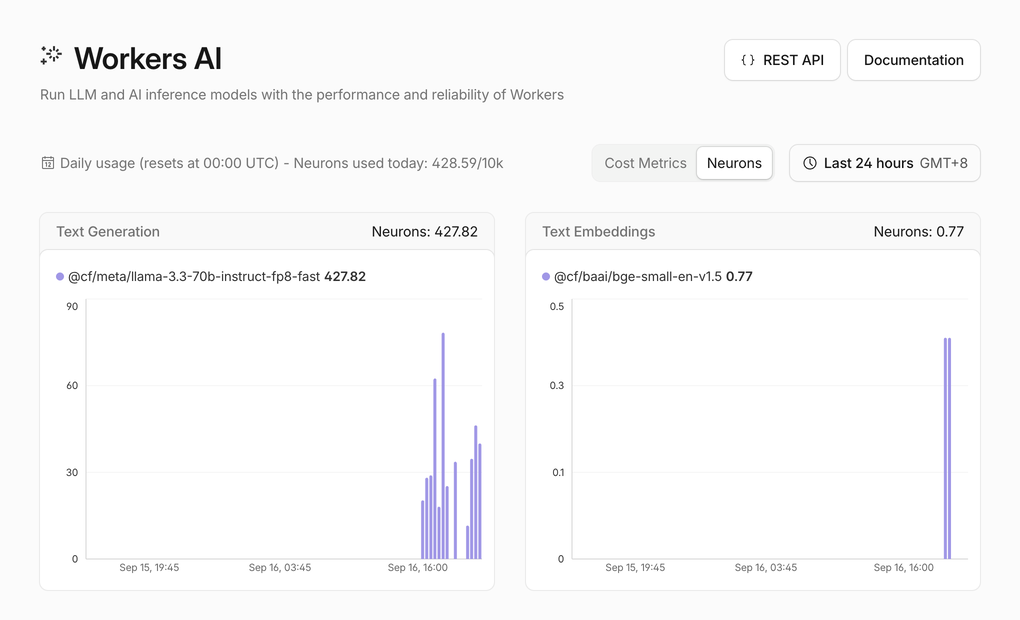
Confirm only that usage remains inside the available daily allocation. Dashboard views help connect configuration, traffic and usage to the command-line result, but the runtime response and independent checks remain authoritative. Do not repeat inference merely to make a chart move.
Remove the Worker and Log Out
In this step, you will remove the disposable endpoint while authorization is available, then remove that authorization from the VM.
Delete only the disposable Worker whose name is recorded in wrangler.jsonc:
npx wrangler delete --force
Confirm authenticated absence while Wrangler is still authorized:
./.labex/verify.py deleted
Now remove this VM's stored authorization:
npx wrangler logout
npx wrangler whoami --json
Require "loggedIn": false, then run the final check:
./.labex/verify.py logout
Deleting a Worker removes the cloud resource; logging out removes authorization from this VM. These are separate cleanup actions.
Summary
You built a Workers AI endpoint that:
- rejects invalid input before inference;
- keeps compatibility, quota, rate-limit, transient and application failures distinct;
- retries a known transient failure at most once;
- validates model output before application formatting;
- returns stable public errors without leaking raw provider details;
- records privacy-bounded lifecycle metadata;
- proves failure behavior with deterministic fixtures instead of wasting quota;
- confirms healthy local and deployed inference on Workers Free; and
- deletes the disposable Worker and logs out of the VM.
The important operational habit is not “retry every AI error.” It is to identify the boundary, retry only a genuinely transient condition within a fixed limit, and give clients an actionable response.