Introduction
A keyword search looks for the same words. A semantic search tries to find text with the same meaning. For example, “I cannot sign in” should be close to an article about resetting a password even though the sentences do not share every word.
An embedding model turns text into a vector: an ordered list of numbers that represents features the model learned from language. Texts with related meaning usually point in similar directions. This lab compares those directions with cosine similarity, a calculation that returns a larger score for more closely aligned vectors. A score is useful only for comparing vectors produced with the same model, dimension count and pooling choice; it is not a universal percentage of truth.
You will build POST /search. The Worker embeds one query together with three tiny help articles using Cloudflare-hosted @cf/baai/bge-small-en-v1.5. The model produces 384 numbers per text. Your application validates every vector before comparing it, rejects incompatible or non-finite values, and returns ranked article IDs without exposing the vectors themselves.
This is the fourth lab in the course. If you entered directly, first complete Connect LabEx to Your Cloudflare Account so you know how to use the VM terminal, authorize Wrangler, confirm your learning account and configure its account ID.
Workers Free accounts currently receive a shared daily allocation of 10,000 Neurons. This model costs about 1,841 Neurons per million input tokens, and this lab uses only a few short synthetic sentences, so Workers Paid is not required while free allocation remains. Local inference still reaches Cloudflare and consumes account usage. Stop rather than retrying repeatedly if the model or allocation is unavailable.
Setup installs Node.js 22.22.0 and project-local Wrangler 4.132.0 in /home/labex/project/search-embeddings. It also supplies deterministic tests and independent checks. Setup does not authorize Wrangler, invoke a model, deploy a Worker or create a cloud resource.
Authorize the VM and Configure the Embedding Worker
In this step, you will authorize this fresh VM and configure one disposable Worker. The Dashboard login belongs to your browser; Wrangler in this VM still needs its own limited authorization.
Enter the prepared project and confirm the pinned CLI version:
cd /home/labex/project/search-embeddings
npx wrangler --version
Expect 4.132.0. Request the narrow permissions used by the earlier Workers AI labs. The KV permission supports Wrangler 4.132.0's cleanup dependency check; this lab creates no KV data.
npx wrangler login --device --browser=false --scopes account:read user:read workers_scripts:write workers_kv:write ai:write
Open the displayed link, enter the current code, inspect the account and permissions, and authorize your learning account. Then inspect structured identity data:
npx wrangler whoami --json
Confirm loggedIn: true, then generate a unique Worker name:
RUN="labex-c07-a04-$(openssl rand -hex 6)"
printf '%s\n' "$RUN"
Replace YOUR_ACCOUNT_ID with the actual ID for the intended account:
cat > wrangler.jsonc <<JSON
{
  "\$schema": "./node_modules/wrangler/config-schema.json",
  "name": "$RUN",
  "account_id": "YOUR_ACCOUNT_ID",
  "main": "src/index.js",
  "compatibility_date": "2026-09-16",
  "workers_dev": true,
  "preview_urls": false,
  "observability": { "enabled": true, "head_sampling_rate": 1 },
  "ai": { "binding": "AI", "remote": true }
}
JSON
env.AI is an in-process binding, not a model API key in source. remote: true means local development still calls the account-backed model.
Understand the Vector Contract
In this step, you will connect the model configuration to the numbers the application must validate.
Generate environment types and confirm the platform binding:
npx wrangler types
grep -A4 'interface __BaseEnv_Env' worker-configuration.d.ts
Look for AI: Ai. The selected BGE Small model returns one 384-dimensional vector for each input text. Dimension means position count, so a batch of four texts should have shape [4, 384]. Every position must be a finite number: not NaN, positive infinity or negative infinity.
This lab explicitly requests cls pooling. Pooling is how the model condenses token-level information into one vector. Vectors created with cls and mean pooling are not compatible even when both have 384 positions, so the application records the choice with the model and dimensions.
Inspect the supplied deterministic fixtures:
grep -nE 'incompatible|non-finite|cosine similarity' test/worker.test.mjs
These fixtures make failure tests repeatable without spending Neurons. They also avoid asserting an exact live similarity score, which can change with model behavior.
Build the Validated Similarity Endpoint
In this step, you will implement the embedding request, vector validation and local cosine comparison. The Worker returns document IDs and scores, not the 1,536 raw numbers from four vectors.
Create the entrypoint:
cat > src/index.js <<'JS'
const MODEL = "@cf/baai/bge-small-en-v1.5";
const DIMENSIONS = 384;
const POOLING = "cls";
const MAX_QUERY = 300;
const DOCUMENTS = [
  { id: "password-reset", text: "Reset a forgotten password and regain account access." },
  { id: "upload-pdf", text: "Troubleshoot a PDF document that will not upload." },
  { id: "billing-receipt", text: "Download a receipt for a completed payment." }
];

export function validateEmbeddingBatch(result, expectedCount) {
  if (!Array.isArray(result?.shape) || result.shape[0] !== expectedCount || result.shape[1] !== DIMENSIONS) {
    throw new Error("incompatible embedding shape");
  }
  if (!Array.isArray(result.data) || result.data.length !== expectedCount) {
    throw new Error("incompatible embedding count");
  }
  for (const vector of result.data) {
    if (!Array.isArray(vector) || vector.length !== DIMENSIONS || !vector.every(Number.isFinite)) {
      throw new Error("invalid embedding vector");
    }
  }
  return result.data;
}

export function cosineSimilarity(left, right) {
  if (left.length !== right.length || left.length === 0) throw new Error("incompatible vectors");
  let dot = 0, leftNorm = 0, rightNorm = 0;
  for (let index = 0; index < left.length; index += 1) {
    dot += left[index] * right[index];
    leftNorm += left[index] ** 2;
    rightNorm += right[index] ** 2;
  }
  if (leftNorm === 0 || rightNorm === 0) throw new Error("zero-length direction");
  return dot / (Math.sqrt(leftNorm) * Math.sqrt(rightNorm));
}

function json(data, status = 200) { return Response.json(data, { status }); }

async function readQuery(request) {
  if (!(request.headers.get("content-type") || "").toLowerCase().includes("application/json")) {
    return { error: json({ error: "json_required" }, 415) };
  }
  let body;
  try { body = await request.json(); } catch { return { error: json({ error: "invalid_json" }, 400) }; }
  const query = typeof body?.query === "string" ? body.query.trim() : "";
  if (!query) return { error: json({ error: "invalid_query" }, 400) };
  if (query.length > MAX_QUERY) return { error: json({ error: "query_too_large" }, 413) };
  return { query };
}

async function search(request, env) {
  const parsed = await readQuery(request);
  if (parsed.error) return parsed.error;
  const requestId = crypto.randomUUID();
  let result;
  try {
    result = await env.AI.run(MODEL, { text: [parsed.query, ...DOCUMENTS.map((item) => item.text)], pooling: POOLING });
  } catch {
    console.error(JSON.stringify({ event: "embedding_failed", requestId, model: MODEL }));
    return json({ error: "model_unavailable", requestId }, 502);
  }
  let vectors;
  try { vectors = validateEmbeddingBatch(result, DOCUMENTS.length + 1); }
  catch {
    console.error(JSON.stringify({ event: "embedding_rejected", requestId, model: MODEL }));
    return json({ error: "invalid_embeddings", requestId }, 502);
  }
  const [queryVector, ...documentVectors] = vectors;
  const matches = DOCUMENTS.map((document, index) => ({ id: document.id, score: cosineSimilarity(queryVector, documentVectors[index]) }))
    .sort((left, right) => right.score - left.score);
  console.log(JSON.stringify({ event: "embedding_compared", requestId, model: MODEL, dimensions: DIMENSIONS, count: vectors.length, pooling: POOLING }));
  return json({ model: MODEL, dimensions: DIMENSIONS, pooling: POOLING, matches, requestId });
}

export default { async fetch(request, env) {
  const url = new URL(request.url);
  if (request.method === "GET" && url.pathname === "/health") return json({ status: "ok" });
  if (request.method === "POST" && url.pathname === "/search") return search(request, env);
  return json({ error: "not_found" }, 404);
} };
JS
The validation runs before similarity. It prevents silent truncation, meaningless cross-dimension comparisons and NaN scores. Logs keep lifecycle metadata but omit the query, article text and vectors.
Run the five deterministic tests, then bundle without deployment:
node --test test/worker.test.mjs
npx wrangler deploy --dry-run
The tests prove local math and rejection behavior. The dry run proves the Worker and binding configuration bundle together.
Exercise One Real Embedding Batch
In this step, you will run the handler locally while its AI binding performs one real remote embedding request.
Start Wrangler in the background and wait for the non-AI health route:
npx wrangler dev --port 8787 > .labex/dev.log 2>&1 &
echo $! > .labex/dev.pid
for attempt in $(seq 1 30); do
  if curl --silent --fail http://127.0.0.1:8787/health; then break; fi
  sleep 1
done
Send a short synthetic query:
curl --silent --show-error http://127.0.0.1:8787/search \
  --header 'Content-Type: application/json' \
  --data '{"query":"I cannot sign in because I forgot my password"}'
Expect model, dimensions: 384, pooling: "cls", three ranked IDs and finite scores. Do not require exact scores. The ordering is evidence from this query, not a permanent model guarantee.
Reject an empty query before inference:
curl --silent --show-error --write-out '\nHTTP %{http_code}\n' http://127.0.0.1:8787/search \
  --header 'Content-Type: application/json' --data '{"query":""}'
Expect {"error":"invalid_query"} and HTTP 400.
Deploy and Inspect Embedding Evidence
In this step, you will deploy the same endpoint and connect runtime evidence to the Cloudflare Dashboard.
Stop only the saved development process and deploy:
kill "$(cat .labex/dev.pid)"
wait "$(cat .labex/dev.pid)" 2>/dev/null || true
npx wrangler deploy
Save the exact URL printed by Wrangler and send one public query:
WORKER_URL="https://YOUR_WORKER_URL"
curl --silent --show-error "$WORKER_URL/search" \
  --header 'Content-Type: application/json' \
  --data '{"query":"I cannot sign in because I forgot my password"}'
Confirm the response records the model, 384 dimensions and cls pooling and ranks exactly the three supplied IDs with finite scores.
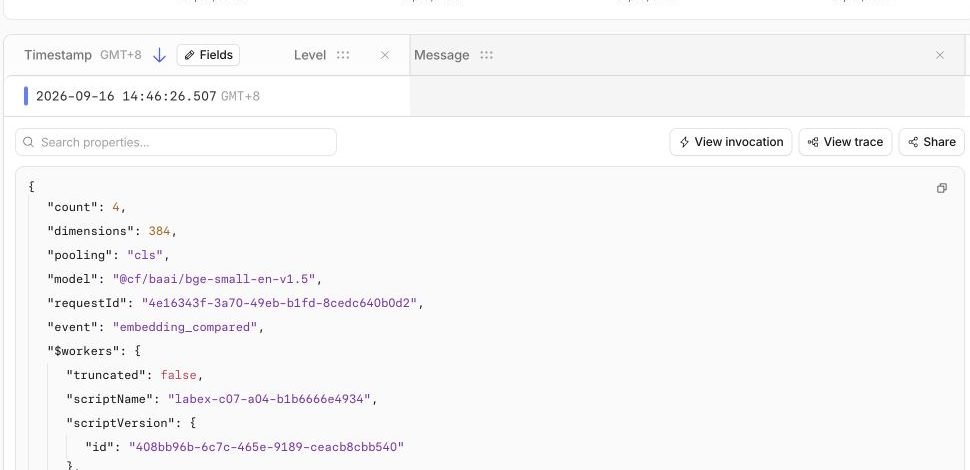
Open Workers & Pages → Overview → your labex-c07-a04-... Worker. Inspect Bindings for the AI binding. In Observability → Logs, search for embedding_compared and expand the event. Confirm the exact model, dimensions: 384, count: 4, pooling: cls and a request ID. The query, documents and vectors must be absent.
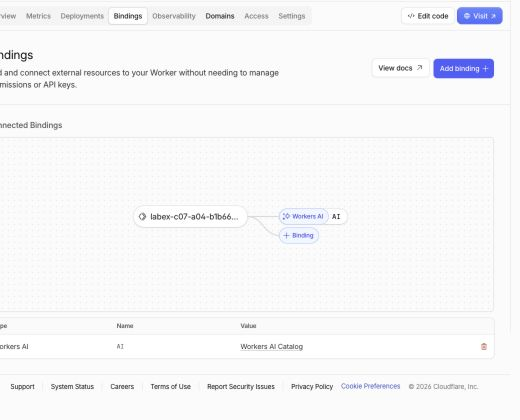
The Bindings page makes the connection visible: the Worker has one Workers AI binding named AI. A binding is the safe handle your code uses as env.AI; you do not paste an API key into the source file.
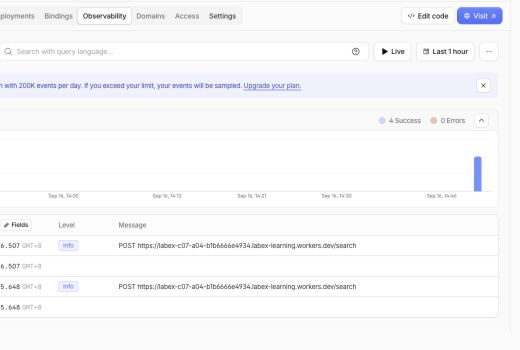
The Observability overview shows successful /search requests and no errors in this disposable run. Your exact totals can differ because every test request becomes an event.
Expand one embedding_compared event. This focused example records only useful operational facts: four texts were compared, each vector had 384 dimensions, cls pooling was used, and the model was @cf/baai/bge-small-en-v1.5. It deliberately does not log the learner's query, the document text or hundreds of vector numbers.
Then open Workers AI. Find the BGE Small model in today's usage and confirm the bounded run remains within the shared 10,000-Neuron Free allocation. Dashboard delivery may lag; wait briefly instead of repeating inference to force a chart update.
In the tested Free account, the embedding model used only 0.29 Neurons while total usage was 295.6 / 10k. The larger total includes other course tests performed on the same day, so treat these numbers as an example rather than a required result. The important checkpoint is that the BGE Small row appears and your daily total remains below the Free allocation.
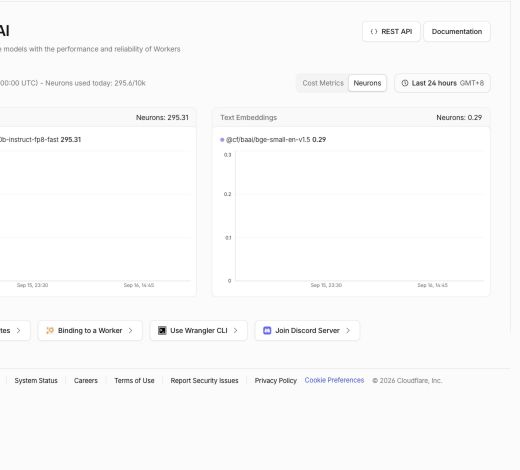
Dashboard charts are a helpful visual checkpoint, but the JSON response and the independent verification script remain the authoritative evidence that the deployed Worker behaves correctly.
Remove the Worker and Log Out
In this step, you will remove the disposable endpoint and then remove this VM's authorization. Workers AI usage is account history, so deleting the Worker does not erase the usage record.
Delete the exact Worker from wrangler.jsonc:
npx wrangler delete
Confirm only when Wrangler shows this lab's unique labex-c07-a04-... name. Require Successfully deleted, then run the independent cloud absence check while still authorized:
python3 .labex/verify.py deleted
Only after it reports PASS: deleted, log out and inspect structured state:
npx wrangler logout
npx wrangler whoami --json
Require loggedIn: false. A closed browser tab or missing local file would not prove cloud cleanup.
Summary
You generated 384-dimensional embeddings with a Cloudflare-hosted model, recorded the compatibility choices, validated every vector, compared semantic direction with cosine similarity and rejected incompatible data before ranking. You also verified the live binding and privacy-bounded logs, then removed the disposable Worker and VM authorization.