



Introduction
In this challenge, you'll learn how to add an item to a Redis-backed to-do list application using the LPUSH command. The goal is to add 'Grocery Shopping' to the todo_list list in Redis.
You'll start by connecting to the Redis server using redis-cli. Then, you'll execute the LPUSH command to add the task to the list. The challenge includes verification steps to confirm the task was successfully added.
Add Item to Redis To-Do List
Quickly add a new task to your Redis-backed to-do list application.
Tasks
- Use the
LPUSHcommand to add 'Grocery Shopping' to thetodo_listlist in Redis.
Requirements
- Connect to the Redis server using the
redis-clicommand. - Use the
LPUSHcommand to add the value 'Grocery Shopping' to the list namedtodo_list. - After executing the
LPUSHcommand, exit theredis-cliusing theexitcommand.
Examples
After successfully adding the item to the list, you can check the list using the LRANGE command.
127.0.0.1:6379> LRANGE todo_list 0 -1
1) "Grocery Shopping"
127.0.0.1:6379> exit
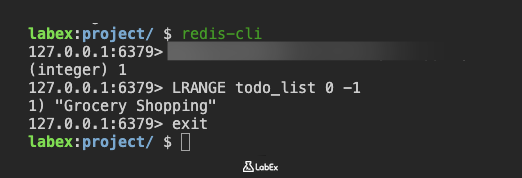
This indicates that one item has been added to the list.
Hints
- Use the
redis-clicommand to interact with the Redis server. - The
LPUSHcommand adds an element to the beginning of a list. - Remember to enclose the value in quotes if it contains spaces.
- Remember to exit the
redis-cliafter adding the item.
Summary
In this challenge, you've learned how to add an item to a Redis-backed to-do list. This involves connecting to a Redis server using redis-cli.
The key learning point is using the LPUSH command to add a new task, specifically "Grocery Shopping", to the todo_list in Redis. The challenge also emphasizes the importance of using quotes for values containing spaces and exiting the redis-cli after the operation.

