



Introduction
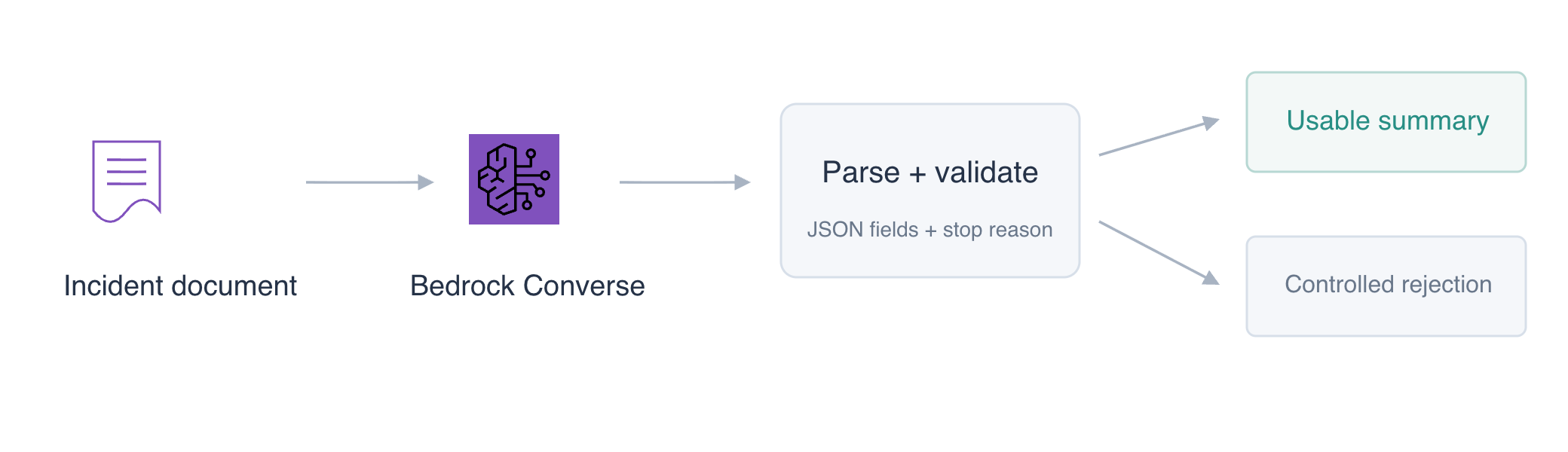
An operations team needs a structured summary of a short incident report. A model can produce plausible prose, but an application needs predictable fields and must reject invalid output. You will request a JSON summary with Bedrock Converse, parse it in Python and test the rejection path with clearly labeled local fixtures.
You should be comfortable with introductory Python, JSON and the Converse requests taught in the previous guided lab. Each fresh VM supplies its own document, configured identity and inference allowance. No earlier VM files or credentials are required.
Certification Relevance
| Certification | Exam task | Practice |
|---|---|---|
| AI Practitioner (AIF-C01) | Task 3.2 | Specify output format and validate a model response before an application uses it. |
Inspect the Document and Required Fields
In this step, you will inspect a supplied synthetic incident report and define the structure the consuming application expects.
Start in the workspace:
cd /home/labex/project
The fixture document is plain text. Read it with cat, which prints the file:
cat incident.txt
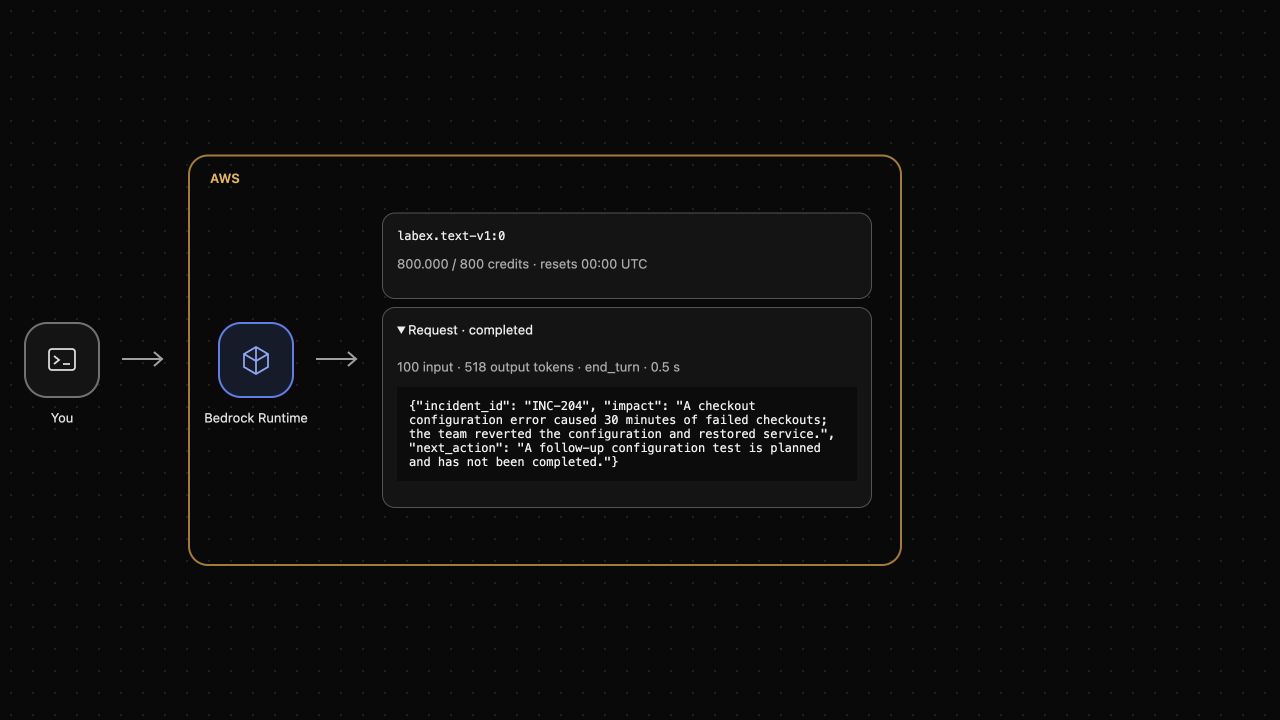
It describes incident INC-204: a checkout configuration error caused 30 minutes of failed checkouts. The team reverted the configuration and restored service. A follow-up configuration test is planned; it has not been completed. These facts are the boundary for your summary.
The application expects exactly three fields: incident_id, impact and next_action. Each must contain a nonempty string. A schema describes that shape; valid JSON alone is insufficient because a list, missing field or number could still be valid JSON. Read the supplied schema reference:
cat summary-schema.json
The reference explains the desired output. You will enforce its fields in ordinary Python; it is not an automatic promise that a model follows them. Prompting for JSON and validating JSON are separate responsibilities.
Generate and Validate a Structured Summary
In this step, you will build a small Python command that requests a summary and validates the returned text before printing success.
boto3 is the AWS SDK for Python. The supplied Python runtime has it installed and uses the already configured credentials and service endpoint. The code uses converse, the same request operation practiced with the CLI. maxTokens bounds output, and the client disables automatic retries so an ambiguous failure does not silently send another inference request.
Create summary.py with the following code. The parse_response function checks the completion reason, parses the text with json.loads, validates the exact keys and checks their types. ValueError is a controlled rejection; a ClientError or connection error is reported without exposing credentials or the full service exception. The optional --response-file mode reads a local response for parser testing and sends no inference request:
cat > summary.py <<'EOF'
import argparse
import json
from pathlib import Path
import boto3
from botocore.config import Config
from botocore.exceptions import BotoCoreError, ClientError


def parse_response(response):
    if not isinstance(response, dict):
        raise ValueError("invalid_response")
    if response.get("stopReason") != "end_turn":
        raise ValueError("incomplete_response")
    try:
        text = response["output"]["message"]["content"][0]["text"]
        value = json.loads(text)
        expected = {"incident_id", "impact", "next_action"}
        if not isinstance(value, dict) or set(value) != expected:
            raise ValueError("invalid_fields")
        if any(not isinstance(v, str) or not v.strip() for v in value.values()):
            raise ValueError("invalid_field_type")
        if value["incident_id"] != "INC-204":
            raise ValueError("unexpected_incident")
        return value
    except (KeyError, IndexError, TypeError, json.JSONDecodeError) as error:
        raise ValueError("invalid_response") from error


def main():
    parser = argparse.ArgumentParser()
    parser.add_argument("--response-file", type=Path)
    args = parser.parse_args()
    try:
        if args.response_file:
            response = json.loads(args.response_file.read_text())
        else:
            client = boto3.client("bedrock-runtime", config=Config(
                connect_timeout=5, read_timeout=150,
                retries={"total_max_attempts": 1}))
            response = client.converse(
                modelId="labex.text-v1:0",
                system=[{"text": "Summarize only facts supplied in the incident document. Return exactly one JSON object with string fields incident_id, impact and next_action. No Markdown fences, extra keys or surrounding prose. Do not turn planned work into completed work."}],
                messages=[{"role": "user", "content": [
                    {"text": Path("incident.txt").read_text()}]}],
                inferenceConfig={"maxTokens": 768, "temperature": 0})
            Path("response.json").write_text(json.dumps(response, indent=2))
        value = parse_response(response)
    except (ValueError, KeyError, TypeError):
        print(json.dumps({"status": "rejected", "reason": "invalid_model_output"}))
        return 2
    except (BotoCoreError, ClientError):
        print(json.dumps({"status": "unavailable", "reason": "inference_failed"}))
        return 3
    print(json.dumps({"status": "ok", "summary": value}, indent=2))
    return 0


if __name__ == "__main__":
    raise SystemExit(main())
EOF
Run the script with the installed AWS Python runtime. The final > summary.json saves its printed result:
/opt/labex/aws/venv/bin/python summary.py > summary.json
Wait for the prompt, then inspect the result:
cat summary.json
A successful run has "status": "ok" and a summary object containing the three required string fields. Read the raw Converse response as well:
python3 -m json.tool response.json
response.json records the actual model output, stop reason and token usage. In the upper AWS View, expand the completed request and compare its text. The generated words may vary. Check that impact reflects failed checkouts and that next_action describes planned work. Passing a schema check does not prove those statements are accurate.
If the script reports rejection, read the raw response before retrying. A model may truncate output or ignore the requested format; do not replace the summary with a hardcoded success. A failed inference may consume allowance.
Exercise the Invalid-Response Boundary
In this step, you will confirm that malformed, wrongly typed and truncated responses are rejected without another model request.
The fixtures/ directory contains deliberate parser test inputs. They are local test data, not inference results. List them:
ls fixtures
Run the script against the malformed JSON fixture:
/opt/labex/aws/venv/bin/python summary.py --response-file fixtures/malformed.json
The expected output is {"status": "rejected", "reason": "invalid_model_output"}. Exit code 2 identifies this controlled rejection. echo $? prints the exit code of the immediately preceding command:
echo $?
A response can be valid JSON and still violate the schema. Test the numeric impact fixture:
/opt/labex/aws/venv/bin/python summary.py --response-file fixtures/wrong-type.json
It should report the same rejection. A complete-looking JSON object must also be rejected if the model reached its token cap. Test that boundary:
/opt/labex/aws/venv/bin/python summary.py --response-file fixtures/truncated.json
It should report rejection because its stopReason is max_tokens. These tests print no successful summary and do not add requests to AWS View.
Finally, parse the actual saved response again:
/opt/labex/aws/venv/bin/python summary.py --response-file response.json
It should still return status: ok. You have tested both the usable actual response and controlled failure inputs. Do not confuse parser fixtures with proof that inference worked; the completed request and raw response establish that separately.
Remove the Owned Exercise Artifacts
In this step, you will remove your script and its two generated result files after functional checks have passed.
The supplied document, schema and parser fixtures belong to the fresh environment. Preserve them and the backend service. rm removes only the three named learner artifacts:
rm summary.py summary.json response.json
Confirm the supplied inputs remain:
ls
Converse creates no persistent cloud server to delete. Removing local files does not refund consumed credits or erase the actual inference records retained by AWS View.
Summary
You used an actual Bedrock Converse response to produce a structured incident summary, enforced its field names and types, checked the completion reason and rejected controlled invalid responses. You also reviewed factual meaning separately from schema validity and cleaned up only owned files.
For further reading, see the AWS reference on Converse response content, stop reasons, and usage.


