Introduction
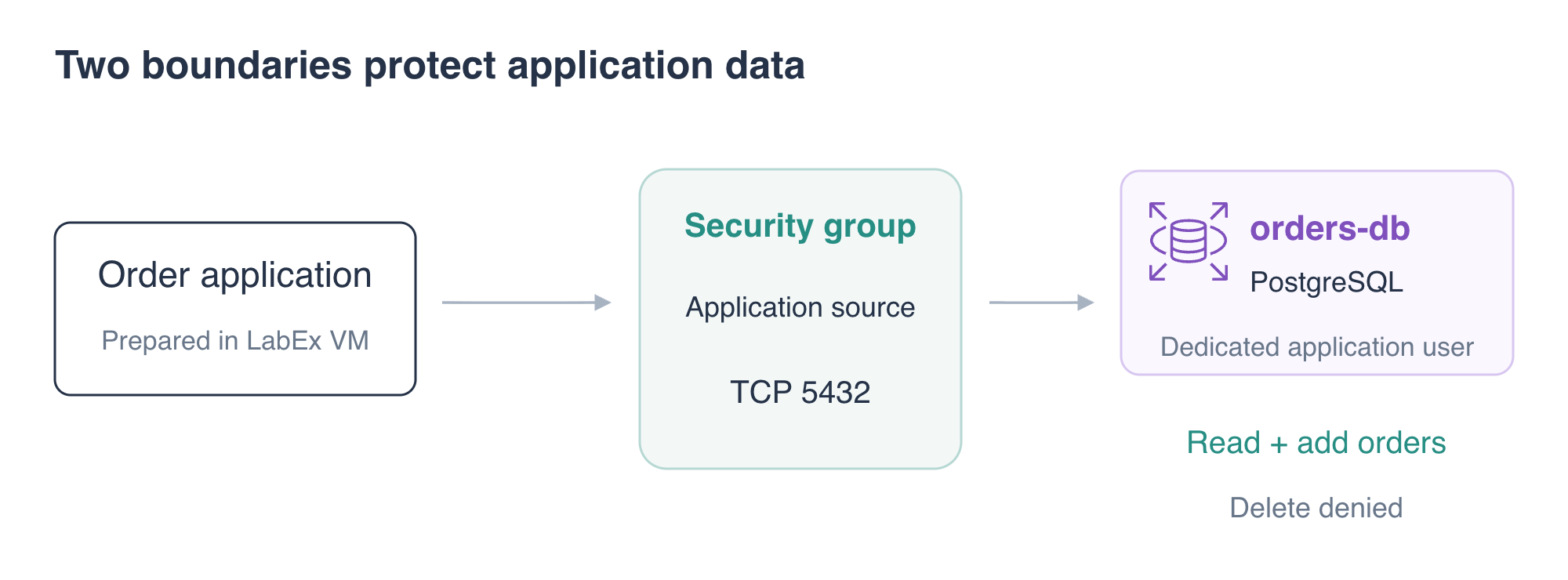
The order database currently accepts connections from the whole application VPC, and the application uses a database administrator identity. You will narrow network access and create a dedicated application user that can read and add orders without deleting them.
Complete the database connection and SQL labs first. This independent environment supplies a PostgreSQL primary, three sample orders and an application. You will test both access boundaries and remove the exercise database at the end.
Certification Relevance
| Certification | Exam task | Practice |
|---|---|---|
| Cloud Practitioner (CLF-C02) | Task 3.5 | Understand security groups as a network access boundary. |
| Solutions Architect – Associate (SAA-C03) | Task 1.3 | Apply least privilege and restrict access to application data. |
Lab Overview
Restrict the PostgreSQL Network Source
In this step, you will replace broad VPC ingress with access from the prepared application security group.
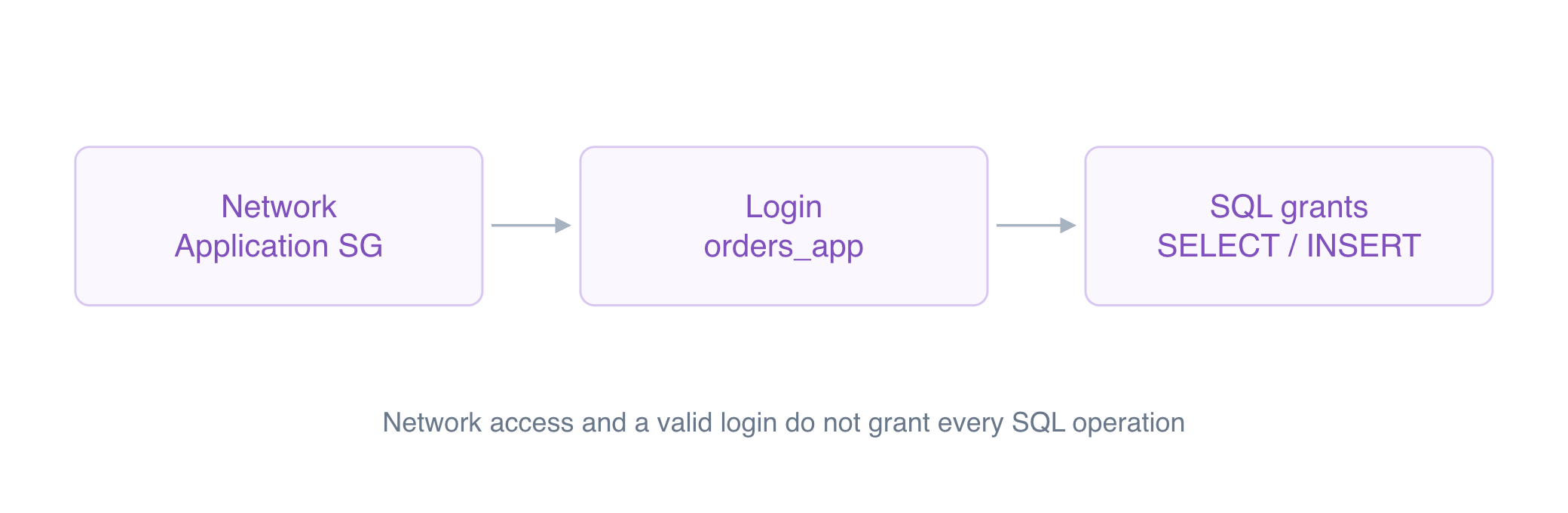
Use the outcomes to identify the boundary: a client that cannot connect has not yet tested table privileges; permission denied for table orders follows a successful connection and login. Keep the allowed read and insert tests alongside the denied tests so that tighter access still supports the application.
A security group controls which network connections may reach the database. It does not decide which SQL operations an authenticated database user can perform. You will address that separate boundary in the next step.
Load the prepared settings:
cd /home/labex/project
source database.env
Inspect the database group and its two supplied rule documents:
aws ec2 \
  describe-security-groups \
  --group-ids "$DB_SECURITY_GROUP_ID" \
  --query 'SecurityGroups[].{Group:GroupName,Ingress:IpPermissions}'
cat broad-rule.json
cat application-rule.json
The existing rule permits TCP port 5432 from 10.70.0.0/16, so other clients in that VPC can attempt database connections. The replacement uses UserIdGroupPairs to reference the application group. A security-group reference permits traffic from resources associated with that source group; it does not copy the source group's rules.
Remove the broad rule and add the application rule:
aws ec2 \
  revoke-security-group-ingress \
  --group-id "$DB_SECURITY_GROUP_ID" \
  --ip-permissions file://broad-rule.json
aws ec2 \
  authorize-security-group-ingress \
  --group-id "$DB_SECURITY_GROUP_ID" \
  --ip-permissions file://application-rule.json
Test a fresh connection from the application source:
psql \
  "service=orders-db" \
  --command 'SELECT count(*) FROM orders;'
Expect 3. Then test the supplied client outside the application group:
psql \
  "service=orders-db-external" \
  --command 'SELECT count(*) FROM orders;'
Expect a connection failure for the external client. Its database password is valid, but its network source is not allowed. The prepared connection names select these two sources. The experiment's access rules do not change your Terminal or AWS View management connection.
AWS View should show the application group as the database's PostgreSQL source instead of the broad VPC CIDR.
Create a Database User for the Application
In this step, you will give the application permission to read and insert orders without granting administrative or deletion privileges.
A PostgreSQL role can hold privileges. A role with LOGIN can authenticate as a database user. Database roles are separate from AWS IAM identities: IAM authorization manages the RDS resource, while these SQL grants govern operations inside PostgreSQL.
Create orders_app using the supplied private application password file. The --set option defines a psql variable; :'app_password' safely quotes that value as a SQL string:
psql \
  "service=orders-db" \
  --set=ON_ERROR_STOP=1 \
  --set=app_password="$(cat app-password.txt)" <<'SQL'
CREATE ROLE orders_app LOGIN PASSWORD :'app_password';
GRANT CONNECT ON DATABASE orders TO orders_app;
GRANT USAGE ON SCHEMA public TO orders_app;
GRANT SELECT, INSERT ON orders TO orders_app;
SQL
CONNECT permits database connections. USAGE permits access through the schema, which is a namespace containing tables. SELECT and INSERT permit only the order operations the application needs. You have not granted DELETE, UPDATE, CREATEDB, CREATEROLE or superuser privileges.
Test the application role using a private password value passed to psql:
PGPASSWORD="$(cat app-password.txt)" psql \
  "service=orders-db-app" \
  --command 'SELECT current_user, count(*) FROM orders;'
Expect user orders_app and 3 orders.
Try deleting an order ID that does not exist. The statement cannot remove a real order even if privileges were accidentally too broad:
PGPASSWORD="$(cat app-password.txt)" psql \
  "service=orders-db-app" \
  --command 'DELETE FROM orders WHERE order_id = -1;'
Expect permission denied for table orders. This failure occurs after a network connection and database login have succeeded, so it proves a different boundary from the earlier external-client failure.
Use the Limited Identity in the Application
In this step, you will configure the application to use the role and prove that normal order operations still work.
Change its database identity and password-file reference, keeping both endpoint fields unchanged:
jq \
  '.user = "orders_app" | .password_file = "app-password.txt"' \
  app-config.json > app-config.new
mv app-config.new app-config.json
Read the current order list:
curl \
  --silent \
  --show-error \
  --fail \
  http://127.0.0.1:8080/application/orders | jq
Expect the three original orders and user: orders_app.
Add one order through the application's HTTP endpoint. Content-Type tells the application that the request body is JSON:
curl \
  --silent \
  --show-error \
  --fail \
  --request POST \
  --header 'Content-Type: application/json' \
  --data '{"order_id":104,"customer":"Kai","total":"5.00"}' \
  http://127.0.0.1:8080/application/orders
Expect saved: true and order ID 104. Read the list again:
curl \
  --silent \
  --show-error \
  --fail \
  http://127.0.0.1:8080/application/orders | jq
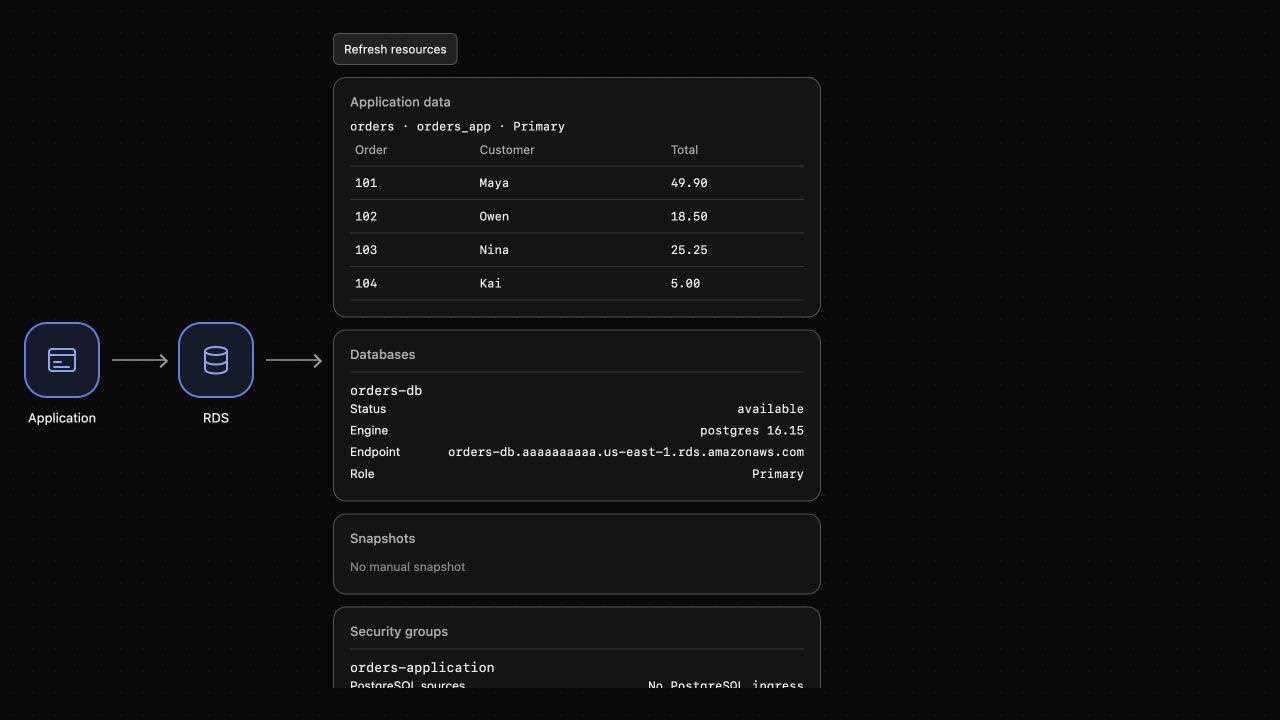
Expect four orders, including Kai's 5.00 order. AWS View should show the same stored data and the application's limited identity. Narrower privileges have preserved the application's required behavior.
Remove the Exercise Database
In this step, you will remove this lab's database, including its sample orders and SQL users.
aws rds \
  delete-db-instance \
  --db-instance-identifier orders-db \
  --skip-final-snapshot \
  --query 'DBInstance.DBInstanceIdentifier'
aws rds \
  wait db-instance-deleted \
  --db-instance-identifier orders-db
aws rds \
  describe-db-instances \
  --query 'DBInstances[].DBInstanceIdentifier'
Expect []. The database engine and its roles are gone; the application's old endpoint no longer connects. Preserve the supplied network and its narrowed database group. There is no reason to reopen database access for cleanup.
Summary
You restricted PostgreSQL connections to the application source and gave the application its own limited database role. The external client could not connect, and the application role could not delete orders, while normal reads and inserts continued to work. You then removed the exercise database while preserving the narrowed network access rules.
The next lab recovers lost orders by restoring a manual RDS snapshot into a new database.
For further reading, see the AWS reference on Security groups for database network access.