




Introduction
In this challenge, you will create a welcoming Go script that demonstrates your programming skills. The goal is to build a personalized greeting for a new team member, showcasing your ability to use various output functions from the fmt package. You will be required to include a team member's name, and ensure the program compiles and runs without errors.
Craft a Personalized Go Greeting
Welcome to the tech startup's onboarding challenge! Your mission is to create a welcoming Go script that demonstrates your programming skills.
Tasks
- Open the Go program named
team_greeting.goin the~/projectdirectory - Use three different
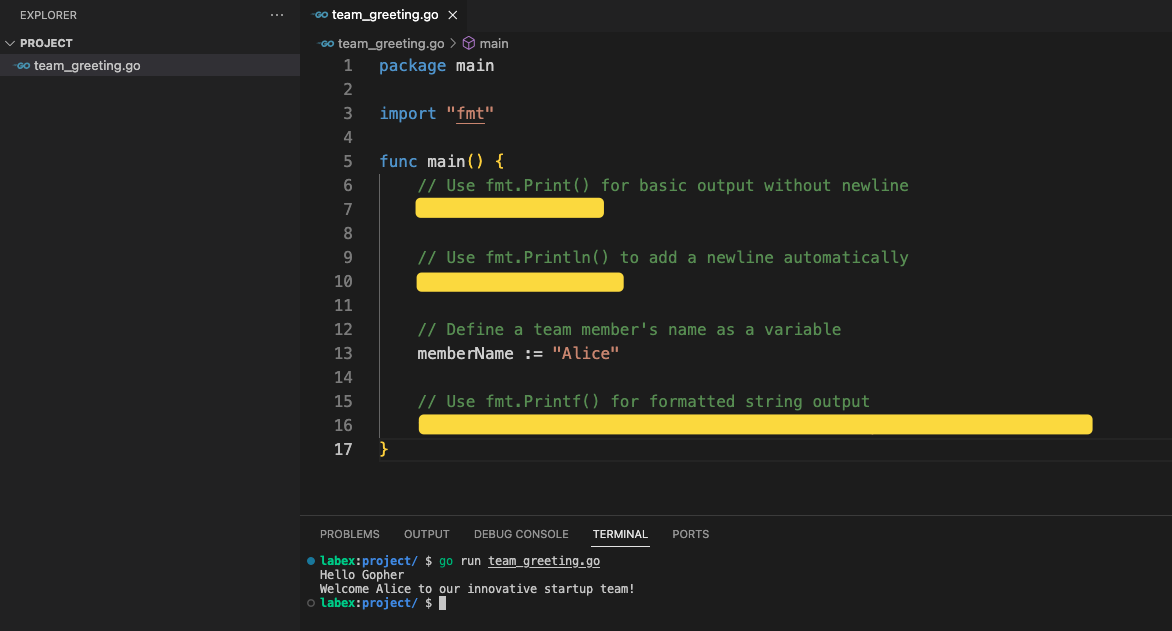
fmtpackage output functions in your program:fmt.Print()fmt.Println()fmt.Printf()
- Include a personalized greeting that welcomes a new team member
Requirements
- The program must be saved as
team_greeting.goin the~/projectdirectory - Use all three output functions:
Print(),Println(), andPrintf() - Include at least one variable with the team member's name
- Ensure the program compiles and runs without errors
Examples
After completing the tasks, compile and run your program using the following command:
cd ~/project
go run team_greeting.go
Example output might look like:
Hello Gopher
Welcome to the amazing tech team!
New Member: Alice joins our innovative startup
Hints
- Remember to import the
fmtpackage - Use
%splaceholder inPrintf()for string formatting - Check your syntax carefully
- Use meaningful variable names
Summary
In summary, this challenge requires you to create a Go program named team_greeting.go that demonstrates your programming skills. The program should include a personalized greeting for a new team member, utilizing three different output functions from the fmt package: Print(), Println(), and Printf(). The program must be saved in the ~/project directory and compile and run without errors.


