



Introduction
Docker registry is a platform that enables us to store, manage, and distribute Docker images. While it's convenient to use cloud-based Docker registries like Docker Hub, they come with certain limitations. In this challenge, we will walk through the process of setting up a local Docker registry, allowing us more control over our Docker images and enabling us to work offline.
Setting up a Docker Registry
The step in this challenge will be to set up our local Docker registry. For this, we will utilize the Docker registry image provided by Docker.
Target
The target of this step is to set up a Docker registry.
Result Example
Here are the steps to set up a Docker registry:
- Pull the
registryimage.

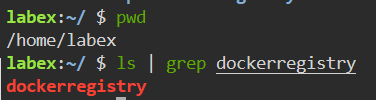
- Create a directory called
dockerregistryin the/home/labexpath to make it easier for the container image to persist.
- Run a container called
my-registrywith theregistryimage, map the port, and mount thedockerregistrydirectory you created as a volume to persist data.

- Use
curlcommand to verify that the repository is available.

After completing this step, you will have a running Docker registry instance on your local machine.
Pushing an Image to the Docker Registry
Now that our Docker registry is up and running, it's time to see it in action! In this step, we'll take a sample Docker image and push it to our local Docker registry.
Target
The target of this step is to push an image to our local Docker registry.
Result Example
Here are the steps to push an image to our local Docker registry:
- Pull
hello-worldimage from Docker Hub.

- Create a new tag for the
hello-worldimage using our registry.

- Push the
hello-worldimage to our registry.

After completing this step, you will have a Docker image pushed to your local Docker registry.
Pulling an Image from the Docker Registry
The Docker registry is now running and populated with our sample image. In this step, we will demonstrate how to pull an image from our local Docker registry.
Target
The target of this step is to pull an image from the registry.
Result Example
Here are the steps to pull an image from your local Docker registry:
- Use the
docker rmicommand to remove the local copy of thehello-worldimage that you tagged for the local registry.

- Pull an image from the your local Docker registry.

- Run a container for the image you just pulled.

After completing this step, you will have pulled a Docker image from your local registry.
Summary
In this challenge, you learned how to set up a local Docker registry, push an image to the registry, and pull an image from the registry. With a local Docker registry, you can have more control over your Docker images and work offline. Congratulations on completing the challenge!


