



Introduction
When an AI request fails, the caller sees only the final HTTP response. That response tells you that something went wrong, but not always whether the request was malformed, rejected by the gateway or rejected by the upstream model provider. Observability means collecting enough evidence to follow the request after it leaves the caller and explain which boundary handled it.
AI Gateway records one log entry for a request that reaches the gateway. A log can show the provider, model, HTTP status, duration and token usage. You can also attach a few pieces of custom metadata: small labels that help you find a request later. Metadata is not a private vault. This lab uses only a random trace ID, a synthetic case name and a Boolean flag—never a credential, prompt, email address or account ID.
You will create one disposable authenticated gateway, then send a deliberately malformed Workers AI request with a safe trace label. You will find its failed log, compare gateway-authentication and upstream-authentication failures, repair the input and confirm the same trace now has a successful request. This turns troubleshooting into evidence rather than guessing.
If you entered this course directly, first complete Connect LabEx to Your Cloudflare Account. It teaches the LabEx VM terminal, Wrangler device authorization, learning-account confirmation and explicit account IDs. Complete Route Inference Through a Gateway first as well, because this lab builds on its two separate authorization headers.
The lab uses the Cloudflare-hosted @cf/meta/llama-3.3-70b-instruct-fp8-fast model with Standard Workers AI billing. Workers Paid, Unified Billing and an external provider account are not required. Requests are small and synthetic. Stop rather than repeatedly retrying if the shared daily Workers AI allocation is unavailable.
Setup installs Node.js 22.22.0 and project-local Wrangler 4.132.0 in /home/labex/project/ai-gateway-trace. It prepares independent read-only assessments, but it does not authorize Wrangler, create cloud resources or send model traffic. LabEx destroys the temporary VM when the lab ends; you will still delete the gateway and token before logout because VM destruction alone cannot remove cloud resources.
Authorize the VM and Create a Safe Trace ID
In this step, you will connect the fresh VM to your learning account and create names for one disposable gateway and one synthetic trace.
A trace ID is a label shared by related observations. It should identify a request without exposing what the user said or who the user is. This lab generates a random value and stores it with resource names, not with credentials.
Enter the prepared project, confirm the pinned CLI and authorize this VM:
cd /home/labex/project/ai-gateway-trace
npx wrangler --version
npx wrangler login --device --browser=false --scopes account:read user:read ai:write
Open the displayed link, enter the code and authorize the intended learning account. Confirm structured identity:
npx wrangler whoami --json
Expect Wrangler 4.132.0 and loggedIn: true. Replace YOUR_ACCOUNT_ID below with the actual 32-character ID shown for the intended account:
GATEWAY_ID="labex-c09-g02-$(openssl rand -hex 6)"
TOKEN_NAME="$GATEWAY_ID-token"
TRACE_ID="trace-$(openssl rand -hex 8)"
cat > .labex/state.json <<JSON
{
  "accountId": "YOUR_ACCOUNT_ID",
  "gatewayId": "$GATEWAY_ID",
  "tokenName": "$TOKEN_NAME",
  "traceId": "$TRACE_ID"
}
JSON
cat .labex/state.json
The trace ID is safe synthetic data. The account ID and resource names stay in the local state file so later cleanup targets only this lab's resources.
Create an Observable Authenticated Gateway
In this step, you will create a gateway that records requests after they pass its caller-authentication boundary.
Open the Cloudflare Dashboard and choose AI → AI Gateway → Create gateway → Custom gateway. Use the saved gatewayId as the gateway name. Keep request logging and gateway authentication on. Keep cache, rate limits, spend limits and retries off, and keep Workers AI billing on Standard.
After creation, confirm the unique gateway ID in the breadcrumb and open Settings. Logging creates the evidence used in this lab; authentication ensures that an unknown caller cannot create log volume or consume model usage.
Choose Create an AI Gateway authentication token. Use the saved tokenName, include only the intended learning account and set exactly these permissions:
- AI Gateway — Run for entering the authenticated gateway;
- AI Gateway — Edit for reading logs and deleting this disposable gateway.
Do not add Workers AI permission. Wrangler provides the separate short-lived upstream credential. Create the token after reviewing the account and permissions, then store its one-time value without echoing it:
bash -c '
while :; do
  read -rsp "Paste the AI Gateway token: " GATEWAY_TOKEN
  printf "\n"
  [ -n "$GATEWAY_TOKEN" ] && break
  printf "Token cannot be empty; paste it again.\n" >&2
done
umask 077
printf "%s" "$GATEWAY_TOKEN" > .labex/gateway-token
unset GATEWAY_TOKEN
chmod 600 .labex/gateway-token
'
Verify the exact resource through the authenticated management API:
ACCOUNT_ID=$(node -p 'JSON.parse(require("fs").readFileSync(".labex/state.json")).accountId')
GATEWAY_ID=$(node -p 'JSON.parse(require("fs").readFileSync(".labex/state.json")).gatewayId')
GATEWAY_TOKEN=$(cat .labex/gateway-token)
curl --http1.1 -fsS \
  -H "Authorization: Bearer $GATEWAY_TOKEN" \
  "https://api.cloudflare.com/client/v4/accounts/$ACCOUNT_ID/ai-gateway/gateways/$GATEWAY_ID" \
  | node -e 'let s="";process.stdin.on("data",d=>s+=d).on("end",()=>{const b=JSON.parse(s),g=b.result||{};console.log(JSON.stringify({success:b.success,id:g.id,collect_logs:g.collect_logs,authentication:g.authentication},null,2))})'
unset GATEWAY_TOKEN
Expect the saved ID with collect_logs: true and authentication: true.
Send a Tagged Request with Invalid Input
In this step, you will create a controlled input failure. The gateway and upstream credentials remain valid; only the model input is malformed.
Custom metadata accepts at most five flat string, number or Boolean values. Keys beginning with cf. are reserved by Cloudflare. This request uses three safe values: the random trace ID, the case name bad-input and synthetic: true.
The selected model requires a prompt. Deliberately omit it while saving both the response and the HTTP status:
ACCOUNT_ID=$(node -p 'JSON.parse(require("fs").readFileSync(".labex/state.json")).accountId')
GATEWAY_ID=$(node -p 'JSON.parse(require("fs").readFileSync(".labex/state.json")).gatewayId')
TRACE_ID=$(node -p 'JSON.parse(require("fs").readFileSync(".labex/state.json")).traceId')
MODEL='@cf/meta/llama-3.3-70b-instruct-fp8-fast'
METADATA=$(node -e 'process.stdout.write(JSON.stringify({trace_id:process.argv[1],case:"bad-input",synthetic:true}))' "$TRACE_ID")
GATEWAY_TOKEN=$(cat .labex/gateway-token)
UPSTREAM_TOKEN=$(npx wrangler auth token --json | node -e 'let s="";process.stdin.on("data",d=>s+=d).on("end",()=>process.stdout.write(JSON.parse(s).token))')
STATUS=$(curl --http1.1 -sS -D .labex/bad-input-headers.txt \
  -o .labex/bad-input-response.json -w '%{http_code}' \
  -H "cf-aig-authorization: Bearer $GATEWAY_TOKEN" \
  -H "Authorization: Bearer $UPSTREAM_TOKEN" \
  -H "cf-aig-metadata: $METADATA" \
  -H 'Content-Type: application/json' \
  --data '{"max_tokens":16}' \
  "https://gateway.ai.cloudflare.com/v1/$ACCOUNT_ID/$GATEWAY_ID/workers-ai/$MODEL")
unset GATEWAY_TOKEN UPSTREAM_TOKEN METADATA
printf '%s\n' "$STATUS" | tee .labex/bad-input-status.txt
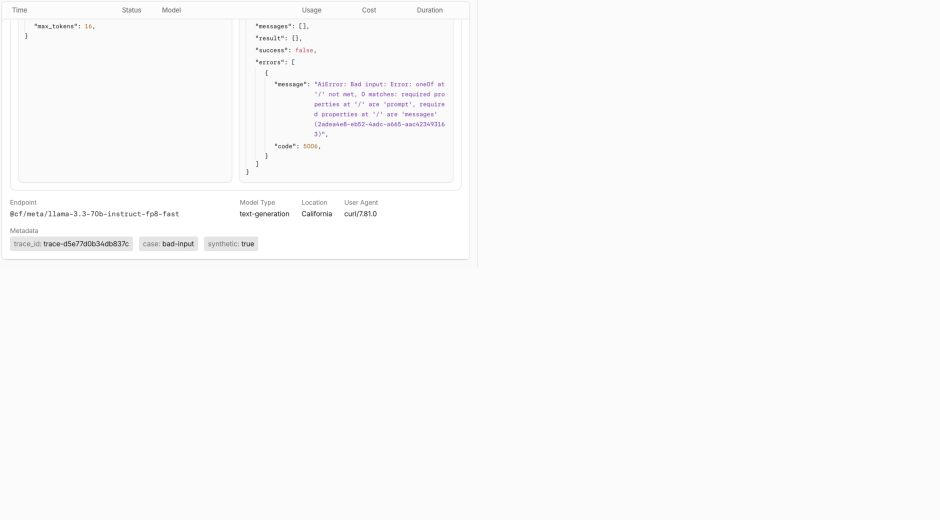
Expect HTTP 400 or 422. This is a client-input failure, not proof of an authorization problem. The response body is preserved for bounded troubleshooting but is not printed automatically.
Correlate the Failure with Its Gateway Log
In this step, you will use the trace ID to find the request record instead of searching by time alone.
Logs can take a short time to appear. Read the existing log inventory through the management API, parse each flat metadata object and print only the fields needed to explain the failure:
ACCOUNT_ID=$(node -p 'JSON.parse(require("fs").readFileSync(".labex/state.json")).accountId')
GATEWAY_ID=$(node -p 'JSON.parse(require("fs").readFileSync(".labex/state.json")).gatewayId')
TRACE_ID=$(node -p 'JSON.parse(require("fs").readFileSync(".labex/state.json")).traceId')
GATEWAY_TOKEN=$(cat .labex/gateway-token)
curl --http1.1 -fsS \
  -H "Authorization: Bearer $GATEWAY_TOKEN" \
  "https://api.cloudflare.com/client/v4/accounts/$ACCOUNT_ID/ai-gateway/gateways/$GATEWAY_ID/logs?per_page=50" \
  > .labex/logs-after-input.json
unset GATEWAY_TOKEN
node - <<'NODE'
const body = require('./.labex/logs-after-input.json')
const trace = require('./.labex/state.json').traceId
const meta = row => {
  try { return typeof row.metadata === 'string' ? JSON.parse(row.metadata) : (row.metadata || {}) }
  catch { return {} }
}
const matches = (body.result || []).filter(row => meta(row).trace_id === trace && meta(row).case === 'bad-input')
console.log(matches.map(row => ({
  id: row.id,
  provider: row.provider,
  model: row.model,
  success: row.success,
  status_code: row.status_code,
  duration: row.duration,
  tokens_in: row.tokens_in,
  tokens_out: row.tokens_out,
  metadata: meta(row)
})))
if (!matches.some(row => row.success === false)) process.exit(2)
NODE
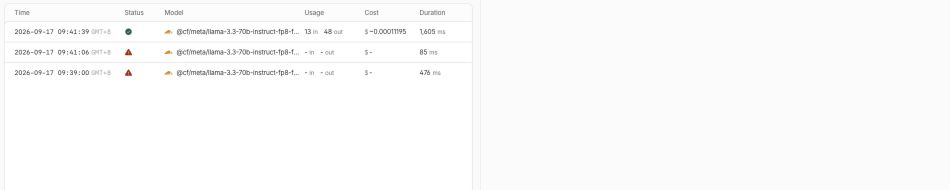
Expect the saved trace ID, case: "bad-input", the Workers AI provider and a failed status. Token counts may be empty because invalid input can fail before generation begins. If the entry is not visible yet, wait about 20 seconds and rerun this same read-only block.
Open the gateway's Logs view in the Dashboard. Use the metadata filter or the visible timestamp to find the failed row, then open its detail panel. Confirm that the model, failed status and custom metadata describe the same synthetic request.
Distinguish Gateway and Upstream Authorization Failures
In this step, you will change one credential at a time. Both tests can return 401 or 403, so the status alone is not enough; the location of the log supplies the missing context.
First keep the upstream credential valid but use an invalid gateway credential. An authenticated gateway rejects this request before it may enter and create the tagged provider log:
ACCOUNT_ID=$(node -p 'JSON.parse(require("fs").readFileSync(".labex/state.json")).accountId')
GATEWAY_ID=$(node -p 'JSON.parse(require("fs").readFileSync(".labex/state.json")).gatewayId')
TRACE_ID=$(node -p 'JSON.parse(require("fs").readFileSync(".labex/state.json")).traceId')
MODEL='@cf/meta/llama-3.3-70b-instruct-fp8-fast'
METADATA=$(node -e 'process.stdout.write(JSON.stringify({trace_id:process.argv[1],case:"bad-gateway-auth",synthetic:true}))' "$TRACE_ID")
UPSTREAM_TOKEN=$(npx wrangler auth token --json | node -e 'let s="";process.stdin.on("data",d=>s+=d).on("end",()=>process.stdout.write(JSON.parse(s).token))')
STATUS=$(curl --http1.1 -sS -o .labex/bad-gateway-auth-response.json -w '%{http_code}' \
  -H 'cf-aig-authorization: Bearer deliberately-invalid-gateway' \
  -H "Authorization: Bearer $UPSTREAM_TOKEN" \
  -H "cf-aig-metadata: $METADATA" \
  -H 'Content-Type: application/json' \
  --data '{"prompt":"This request must not reach Workers AI.","max_tokens":8}' \
  "https://gateway.ai.cloudflare.com/v1/$ACCOUNT_ID/$GATEWAY_ID/workers-ai/$MODEL")
unset UPSTREAM_TOKEN METADATA
printf '%s\n' "$STATUS" | tee .labex/bad-gateway-auth-status.txt
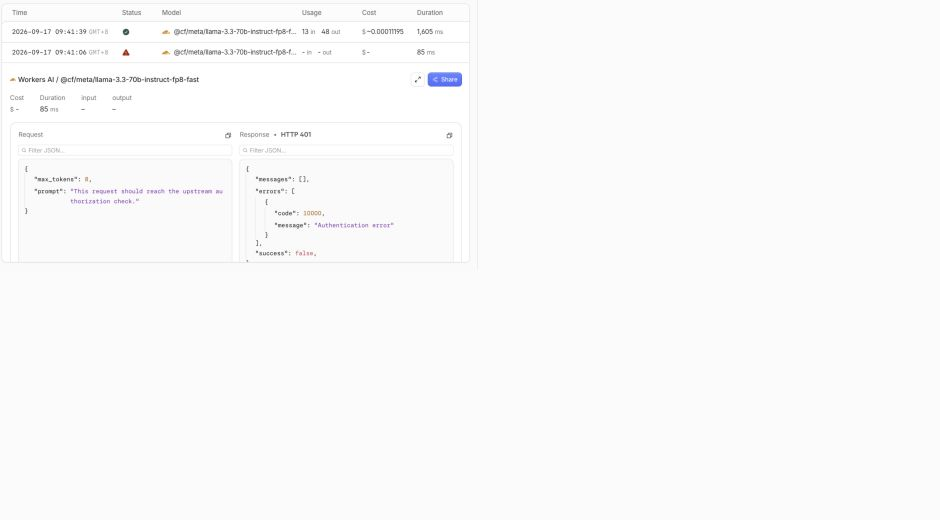
Now keep the gateway credential valid but replace only the upstream Workers AI credential. This request enters the gateway and can leave a failed provider record:
METADATA=$(node -e 'process.stdout.write(JSON.stringify({trace_id:process.argv[1],case:"bad-upstream-auth",synthetic:true}))' "$TRACE_ID")
GATEWAY_TOKEN=$(cat .labex/gateway-token)
STATUS=$(curl --http1.1 -sS -o .labex/bad-upstream-auth-response.json -w '%{http_code}' \
  -H "cf-aig-authorization: Bearer $GATEWAY_TOKEN" \
  -H 'Authorization: Bearer deliberately-invalid-upstream' \
  -H "cf-aig-metadata: $METADATA" \
  -H 'Content-Type: application/json' \
  --data '{"prompt":"This request should reach the upstream authorization check.","max_tokens":8}' \
  "https://gateway.ai.cloudflare.com/v1/$ACCOUNT_ID/$GATEWAY_ID/workers-ai/$MODEL")
unset GATEWAY_TOKEN METADATA
printf '%s\n' "$STATUS" | tee .labex/bad-upstream-auth-status.txt
Expect 401 or 403 from both. Wait briefly, then read—not regenerate—the logs and compare the two tags:
GATEWAY_TOKEN=$(cat .labex/gateway-token)
curl --http1.1 -fsS \
  -H "Authorization: Bearer $GATEWAY_TOKEN" \
  "https://api.cloudflare.com/client/v4/accounts/$ACCOUNT_ID/ai-gateway/gateways/$GATEWAY_ID/logs?per_page=50" \
  > .labex/logs-after-auth.json
unset GATEWAY_TOKEN
node - <<'NODE'
const rows = require('./.labex/logs-after-auth.json').result || []
const trace = require('./.labex/state.json').traceId
const meta = row => { try { return typeof row.metadata === 'string' ? JSON.parse(row.metadata) : (row.metadata || {}) } catch { return {} } }
for (const name of ['bad-gateway-auth', 'bad-upstream-auth']) {
  const found = rows.filter(row => meta(row).trace_id === trace && meta(row).case === name)
  console.log(name, found.map(row => ({status_code: row.status_code, success: row.success, provider: row.provider})))
}
NODE
The gateway-auth tag should have no provider log; the upstream-auth tag should show a failed Workers AI row. This is why a boundary diagram and correlated logs are more informative than an HTTP status by itself.
Repair the Request and Confirm Success
In this step, you will restore both valid credentials and supply the required prompt. A repair is complete only when runtime output and observability agree.
Use the same trace ID with a new repaired case name:
METADATA=$(node -e 'process.stdout.write(JSON.stringify({trace_id:process.argv[1],case:"repaired",synthetic:true}))' "$TRACE_ID")
GATEWAY_TOKEN=$(cat .labex/gateway-token)
UPSTREAM_TOKEN=$(npx wrangler auth token --json | node -e 'let s="";process.stdin.on("data",d=>s+=d).on("end",()=>process.stdout.write(JSON.parse(s).token))')
STATUS=$(curl --http1.1 -sS -o .labex/repaired-response.json -w '%{http_code}' \
  -H "cf-aig-authorization: Bearer $GATEWAY_TOKEN" \
  -H "Authorization: Bearer $UPSTREAM_TOKEN" \
  -H "cf-aig-metadata: $METADATA" \
  -H 'Content-Type: application/json' \
  --data '{"prompt":"In one short sentence, explain why trace IDs help debugging.","max_tokens":48}' \
  "https://gateway.ai.cloudflare.com/v1/$ACCOUNT_ID/$GATEWAY_ID/workers-ai/$MODEL")
unset GATEWAY_TOKEN UPSTREAM_TOKEN METADATA
printf '%s\n' "$STATUS" | tee .labex/repaired-status.txt
node -e 'const b=require("./.labex/repaired-response.json"); console.log(b.result?.response ?? b.result)'
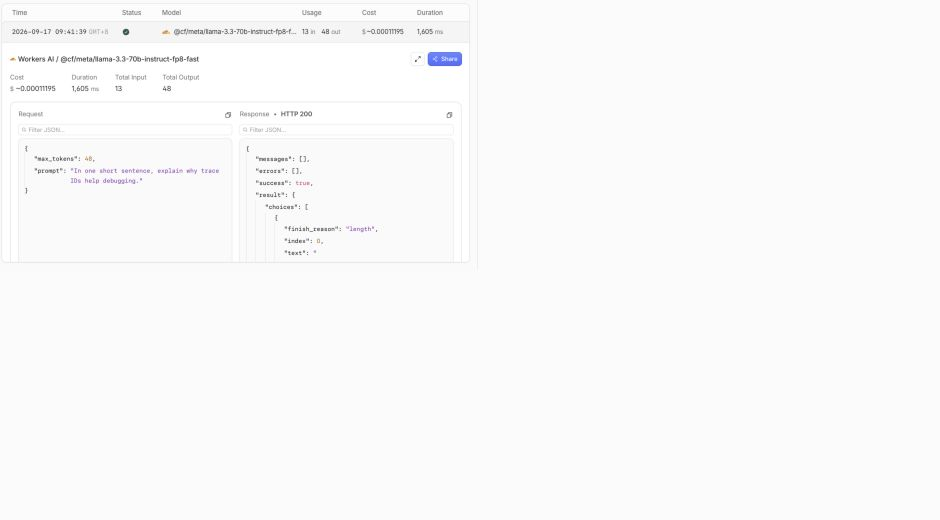
Expect HTTP 200 and nonempty generated text. Wait for the log if needed, then rerun the read-only log inventory from the prior step. In the Dashboard, filter by the trace ID and compare bad-input, bad-upstream-auth and repaired. The repaired row should show success, a 200 status and token usage.
Delete the Disposable Gateway
In this step, you will remove the cloud resource while the management credential can still prove its absence.
ACCOUNT_ID=$(node -p 'JSON.parse(require("fs").readFileSync(".labex/state.json")).accountId')
GATEWAY_ID=$(node -p 'JSON.parse(require("fs").readFileSync(".labex/state.json")).gatewayId')
GATEWAY_TOKEN=$(cat .labex/gateway-token)
curl --http1.1 -fsS -X DELETE \
  -H "Authorization: Bearer $GATEWAY_TOKEN" \
  "https://api.cloudflare.com/client/v4/accounts/$ACCOUNT_ID/ai-gateway/gateways/$GATEWAY_ID" \
  | node -e 'let s="";process.stdin.on("data",d=>s+=d).on("end",()=>{const b=JSON.parse(s);if(!b.success)process.exit(1);console.log("gateway deletion accepted")})'
unset GATEWAY_TOKEN

GATEWAY_TOKEN=$(cat .labex/gateway-token)
curl --http1.1 -fsS \
  -H "Authorization: Bearer $GATEWAY_TOKEN" \
  "https://api.cloudflare.com/client/v4/accounts/$ACCOUNT_ID/ai-gateway/gateways" \
  > .labex/gateways-after-delete.json
unset GATEWAY_TOKEN
node -e 'const b=require("./.labex/gateways-after-delete.json"),id=process.argv[1],found=(b.result||[]).some(g=>g.id===id);console.log("gateway absent:",!found);if(found)process.exit(1)' "$GATEWAY_ID"
Expect gateway absent: true. This authenticated inventory distinguishes real deletion from a missing page caused by logout or network failure.
Delete the Token and Log Out
In this step, you will revoke the remaining cloud credential and disconnect the VM.
In the Cloudflare Dashboard, open My Profile → API Tokens. Find the exact saved tokenName, open Actions, choose Delete, inspect the confirmation and delete only that token. It is safe to revoke now because the gateway deletion is already proved.
Erase the VM copy and end Wrangler's separate authorization:
shred -u .labex/gateway-token
npx wrangler logout
npx wrangler whoami --json || true
test ! -e .labex/gateway-token && echo "local gateway token removed"
Expect loggedIn: false and local gateway token removed. The Dashboard session is separate and remains signed in. When the lab ends, LabEx destroys this temporary VM instead of saving it.
Summary
You used safe custom metadata to correlate a malformed Workers AI request with its AI Gateway log. You learned that an HTTP status needs boundary context: invalid gateway authentication is rejected before a provider log, while invalid upstream authorization appears as a failed Workers AI record. You then repaired the input, confirmed generated text and a successful correlated log, and removed every disposable credential and resource.
The next lab uses the same evidence-first approach to caching. You will repeat one bounded public request, distinguish a cache hit from a new model call and bypass the cache when fresh output is required.


