



Introduction
A durable Agent can remember a support queue, but a useful dashboard must also keep every connected screen current. Polling asks the server for a new copy again and again. The Cloudflare Agents SDK instead opens a WebSocket: a long-lived, two-way connection that can carry an update to all clients of the same named Agent as soon as state changes.
You will build a deliberately small, non-LLM dashboard. Two independent vanilla JavaScript clients—Dispatcher and Observer—connect to SupportDashboard:planning. Dispatcher invokes a server method marked @callable(). The method validates the ticket, updates Agent state once, and the SDK broadcasts the resulting state to both clients. An invalid title is rejected on the server and does not advance the shared revision.
This lab introduces four pieces only when the application needs them:
AgentClientmaintains the browser's WebSocket connection.onStateUpdateredraws a view after the server broadcasts state.@callable()exposes a specific server method to connected clients.setState()persists one authoritative next state and triggers synchronization.
The example uses synthetic support text and a public disposable Worker so you can focus on the protocol. Input validation is not user authentication. A production support tool must add an identity and authorization layer before exposing customer data or mutations.
Before entering this course directly, complete Connect LabEx to Your Cloudflare Account. Each new LabEx VM needs its own Wrangler authorization. S01 is recommended because this lab builds on named Agent identity, durable state and explicit cleanup, but no React or AI model knowledge is assumed.
Authorize the VM and Configure the Dashboard
In this step, you will authorize the fresh VM, confirm the intended Cloudflare account and declare the one Agent namespace used by the dashboard.
Enter the prepared project and confirm the pinned runtime. Setup installed the dependencies and supplied only the visual page shell; it did not authorize Cloudflare or implement the Agent.
cd /home/labex/project/support-dashboard-agent
node --version
npx wrangler --version
npm list agents vite @cloudflare/vite-plugin --depth=0
Expect Node.js v22.22.0, Wrangler 4.134.0, Agents SDK 0.23.0, Vite 8.3.0 and the Cloudflare Vite plugin 1.55.0.
Authorize this VM and inspect structured identity:
npx wrangler login --device --browser=false
npx wrangler whoami --json
Open the printed link in a browser, enter the short code, confirm your dedicated learning account and inspect the permissions before authorizing. Back in the terminal, confirm loggedIn: true, then select the account by its confirmed display name without printing its ID:
WHOAMI="$(npx wrangler whoami --json)"
printf '%s\n' "$WHOAMI" | jq '{loggedIn, authType, accounts: [.accounts[] | {name}]}'
ACCOUNT_ID="$(printf '%s\n' "$WHOAMI" | jq -r '.accounts[] | select(.name == "LabEx Learning") | .id')"
test -n "$ACCOUNT_ID"
RUN="labex-c11-s02-$(openssl rand -hex 6)"
printf '%s\n' "$RUN"
If your learning account uses another name, replace only LabEx Learning after confirming the intended account. Create the configuration:
cat > wrangler.jsonc <<JSON
{
  "\$schema": "./node_modules/wrangler/config-schema.json",
  "name": "$RUN",
  "account_id": "$ACCOUNT_ID",
  "main": "src/server.ts",
  "compatibility_date": "2026-09-18",
  "compatibility_flags": ["nodejs_compat"],
  "workers_dev": true,
  "preview_urls": false,
  "observability": { "enabled": true },
  "durable_objects": {
    "bindings": [
      { "name": "SupportDashboard", "class_name": "SupportDashboard" }
    ]
  },
  "migrations": [
    { "tag": "v1", "new_sqlite_classes": ["SupportDashboard"] }
  ]
}
JSON
The binding selects the Agent class namespace; the instance name will be supplied by each browser client. Configuration alone creates no cloud resource.
Implement a Validated Callable Method
In this step, you will implement the shared queue state and the only browser-callable mutation.
The server owns the mutation rule. A browser may request an update, but it must not decide whether a title or priority is valid. Create src/server.ts:
cat > src/server.ts <<'TS'
import { Agent, callable, routeAgentRequest } from "agents";

type Priority = "normal" | "urgent";
type Ticket = {
  id: number;
  title: string;
  priority: Priority;
};

export type DashboardState = {
  tickets: Ticket[];
  revision: number;
  lastUpdatedBy: string;
};

interface Env {
  SupportDashboard: DurableObjectNamespace<SupportDashboard>;
}

export class SupportDashboard extends Agent<Env, DashboardState> {
  initialState: DashboardState = {
    tickets: [],
    revision: 0,
    lastUpdatedBy: "system"
  };

  @callable()
  addTicket(titleInput: string, priorityInput: string): DashboardState {
    const title = typeof titleInput === "string" ? titleInput.trim() : "";
    if (title.length < 3 || title.length > 80) {
      throw new Error("title must contain 3-80 characters");
    }
    if (priorityInput !== "normal" && priorityInput !== "urgent") {
      throw new Error("priority must be normal or urgent");
    }
    const priority: Priority = priorityInput;
    const next: DashboardState = {
      tickets: [
        ...this.state.tickets,
        { id: this.state.revision + 1, title, priority }
      ].slice(-6),
      revision: this.state.revision + 1,
      lastUpdatedBy: "dispatcher"
    };
    this.setState(next);
    console.log(JSON.stringify({
      event: "support_queue_updated",
      instance: this.name,
      revision: next.revision,
      ticketCount: next.tickets.length
    }));
    return next;
  }
}

export default {
  async fetch(request: Request, env: Env): Promise<Response> {
    return (await routeAgentRequest(request, env)) ??
      new Response("Not found", { status: 404 });
  }
};
TS
@callable() is an explicit RPC boundary: only decorated methods can be invoked through the Agent client protocol. Validation happens before setState(), so rejected calls cannot advance the revision. Keeping only the latest six synthetic tickets bounds the demonstration state. The structured log contains the instance, revision and count, but no ticket text.
Connect Two Vanilla Browser Clients
In this step, you will configure the current decorator build path and connect two independent vanilla clients to one named Agent.
The current SDK decorator uses the JavaScript standard decorator transform. A manual project therefore needs both the Agents TypeScript preset and the Agents Vite plugin. Do not enable TypeScript's legacy experimentalDecorators mode.
cat > tsconfig.json <<'JSON'
{
  "extends": "agents/tsconfig",
  "compilerOptions": {
    "noEmit": true
  },
  "include": [
    "src/**/*.ts",
    "vite.config.ts",
    "worker-configuration.d.ts"
  ]
}
JSON

cat > vite.config.ts <<'TS'
import { cloudflare } from "@cloudflare/vite-plugin";
import agents from "agents/vite";
import { defineConfig } from "vite";

export default defineConfig({
  plugins: [agents(), cloudflare()]
});
TS
Create src/client.ts:
cat > src/client.ts <<'TS'
import { AgentClient } from "agents/client";
import type { DashboardState } from "./server";

function required<T>(selector: string): T {
  const element = document.querySelector(selector);
  if (!element) throw new Error(`Missing page element: ${selector}`);
  return element as unknown as T;
}

const dispatcherView = required<HTMLDivElement>("#dispatcher");
const observerView = required<HTMLDivElement>("#observer");
const statusView = required<HTMLParagraphElement>("#status");
const errorView = required<HTMLParagraphElement>("#error");
const titleInput = required<HTMLInputElement>("#title");
const priorityInput = required<HTMLSelectElement>("#priority");
const form = required<HTMLFormElement>("#ticket-form");

function render(target: HTMLDivElement, state: DashboardState | undefined) {
  if (!state) {
    target.innerHTML = '<p class="empty">Waiting for initial state…</p>';
    return;
  }
  const tickets = state.tickets.map((ticket) =>
    `<div class="ticket ${ticket.priority}"><strong>#${ticket.id}</strong> ${ticket.title}<br><small>${ticket.priority}</small></div>`
  ).join("");
  target.innerHTML = `<span class="revision">Revision ${state.revision}</span>${tickets || '<p class="empty">No tickets yet</p>'}`;
}

const shared = {
  agent: "SupportDashboard",
  name: "planning",
  host: window.location.host
};

const dispatcher = new AgentClient<DashboardState>({
  ...shared,
  onStateUpdate: (state) => render(dispatcherView, state)
});
const observer = new AgentClient<DashboardState>({
  ...shared,
  onStateUpdate: (state) => render(observerView, state)
});

Promise.all([dispatcher.ready, observer.ready]).then(() => {
  render(dispatcherView, dispatcher.state);
  render(observerView, observer.state);
  statusView.textContent = "Both clients are connected to SupportDashboard:planning";
});

form.addEventListener("submit", async (event) => {
  event.preventDefault();
  errorView.textContent = "";
  try {
    await dispatcher.call("addTicket", [titleInput.value, priorityInput.value]);
  } catch (cause) {
    errorView.textContent = cause instanceof Error ? cause.message : String(cause);
  }
});
TS
These are two real WebSocket clients even though they appear on one page. Both route to the same class and name, so both receive the same state broadcast. Only Dispatcher makes the call; Observer demonstrates that synchronization is server-driven rather than a copied DOM update.
Generate Types and Build Both Sides
In this step, you will type-check the shared state contract and build the Worker and browser application before starting a runtime.
Generate environment types from the exact binding configuration:
npx wrangler types
grep -n "SupportDashboard" worker-configuration.d.ts | head
Run TypeScript across the Worker, browser client and Vite configuration:
npm run check
No compiler diagnostics means the state shape, callable server and DOM client agree. Build the two production targets:
npm run build
find dist -maxdepth 3 -type f | sort | sed -n '1,16p'
Vite reports a Worker environment and a client environment. The Cloudflare plugin produces the Worker bundle and attaches the built static page; the Agents plugin applies the current decorator transform. A successful build proves packaging, not WebSocket behavior, account ownership or remote deployment.
Observe Local Synchronization and Rejection
In this step, you will watch two local clients converge after a valid update and remain unchanged after an invalid one.
Start the local Vite and Workers runtime as a background job:
CI=true npm run dev > .labex/dev.log 2>&1 < /dev/null &
echo $! > .labex/dev.pid
for attempt in $(seq 1 40); do
  if curl --silent --fail http://127.0.0.1:5173/ > /dev/null; then
    break
  fi
  sleep 1
done
curl --silent --head http://127.0.0.1:5173/ | head
Open http://localhost:5173 in the browser inside the LabEx desktop. Wait until the green status says both clients are connected. Both cards begin at revision 0 with no tickets.
Keep the prepared title and click Add with Dispatcher. Both cards should advance to revision 1 and display the same ticket. Dispatcher first sends an RPC frame over its WebSocket. addTicket() validates the arguments in the Agent, then setState(next) persists revision 1 and broadcasts it. Both onStateUpdate handlers independently redraw their cards.
Now replace the title with x and submit again. The page shows title must contain 3-80 characters; both cards remain at revision 1. This is useful evidence that validation occurred before the state write.
Run the independent local check:
python3 .labex/verify.py local
The verifier uses fresh, run-unique names rather than trusting the visible example. It opens two clients, proves convergence, checks a different name stays at revision zero, sends an invalid update and confirms the shared revision does not change.
Deploy and Inspect the Cloud Dashboard
In this step, you will deploy the production bundle, prove the same two-client contract on Cloudflare and connect that behavior to Dashboard evidence.
Stop the exact local process and deploy the production build:
kill "$(cat .labex/dev.pid)"
wait "$(cat .labex/dev.pid)" 2>/dev/null || true
npm run deploy
Wrangler applies migration v1, uploads the Worker plus static client and prints a workers.dev URL. Save that exact URL:
WORKER_URL="https://YOUR_WORKER_URL"
for attempt in $(seq 1 30); do
  if curl --silent --fail "$WORKER_URL/" > /dev/null; then
    break
  fi
  sleep 2
done
Open the URL in the built-in browser. Add Cloud dashboard ticket as Urgent. Both cards should show the same revision and red urgent marker. Then submit x; the rejection appears while both revisions remain unchanged. These are new cloud-owned Agent instances—the local Vite state is intentionally separate.
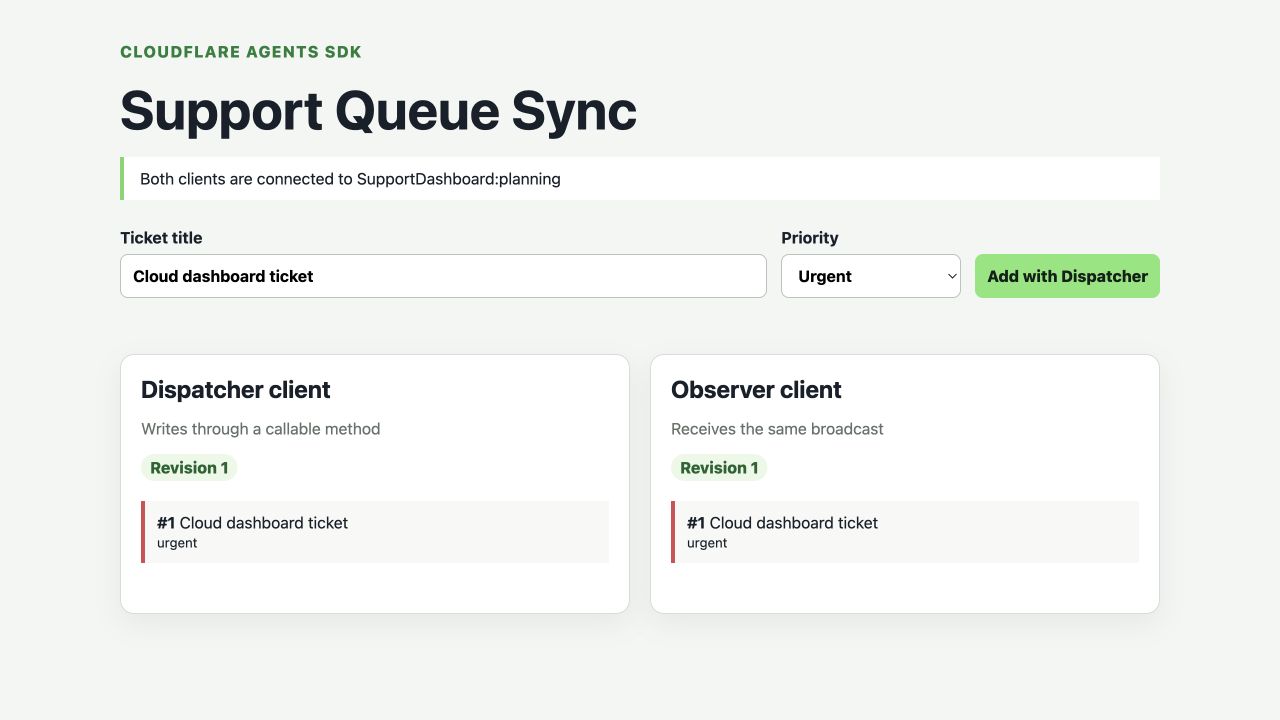
In this real test run, Dispatcher performed the write while Observer received the same broadcast. The ticket text and revision are examples from the disposable course resource; your own values may differ.
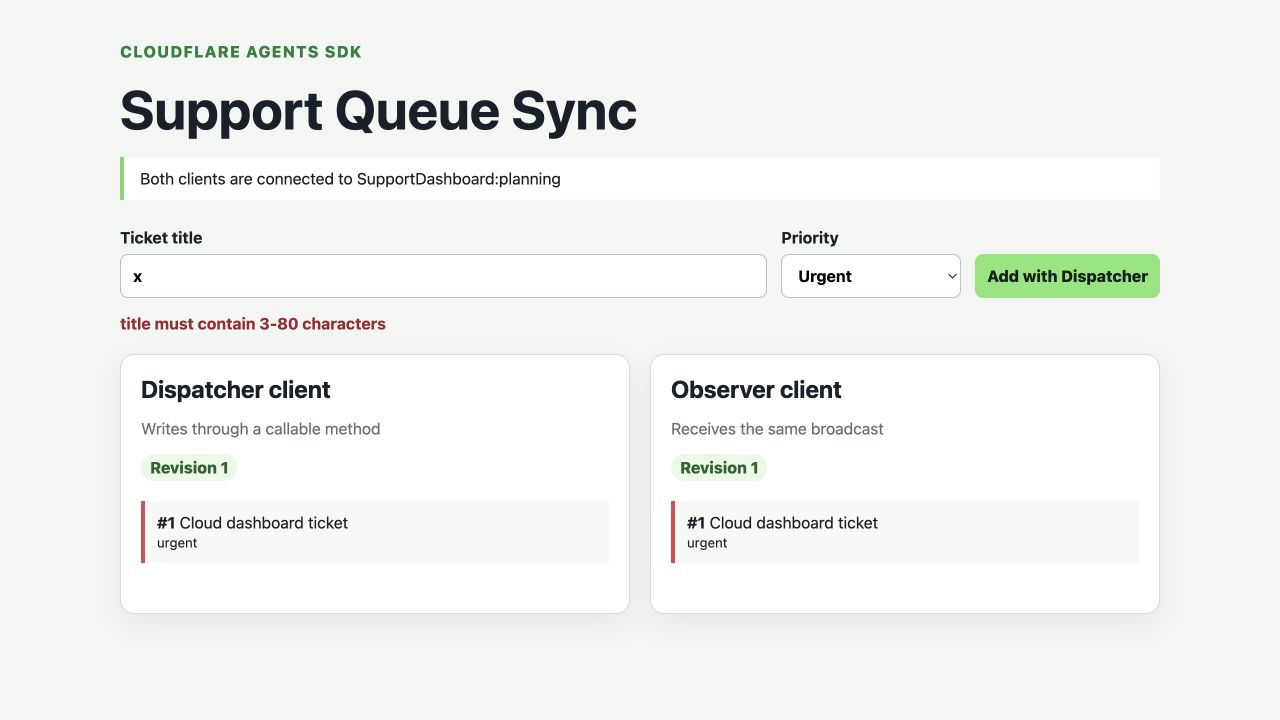
The error appears beside the input, but neither card advances. Read the unchanged revision on both cards as the important clue: the server rejected the argument before calling setState().
Open Workers & Pages in the Cloudflare Dashboard and select your exact labex-c11-s02-... Worker. Use the Bindings tab to confirm SupportDashboard points to the SupportDashboard Durable Object class. Under Durable Objects, confirm its namespace uses SQL storage. Finally open Observability → Logs, filter for support_queue_updated and expand one event. Match its instance planning, revision and ticket count; the ticket title is intentionally absent.
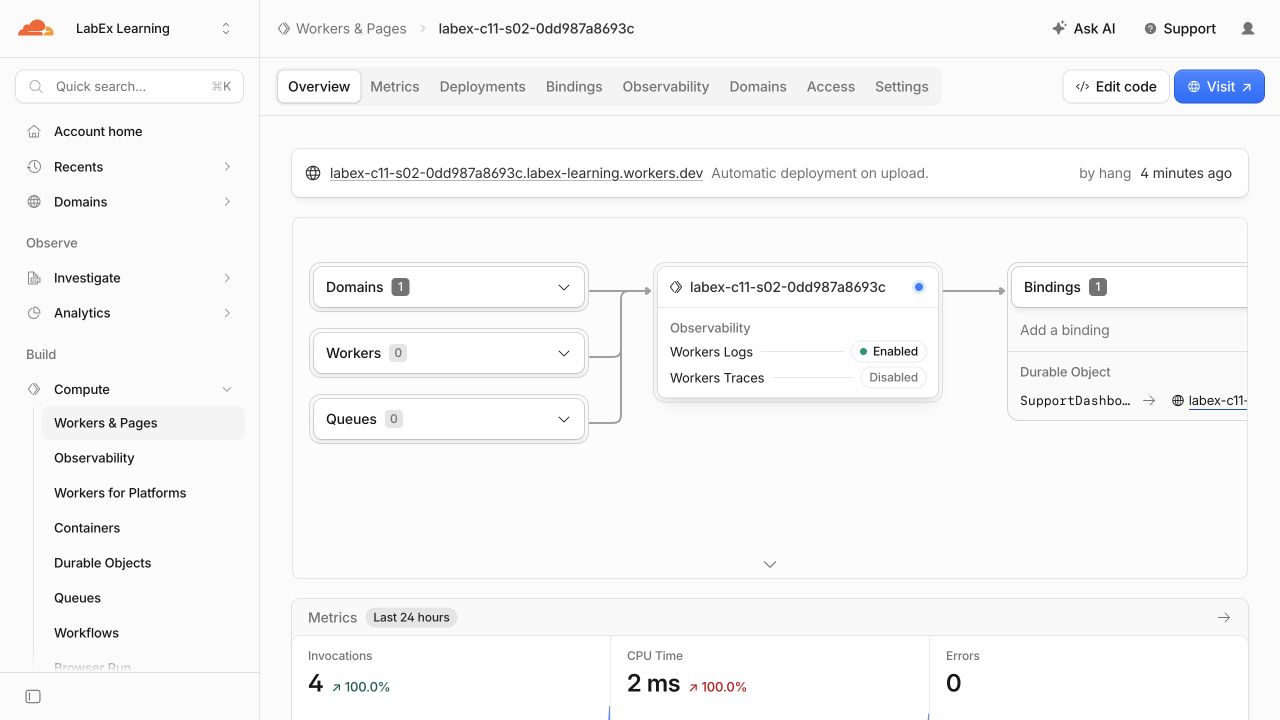
The overview joins several ideas you have used separately: the workers.dev domain reaches the Worker, the binding connects it to durable state, and the zero-error counter is a quick health signal. The generated Worker name in this screenshot belongs to one accepted test run.
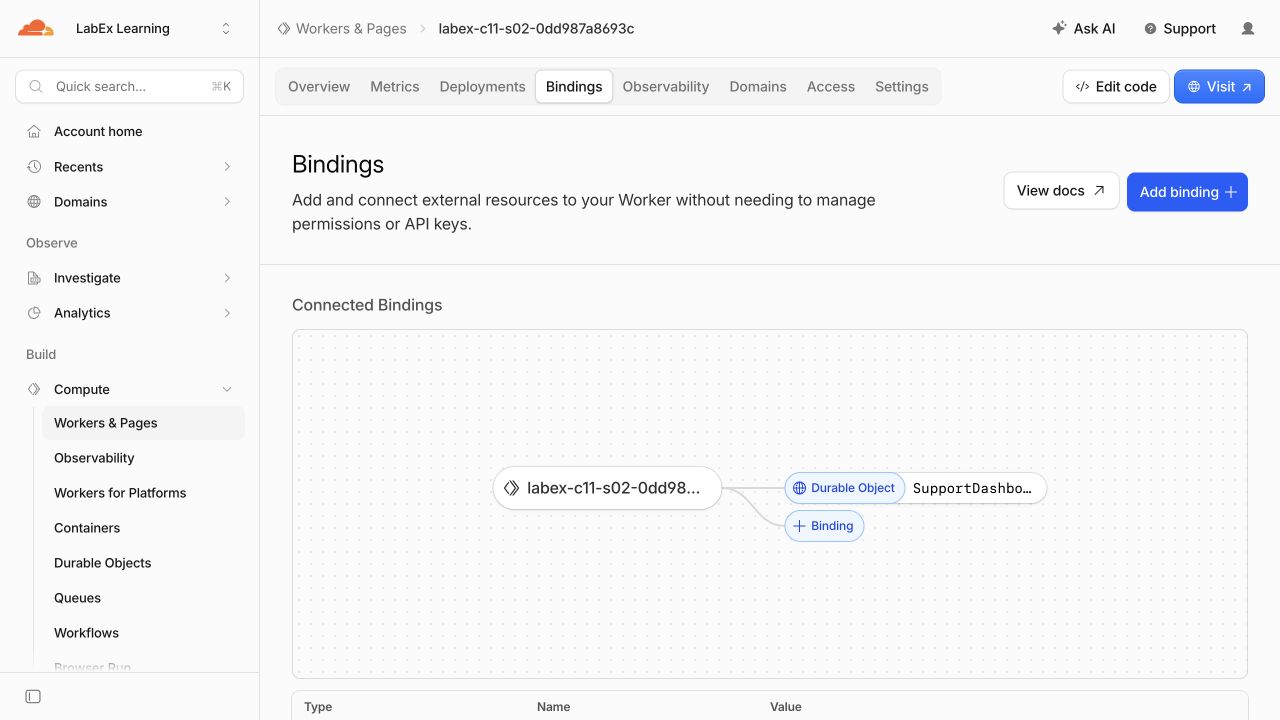
The binding graph should connect your exact Worker to a Durable Object named SupportDashboard. This is configuration evidence; it does not replace the two-client behavior check.
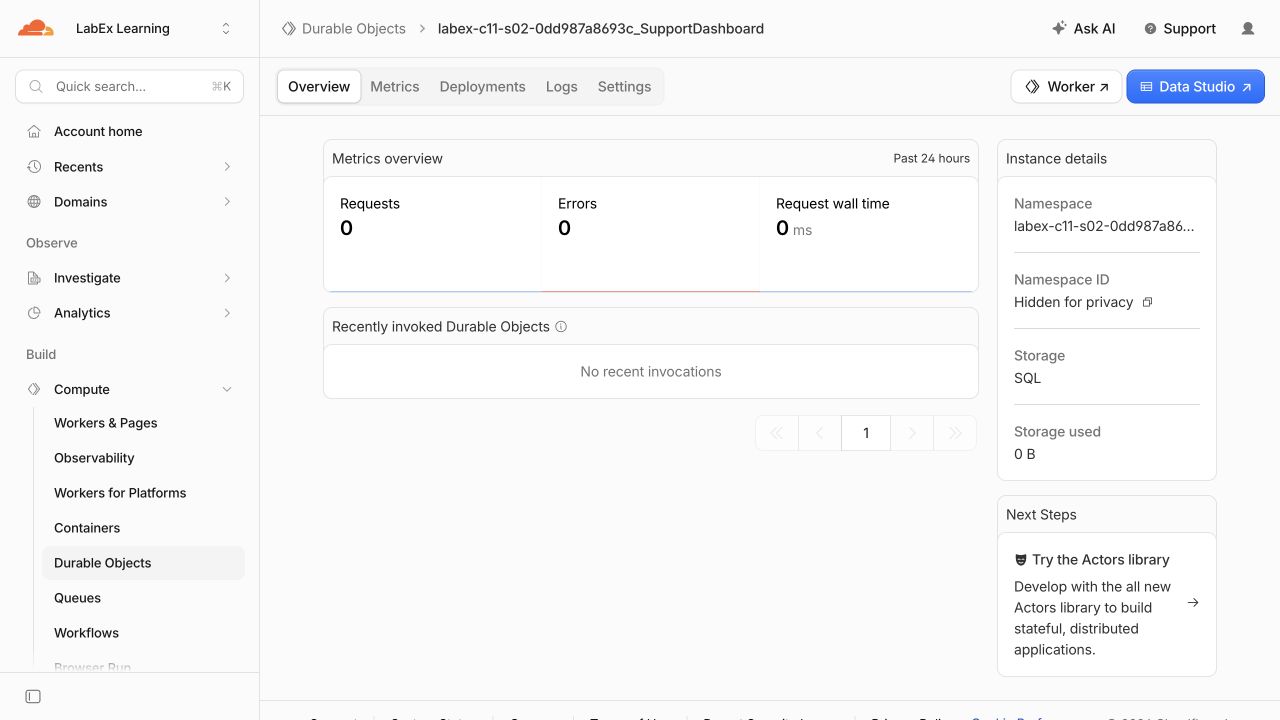
The namespace page identifies the durable storage behind the Agent class and reports Storage: SQL. Its opaque namespace ID is hidden in the teaching image for privacy; learners never need to copy it.
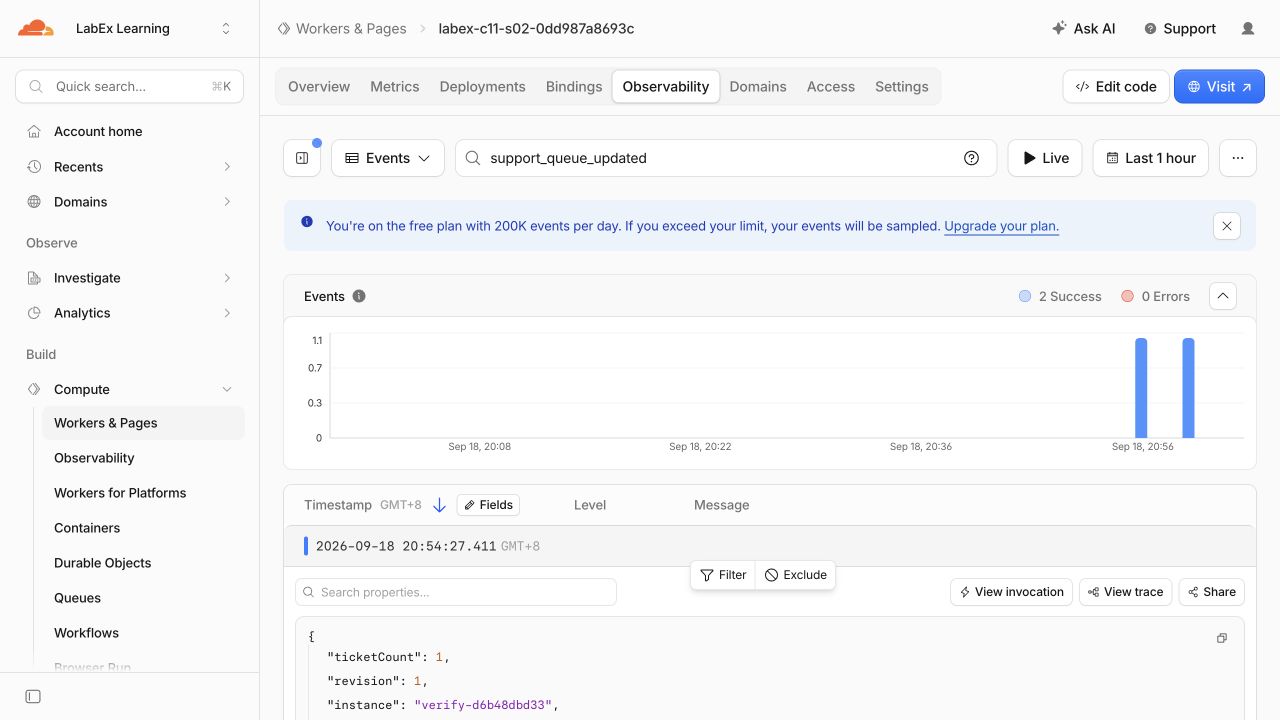
The expanded event contains the synthetic instance name, revision and ticket count, but not the ticket title. That is deliberate data minimization: logs should help diagnose behavior without copying potentially sensitive user content.
Dashboard data can arrive late, so an empty recent log view is inconclusive. The authenticated settings, owned namespace and independent live AgentClient checks are authoritative.
python3 .labex/verify.py deployed
python3 .labex/verify.py observed
The first check creates fresh remote names and proves synchronization, isolation and rejection without trusting the visible planning example. The second keeps the exact owned resources available for your read-only Dashboard inspection.
Remove the Dashboard Namespace and Worker
In this step, you will explicitly erase the Agent class namespace and then remove the remaining Worker while the VM is still authorized.
The queue is stored in the Durable Object class namespace, so explicitly delete that class before deleting the remaining stateless Worker. Create a cleanup entrypoint:
cat > src/cleanup.ts <<'TS'
export default {
  fetch() {
    return Response.json({ status: "cleanup" }, { status: 410 });
  }
};
TS
Keep the original migration and append v2 for deletion:
RUN="$(node -e 'console.log(JSON.parse(require("fs").readFileSync("wrangler.jsonc", "utf8")).name)')"
ACCOUNT_ID="$(node -e 'console.log(JSON.parse(require("fs").readFileSync("wrangler.jsonc", "utf8")).account_id)')"
cat > wrangler.cleanup.jsonc <<JSON
{
  "\$schema": "./node_modules/wrangler/config-schema.json",
  "name": "$RUN",
  "account_id": "$ACCOUNT_ID",
  "main": "src/cleanup.ts",
  "compatibility_date": "2026-09-18",
  "compatibility_flags": ["nodejs_compat"],
  "workers_dev": true,
  "preview_urls": false,
  "migrations": [
    { "tag": "v1", "new_sqlite_classes": ["SupportDashboard"] },
    { "tag": "v2", "deleted_classes": ["SupportDashboard"] }
  ]
}
JSON
npx wrangler deploy --config wrangler.cleanup.jsonc
npx wrangler delete --config wrangler.cleanup.jsonc --force
python3 .labex/verify.py deleted
Migration history is append-only: rewriting v1 would not describe the transition already applied in Cloudflare. In the Dashboard, confirm the exact Worker and its SupportDashboard namespace are absent. Preserve unrelated resources if your account contains any.
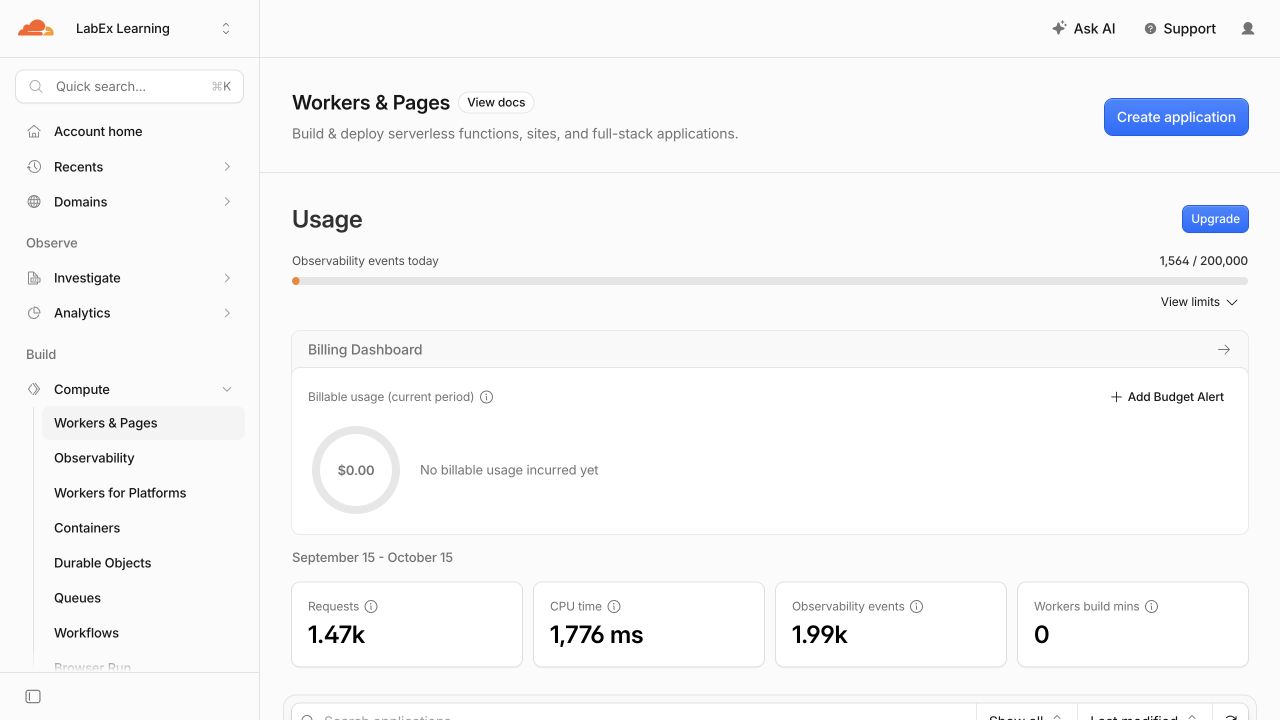
The tested account returned to its Workers & Pages overview after deletion. Your learning account may contain unrelated Workers, so verify that the exact labex-c11-s02-... name disappeared rather than expecting an empty account.
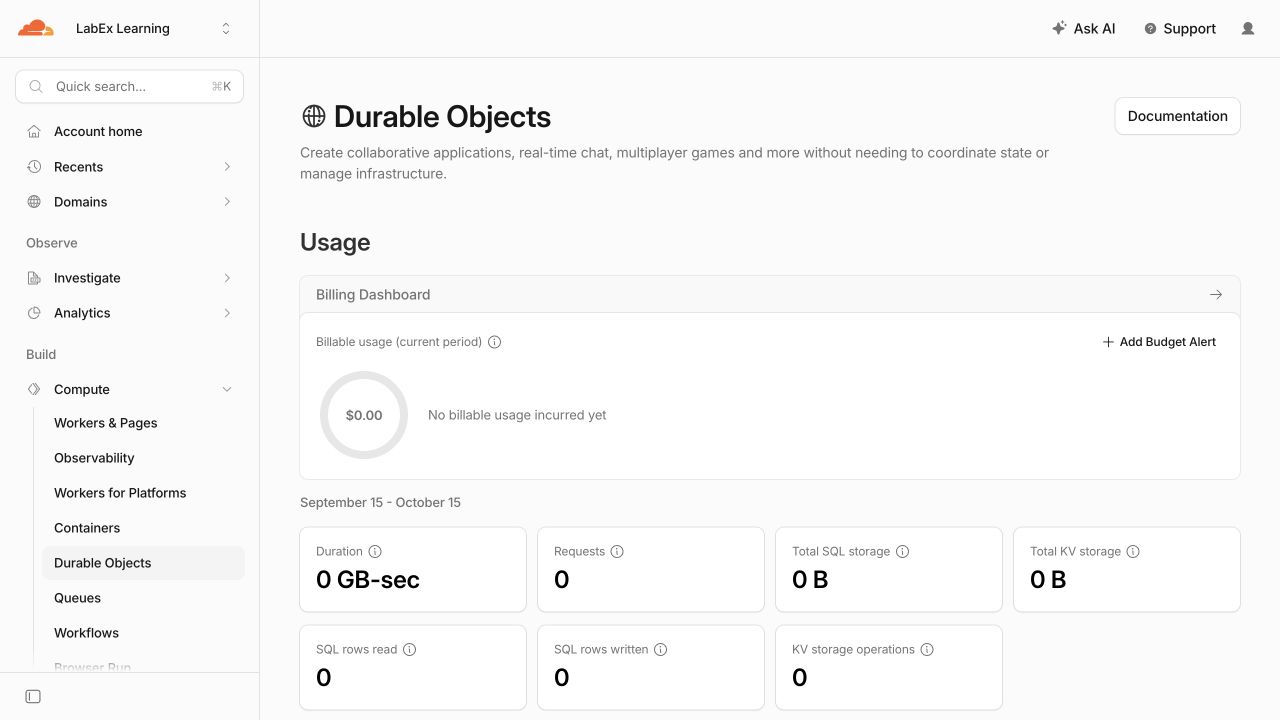
The accepted test account also returned to an empty Durable Objects overview. On an account with other namespaces, preserve them and confirm only the namespace owned by this lab is gone.
Revoke This VM's Authorization
In this step, you will remove the OAuth authorization stored only in this disposable VM and verify the structured logged-out state.
Cloud cleanup is complete, but this disposable VM still holds its local OAuth grant. Remove it and request structured status:
npx wrangler logout
npx wrangler whoami --json
python3 .labex/verify.py logout
The JSON must explicitly contain "loggedIn": false. A network error is not evidence of logout; retry the status read when connectivity returns. The public synthetic dashboard, its durable state and this VM's authorization are now all removed.
Summary
You turned one durable named Agent into a real-time browser application without introducing React or a language model. Two AgentClient connections selected SupportDashboard:planning, a validated @callable() method owned the mutation, setState() persisted one authoritative revision, and the SDK broadcast that state to both onStateUpdate handlers.
You also learned why the current decorator path needs both agents/tsconfig and agents/vite, distinguished a WebSocket RPC from direct client state changes, proved rejected input has no effect, repeated synchronization and name isolation on Cloudflare, inspected privacy-bounded evidence, and explicitly removed the class namespace, Worker and VM authorization.


