



Introduction
A support application needs to accept a document and send it back without making its storage bucket public. You will connect a private R2 bucket to a Worker, implement a bounded upload, and stream downloads to callers. A stream delivers chunks as they are available instead of first collecting the whole download in memory.
Complete Organize a Document Bucket and the Workers configuration/secrets lessons first. This fresh VM contains Node.js 22.22.0, Wrangler 4.131.1, synthetic documents and a supplied authentication module. The module protects the demonstration endpoint with a disposable token so the storage lesson does not expose an unrestricted upload service. You will learn to repair application authorization later in this course.
Before starting, your own learning account needs an active R2 subscription and permission to manage a new bucket and Worker. Review R2 pricing; storage/operations and Worker usage are separately metered. No purchased domain is required. Use only synthetic files and remove this lab's Worker, objects and bucket at the end. Each VM needs its own authorization; no earlier VM resources are reused.
Connect the application bucket
In this step, you authorize this VM and create an independent private bucket for the application. Device authorization confirms your learning account. R2 bucket management uses a separate API token restricted to that account.
Start Bash for the command syntax used below, then move to the prepared project and check its tools. Keep this same terminal open so your resource-name variables remain available:
bash
cd /home/labex/project/r2-lab
export PATH="$PWD/.tools/node-v22.22.0-linux-x64/bin:$PATH"
node --version
npx wrangler --version
Authorize the displayed device code in your own browser. Confirm the learning account and the requested account and user read scopes before granting consent:
npx wrangler login --device --browser=false --scopes account:read user:read workers_scripts:write workers_kv:write
npx wrangler whoami --json
Require loggedIn: true. Read the account name even if only one is listed. Replace YOUR_ACCOUNT_ID below with that account's actual 32-character ID. openssl rand -hex 6 generates twelve random hexadecimal characters so this lab cannot collide with a previous run. The here-document writes a standard configuration file; the shell substitutes your variables into it.
ACCOUNT_ID=YOUR_ACCOUNT_ID
RUN_ID=$(openssl rand -hex 6)
NAME="labex-c05-r02-$RUN_ID"
BUCKET="$NAME-docs"
cat > wrangler.jsonc <<JSON
{"name":"$NAME","account_id":"$ACCOUNT_ID","main":"src/index.js","workers_dev":true,"compatibility_date":"2026-07-30","r2_buckets":[{"binding":"DOCUMENTS","bucket_name":"$BUCKET"}]}
JSON
For bucket management, open your Cloudflare profile's API Tokens page and create a custom token named after this lab. Grant Account → Workers R2 Storage → Edit, and restrict Account Resources to the learning account whose ID you saved. Set a short expiry. Do not include other accounts or unrelated permissions. This management token is for bucket administration, including creation and deletion. In this lab, the Worker accesses R2 objects through its DOCUMENTS binding.
Copy the token once into this hidden VM prompt. umask 077 restricts the file to your user; read -s hides input. The file uses Wrangler's standard token variable and is excluded from Git.
umask 077
read -r -s -p 'R2 management API token: ' R2_MANAGEMENT_TOKEN; printf '\n'
printf 'CLOUDFLARE_API_TOKEN=%s\n' "$R2_MANAGEMENT_TOKEN" > .env.management
unset R2_MANAGEMENT_TOKEN
Use --env-file=.env.management only for R2 management commands; ordinary whoami continues to check the VM's device authorization.
Put --env-file at the end of each Wrangler command so its list of file arguments does not consume the command name. After creating each bucket, if Wrangler asks whether to add a binding to your configuration, type n and press Enter. The configuration already contains the intended binding.
npx wrangler r2 bucket create "$BUCKET" --env-file=.env.management
List your buckets and find the exact generated name. Other buckets belong to other work; leave them alone.
npx wrangler r2 bucket list --env-file=.env.management
In Dashboard, open Storage & databases → R2 → Overview, select this exact bucket, and inspect its empty object list. In its settings, leave the public development URL and custom domains disabled. A bucket name in Dashboard confirms identity; later download checks prove the stored bytes.
Worker script permission supports deployment. KV permission supports Wrangler’s deletion bookkeeping; this lab creates no KV namespace. The R2 management token remains a separate account-scoped credential.
Implement bounded uploads and streaming downloads
In this step, you turn the DOCUMENTS configuration binding into object operations. A binding is a runtime object Cloudflare supplies to the Worker. env.DOCUMENTS refers to the private bucket configured by name; the Worker does not need an S3 secret to use it.
The supplied src/auth.js checks a disposable bearer token. Our route accepts only simple .txt document names. PUT replaces bytes at the selected key. This example allows at most 1 MiB (1,048,576 bytes), including clients that omit a length header. Upload chunks are collected only up to that bound, so R2 can receive a body with a known length. Downloads pass object.body directly to the response and remain streamed.
Write the handler with this here-document:
cat > src/index.js <<'JS'
import { authorized } from "./auth.js";
const MAX_BYTES = 1024 * 1024;
export default {
  async fetch(request, env) {
    const path = new URL(request.url).pathname;
    if (path === "/health" && request.method === "GET") return new Response("ok");
    if (!await authorized(request, env)) return new Response("Unauthorized", { status: 401 });
    if (!/^\/documents\/[a-z0-9-]+\.txt$/.test(path)) return new Response("Not found", { status: 404 });
    const key = path.slice(1);
    if (request.method === "PUT") {
      if (Number(request.headers.get("Content-Length")) > MAX_BYTES)
        return new Response("Too large", { status: 413 });
      // Count actual bytes too: a request may omit Content-Length.
      const reader = request.body?.getReader();
      if (!reader) return new Response("Body required", { status: 400 });
      const chunks = [];
      let total = 0;
      for (;;) {
        const { value, done } = await reader.read();
        if (done) break;
        total += value.byteLength;
        if (total > MAX_BYTES) {
          await reader.cancel();
          return new Response("Too large", { status: 413 });
        }
        chunks.push(value);
      }
      const bytes = new Uint8Array(total);
      let offset = 0;
      for (const chunk of chunks) { bytes.set(chunk, offset); offset += chunk.byteLength; }
      await env.DOCUMENTS.put(key, bytes, { httpMetadata: { contentType: "text/plain" } });
      return new Response("Stored", { status: 201 });
    }
    if (request.method !== "GET") return new Response("Method not allowed", { status: 405, headers: { Allow: "GET, PUT" } });
    const object = await env.DOCUMENTS.get(key);
    if (object === null) return new Response("Not found", { status: 404 });
    const headers = new Headers();
    object.writeHttpMetadata(headers);
    headers.set("ETag", object.httpEtag);
    headers.set("Cache-Control", "private, no-store");
    return new Response(object.body, { headers });
  }
};
JS
get() returns null for a missing key; handle that before reading its body. writeHttpMetadata restores the saved content type and httpEtag is already correctly quoted. private, no-store keeps these protected documents out of shared caches.
Create a random application token in .dev.vars, which Wrangler loads for local development. This is a synthetic lab credential, separate from your Cloudflare account credentials:
umask 077
printf "ACCESS_TOKEN=%s\n" "$(openssl rand -hex 24)" > .dev.vars
Check that Wrangler can bundle the code without deploying. The platform check runs a separate temporary local runtime with fresh synthetic data to verify exact bytes, both size-limit paths, and absence of oversized objects:
npx wrangler deploy --dry-run
Exercise the local storage boundary
In this step, you run the Worker against local R2 storage. wrangler dev uses a local simulation by default, so no cloud object is created by these requests. Run the development server in the background; $! records this job's process ID for cleanup.
npx wrangler dev --ip 127.0.0.1 --port 8787 > dev.log 2>&1 &
DEV_PID=$!
Wait until dev.log reports the server is ready, then load the disposable application token into this terminal. Do not print it.
cat dev.log
set -a
source .dev.vars
set +a
Upload and download the prepared file. --data-binary preserves its bytes; -o saves the download.
curl -i -X PUT -H "Authorization: Bearer $ACCESS_TOKEN" --data-binary @document.txt http://127.0.0.1:8787/documents/report.txt
curl -fsS -H "Authorization: Bearer $ACCESS_TOKEN" http://127.0.0.1:8787/documents/report.txt -o local-download.txt
cmp document.txt local-download.txt
Require 201 Stored from the upload and a silent successful comparison. Test a missing key and an upload one byte above the limit. Python creates only a bounded synthetic fixture:
curl -i -H "Authorization: Bearer $ACCESS_TOKEN" http://127.0.0.1:8787/documents/missing.txt
python3 -c "open('oversized.txt','wb').write(b'x' * (1024 * 1024 + 1))"
curl -i -X PUT -H "Authorization: Bearer $ACCESS_TOKEN" --data-binary @oversized.txt http://127.0.0.1:8787/documents/large.txt
Require 404 Not found and 413 Too large. These curl calls deliberately omit --fail so the expected HTTP errors remain readable. An error HTML page from a proxy is not the application response. Run the platform check before stopping the local server.
Deploy and verify the private-bucket integration
In this step, you repeat the document workflow on real R2. Local success does not prove remote binding or account ownership.
Stop the development server and publish the Worker:
kill "$DEV_PID"
wait "$DEV_PID" 2>/dev/null || true
npx wrangler deploy
Upload the application secret using the standard bulk command. .dev.vars is not automatically uploaded by deploy.
npx wrangler secret bulk .dev.vars
Copy the exact HTTPS workers.dev URL from deployment output into BASE_URL, with no trailing slash. Wait for /health to return ok; if the deployment is still propagating, repeat the read for up to one minute.
BASE_URL=https://YOUR_WORKER.YOUR_SUBDOMAIN.workers.dev
curl -i "$BASE_URL/health"
Upload the report to the remote bucket, download it, and compare:
curl -i -X PUT -H "Authorization: Bearer $ACCESS_TOKEN" --data-binary @document.txt "$BASE_URL/documents/report.txt"
curl -fsS -H "Authorization: Bearer $ACCESS_TOKEN" "$BASE_URL/documents/report.txt" -o remote-download.txt
cmp document.txt remote-download.txt
Require 201 Stored and identical bytes. Repeat negative checks against the public endpoint:
curl -i "$BASE_URL/documents/report.txt"
curl -i -H "Authorization: Bearer $ACCESS_TOKEN" "$BASE_URL/documents/missing.txt"
curl -i -X PUT -H "Authorization: Bearer $ACCESS_TOKEN" --data-binary @oversized.txt "$BASE_URL/documents/large.txt"
Require 401 Unauthorized, 404 Not found and 413 Too large. In Dashboard, open this Worker and inspect its R2 binding; then open the exact bucket to find documents/report.txt. Its public development URL and custom domains remain disabled. The Worker provides the access path; bucket privacy does not mean every Worker route is automatically safe.
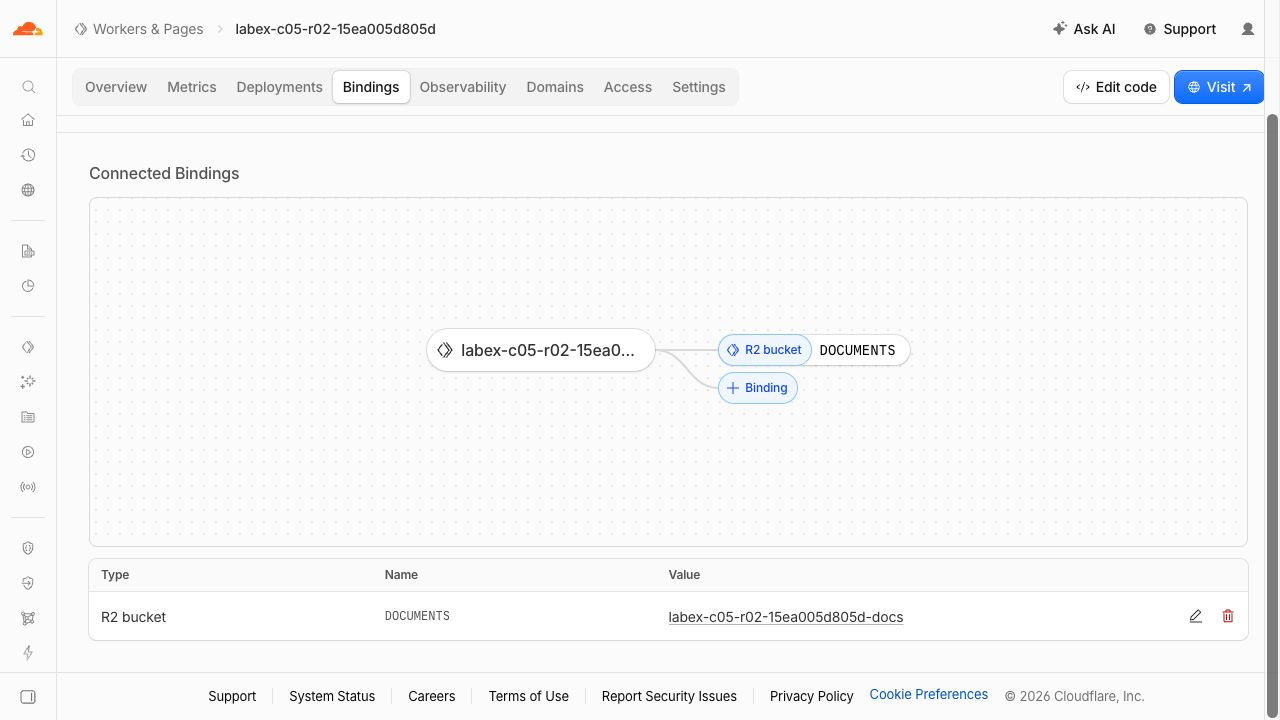
The DOCUMENTS row links this Worker to its exact bucket. Generated resource names in this example differ from yours.
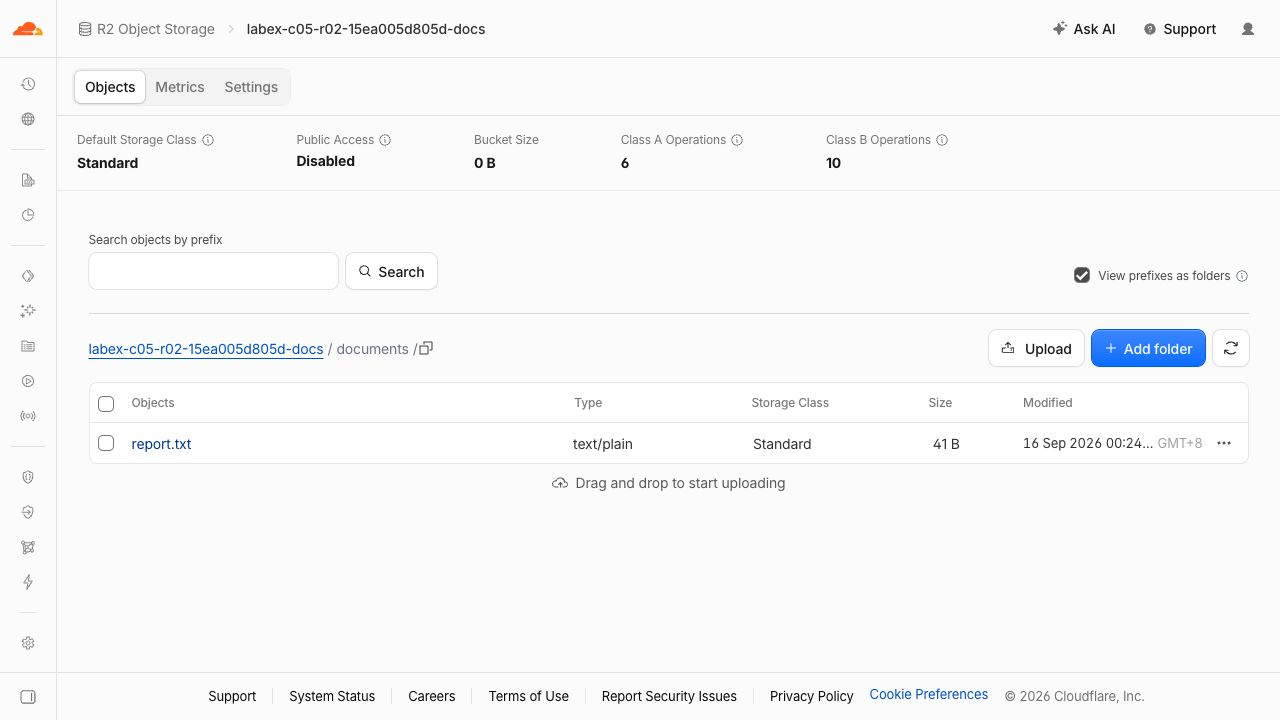
The object row shows report.txt, text/plain and 41 B while Public Access remains Disabled. Names and dates are examples. Bucket Size can lag at 0 B; the object row and successful download establish that the report exists.
Remove the remote application and bucket
In this step, you delete only this lab's Worker and objects while still authorized. The private bucket does not disappear when its Worker is deleted.
npx wrangler delete
Confirm the exact generated Worker name. Delete the one uploaded object explicitly, then delete the bucket:
BUCKET=$(node -p "JSON.parse(require('fs').readFileSync('wrangler.jsonc')).r2_buckets[0].bucket_name")
npx wrangler r2 object delete "$BUCKET/documents/report.txt" --remote --env-file=.env.management
npx wrangler r2 bucket delete "$BUCKET" --env-file=.env.management
The oversized request should not have created documents/large.txt. If the bucket is unexpectedly nonempty, inspect only this bucket and remove the exact synthetic key after diagnosing the failed size contract. Such a repair means the earlier functional check has not passed.
Refresh the Worker and bucket lists in Dashboard, and run the platform cleanup check. Authentication/network failures are inconclusive, not successful deletion.
Close remaining credentials
In this step, you revoke this lab's management token on your profile API Tokens page, remove the local application secret and close VM authorization. Do this only after the previous cleanup check passes.
rm .env.management .dev.vars
unset ACCESS_TOKEN
npx wrangler logout
npx wrangler whoami --json || true
Require loggedIn: false. Revocation of the management token is a separate manual Dashboard checkpoint; deleting the local file alone does not revoke it. Keep the ordinary Dashboard login and other labs' tokens untouched.
Summary
Bind private R2 storage to a Worker, accept bounded uploads, stream exact document bytes, handle errors, and remove owned cloud resources.


