



Introduction
An export service should remove temporary downloads without deleting retained documents. You will apply prefix-scoped expiration, storage-class transition and incomplete-upload cleanup rules to a fresh private bucket, then inspect real policy and object metadata.
Complete object management and multipart cleanup first. This new VM uses Node.js 22.22.0, Wrangler 4.131.1 and AWS SDK 3.888.0. R2 must be active and you need permission to configure the new bucket. Review lifecycle behavior and pricing, including Infrequent Access minimum-duration/retrieval charges. The fixture stays in Standard storage and is explicitly deleted during this session. Acceptance checks applied rules and current metadata, not days-later deletion or transition. No domain is required.
Create your private document bucket
In this step, you authorize this VM and create one disposable bucket. Device authorization confirms your learning account. R2 bucket management uses a separate API token restricted to that account.
Start Bash for the command syntax used below, then move to the prepared project and check its tools. Keep this same terminal open so your resource-name variables remain available:
bash
cd /home/labex/project/r2-lab
export PATH="$PWD/.tools/node-v22.22.0-linux-x64/bin:$PATH"
node --version
npx wrangler --version
Authorize the displayed device code in your own browser. Confirm the learning account and the requested account and user read scopes before granting consent:
npx wrangler login --device --browser=false --scopes account:read user:read
npx wrangler whoami --json
Require loggedIn: true. Read the account name even if only one is listed. Replace YOUR_ACCOUNT_ID below with that account's actual 32-character ID. openssl rand -hex 6 generates twelve random hexadecimal characters so this lab cannot collide with a previous run. The here-document writes a standard configuration file; the shell substitutes your variables into it.
ACCOUNT_ID=YOUR_ACCOUNT_ID
RUN_ID=$(openssl rand -hex 6)
NAME="labex-c05-r07-$RUN_ID"
BUCKET="$NAME-docs"
cat > wrangler.jsonc <<JSON
{"name":"$NAME","account_id":"$ACCOUNT_ID","compatibility_date":"2026-07-30","r2_buckets":[{"binding":"DOCUMENTS","bucket_name":"$BUCKET"}]}
JSON
For bucket management, open your Cloudflare profile's API Tokens page and create a custom token named after this lab. Grant Account → Workers R2 Storage → Edit, and restrict Account Resources to the learning account whose ID you saved. Set a short expiry. Do not include other accounts or unrelated permissions. This management token is for bucket administration, including creation and deletion. Later in this same step, you create a separate bucket-scoped object token for the S3 SDK to work with objects.
Copy the token once into this hidden VM prompt. umask 077 restricts the file to your user; read -s hides input. The file uses Wrangler's standard token variable and is excluded from Git.
umask 077
read -r -s -p 'R2 management API token: ' R2_MANAGEMENT_TOKEN; printf '\n'
printf 'CLOUDFLARE_API_TOKEN=%s\n' "$R2_MANAGEMENT_TOKEN" > .env.management
unset R2_MANAGEMENT_TOKEN
Use --env-file=.env.management only for R2 management commands; ordinary whoami continues to check the VM's device authorization.
Put --env-file at the end of each Wrangler command so its list of file arguments does not consume the command name. After creating each bucket, if Wrangler asks whether to add a binding to your configuration, type n and press Enter. The configuration already contains the intended binding.
npx wrangler r2 bucket create "$BUCKET" --env-file=.env.management
List your buckets and find the exact generated name. Other buckets belong to other work; leave them alone.
npx wrangler r2 bucket list --env-file=.env.management
In Dashboard, open Storage & databases → R2 → Overview, select this exact bucket, and inspect its empty object list. In its settings, leave the public development URL and custom domains disabled. A bucket name in Dashboard confirms identity; later download checks prove the stored bytes.
The S3-compatible API gives standard storage SDKs access to R2. It uses a separate access-key pair rather than Wrangler's device token. In R2 Overview, use Account Details → API Tokens → Manage, then create a User API token named after this lab's generated resource name. Choose Object Read & Write, restrict it to this exact new bucket, and select a short expiry if the form offers one. Do not choose all buckets or Admin access. Keep this token page available until you have stored the one-time secret.
Use the following Bash prompts in the VM. read -s hides input; umask 077 makes the credential file readable only by your user. These names are the standard AWS SDK environment variables. Paste the Access Key ID and Secret Access Key into their respective prompts, then press Enter. Do not paste the general API token value.
umask 077
read -r -s -p 'Access Key ID: ' AWS_ACCESS_KEY_ID; printf '\n'
read -r -s -p 'Secret Access Key: ' AWS_SECRET_ACCESS_KEY; printf '\n'
printf 'AWS_ACCESS_KEY_ID=%s\nAWS_SECRET_ACCESS_KEY=%s\n' "$AWS_ACCESS_KEY_ID" "$AWS_SECRET_ACCESS_KEY" > .env.s3
unset AWS_ACCESS_KEY_ID AWS_SECRET_ACCESS_KEY
Write a reusable standard SDK client. The SDK requires a region string; R2 uses auto. Reading the existing configuration keeps CLI and SDK operations aimed at the same account and bucket.
cat > storage.mjs <<'JS'
import { S3Client } from "@aws-sdk/client-s3";
import { readFileSync } from "node:fs";
const config = JSON.parse(readFileSync("wrangler.jsonc", "utf8"));
export const Bucket = config.r2_buckets[0].bucket_name;
export const s3 = new S3Client({
  region: "auto",
  endpoint: `https://${config.account_id}.r2.cloudflarestorage.com`,
  credentials: {
    accessKeyId: process.env.AWS_ACCESS_KEY_ID,
    secretAccessKey: process.env.AWS_SECRET_ACCESS_KEY
  }
});
JS
Apply prefix-specific lifecycle rules
In this step, you configure a lifecycle policy, a set of storage actions that R2 applies as objects age. Temporary exports should expire, while retained handbooks remain outside those rules. A storage-class transition changes the billing/access class; it does not delete the object.
This new disposable bucket will use two rules: temporary/ objects expire after two days and unfinished uploads under that prefix are aborted after one day; archive/ objects transition to Infrequent Access after thirty days. Nothing targets retained/.
The API expresses ages in seconds: one day is 86,400 seconds. Write the policy with a quoted here-document so its JSON is preserved:
cat > lifecycle.json <<'JSON'
{
  "rules": [
    {
      "id": "temporary-exports",
      "enabled": true,
      "conditions": {
        "prefix": "temporary/"
      },
      "deleteObjectsTransition": {
        "condition": {
          "type": "Age",
          "maxAge": 172800
        }
      },
      "abortMultipartUploadsTransition": {
        "condition": {
          "type": "Age",
          "maxAge": 86400
        }
      }
    },
    {
      "id": "archive-transition",
      "enabled": true,
      "conditions": {
        "prefix": "archive/"
      },
      "storageClassTransitions": [
        {
          "condition": {
            "type": "Age",
            "maxAge": 2592000
          },
          "storageClass": "InfrequentAccess"
        }
      ]
    }
  ]
}
JSON
npx wrangler r2 bucket lifecycle set "$BUCKET" --file lifecycle.json --env-file=.env.management
npx wrangler r2 bucket lifecycle list "$BUCKET" --env-file=.env.management
The set command replaces the policy, so confirm only this new lab bucket. Require the exact two prefixes, enabled state and ages. Do not apply this replacement to an existing application bucket. In Dashboard, open the same bucket's Settings → Object Lifecycle Rules and inspect the actions without changing them.
Cost boundary: Infrequent Access has retrieval charges and a minimum storage duration. This lab configures a future transition and removes its new Standard objects during cleanup. You will not wait thirty days, force a transition, or claim that a transition actually occurred.
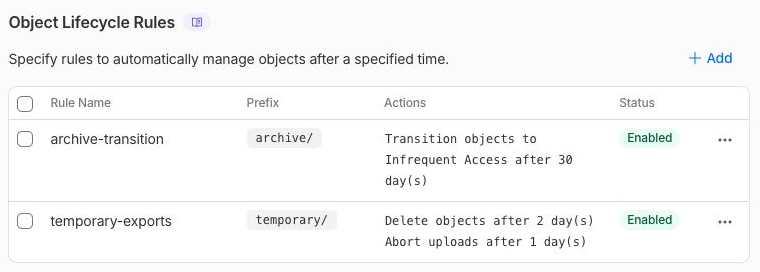
This real Dashboard view shows configured future actions: delete temporary/ objects after 2 days, abort incomplete uploads under that prefix after 1 day, and move archive/ objects to Infrequent Access after 30 days. It does not show that those waiting periods have elapsed or those actions have already run. The next step checks current object metadata; retained/ is outside both prefixes.
Inspect newly applied expiration metadata
In this step, you upload new objects after applying the policy. R2 documents that new objects reflect an applicable expiration in x-amz-expiration; existing objects can take longer to reflect a changed rule. The SDK exposes this header as Expiration.
cat > seed.mjs <<'JS'
import { PutObjectCommand, HeadObjectCommand } from "@aws-sdk/client-s3";
import { readFileSync } from "node:fs";
import { s3, Bucket } from "./storage.mjs";
for (const Key of ["temporary/export.txt", "archive/export.txt"]) {
  await s3.send(new PutObjectCommand({ Bucket, Key, Body: readFileSync("document.txt"), ContentType: "text/plain" }));
}
await s3.send(new PutObjectCommand({ Bucket, Key: "retained/handbook.txt", Body: readFileSync("retained.txt"), ContentType: "text/plain" }));
for (const Key of ["temporary/export.txt", "archive/export.txt", "retained/handbook.txt"]) {
  const head = await s3.send(new HeadObjectCommand({ Bucket, Key }));
  console.log({ key: Key, expiration: head.Expiration || "none", storageClass: head.StorageClass || "STANDARD" });
}
JS
node --env-file=.env.s3 seed.mjs
Require an expiry date for temporary/export.txt, no deletion expiry for the retained handbook, and Standard storage for the new archive object. The future transition is proved by the remote rule, not by a current IA storage class. If the expected new-object expiration metadata is absent, inspect the applied prefix and policy; do not call that a successful expiry check.
Download the retained object and compare its original bytes:
npx wrangler r2 object get "$BUCKET/retained/handbook.txt" --remote --file retained-download.txt --env-file=.env.management
cmp retained.txt retained-download.txt
A passing policy read and readable retained object establish this lab's bounded result. Actual lifecycle deletion is asynchronous and can occur after the nominal expiration; this lab does not grade a hours-later event.
Empty the lab storage explicitly
In this step, you remove the three fixtures now instead of relying on their future lifecycle actions. No incomplete upload was created in this lab, but list that inventory as well: object listings alone cannot prove a bucket has no unfinished parts.
cat > empty.mjs <<'JS'
import { DeleteObjectCommand, ListObjectsV2Command, ListMultipartUploadsCommand } from "@aws-sdk/client-s3";
import { s3, Bucket } from "./storage.mjs";
for (const Key of ["temporary/export.txt", "archive/export.txt", "retained/handbook.txt"]) await s3.send(new DeleteObjectCommand({ Bucket, Key }));
const objects = await s3.send(new ListObjectsV2Command({ Bucket }));
const uploads = await s3.send(new ListMultipartUploadsCommand({ Bucket }));
console.log("Objects:", objects.Contents || []);
console.log("Incomplete uploads:", uploads.Uploads || []);
JS
node --env-file=.env.s3 empty.mjs
Require empty object and incomplete-upload arrays. If you created a multipart session while experimenting, use the previous lab's abort operation with that exact owned key and upload ID, then repeat these read-only lists. Never silently ignore failed list requests.
Remove the empty bucket and its policy
In this step, you delete the owned bucket after its object/upload check passes. The policy is bucket configuration and disappears with the bucket.
npx wrangler r2 bucket delete "$BUCKET" --env-file=.env.management
npx wrangler r2 bucket list --env-file=.env.management
Confirm the exact generated name. Require that name to be absent from a successful authenticated list. Run the platform deletion check before revoking the management credential.
Revoke the lab credential and log out
In this step, you close access left by this exercise. On the R2 API Tokens page, revoke only the object token named for this lab. On your profile API Tokens page, revoke the separate R2 management token you created for this lab. Deleting a bucket does not revoke a token, and Wrangler logout does not revoke S3 credentials.
After revocation, remove the local credential file and log this VM out:
rm .env.s3 .env.management
npx wrangler logout
Inspect structured identity. Its nonzero status is expected when logged out:
npx wrangler whoami --json || true
Require loggedIn: false; keep your ordinary Dashboard login. The platform checks local credential removal and Wrangler logout. Both token revocations are manual Dashboard checkpoints in this candidate; it is not inferred from file deletion.
Summary
Apply scoped expiration, future storage transitions and multipart cleanup rules, inspect current metadata, preserve retained data and clean up explicitly.


