



Introduction
A temporary reservation should release itself even when nobody visits the application again. An in-memory JavaScript timer is unsafe because a Worker can go idle or restart before the timer fires. A Durable Object alarm instead stores one future wake-up time with the object's durable state. Cloudflare wakes the object and calls its alarm() method when that time arrives.
Alarms have at-least-once execution: Cloudflare retries a failed handler, so the same intended effect may be attempted again. The expiry operation must therefore be idempotent—running it more than once produces the same final state as running it once. You will use a conditional SQLite update so only a held reservation can become expired; its counter increases in the same update and cannot increase on a replay.
This lab uses one named Durable Object per reservation. Each reservation therefore owns the one alarm slot available to its object. You will schedule short and long holds, restart the local runtime before one alarm fires, deliberately replay the expiry path twice, repeat a real alarm test on Cloudflare, inspect the Dashboard, redeploy and clean up.
Before entering this course directly, complete Connect LabEx to Your Cloudflare Account. Every fresh VM needs its own Wrangler authorization. You should already understand stable object names, RPC, SQLite-backed state and bounded concurrency from O01–O03.
Calling setAlarm() again replaces the alarm for that same object; other named objects keep their own alarms. Setup installs Node.js 22.22.0 and project-local Wrangler 4.132.0 in /home/labex/project/reservation-expiry. It does not authorize Cloudflare, create an alarm or deploy a Worker.
Authorize the VM and Declare the Alarm Namespace
In this step, you will authorize the fresh VM and declare one SQLite-backed Durable Object class for scheduled reservations.
Enter the project, confirm the pinned Wrangler version and authorize this fresh VM:
cd /home/labex/project/reservation-expiry
npx wrangler --version
npx wrangler login --device --browser=false
Expect Wrangler 4.132.0. Open the displayed Cloudflare URL in the browser, enter the short code, confirm the intended learning account and authorize it. Never paste a password or token into the terminal or lab.
Read only safe identity fields, select the account you confirmed and make a unique disposable Worker name:
WHOAMI="$(npx wrangler whoami --json)"
printf '%s\n' "$WHOAMI" | jq '{loggedIn, authType, accounts: [.accounts[] | {name}]}'
ACCOUNT_ID="$(printf '%s\n' "$WHOAMI" | jq -r '.accounts[] | select(.name == "LabEx Learning") | .id')"
test -n "$ACCOUNT_ID"
RUN="labex-c10-o04-$(openssl rand -hex 6)"
printf '%s\n' "$RUN"
If your dedicated learning account has another display name, substitute the name you confirmed. Create the configuration:
cat > wrangler.jsonc <<JSON
{
  "\$schema": "./node_modules/wrangler/config-schema.json",
  "name": "$RUN",
  "account_id": "$ACCOUNT_ID",
  "main": "src/index.js",
  "compatibility_date": "2026-09-18",
  "workers_dev": true,
  "preview_urls": false,
  "observability": { "enabled": true, "head_sampling_rate": 1 },
  "durable_objects": { "bindings": [
    { "name": "RESERVATIONS", "class_name": "ReservationExpiry" }
  ] },
  "exports": {
    "ReservationExpiry": { "type": "durable-object", "storage": "sqlite" }
  }
}
JSON
RESERVATIONS lets the front-door Worker select an object by reservation ID. The class export gives every selected object private SQLite storage and one alarm slot. Nothing exists in the cloud until deployment.
Implement Persistent and Idempotent Expiry
In this step, you will implement durable reservation state, alarm scheduling and a replay-safe expiry transition.
Create the application. The important part is the conditional UPDATE, not the HTTP plumbing:
cat > src/index.js <<'JS'
import { DurableObject } from "cloudflare:workers";

const NAME_PATTERN = /^[a-z0-9](?:[a-z0-9-]{1,38}[a-z0-9])$/;
const json = (body, status = 200) => Response.json(body, { status });

async function readBody(request) {
  try { return await request.json(); } catch { return null; }
}
function parsePath(pathname) {
  const match = pathname.match(/^\/reservations\/([^/]+)(?:\/(replay-alarm))?$/);
  if (!match || !NAME_PATTERN.test(match[1])) return null;
  return { reservationId: match[1], action: match[2] ?? null };
}

export class ReservationExpiry extends DurableObject {
  constructor(ctx, env) {
    super(ctx, env);
    this.ctx.blockConcurrencyWhile(async () => {
      this.ctx.storage.sql.exec(`
        CREATE TABLE IF NOT EXISTS reservation (
          singleton INTEGER PRIMARY KEY CHECK (singleton = 1),
          status TEXT NOT NULL CHECK (status IN ('held', 'expired')),
          created_at INTEGER NOT NULL,
          expires_at INTEGER NOT NULL,
          expired_at INTEGER,
          expiration_count INTEGER NOT NULL DEFAULT 0
        )
      `);
    });
  }

  row() {
    return this.ctx.storage.sql.exec(`
      SELECT status, created_at, expires_at, expired_at, expiration_count
      FROM reservation WHERE singleton = 1
    `).one();
  }

  async createReservation(ttlSeconds) {
    const createdAt = Date.now();
    const expiresAt = createdAt + ttlSeconds * 1000;
    this.ctx.storage.sql.exec(`
      INSERT INTO reservation
        (singleton, status, created_at, expires_at, expired_at, expiration_count)
      VALUES (1, 'held', ?, ?, NULL, 0)
      ON CONFLICT(singleton) DO UPDATE SET
        status = 'held', created_at = excluded.created_at,
        expires_at = excluded.expires_at, expired_at = NULL,
        expiration_count = 0
    `, createdAt, expiresAt);
    await this.ctx.storage.setAlarm(expiresAt);
    return this.getStatus();
  }

  async getStatus() {
    const record = this.row();
    if (!record) return { status: "missing", alarmAt: await this.ctx.storage.getAlarm() };
    return {
      status: record.status,
      createdAt: record.created_at,
      expiresAt: record.expires_at,
      expiredAt: record.expired_at,
      expirationCount: record.expiration_count,
      alarmAt: await this.ctx.storage.getAlarm()
    };
  }

  async processExpiry(now = Date.now()) {
    const result = this.ctx.storage.sql.exec(`
      UPDATE reservation
      SET status = 'expired', expired_at = ?,
          expiration_count = expiration_count + 1
      WHERE status = 'held' AND expires_at <= ?
    `, now, now);
    const changed = result.rowsWritten === 1;
    if (changed) await this.ctx.storage.deleteAlarm();
    return { ...(await this.getStatus()), changed };
  }

  async alarm(alarmInfo) {
    console.log(JSON.stringify({
      event: "reservation-alarm",
      isRetry: alarmInfo?.isRetry ?? false,
      retryCount: alarmInfo?.retryCount ?? 0
    }));
    await this.processExpiry(Date.now());
  }
}

export default {
  async fetch(request, env) {
    const url = new URL(request.url);
    if (url.pathname === "/") return json({ service: "reservation-expiry" });
    const parsed = parsePath(url.pathname);
    if (!parsed) return json({ error: "Use a lowercase reservation ID containing 3-40 letters, digits, or hyphens." }, 400);

    let body = null;
    if (request.method === "POST") {
      body = await readBody(request);
      if (!body) return json({ error: "Send a JSON request body." }, 400);
    }
    if (!parsed.action && request.method === "POST") {
      if (!Number.isInteger(body.ttlSeconds) || body.ttlSeconds < 5 || body.ttlSeconds > 3600) {
        return json({ error: "ttlSeconds must be an integer from 5 through 3600." }, 400);
      }
    } else if (parsed.action === "replay-alarm" && request.method === "POST") {
      if (!Number.isSafeInteger(body.now) || body.now < 1) return json({ error: "now must be a positive integer timestamp." }, 400);
    } else if (parsed.action || request.method !== "GET") {
      return json({ error: "Method not allowed." }, 405);
    }

    const stub = env.RESERVATIONS.getByName(parsed.reservationId);
    if (request.method === "GET") return json({ reservationId: parsed.reservationId, ...(await stub.getStatus()) });
    if (parsed.action === "replay-alarm") return json({ reservationId: parsed.reservationId, ...(await stub.processExpiry(body.now)) });
    return json({ reservationId: parsed.reservationId, ...(await stub.createReservation(body.ttlSeconds)) }, 201);
  }
};
JS
setAlarm(expiresAt) stores an absolute Unix timestamp. getAlarm() makes the schedule observable. When due, one SQL statement changes held to expired and increments the counter. A retry sees expired, so the WHERE status = 'held' condition matches zero rows.
The /replay-alarm route is a deliberate testing seam: it calls the exact method used by alarm() with an explicit clock. It proves replay safety immediately without manufacturing a Cloudflare failure.
Run deterministic routing tests and a Wrangler build:
NODE_NO_WARNINGS=1 node --experimental-loader ./test/cloudflare-loader.mjs --test test/worker.test.mjs
npx wrangler deploy --dry-run --outdir /tmp/o04-dry-run
Prove an Alarm Survives a Local Restart
In this step, you will schedule two local holds, restart Wrangler and observe that only the due hold expires.
Start Wrangler's local Durable Object runtime and wait for it:
rm -rf .wrangler/state
npx wrangler dev --local --ip 127.0.0.1 --port 8787 > .labex/dev.log 2>&1 &
echo $! > .labex/dev.pid
for attempt in $(seq 1 30); do
  curl --silent --fail http://127.0.0.1:8787/ >/dev/null && break
  sleep 1
done
curl --silent --fail http://127.0.0.1:8787/ | jq
Create a 30-second hold and an unrelated one-hour hold. The longer short hold gives you enough time to stop Wrangler before its alarm is due:
curl --silent --fail --request POST http://127.0.0.1:8787/reservations/local-expiring \
  --header 'content-type: application/json' --data '{"ttlSeconds":30}' | jq
curl --silent --fail --request POST http://127.0.0.1:8787/reservations/local-safe \
  --header 'content-type: application/json' --data '{"ttlSeconds":3600}' | jq
Both responses show held, expirationCount: 0 and a numeric alarmAt. Stop the runtime before the first alarm is due, then reopen the same local durable storage:
kill "$(cat .labex/dev.pid)"
wait "$(cat .labex/dev.pid)" 2>/dev/null || true
npx wrangler dev --local --ip 127.0.0.1 --port 8787 > .labex/dev.log 2>&1 &
echo $! > .labex/dev.pid
for attempt in $(seq 1 30); do
  curl --silent --fail http://127.0.0.1:8787/ >/dev/null && break
  sleep 1
done
for attempt in $(seq 1 50); do
  STATE="$(curl --silent --fail http://127.0.0.1:8787/reservations/local-expiring)"
  test "$(printf '%s' "$STATE" | jq -r .status)" = expired && break
  sleep 1
done
printf '%s\n' "$STATE" | jq
curl --silent --fail http://127.0.0.1:8787/reservations/local-safe | jq
The short hold is expired exactly once and its alarm is null; the unrelated object remains held with its own alarm. This is why a persistent alarm is different from setTimeout().
Replay Expiry Without Applying It Twice
In this step, you will invoke the expiry path twice with the same logical deadline and compare both results.
Create a long hold so its real alarm cannot race this deterministic check. Capture the stored deadline:
REPLAY="$(curl --silent --fail --request POST http://127.0.0.1:8787/reservations/replay-proof \
  --header 'content-type: application/json' --data '{"ttlSeconds":180}')"
printf '%s\n' "$REPLAY" | jq
REPLAY_NOW="$(printf '%s\n' "$REPLAY" | jq '.expiresAt + 1')"
Call the same expiry method twice with a clock just after the deadline:
curl --silent --fail --request POST http://127.0.0.1:8787/reservations/replay-proof/replay-alarm \
  --header 'content-type: application/json' --data "{\"now\":$REPLAY_NOW}" \
  | tee .labex/replay-first.json | jq
curl --silent --fail --request POST http://127.0.0.1:8787/reservations/replay-proof/replay-alarm \
  --header 'content-type: application/json' --data "{\"now\":$REPLAY_NOW}" \
  | tee .labex/replay-second.json | jq
The first response has changed: true; the second has changed: false. Both end with expired and expirationCount: 1. That is practical idempotency: a retry is safe even if the platform cannot know whether an earlier attempt completed.
Run the Real Alarm on Cloudflare
In this step, you will deploy the disposable namespace and verify a real Cloudflare alarm independently.
Stop the local runtime and deploy the disposable Worker:
kill "$(cat .labex/dev.pid)"
wait "$(cat .labex/dev.pid)" 2>/dev/null || true
DEPLOY_OUTPUT="$(npx wrangler deploy 2>&1 | tee /dev/tty)"
APP_URL="$(printf '%s\n' "$DEPLOY_OUTPUT" | grep -Eo 'https://[a-z0-9.-]+\.workers\.dev' | tail -1)"
test -n "$APP_URL"
printf '%s\n' "$APP_URL" | tee .labex/app-url
The Worker route and namespace may become available at slightly different moments. Poll a harmless read, then create one short and one long hold:
for attempt in $(seq 1 30); do
  curl --silent --fail "$APP_URL/" >/dev/null && break
  sleep 1
done
curl --silent --fail --request POST "$APP_URL/reservations/cloud-expiring" \
  --header 'content-type: application/json' --data '{"ttlSeconds":12}' | jq
curl --silent --fail --request POST "$APP_URL/reservations/cloud-safe" \
  --header 'content-type: application/json' --data '{"ttlSeconds":3600}' | jq
for attempt in $(seq 1 50); do
  CLOUD_STATE="$(curl --silent --fail "$APP_URL/reservations/cloud-expiring")"
  test "$(printf '%s' "$CLOUD_STATE" | jq -r .status)" = expired && break
  sleep 1
done
printf '%s\n' "$CLOUD_STATE" | jq
curl --silent --fail "$APP_URL/reservations/cloud-safe" | jq
The short cloud hold must expire exactly once; the unrelated long hold remains valid. The check below also creates fresh run-unique objects and repeats both the real alarm and replay tests independently.
Inspect the Namespace, Binding and Alarm Logs
In this step, you will connect runtime evidence to the Dashboard views and verify state after redeployment.
Open Workers & Pages in the Cloudflare Dashboard, select the Worker whose exact name is stored in $RUN, and open Settings > Bindings. The RESERVATIONS row should point to ReservationExpiry. A binding is the front-door Worker's route into the namespace, not one individual reservation.
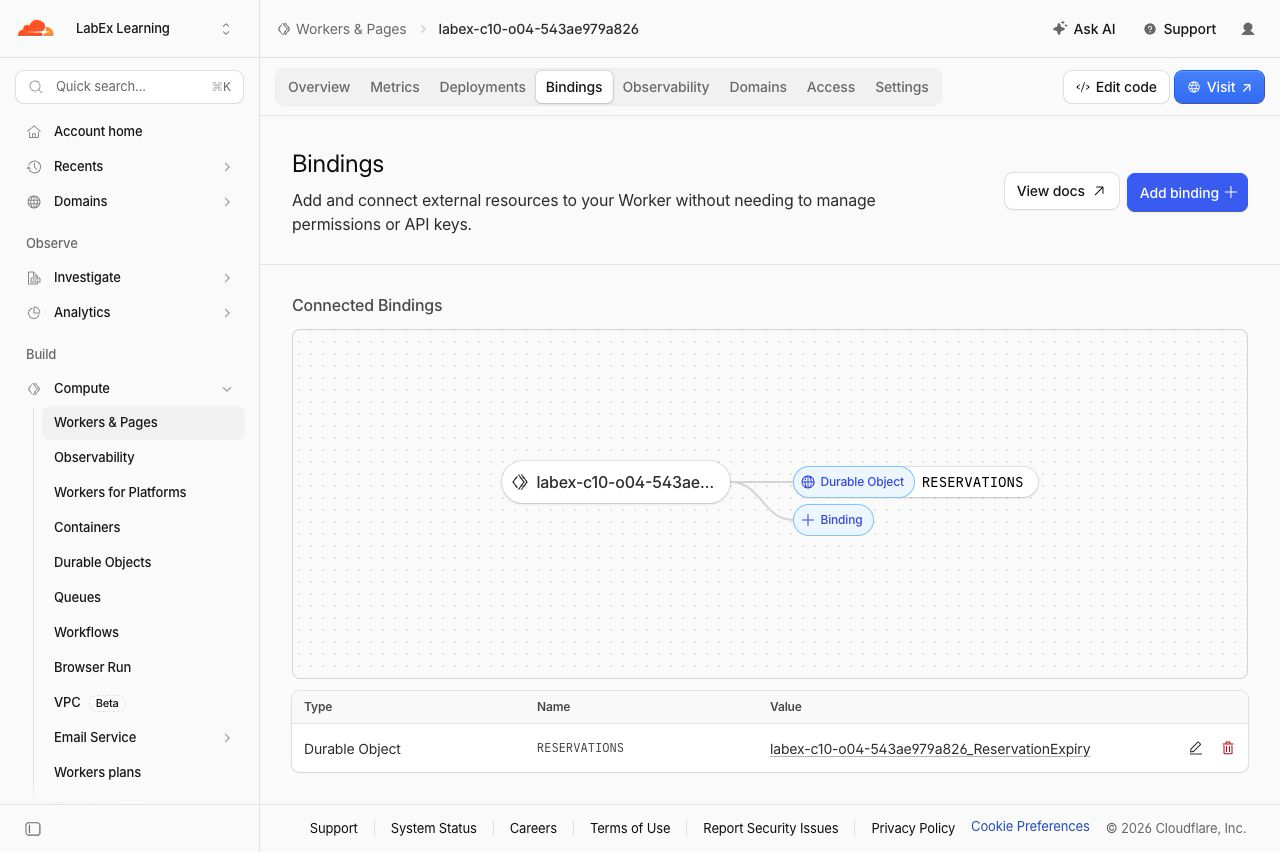
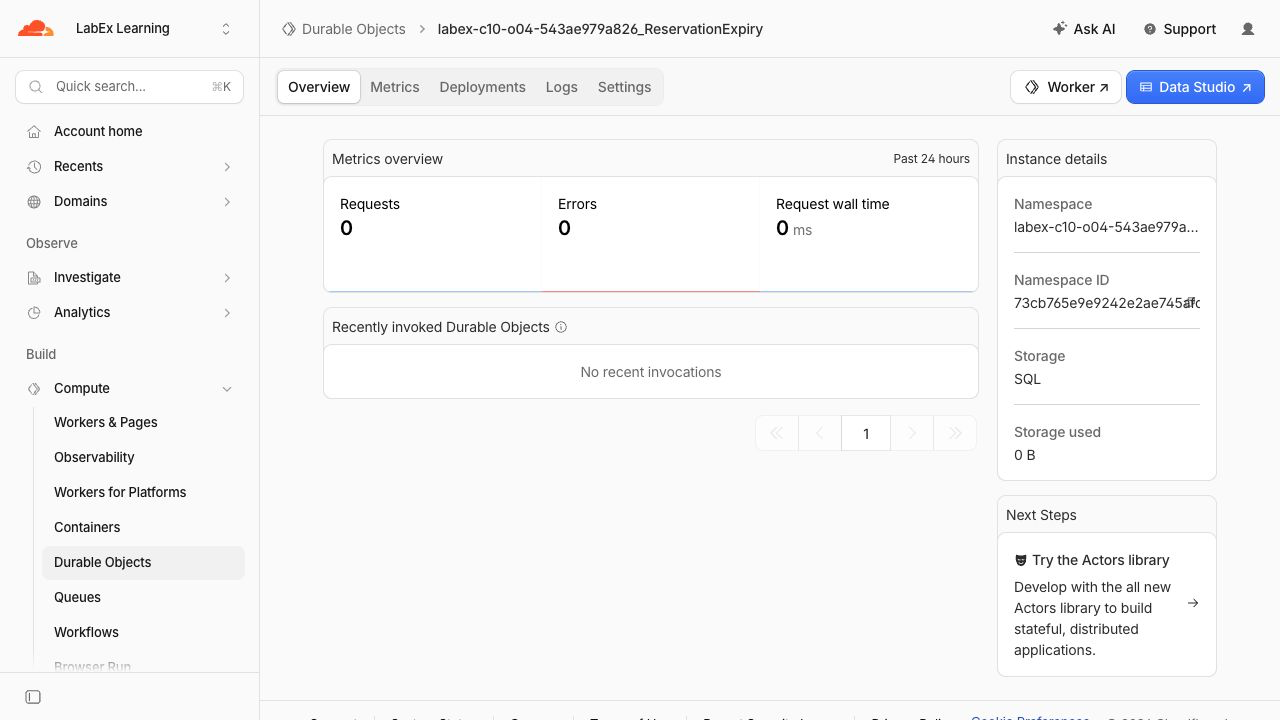
Open Durable Objects, select the namespace associated with the same Worker and confirm it uses SQLite storage. The namespace is the collection of all named reservation objects created by this lab.
Open the namespace's Logs tab and choose a row whose details report eventType: "alarm". The tested event also reports entrypoint: "ReservationExpiry" and outcome: "ok", connecting the scheduled wake-up to the class you wrote. The handler's own retryCount and isRetry log fields can help during failure diagnosis; correctness still comes from durable conditional state, not from assuming a first attempt.
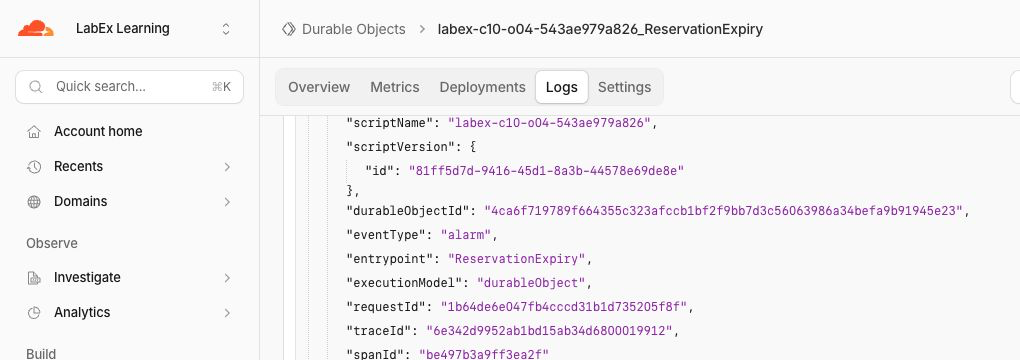
Dashboard data can arrive after the request. The runtime and API checks remain authoritative. These images are orientation aids from the tested disposable run; your suffix, timestamps and traffic totals will differ.
Redeploy unchanged code and prove both states survive:
npx wrangler deploy
APP_URL="$(cat .labex/app-url)"
curl --silent --fail "$APP_URL/reservations/cloud-expiring" | jq
curl --silent --fail "$APP_URL/reservations/cloud-safe" | jq
Delete the Alarm Namespace
In this step, you will delete the exact disposable namespace and Worker while the VM is still authorized. Keeping authorization until the backend check runs lets LabEx distinguish proven deletion from a network or authentication failure.
Confirm that $RUN begins with labex-c10-o04-. Create a stateless cleanup entrypoint:
cat > src/cleanup.js <<'JS'
export default {
  fetch() {
    return Response.json({ status: "cleanup" }, { status: 410 });
  }
};
JS
Create a cleanup configuration for the exact same Worker and account. The state: "deleted" tombstone removes only this lab's class namespace, including its disposable objects and outstanding long alarms:
ACCOUNT_ID="$(node -e 'console.log(JSON.parse(require("fs").readFileSync("wrangler.jsonc", "utf8")).account_id)')"
cat > wrangler.cleanup.jsonc <<JSON
{
  "\$schema": "./node_modules/wrangler/config-schema.json",
  "name": "$RUN",
  "account_id": "$ACCOUNT_ID",
  "main": "src/cleanup.js",
  "compatibility_date": "2026-09-18",
  "workers_dev": true,
  "preview_urls": false,
  "exports": {
    "ReservationExpiry": { "type": "durable-object", "state": "deleted" }
  }
}
JSON
npx wrangler deploy --config wrangler.cleanup.jsonc
The reconciliation output should report Deleted: ReservationExpiry. Delete the remaining stateless Worker. Wrangler asks for confirmation because deletion cannot be undone; confirm only after the displayed name exactly matches your $RUN value:
npx wrangler delete --config wrangler.cleanup.jsonc
At the prompt, type y and press Enter. The command should finish with Successfully deleted followed by your generated Worker name.
Keep this VM authorized for the check at the end of this step. Confirm that Wrangler still reports an authenticated session:
npx wrangler whoami --json | jq '{loggedIn, authType}'
The JSON must contain "loggedIn": true. LabEx can now query the selected account and prove both the Worker and its Durable Object namespace are absent. A network or authentication error is not proof of cleanup.
Revoke This VM's Wrangler Authorization
In this step, you will revoke the OAuth authorization stored only in this fresh VM after cloud-resource deletion has been verified.
wrangler logout removes the local authorization. The structured whoami --json check is important because ordinary human-readable output can be ambiguous; the loggedIn field is the authoritative result:
npx wrangler logout
npx wrangler whoami --json
The final JSON must contain "loggedIn": false. This does not delete or sign out your Cloudflare learning account in the browser; it only prevents this VM from making further authenticated Wrangler requests.
Summary
You built one disposable reservation per named Durable Object and gave each object one persistent alarm. You observed a scheduled expiry survive a local runtime restart, proved a separate reservation stayed valid, and used a conditional SQLite transition to make repeated expiry safe. You repeated the real alarm behavior on Cloudflare, inspected the binding, namespace and logs, verified state across redeployment and removed the exact disposable namespace before logging out.
The reusable design rule is: schedule future work durably, assume it may be attempted again, and store enough state for the effect itself to decide whether it already happened.


