



Introduction
A normal Cloudflare Worker can answer many requests, but one request cannot assume that the next request reaches the same running JavaScript instance. That stateless design is excellent for independent work. It becomes awkward when several requests must agree on one changing value, such as the number of people waiting in a support queue.
A Durable Object gives the application one addressable coordination unit. In this lab, every counter name selects a different object. Requests for support repeatedly reach the same logical counter, while requests for billing reach another counter with separate state. Cloudflare can move or restart the underlying runtime; the stable object identity and SQLite-backed state remain the application contract.
You will connect four ideas:
- A class defines what one counter object can do.
- A namespace is the collection of objects backed by that class.
- A binding gives the front-door Worker access to the namespace.
getByName()turns the same validated name into the same object reference, and an RPC method calls that object's code.
You will build the application, prove name-based routing locally, deploy it to your own Cloudflare learning account, connect terminal evidence to the Dashboard and remove both the class namespace and Worker when finished.
Before starting this course, complete Connect LabEx to Your Cloudflare Account. It teaches the LabEx VM terminal, Wrangler device authorization, account confirmation and account-ID configuration. You should already know how a small JavaScript Worker handles an HTTP request. No previous Durable Objects knowledge is assumed.
Official documentation currently makes SQLite-backed Durable Objects available on Workers Free. This lab creates one disposable class namespace, a few tiny objects and only bounded requests. It does not require Workers Paid. Setup installs Node.js 22.22.0 and project-local Wrangler 4.132.0 in /home/labex/project/named-counters; it does not log in, create cloud state, deploy code or complete the learner implementation.
Authorize the VM and Name the Application
In this step, you will connect this fresh LabEx VM to your Cloudflare learning account and create a unique application configuration. Being signed in to the Dashboard in a browser does not automatically authorize commands inside a new VM.
Enter the prepared project and confirm the pinned Wrangler version:
cd /home/labex/project/named-counters
npx wrangler --version
Expect 4.132.0. Start Wrangler's device authorization flow:
npx wrangler login --device --browser=false
Wrangler prints a URL and a short device code. Open the URL in the browser, enter the code, confirm that the selected account is your dedicated learning account and inspect the requested permissions before authorizing. Background access can appear because Wrangler must continue working after you return to the terminal. Never send a password or token through the terminal.
After the browser reports success, return to the terminal and wait for Wrangler to finish. Ask for structured account information:
npx wrangler whoami --json
Confirm loggedIn: true, then identify the intended account—even when only one account appears. The account name is the human check; the ID is a stable configuration value that does not need to be printed in the terminal.
Save the structured result, display only the non-sensitive account name, and select the matching ID for LabEx Learning:
WHOAMI="$(npx wrangler whoami --json)"
printf '%s\n' "$WHOAMI" | jq '{loggedIn, authType, accounts: [.accounts[] | {name}]}'
ACCOUNT_ID="$(printf '%s\n' "$WHOAMI" | jq -r '.accounts[] | select(.name == "LabEx Learning") | .id')"
test -n "$ACCOUNT_ID"
$(...) captures command output into a shell variable. jq first displays only the account name for confirmation, then privately selects the associated ID. test -n succeeds only when the selected value is nonempty. If your dedicated learning account has a different display name, replace LabEx Learning in the selection expression after confirming that name.
Generate a unique Worker name. openssl rand -hex 6 produces 12 random hexadecimal characters, and $(...) inserts them into the shell variable:
RUN="labex-c10-o01-$(openssl rand -hex 6)"
printf '%s\n' "$RUN"
Create wrangler.jsonc. A configuration file tells Wrangler which code to deploy and which Cloudflare capabilities the runtime should attach. The unquoted JSON marker allows $RUN and $ACCOUNT_ID to expand, while the backslash keeps the $schema key literal.
cat > wrangler.jsonc <<JSON
{
  "\$schema": "./node_modules/wrangler/config-schema.json",
  "name": "$RUN",
  "account_id": "$ACCOUNT_ID",
  "main": "src/index.js",
  "compatibility_date": "2026-09-18",
  "workers_dev": true,
  "preview_urls": false,
  "observability": {
    "enabled": true,
    "head_sampling_rate": 1
  },
  "durable_objects": {
    "bindings": [
      { "name": "COUNTERS", "class_name": "Counter" }
    ]
  },
  "exports": {
    "Counter": { "type": "durable-object", "storage": "sqlite" }
  }
}
JSON
This file describes the application but does not create anything in Cloudflare yet. observability keeps request and application logs for a later Dashboard checkpoint. The Durable Object fields become meaningful in the next step.
Connect a Namespace, Binding and Class
In this step, you will read the Durable Objects configuration as a map of how a request reaches one stateful object, then generate runtime types that expose the binding to your code.
A Durable Object class is the JavaScript blueprint for one object. The Counter class you will write later defines operations such as incrementing and reading a value.
A namespace is the collection of every object backed by that class. One namespace can contain support, billing and many other named counters. The namespace does not mean that those counters share one value; each stable object identity owns separate storage.
A binding is the name used by the front-door Worker to access that namespace. This configuration binds the name COUNTERS to the Counter class. Your code will therefore use env.COUNTERS.
The exports entry declares the current lifecycle state of the class. It tells Cloudflare to create Counter with the SQLite storage backend on the first deployment. SQLite is the recommended backend for new classes and is available on Workers Free. The tiny table in this lab stores only one integer inside each object.
Generate a type description from the configuration:
npx wrangler types
Search the generated file for COUNTERS:
grep -n 'COUNTERS' worker-configuration.d.ts
The line will resemble:
COUNTERS: DurableObjectNamespace<import("./src/index").Counter>;
The exact surrounding generated text can change, but three facts matter: the binding is named COUNTERS, it is a DurableObjectNamespace, and it points to the exported Counter class. Regenerate types whenever a binding changes so configuration and code do not silently drift apart.
Build the Named Counter
In this step, you will implement the Counter class and the front-door Worker that routes a validated URL name to one object.
Every Durable Object has private storage. The constructor creates a one-row table named counter_state and inserts the initial value only when the row does not already exist. blockConcurrencyWhile() delays object requests until this short initialization finishes. It is appropriate for schema setup; it should not wrap every request or external network work.
The public increment() and getCount() methods are RPC methods. RPC, short for remote procedure call, lets the Worker call a method on a Durable Object stub as if it were an asynchronous JavaScript object. Cloudflare carries the call to the selected object.
Create the Worker entrypoint:
cat > src/index.js <<'JS'
import { DurableObject } from "cloudflare:workers";

export class Counter extends DurableObject {
  constructor(ctx, env) {
    super(ctx, env);
    ctx.blockConcurrencyWhile(async () => {
      this.ctx.storage.sql.exec(`
        CREATE TABLE IF NOT EXISTS counter_state (
          key INTEGER PRIMARY KEY CHECK (key = 1),
          value INTEGER NOT NULL
        )
      `);
      this.ctx.storage.sql.exec(
        "INSERT OR IGNORE INTO counter_state (key, value) VALUES (1, 0)"
      );
    });
  }

  increment() {
    return this.ctx.storage.sql
      .exec("UPDATE counter_state SET value = value + 1 WHERE key = 1 RETURNING value")
      .one().value;
  }

  getCount() {
    return this.ctx.storage.sql
      .exec("SELECT value FROM counter_state WHERE key = 1")
      .one().value;
  }
}

function json(data, status = 200) {
  return Response.json(data, { status });
}

function counterName(pathname) {
  const match = pathname.match(/^\/counters\/([^/]+)$/);
  if (!match) return { error: "not_found", status: 404 };

  let name;
  try {
    name = decodeURIComponent(match[1]);
  } catch {
    return { error: "invalid_counter_name", status: 400 };
  }

  if (!/^[a-z][a-z0-9-]{0,31}$/.test(name)) {
    return { error: "invalid_counter_name", status: 400 };
  }
  return { name };
}

export default {
  async fetch(request, env) {
    const url = new URL(request.url);
    if (request.method === "GET" && url.pathname === "/health") {
      return json({ status: "ok" });
    }

    const parsed = counterName(url.pathname);
    if (parsed.error) return json({ error: parsed.error }, parsed.status);
    if (request.method !== "GET" && request.method !== "POST") {
      return json({ error: "method_not_allowed" }, 405);
    }

    const name = parsed.name;
    const stub = env.COUNTERS.getByName(name);
    const count = request.method === "POST"
      ? await stub.increment()
      : await stub.getCount();

    console.log(JSON.stringify({
      event: request.method === "POST" ? "counter_incremented" : "counter_read",
      name,
      count
    }));
    return json({ name, count });
  }
};
JS
The routing line getByName(name) is the identity boundary. The same validated text deterministically selects the same logical object; different text selects another object. The stub is only a reference. The object is created lazily when an RPC call actually reaches it.
Run the supplied deterministic tests. They use a small namespace fixture, so they make no cloud request:
NODE_NO_WARNINGS=1 node --experimental-loader ./test/cloudflare-loader.mjs --test test/worker.test.mjs
The small loader supplies only a local stand-in for the cloudflare:workers base class so Node can import the module; the namespace fixture still controls every tested call, and no Cloudflare API is contacted. Expect three passing tests. Then ask Wrangler to build the Worker without deploying it:
npx wrangler deploy --dry-run
The tests prove the HTTP routing contract, and the dry run proves that Wrangler can bundle the real Durable Object class. Neither action creates a remote namespace.
Prove Stable Names Locally
In this step, you will run the application in the local Workers runtime and use two names to see the routing rule in action before creating a cloud resource.
Start Wrangler on port 8787 in the background. > saves logs, 2>&1 combines errors with ordinary output, and & returns the terminal prompt. $! is the process ID of the command that just started.
npx wrangler dev --port 8787 > .labex/dev.log 2>&1 &
echo $! > .labex/dev.pid
Wait for the health route. The loop tries once per second and stops as soon as the Worker responds:
for attempt in $(seq 1 30); do
  if curl --silent --fail http://127.0.0.1:8787/health; then
    break
  fi
  sleep 1
done
Expect {"status":"ok"}. Increment the support counter twice:
curl --silent --request POST http://127.0.0.1:8787/counters/support | jq
curl --silent --request POST http://127.0.0.1:8787/counters/support | jq
The responses show support moving from 1 to 2:
{
  "name": "support",
  "count": 2
}
Now increment billing once:
curl --silent --request POST http://127.0.0.1:8787/counters/billing | jq
Its count is 1, not 3. A namespace is a collection, while each name selects an isolated object inside that collection.
Read both objects without changing them:
curl --silent http://127.0.0.1:8787/counters/support | jq
curl --silent http://127.0.0.1:8787/counters/billing | jq
The counts remain 2 and 1. Finally, prove that invalid input is rejected before getByName() can select an object:
curl --silent --request POST --write-out '\nHTTP %{http_code}\n' \
  http://127.0.0.1:8787/counters/Not_Allowed
Expect {"error":"invalid_counter_name"} and HTTP 400. The underscore and uppercase letters are outside the documented naming rule.
Deploy and Inspect the Namespace
In this step, you will stop the local runtime, deploy the same application to Cloudflare and connect API behavior to the namespace, binding, metrics and logs visible in the Dashboard.
Stop only the development process whose ID you saved:
kill "$(cat .labex/dev.pid)"
wait "$(cat .labex/dev.pid)" 2>/dev/null || true
Deploy the Worker and its declared SQLite-backed Counter class:
npx wrangler deploy
Wrangler prints a public workers.dev URL and a class reconciliation result. Save the exact URL by replacing the example value:
WORKER_URL="https://YOUR_WORKER_URL"
The edge route can take a short time to become ready. Poll only the health route, which does not touch a Durable Object:
for attempt in $(seq 1 30); do
  if curl --silent --fail "$WORKER_URL/health"; then
    break
  fi
  sleep 2
done
Create two requests for support and one for billing:
curl --silent --request POST "$WORKER_URL/counters/support" | jq
curl --silent --request POST "$WORKER_URL/counters/support" | jq
curl --silent --request POST "$WORKER_URL/counters/billing" | jq
Read the values:
curl --silent "$WORKER_URL/counters/support" | jq
curl --silent "$WORKER_URL/counters/billing" | jq
The remote application must show the same identity contract as the local runtime: support is 2, while billing is 1.
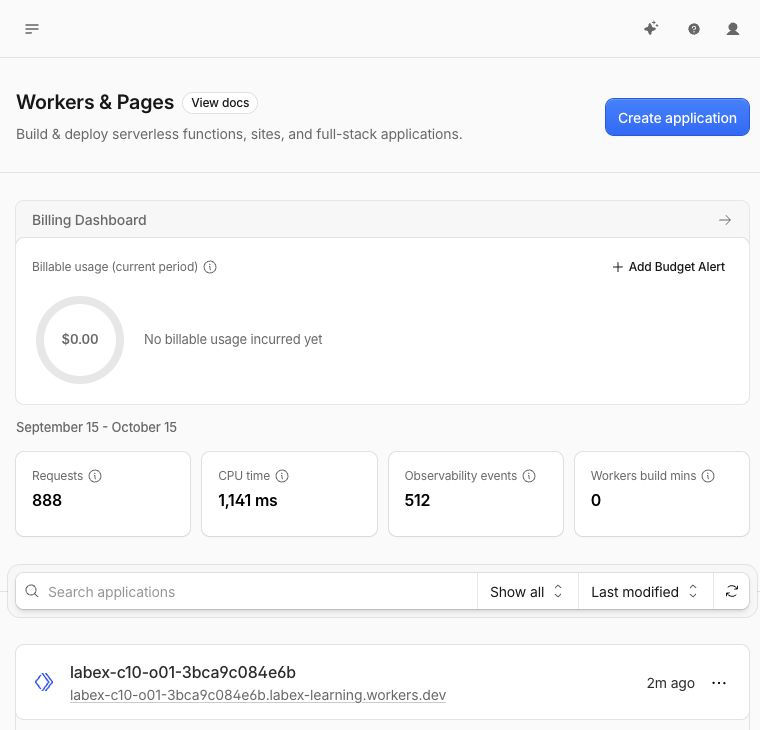
Open Workers & Pages in the Cloudflare Dashboard. Your uniquely named Worker appears in the application list. The Worker name, timestamps and account-wide usage totals in the following screenshot are examples from the tested run; find the labex-c10-o01-... name generated in your own terminal.
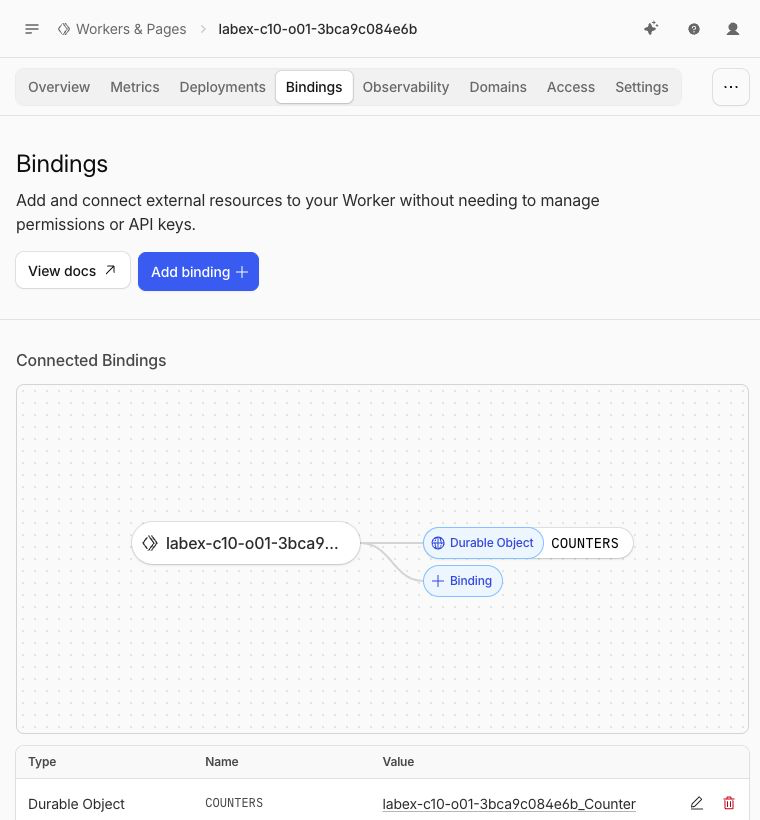
Open the Cloudflare Dashboard and go to Workers & Pages → Overview → your labex-c10-o01-... Worker → Settings → Bindings. Find the Durable Object binding named COUNTERS and its Counter class. The Worker knows the binding name; Cloudflare connects it to the namespace declared by the class export.
The binding diagram should show the Worker connected to a Durable Object through COUNTERS. The run-specific Worker and namespace names in this screenshot are examples; the binding name and relationship are the important parts.
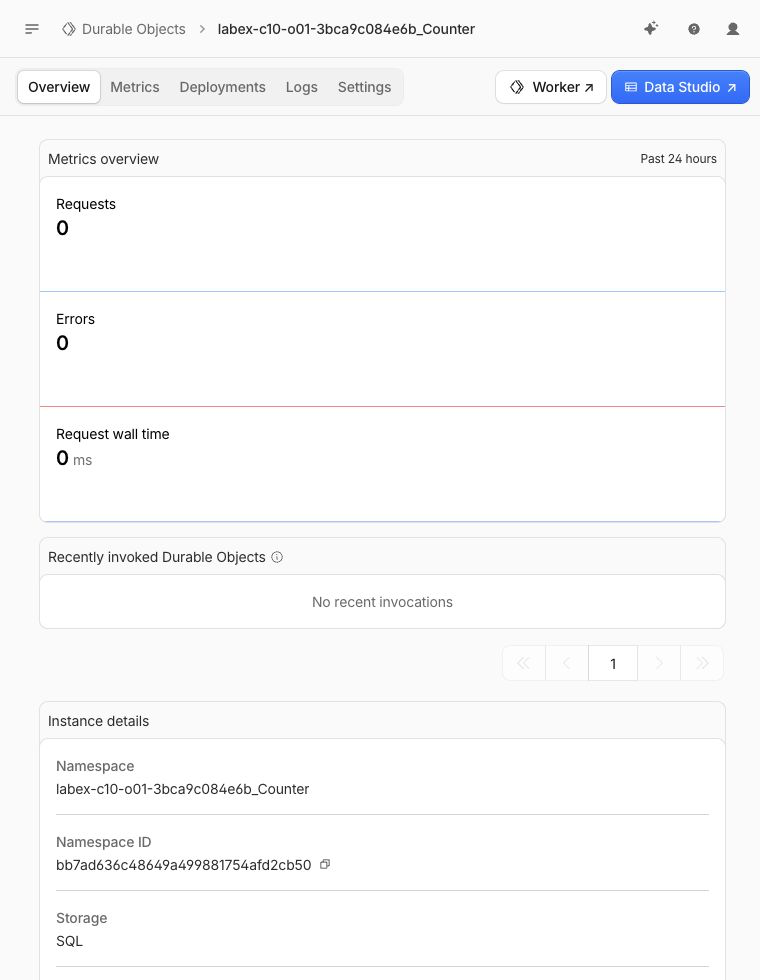
Next open Durable Objects from the Developer Platform navigation. Select the namespace owned by your disposable Worker. Confirm that it uses SQLite storage and that the class is Counter. A namespace is the class-level collection; the names support and billing identify objects inside it.
The namespace overview shows Storage: SQL. Its namespace name and ID belong to the disposable tested run, so your values will differ.
Open the namespace's Metrics view. Recent requests can take time to appear, so a temporarily empty chart is inconclusive. Do not generate a large request loop to force a graph.
The example namespace screenshot still reports zero recent invocations even though the runtime requests passed. This illustrates why delayed Dashboard metrics are supporting context rather than the authoritative functional check.
Return to the Worker and open Observability → Logs. Find a recent counter_incremented or counter_read event. The structured log contains the synthetic counter name and count but no account identifier or credential. Match it to one of the bounded requests above.
Expand one matching event. In the tested run, a verifier-generated name ended at count 2, while the event chart reported successful requests and zero errors. Your synthetic name and totals will differ.
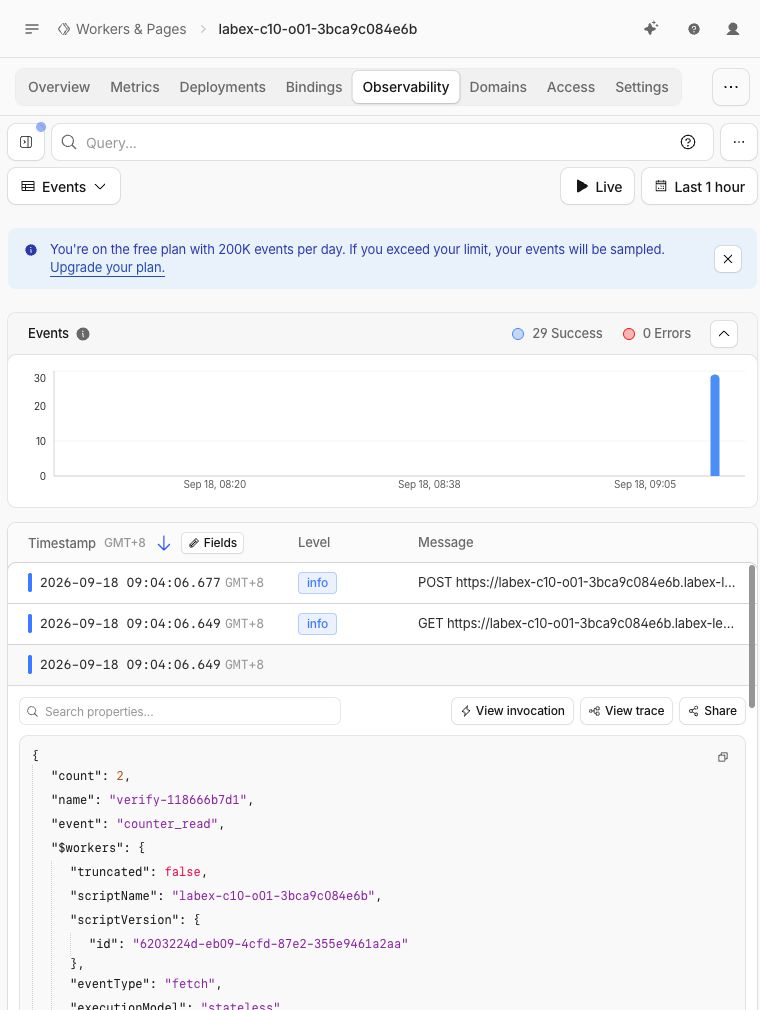
Dashboard values such as Worker names, object IDs, timestamps and request counts are specific to your run. CLI/API/runtime checks remain the authoritative evidence; Dashboard views teach you where those same relationships are visible.
Remove the Namespace and Log Out
In this step, you will deliberately retire the Counter class, delete its namespace and stored data, remove the Worker and then revoke this VM's Wrangler session.
Deleting a Worker script alone is not a clear declaration that stored Durable Object data should disappear. The exports lifecycle uses a deleted tombstone: a short-lived configuration entry that tells Cloudflare to permanently delete one class namespace. This operation has no Trash, so confirm that the class and Worker name belong to this lab.
Create a minimal cleanup entrypoint with no Counter export:
cat > src/cleanup.js <<'JS'
export default {
  fetch() {
    return Response.json({ status: "cleanup" }, { status: 410 });
  }
};
JS
Create a cleanup configuration. It keeps the same Worker name and account, removes the binding and marks only Counter as deleted:
ACCOUNT_ID="$(node -e 'console.log(JSON.parse(require("fs").readFileSync("wrangler.jsonc", "utf8")).account_id)')"
cat > wrangler.cleanup.jsonc <<JSON
{
  "\$schema": "./node_modules/wrangler/config-schema.json",
  "name": "$RUN",
  "account_id": "$ACCOUNT_ID",
  "main": "src/cleanup.js",
  "compatibility_date": "2026-09-18",
  "workers_dev": true,
  "preview_urls": false,
  "exports": {
    "Counter": { "type": "durable-object", "state": "deleted" }
  }
}
JSON
Deploy the tombstone:
npx wrangler deploy --config wrangler.cleanup.jsonc
Read Wrangler's reconciliation output carefully. It should report that Counter was deleted. This permanently removes the class namespace and the tiny values stored by support, billing and the independent verifier.
Now delete the remaining stateless cleanup Worker:
npx wrangler delete --config wrangler.cleanup.jsonc
Confirm only the exact labex-c10-o01-... application. In the Dashboard, check that the exact Worker is absent and the namespace owned by it no longer appears. Historical metrics or logs may remain temporarily and are not active resources.
Run the authenticated deletion check before removing authorization:
python3 .labex/verify.py deleted
Only after it prints PASS: deleted, log out:
npx wrangler logout
npx wrangler whoami --json
The final output must explicitly report loggedIn: false. A network error is not proof of logout.
Summary
You built and operated your first Durable Objects application. You learned that a class defines one object's behavior, a namespace groups objects of that class, a binding exposes the namespace to a Worker and getByName() deterministically selects one logical object. RPC methods changed and read SQLite-backed state, repeated names shared a count, different names stayed isolated, and invalid names were rejected before object selection.
You also connected runtime behavior to the Cloudflare Dashboard, then used a declarative class tombstone to remove the namespace and its data before deleting the Worker and logging out. The next lab will build on this identity model by treating SQLite as an activity log and demonstrating why durable storage differs from temporary in-memory state.


