



Introduction
A live WebSocket connection can last much longer than one JavaScript object in memory. Cloudflare can hibernate a quiet Durable Object: clients stay connected at the network edge, but the object's in-memory fields disappear. A later message wakes a new class instance. This reduces idle duration charges, but it means a plain in-memory map is not a reliable place for a client's name or role.
The Hibernation WebSocket API solves the lifecycle problem in two parts. ctx.acceptWebSocket(server) registers a connection without pinning the object in memory. serializeAttachment() stores a small structured-clone value with that connection; after reconstruction, deserializeAttachment() restores it. ctx.getWebSockets() lets a new constructor enumerate the still-connected sockets.
You will build a room-presence service that attaches a validated client ID, display name and room name to every socket. A controlled reconstruction test will create a new class instance around existing fake sockets and prove that their attachments rebuild the session map. You will also exercise real local and deployed WebSockets, disconnect and reconnect one browser client, and confirm room behavior remains correct. Cloudflare decides when production hibernation occurs, so neither the lesson nor grading pretends to force an eviction on demand.
Before entering this course directly, complete Connect LabEx to Your Cloudflare Account. Every fresh VM needs its own Wrangler authorization. You should already understand named Durable Objects, SQLite-backed state and room-scoped WebSocket broadcasts from O01–O05.
Setup installs Node.js 22.22.0, project-local Wrangler 4.132.0 and a pinned WebSocket client in /home/labex/project/connection-context. It supplies browser and test fixtures, but it does not authorize Cloudflare, implement the Durable Object, accept a socket or deploy a Worker.
Authorize the VM and Declare the Presence Namespace
In this step, you will authorize this fresh VM, select your dedicated learning account and declare one SQLite-backed Durable Object class for presence rooms.
cd /home/labex/project/connection-context
npx wrangler --version
npx wrangler login --device --browser=false
Expect Wrangler 4.132.0. Open the displayed Cloudflare URL in the browser, enter the short code, confirm the intended learning account and authorize it. The browser grants Wrangler access; it never sends your password to the VM.
Read only safe identity fields and create a unique disposable Worker name:
WHOAMI="$(npx wrangler whoami --json)"
printf '%s\n' "$WHOAMI" | jq '{loggedIn, authType, accounts: [.accounts[] | {name}]}'
ACCOUNT_ID="$(printf '%s\n' "$WHOAMI" | jq -r '.accounts[] | select(.name == "LabEx Learning") | .id')"
test -n "$ACCOUNT_ID"
RUN="labex-c10-o06-$(openssl rand -hex 6)"
printf '%s\n' "$RUN" | tee .labex/run-name
cat > wrangler.jsonc <<JSON
{
  "\$schema": "./node_modules/wrangler/config-schema.json",
  "name": "$RUN",
  "account_id": "$ACCOUNT_ID",
  "main": "src/index.js",
  "compatibility_date": "2026-09-18",
  "workers_dev": true,
  "preview_urls": false,
  "observability": { "enabled": true, "head_sampling_rate": 1 },
  "durable_objects": { "bindings": [
    { "name": "PRESENCE", "class_name": "PresenceRoom" }
  ] },
  "exports": {
    "PresenceRoom": { "type": "durable-object", "storage": "sqlite" }
  }
}
JSON
PRESENCE is the Worker's route to room objects. Stable room names keep one room's connections and history separate from another room. The class export gives each room private SQLite storage; no cloud resource exists until deployment.
Implement Hibernation-Safe Connection Context
In this step, you will separate safe connection metadata from the live socket object, then use the Hibernation WebSocket API to restore that metadata whenever Cloudflare constructs a new object instance.
An attachment is a small structured-clone value stored with one WebSocket. It survives hibernation only while that connection stays healthy; durable room history still belongs in SQLite. Create validation and reconstruction helpers:
cat > src/context.js <<'JS'
const TOKEN = /^[a-z0-9](?:[a-z0-9-]{0,30}[a-z0-9])?$/;

export function connectionContext(url) {
  const room = url.pathname.match(/^\/rooms\/([^/]+)\/connect$/)?.[1] ?? "";
  const clientId = url.searchParams.get("clientId") ?? "";
  const displayName = (url.searchParams.get("name") ?? "").trim();
  if (!TOKEN.test(room) || !TOKEN.test(clientId)) return null;
  if (displayName.length < 1 || displayName.length > 32) return null;
  return { room, clientId, displayName };
}

export function validAttachment(value) {
  return Boolean(value && typeof value === "object" && TOKEN.test(value.room) &&
    TOKEN.test(value.clientId) && typeof value.displayName === "string" &&
    value.displayName.length >= 1 && value.displayName.length <= 32);
}

export function restoreSessions(sockets) {
  const sessions = new Map();
  for (const socket of sockets) {
    const attachment = socket.deserializeAttachment();
    if (validAttachment(attachment)) sessions.set(socket, attachment);
  }
  return sessions;
}
JS
Create the Durable Object and front-door Worker:
cat > src/index.js <<'JS'
import { DurableObject } from "cloudflare:workers";
import { connectionContext, restoreSessions } from "./context.js";

const json = (body, status = 200) => Response.json(body, { status });

export class PresenceRoom extends DurableObject {
  constructor(ctx, env) {
    super(ctx, env);
    this.sessions = restoreSessions(ctx.getWebSockets());
    this.ctx.blockConcurrencyWhile(async () => {
      this.ctx.storage.sql.exec(`
        CREATE TABLE IF NOT EXISTS announcements (
          sequence INTEGER PRIMARY KEY AUTOINCREMENT,
          client_id TEXT NOT NULL,
          display_name TEXT NOT NULL,
          text TEXT NOT NULL
        )
      `);
    });
  }

  async fetch(request) {
    const context = connectionContext(new URL(request.url));
    if (!context) return json({ error: "invalid_connection_context" }, 400);
    if ((request.headers.get("Upgrade") || "").toLowerCase() !== "websocket") {
      return json({ error: "websocket_upgrade_required" }, 426);
    }
    const pair = new WebSocketPair();
    const [client, server] = Object.values(pair);
    this.ctx.acceptWebSocket(server, [`room:${context.room}`]);
    server.serializeAttachment(context);
    this.sessions.set(server, context);
    server.send(JSON.stringify({ type: "ready", context, connected: this.sessions.size }));
    return new Response(null, { status: 101, webSocket: client });
  }

  webSocketMessage(socket, raw) {
    const context = socket.deserializeAttachment();
    if (!context || !this.sessions.has(socket)) {
      socket.send(JSON.stringify({ type: "error", code: "missing_context" }));
      return;
    }
    let message;
    try { message = JSON.parse(raw); } catch { message = null; }
    const text = typeof message?.text === "string" ? message.text.trim() : "";
    if (message?.type !== "announce" || text.length < 1 || text.length > 80 || Object.keys(message).length !== 2) {
      socket.send(JSON.stringify({ type: "error", code: "invalid_message" }));
      return;
    }
    const row = this.ctx.storage.sql.exec(`
      INSERT INTO announcements (client_id, display_name, text)
      VALUES (?, ?, ?) RETURNING sequence
    `, context.clientId, context.displayName, text).one();
    const update = JSON.stringify({ type: "announcement", sequence: row.sequence,
      clientId: context.clientId, displayName: context.displayName, text });
    for (const peer of this.ctx.getWebSockets(`room:${context.room}`)) peer.send(update);
    console.log(JSON.stringify({ event: "presence_announcement", sequence: row.sequence,
      clientId: context.clientId, connected: this.ctx.getWebSockets().length }));
  }

  webSocketClose(socket) {
    this.sessions.delete(socket);
  }

  async getState() {
    const announcements = this.ctx.storage.sql.exec(`
      SELECT sequence, client_id AS clientId, display_name AS displayName, text
      FROM announcements ORDER BY sequence
    `).toArray();
    return { messageCount: announcements.length, announcements };
  }
}

export default {
  async fetch(request, env) {
    const url = new URL(request.url);
    const match = url.pathname.match(/^\/rooms\/([^/]+)\/(connect|state)$/);
    if (!match) return json({ error: "not_found" }, 404);
    const room = match[1];
    if (match[2] === "connect") return env.PRESENCE.getByName(room).fetch(request);
    if (request.method !== "GET") return json({ error: "method_not_allowed" }, 405);
    return json({ room, ...await env.PRESENCE.getByName(room).getState() });
  }
};
JS
ctx.acceptWebSocket() replaces server.accept() and event listeners. Messages now arrive through the class-level webSocketMessage() handler. The constructor rebuilds sessions from runtime-owned sockets and their attachments; it does not assume the previous JavaScript Map survived.
Prove Context Reconstruction Without Pretending to Force Eviction
In this step, you will test the reconstruction boundary directly. Cloudflare chooses when an idle production object hibernates, so a deterministic lab should not wait for or claim a forced eviction. Instead, a fresh PresenceRoom instance receives fake runtime-owned sockets whose attachments were written by an earlier instance.
cat > test/context.test.mjs <<'JS'
import test from "node:test";
import assert from "node:assert/strict";
import { connectionContext, restoreSessions, validAttachment } from "../src/context.js";
import { PresenceRoom } from "../src/index.js";

const attachment = (room, clientId, displayName) => ({ room, clientId, displayName });
const socket = value => ({ deserializeAttachment: () => value });

test("connection input becomes a bounded attachment", () => {
  const url = new URL("https://example.test/rooms/planning/connect?clientId=alice-1&name=Alice");
  assert.deepEqual(connectionContext(url), attachment("planning", "alice-1", "Alice"));
  assert.equal(connectionContext(new URL("https://example.test/rooms/Bad!/connect?clientId=a&name=A")), null);
});

test("attachment validation rejects incomplete context", () => {
  assert.equal(validAttachment(attachment("planning", "alice-1", "Alice")), true);
  assert.equal(validAttachment({ room: "planning", clientId: "alice-1" }), false);
});

test("controlled reconstruction restores only valid socket context", () => {
  const alice = socket(attachment("planning", "alice-1", "Alice"));
  const bob = socket(attachment("planning", "bob-1", "Bob"));
  const broken = socket(null);
  const restored = restoreSessions([alice, bob, broken]);
  assert.equal(restored.size, 2);
  assert.equal(restored.get(alice).displayName, "Alice");
  assert.equal(restored.get(bob).clientId, "bob-1");
});

test("a new Durable Object constructor rebuilds its session map", () => {
  const sockets = [socket(attachment("planning", "alice-1", "Alice")), socket(attachment("planning", "bob-1", "Bob"))];
  const ctx = {
    getWebSockets: () => sockets,
    blockConcurrencyWhile: fn => fn(),
    storage: { sql: { exec: () => ({}) } }
  };
  const room = new PresenceRoom(ctx, {});
  assert.equal(room.sessions.size, 2);
  assert.deepEqual([...room.sessions.values()].map(value => value.displayName), ["Alice", "Bob"]);
});
JS
npm test
Expect four passing tests. These tests establish that the code can reconstruct context from attachments. Later live checks establish real socket behavior, but neither one is mislabeled as proof that a particular production object was evicted on demand.
Reconnect a Client and Keep Room Behavior
In this step, you will exercise real local sockets. Reconnection creates a new socket and therefore a new attachment, while durable announcements stay in SQLite.
cat > tools/reconnect.mjs <<'JS'
import WebSocket from "ws";
const [base, prefix] = process.argv.slice(2);
const wsBase = base.replace(/^http/, "ws");
const room = `${prefix}-planning`, other = `${prefix}-support`;
const open = (roomName, id, name) => new Promise((resolve, reject) => {
  const ws = new WebSocket(`${wsBase}/rooms/${roomName}/connect?clientId=${id}&name=${encodeURIComponent(name)}`);
  const inbox = [];
  ws.on("message", raw => { const value = JSON.parse(raw); inbox.push(value); if (value.type === "ready") resolve({ ws, inbox, ready: value }); });
  ws.on("error", reject);
});
const waitFor = (client, predicate) => new Promise((resolve, reject) => {
  const timer = setTimeout(() => reject(new Error("message timeout")), 5000);
  const check = value => { if (predicate(value)) { clearTimeout(timer); client.ws.off("message", listener); resolve(value); } };
  const listener = raw => check(JSON.parse(raw)); client.ws.on("message", listener); client.inbox.forEach(check);
});
const close = client => new Promise(resolve => { client.ws.once("close", resolve); client.ws.close(1000, "reconnect"); });
const alice = await open(room, `${prefix}-alice`, "Alice");
const bob = await open(room, `${prefix}-bob`, "Bob");
const carol = await open(other, `${prefix}-carol`, "Carol");
alice.ws.send(JSON.stringify({ type: "announce", text: "First update" }));
await Promise.all([waitFor(alice, x => x.sequence === 1), waitFor(bob, x => x.sequence === 1)]);
await close(alice);
const reconnected = await open(room, `${prefix}-alice`, "Alice");
reconnected.ws.send(JSON.stringify({ type: "announce", text: "Back online" }));
const [again, peer] = await Promise.all([waitFor(reconnected, x => x.sequence === 2), waitFor(bob, x => x.sequence === 2)]);
await new Promise(resolve => setTimeout(resolve, 300));
const state = await fetch(`${base}/rooms/${room}/state`).then(r => r.json());
const otherState = await fetch(`${base}/rooms/${other}/state`).then(r => r.json());
console.log(JSON.stringify({ restoredName: again.displayName, peerName: peer.displayName,
  otherAnnouncements: carol.inbox.filter(x => x.type === "announcement").length, state, otherState }, null, 2));
await Promise.all([reconnected, bob, carol].map(close));
JS
rm -f .labex/local.json .labex/dev.log .labex/dev.pid
mkdir -p .labex/local-state
npx wrangler dev --local --ip 127.0.0.1 --port 8787 --persist-to .labex/local-state > .labex/dev.log 2>&1 &
echo $! > .labex/dev.pid
for attempt in $(seq 1 30); do
  LOCAL_READY="$(curl --silent http://127.0.0.1:8787/rooms/probe/state || true)"
  test "$(jq -r '.messageCount // -1' <<<"$LOCAL_READY" 2>/dev/null)" = 0 && break
  sleep 1
done
test "$(jq -r .messageCount <<<"$LOCAL_READY")" = 0
sleep 2
node tools/reconnect.mjs http://127.0.0.1:8787 local | tee .labex/local.json
Alice reconnects with a fresh socket, yet her second message still carries displayName: Alice; Bob receives it and Carol remains isolated. The room's two durable announcements show that socket lifetime and room-history lifetime are different.
Deploy and Repeat the Reconnect Contract
In this step, you will stop the exact local job, deploy, wait for the real stateful route and repeat the live client contract with unique cloud rooms:
kill "$(cat .labex/dev.pid)"
wait "$(cat .labex/dev.pid)" 2>/dev/null || true
rm -f .labex/cloud.json .labex/deploy.log .labex/app-url
npx wrangler deploy | tee .labex/deploy.log
APP_URL="$(grep -Eo 'https://[^ ]+\.workers\.dev' .labex/deploy.log | tail -1)"
test -n "$APP_URL"
printf '%s\n' "$APP_URL" | tee .labex/app-url
for attempt in $(seq 1 30); do READY="$(curl --silent "$APP_URL/rooms/cloud-probe/state" || true)"; test "$(jq -r '.messageCount // -1' <<<"$READY" 2>/dev/null)" = 0 && break; sleep 2; done
test "$(jq -r .messageCount <<<"$READY")" = 0
sleep 5
node tools/reconnect.mjs "$APP_URL" cloud | tee .labex/cloud.json
The same outcome on Cloudflare proves the deployed service uses its serialized attachment after each connection is accepted and after Alice reconnects. It does not claim the platform happened to hibernate during this bounded run.
Inspect the Hibernation-Compatible Deployment
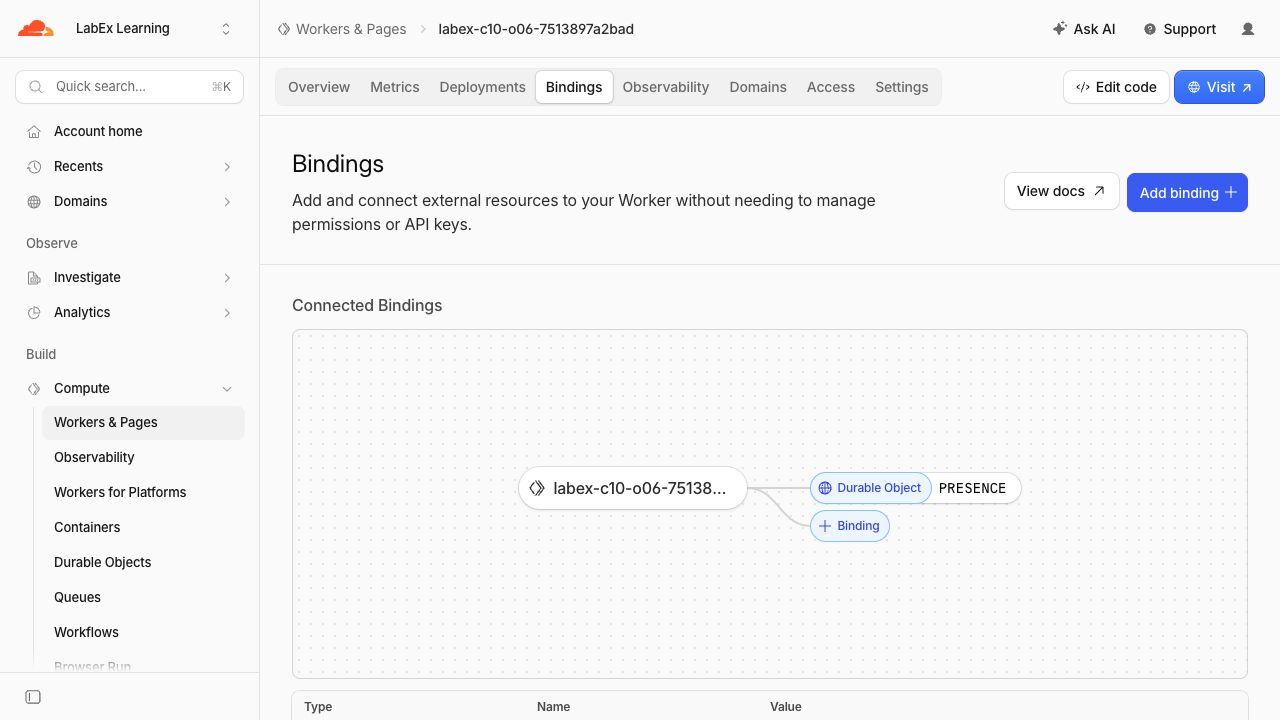
In this step, you will connect runtime evidence to the Cloudflare Dashboard and an unchanged redeployment. Open Workers & Pages, select the exact name in .labex/run-name, and open Bindings. PRESENCE should point to PresenceRoom.
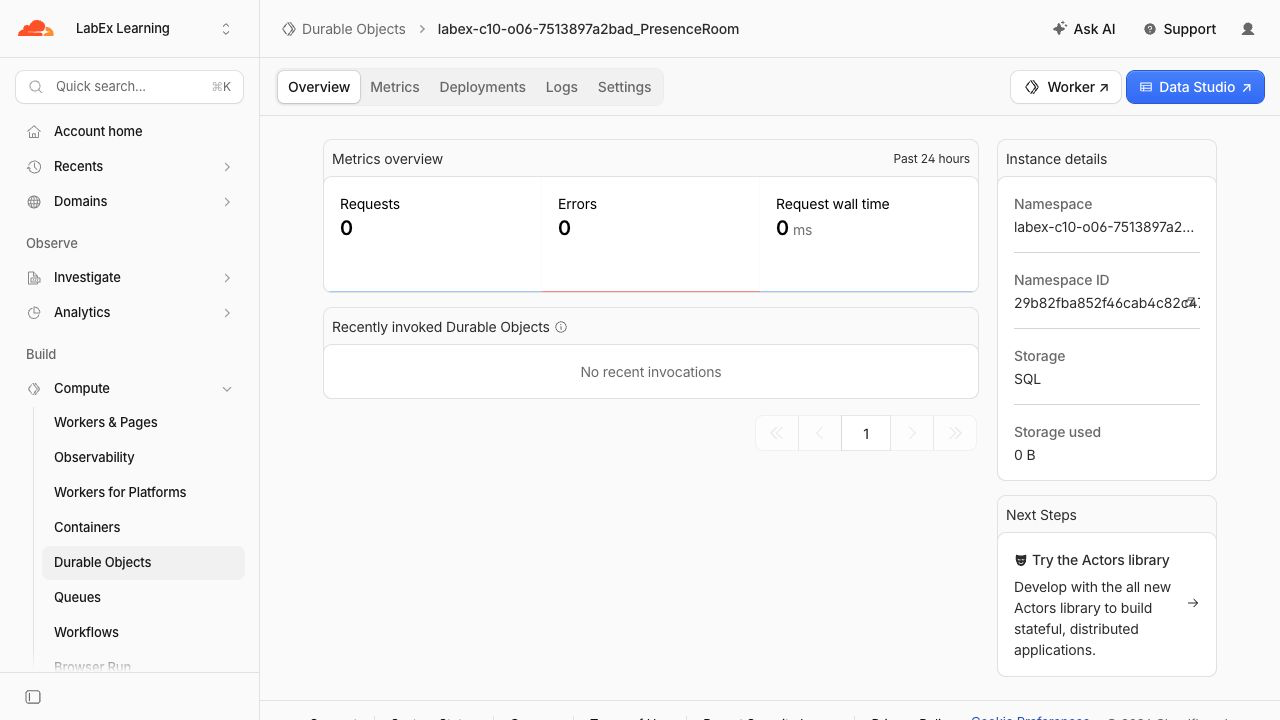
Open Durable Objects, select <your-worker>_PresenceRoom, and confirm Storage: SQL. This page identifies the class namespace; it does not expose attachment values.
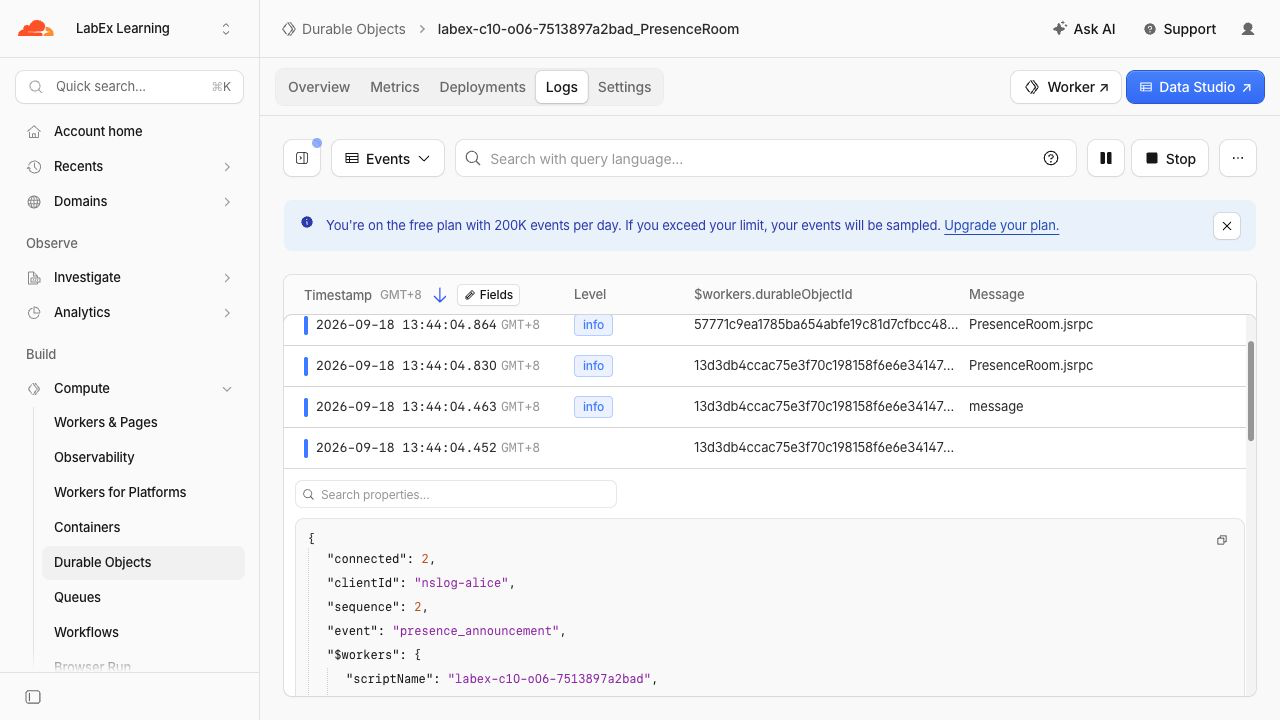
Open Logs and inspect a successful presence_announcement row. It contains a synthetic client ID and sequence but not the announcement text. Dashboard traffic can arrive later than the response, so the live client and backend checks remain authoritative.
Redeploy unchanged code and read the same cloud rooms:
npx wrangler deploy
APP_URL="$(cat .labex/app-url)"
curl --silent --fail "$APP_URL/rooms/cloud-planning/state" | jq
curl --silent --fail "$APP_URL/rooms/cloud-support/state" | jq
The planning room still contains both announcements and support remains empty. Redeployment proves durable history survives a new Worker version; the controlled constructor test separately proves attachment reconstruction.
Delete the Presence Namespace
In this step, you will delete only this lab's generated Worker and namespace while the VM is still authorized:
RUN="$(cat .labex/run-name)"
case "$RUN" in labex-c10-o06-*) ;; *) echo "Unexpected Worker name" >&2; exit 1;; esac
cat > src/cleanup.js <<'JS'
export default { fetch() { return Response.json({ status: "cleanup" }, { status: 410 }); } };
JS
ACCOUNT_ID="$(node -e 'console.log(JSON.parse(require("fs").readFileSync("wrangler.jsonc", "utf8")).account_id)')"
cat > wrangler.cleanup.jsonc <<JSON
{
  "\$schema": "./node_modules/wrangler/config-schema.json",
  "name": "$RUN",
  "account_id": "$ACCOUNT_ID",
  "main": "src/cleanup.js",
  "compatibility_date": "2026-09-18",
  "workers_dev": true,
  "preview_urls": false,
  "exports": { "PresenceRoom": { "type": "durable-object", "state": "deleted" } }
}
JSON
npx wrangler deploy --config wrangler.cleanup.jsonc
npx wrangler delete --config wrangler.cleanup.jsonc
Confirm the prompt displays your exact $RUN, type y, and expect Successfully deleted. Keep the VM authorized for the check below:
npx wrangler whoami --json | jq '{loggedIn, authType}'
The JSON must contain "loggedIn": true; authentication or network failure is not proof of deletion.
Revoke This VM's Wrangler Authorization
In this step, you will remove only this VM's OAuth authorization after deletion is independently verified:
npx wrangler logout
npx wrangler whoami --json
The final JSON must contain "loggedIn": false. Your learning account remains signed in to the browser.
Summary
You replaced ordinary accepted sockets with the Hibernation WebSocket API, stored bounded client context in serialized attachments and rebuilt an in-memory session map from runtime-owned sockets. A controlled fresh-instance test proved reconstruction without pretending to force production eviction. Real local and cloud clients then disconnected, reconnected and preserved room behavior while SQLite retained durable announcements. Finally, you inspected the deployment and removed the exact disposable resources before logging out.


