



Introduction
An AI model can be temporarily unavailable, overloaded or given input it cannot understand. A fallback gives an application one planned alternative instead of returning an immediate error. A useful fallback is bounded: it has a short ordered list and a clear stopping point. It must not retry forever or call every model after the first success.
You will deploy a small Cloudflare Worker with two paths. The fallback path deliberately sends chat-shaped input to an embedding model, catches that predictable incompatibility, and then calls one chat model. The healthy path calls a compatible primary chat model and stops. Every attempt travels through the same AI Gateway, so its logs explain which model failed and which model completed the request.
If you entered this course directly, first complete Connect LabEx to Your Cloudflare Account. It teaches the LabEx terminal, Wrangler device authorization, account selection and account ID. Complete Route Inference Through a Gateway first as well, because this lab builds on its gateway and Workers AI concepts.
The lab uses Cloudflare-hosted Workers AI models and the Workers AI binding. It does not need Workers Paid, an external provider key or the deprecated Universal Endpoint. The controlled failed attempt is rejected before inference, and each successful path generates only a short reply. Stop instead of repeatedly retrying if the shared daily Workers AI allocation is unavailable.
Setup installs Node.js 22.22.0 and project-local Wrangler 4.132.0 in /home/labex/project/ai-gateway-fallback. It prepares independent checks, but it does not authorize Wrangler, create cloud resources, deploy a Worker or send model traffic. LabEx destroys the VM after the lab; you will still delete the remote Worker, gateway and API token because destroying a VM does not remove cloud resources.
Authorize the VM and Name the Recovery Path
Each lab starts in a fresh VM. In this step, you will authorize Wrangler to use your learning account and save unique names for one gateway, one Worker and one temporary token.
cd /home/labex/project/ai-gateway-fallback
npx wrangler --version
npx wrangler login --device --browser=false
Open the displayed link, enter its code and authorize the intended learning account. Wrangler requests the Worker deployment and Workers AI permissions needed later in this lab; review the displayed account before approving. Then inspect structured identity data:
npx wrangler whoami --json
Expect Wrangler 4.132.0 and loggedIn: true. Replace YOUR_ACCOUNT_ID with the actual 32-character ID shown for the intended account:
GATEWAY_ID="labex-c09-g05-$(openssl rand -hex 6)"
WORKER_NAME="${GATEWAY_ID/g05/g05-worker}"
TOKEN_NAME="$GATEWAY_ID-token"
cat > .labex/state.json <<JSON
{
  "accountId": "YOUR_ACCOUNT_ID",
  "gatewayId": "$GATEWAY_ID",
  "workerName": "$WORKER_NAME",
  "tokenName": "$TOKEN_NAME"
}
JSON
cat .labex/state.json
These identifiers are not secrets. Recording them makes later verification and cleanup target only this lab's resources.
Create an Observable AI Gateway
In this step, you will create the shared checkpoint that records both model routes.
An AI Gateway is a named checkpoint between an application and model calls. It gives several attempts one place for logs and metadata, even when the application changes models.
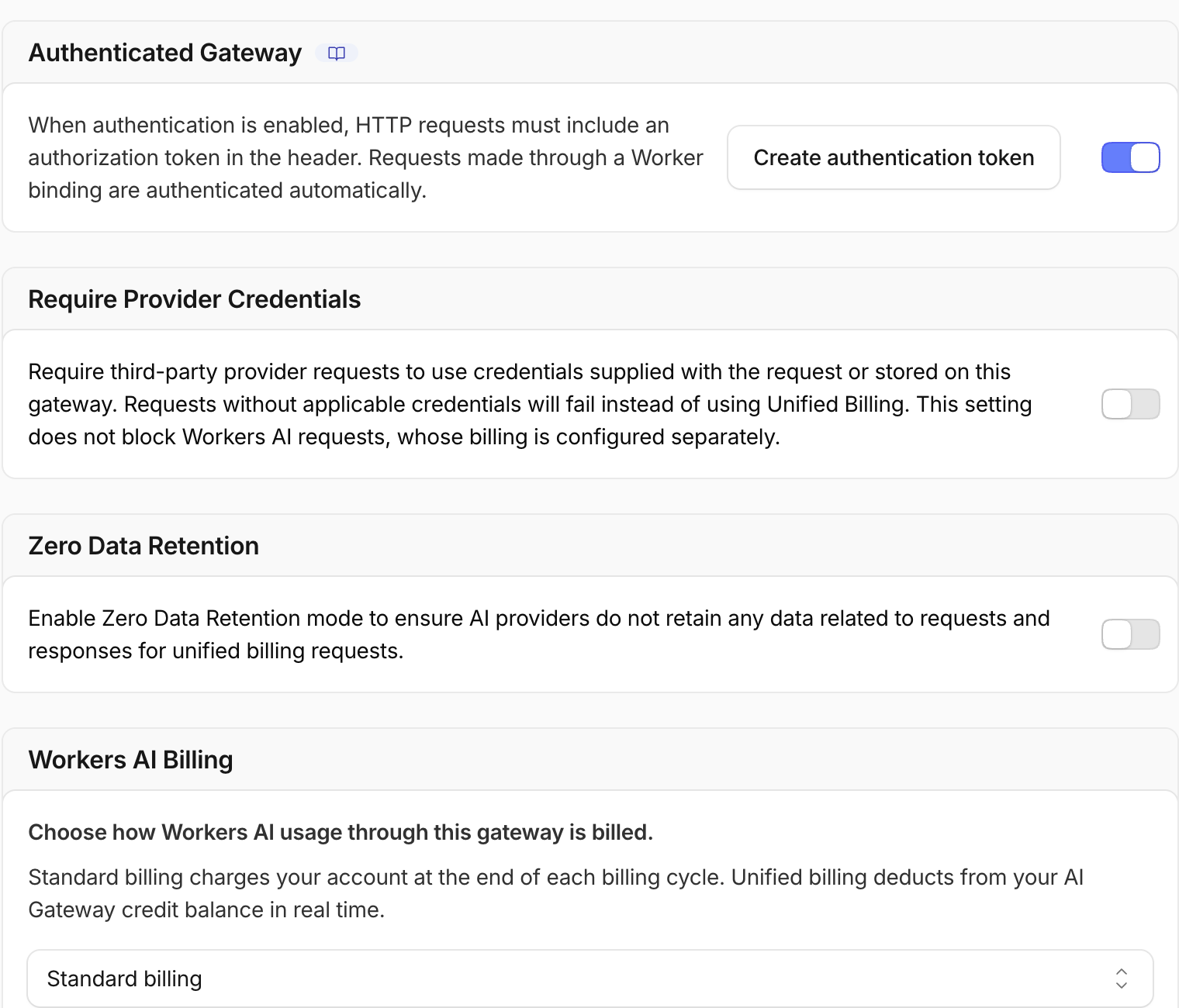
Open the Cloudflare Dashboard and choose AI → AI Gateway → Create a custom gateway. Use the saved gatewayId. Keep Collect Logs and Authenticated Gateway enabled. Keep caching, rate limits, retries and spend limits off, and keep Workers AI billing on Standard. Then create the gateway.
Open My Profile → API Tokens, choose Create Token → Create Custom Token, and use the saved tokenName. Add account permissions AI Gateway — Edit and AI Gateway — Run, limited to the intended learning account. This temporary token lets the lab read and later delete only its gateway; the deployed Worker's AI binding does not embed it.
After creating the token, copy only the value after Bearer from Cloudflare's one-time verification command and store it with hidden input:
bash -c '
while :; do
  read -ersp "Paste the AI Gateway token: " GATEWAY_TOKEN
  printf "\n"
  [ -n "$GATEWAY_TOKEN" ] && break
  printf "Token cannot be empty; paste it again.\n" >&2
done
umask 077
printf "%s" "$GATEWAY_TOKEN" > .labex/gateway-token
unset GATEWAY_TOKEN
chmod 600 .labex/gateway-token
'
Read back only the important nonsecret settings:
ACCOUNT_ID=$(node -p 'JSON.parse(require("fs").readFileSync(".labex/state.json")).accountId')
GATEWAY_ID=$(node -p 'JSON.parse(require("fs").readFileSync(".labex/state.json")).gatewayId')
GATEWAY_TOKEN=$(cat .labex/gateway-token)
curl --http1.1 -fsS -H "Authorization: Bearer $GATEWAY_TOKEN" \
  "https://api.cloudflare.com/client/v4/accounts/$ACCOUNT_ID/ai-gateway/gateways/$GATEWAY_ID" \
  > .labex/gateway.json
unset GATEWAY_TOKEN
node -e 'const g=require("./.labex/gateway.json").result; console.log({id:g.id,collect_logs:g.collect_logs,authentication:g.authentication})'
Expect the saved gateway ID with both values set to true.
Define a Two-Attempt Worker
In this step, you will write the recovery policy in ordinary Worker code. The policy has two explicit calls instead of a loop, so its maximum cost and latency are easy to see.
The first fallback-path call uses an embedding model. Embedding models turn text into number vectors; they do not accept chat messages. Supplying chat-shaped input creates a safe, deterministic compatibility failure before inference. The catch block records that failure and makes one call to a compatible chat model.
GATEWAY_ID=$(node -p 'JSON.parse(require("fs").readFileSync(".labex/state.json")).gatewayId')
WORKER_NAME=$(node -p 'JSON.parse(require("fs").readFileSync(".labex/state.json")).workerName')
cat > wrangler.jsonc <<JSON
{
  "name": "$WORKER_NAME",
  "main": "src/index.js",
  "compatibility_date": "2026-09-17",
  "ai": { "binding": "AI" }
}
JSON
cat > src/index.js <<JS
export default {
  async fetch(request, env) {
    const healthy = new URL(request.url).pathname === "/healthy";
    const attempts = [];
    const gateway = {
      gateway: {
        id: "$GATEWAY_ID",
        metadata: {
          lab: "g05-fallback",
          mode: healthy ? "healthy" : "fallback",
          synthetic: true
        }
      }
    };

    if (!healthy) {
      try {
        await env.AI.run(
          "@cf/baai/bge-small-en-v1.5",
          { messages: [{ role: "user", content: "Reply with ROUTE OK" }] },
          gateway
        );
        attempts.push({ model: "@cf/baai/bge-small-en-v1.5", status: "unexpected-success" });
      } catch (error) {
        attempts.push({
          model: "@cf/baai/bge-small-en-v1.5",
          status: "failed",
          reason: String(error).slice(0, 180)
        });
      }
    }

    const selectedModel = healthy
      ? "@cf/meta/llama-3.3-70b-instruct-fp8-fast"
      : "@cf/meta/llama-3.2-3b-instruct";
    const result = await env.AI.run(
      selectedModel,
      { prompt: "Reply with exactly: ROUTE OK", max_tokens: 12 },
      gateway
    );
    attempts.push({ model: selectedModel, status: "succeeded" });

    return Response.json({
      mode: healthy ? "healthy-primary" : "fallback-recovery",
      usedFallback: !healthy,
      selectedModel,
      attempts,
      response: result.response
    });
  }
};
JS
npx wrangler deploy --dry-run
The AI binding gives the Worker direct access to Workers AI. The gateway option routes each call through the saved gateway and attaches only synthetic metadata—never a prompt, credential or person identifier.
Deploy and Exercise the Fallback Path
In this step, you will deploy the Worker and trigger the controlled recovery case once.
Deploy the Worker and save Wrangler's output so the test uses the exact URL assigned to your account:
npx wrangler deploy 2>&1 | tee .labex/deploy-output.txt
WORKER_URL=$(grep -Eo 'https://[^ ]+\.workers\.dev' .labex/deploy-output.txt | tail -1)
printf '%s\n' "$WORKER_URL" | tee .labex/worker-url.txt
The workers.dev route can take a few seconds to propagate after a successful deployment. Poll the URL without sending extra model traffic: a 404 is only the not-yet-ready edge route, and the loop stops at the first 200 response.
WORKER_URL=$(cat .labex/worker-url.txt)
for attempt in $(seq 1 12); do
  STATUS=$(curl --http1.1 -sS -o .labex/fallback-response.json -w '%{http_code}' "$WORKER_URL/fallback")
  printf 'attempt %s: HTTP %s\n' "$attempt" "$STATUS"
  [ "$STATUS" = 200 ] && break
  [ "$attempt" -eq 12 ] && exit 1
  sleep 5
done
python3 -m json.tool < .labex/fallback-response.json
Expect usedFallback: true, two attempts, the embedding model marked failed, and @cf/meta/llama-3.2-3b-instruct marked succeeded. The generated wording is not graded exactly; the route decision is.
Prove a Healthy Primary Stops Early
In this step, you will show that a successful primary model prevents an unnecessary fallback call.
A fallback is correct only if it stays out of the way when the primary path works. The /healthy path starts with a compatible chat model, so it should produce one attempt and stop.
WORKER_URL=$(cat .labex/worker-url.txt)
curl --http1.1 -fsS "$WORKER_URL/healthy" \
  | tee .labex/healthy-response.json \
  | python3 -m json.tool
Expect usedFallback: false, @cf/meta/llama-3.3-70b-instruct-fp8-fast as selectedModel, and exactly one successful attempt. This is the short-circuit behavior: success ends the route immediately.
Read the Route from Gateway Logs
In this step, you will connect the Worker's JSON results to independent AI Gateway evidence.
The Worker response describes application behavior. AI Gateway logs provide independent provider-side evidence. Logs may take a few seconds to appear, so wait briefly and print only fields relevant to routing:
sleep 8
ACCOUNT_ID=$(node -p 'JSON.parse(require("fs").readFileSync(".labex/state.json")).accountId')
GATEWAY_ID=$(node -p 'JSON.parse(require("fs").readFileSync(".labex/state.json")).gatewayId')
GATEWAY_TOKEN=$(cat .labex/gateway-token)
curl --http1.1 -fsS -H "Authorization: Bearer $GATEWAY_TOKEN" \
  "https://api.cloudflare.com/client/v4/accounts/$ACCOUNT_ID/ai-gateway/gateways/$GATEWAY_ID/logs?per_page=50" \
  > .labex/logs.json
unset GATEWAY_TOKEN
node - <<'NODE'
const rows=require('./.labex/logs.json').result||[];
const meta=row=>{try{return typeof row.metadata==='string'?JSON.parse(row.metadata):(row.metadata||{})}catch{return {}}};
console.table(rows.filter(row=>meta(row).lab==='g05-fallback').map(row=>({
  mode:meta(row).mode, model:row.model, success:row.success, status:row.status_code
})));
NODE
Open the gateway's Logs page in the Dashboard. The fallback group should contain a failed embedding-model row and a successful fallback-model row. The healthy group should contain only the successful primary chat model.
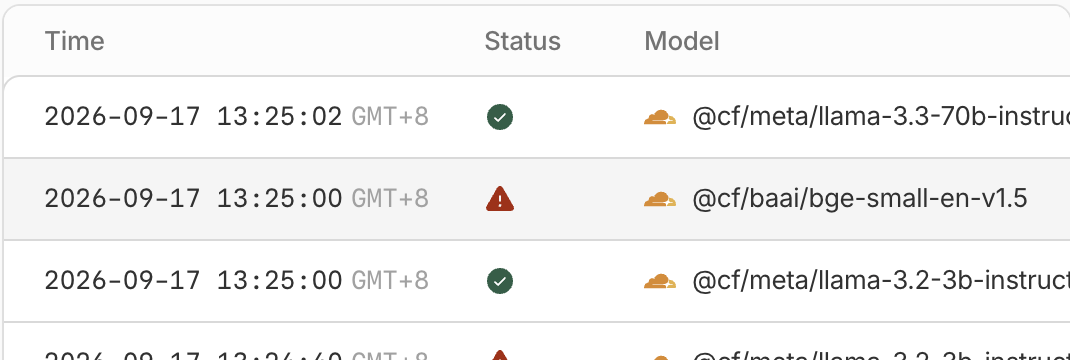
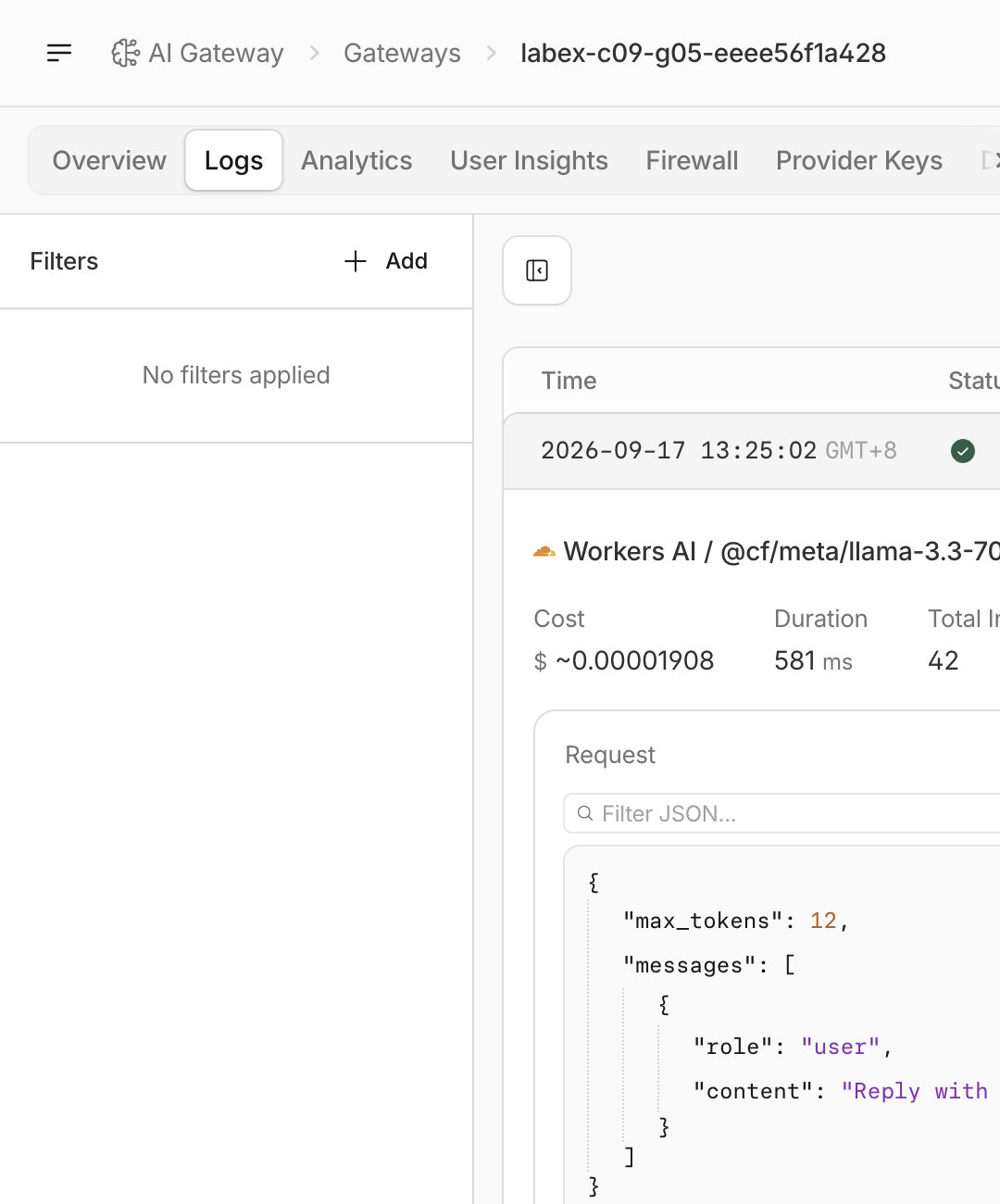
The mode metadata connects rows without including a prompt or secret. Model, success and status explain the route; the generated prose alone cannot.
Inspect the Bounded Recovery Contract
In this step, you will compare both paths and state the maximum number of model attempts.
You now have three matching forms of evidence:
- the source has two explicit
env.AI.run()calls and no retry loop; /fallbackreports one failure followed by one success;/healthyreports one success and stops.
Display a compact comparison from the saved responses:
node - <<'NODE'
for (const name of ['fallback','healthy']) {
  const body=require(`./.labex/${name}-response.json`);
  console.log(name, {
    usedFallback: body.usedFallback,
    selectedModel: body.selectedModel,
    attemptCount: body.attempts.length,
    statuses: body.attempts.map(item=>item.status)
  });
}
NODE
The maximum is two attempts. If the fallback also fails, the Worker returns an error instead of restarting the route. In a production application you might add a timeout, circuit breaker or user-friendly error, but each extra recovery mechanism should remain independently bounded and observable.
Remove the Disposable Resources
In this step, you will delete every remote resource owned by this lab and remove local authorization.
Delete the Worker first so it cannot create new gateway traffic. Then delete only the gateway recorded in state.json:
ACCOUNT_ID=$(node -p 'JSON.parse(require("fs").readFileSync(".labex/state.json")).accountId')
GATEWAY_ID=$(node -p 'JSON.parse(require("fs").readFileSync(".labex/state.json")).gatewayId')
WORKER_NAME=$(node -p 'JSON.parse(require("fs").readFileSync(".labex/state.json")).workerName')
GATEWAY_TOKEN=$(cat .labex/gateway-token)
npx wrangler delete --name "$WORKER_NAME" --force
curl --http1.1 -fsS -X DELETE \
  -H "Authorization: Bearer $GATEWAY_TOKEN" \
  "https://api.cloudflare.com/client/v4/accounts/$ACCOUNT_ID/ai-gateway/gateways/$GATEWAY_ID" \
  > .labex/delete-gateway.json
unset GATEWAY_TOKEN
node -p 'require("./.labex/delete-gateway.json").success'
Expect true. While both temporary authorizations still exist in this VM, save independent absence evidence for the Worker and gateway:
set +e
npx wrangler deployments list --name "$WORKER_NAME" --json \
  > .labex/worker-after-delete.json 2> .labex/worker-absent.err
printf '%s\n' "$?" > .labex/worker-absent-status.txt
set -e
GATEWAY_TOKEN=$(cat .labex/gateway-token)
curl --http1.1 -fsS -H "Authorization: Bearer $GATEWAY_TOKEN" \
  "https://api.cloudflare.com/client/v4/accounts/$ACCOUNT_ID/ai-gateway/gateways" \
  > .labex/gateways-after-delete.json
unset GATEWAY_TOKEN
GATEWAY_ID="$GATEWAY_ID" node - <<'NODE'
const rows=require('./.labex/gateways-after-delete.json').result||[];
console.log('gateway absent:', !rows.some(row=>row.id===process.env.GATEWAY_ID));
NODE
grep -Ei '10090|10007|script_not_found|does not exist' .labex/worker-absent.err
Expect gateway absent: true and a Worker absence response such as script_not_found, code 10090, code 10007 or does not exist. Wrangler can use different error shapes for the same missing script; network and authentication errors are not deletion evidence.
Now open My Profile → API Tokens and delete the exact saved tokenName. Finally remove its VM copy and log out:
shred -u .labex/gateway-token
npx wrangler logout
npx wrangler whoami --json
Expect loggedIn: false. Deleting the VM later removes local files, but only these commands remove the remote resources and revoke authorization.
Summary
You built a bounded recovery path with two Cloudflare-hosted models. A controlled incompatible primary attempt failed, one fallback model recovered the request, and a healthy primary stopped after one call. AI Gateway logs connected application decisions to provider-side model and status evidence. You also learned why explicit attempt limits, safe metadata and verified cleanup belong to a reliable fallback design.


