



Introduction
An AI client should not need a custom integration for every application it uses. The Model Context Protocol (MCP) gives clients a standard way to discover tools, inspect their input contracts and invoke them. In this lab, the tool is deliberately small: it looks up one synthetic support case and cannot change anything.
You will build the server with Cloudflare's current stateless MCP handler:
- A dedicated Cloudflare KV namespace holds the synthetic business record. KV is the explicit application data store; it is not hidden MCP session memory.
- A strict Zod schema accepts only a synthetic ticket identifier and rejects extra fields.
McpServer.registerTool()publishes one tool with read-only, non-destructive annotations.createMcpHandler()creates a fresh server for each Streamable HTTP request.- The official MCP TypeScript client discovers and invokes the tool from independent connections.
- Local and deployed probes prove valid lookup, safe missing-record behavior, invalid-argument rejection and the absence of implicit shared session state.
This endpoint is intentionally unauthenticated only because it exposes one disposable, synthetic, read-only record. Do not use this pattern to publish private customer data. Production servers should add authentication and authorization before accessing tenant data; external OAuth providers are outside this beginner lab.
The MCP ecosystem previously used SSE endpoints and stateful server boilerplate. This lab does not teach that legacy design. It uses Streamable HTTP and a per-request server factory, which is the current Cloudflare guidance for a new remote server.
Before entering this course directly, complete Connect LabEx to Your Cloudflare Account. Every fresh LabEx VM needs its own Wrangler authorization. Earlier course labs are recommended, but their VMs and resources are never reused here.
Authorize the VM and Create a Dedicated Catalog
In this step, you will authorize this fresh VM, choose the learning account and create one disposable KV namespace. Keeping the catalog separate makes its ownership and cleanup unambiguous.
Enter the prepared project and inspect the pinned tools:
cd /home/labex/project/read-only-mcp-tool
node --version
npx wrangler --version
Authorize this VM:
npx wrangler login
Open the displayed device link in the browser, review the requested permissions and authorize your dedicated learning account. Return to the terminal, wait for completion and inspect the structured identity:
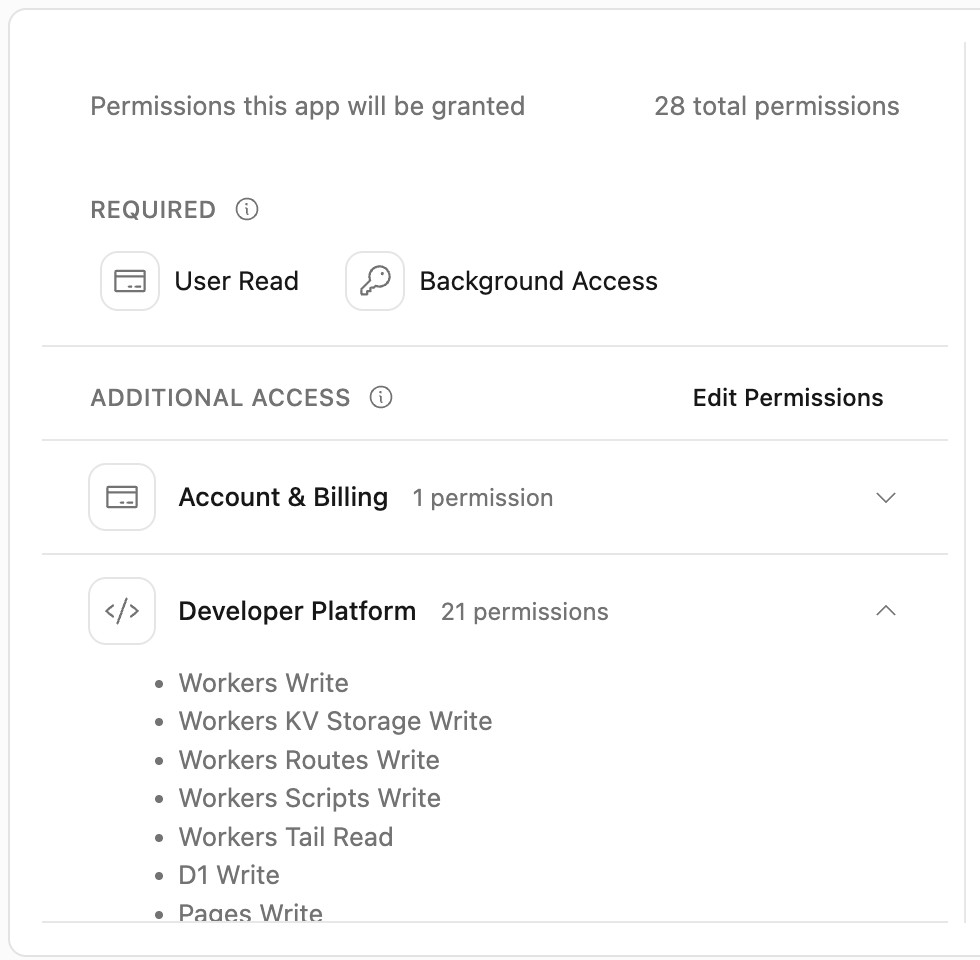
The permission list is broader than this single lab because Wrangler is Cloudflare's general development CLI. Confirm that the page names Wrangler, that you are using the intended learning account and that no password or token appears in the terminal before you approve it.
npx wrangler whoami --json
Confirm loggedIn: true and the intended account name, even when the output lists only one account. Copy that account's actual id. Generate one unique prefix and save the initial Worker configuration, replacing the placeholder first:
ACCOUNT_ID="paste-your-confirmed-account-id"
RUN="labex-c11-s07-$(openssl rand -hex 6)"
cat > wrangler.jsonc <<JSON
{
  "\$schema": "./node_modules/wrangler/config-schema.json",
  "name": "$RUN",
  "account_id": "$ACCOUNT_ID",
  "main": "src/server.ts",
  "compatibility_date": "2026-09-19",
  "compatibility_flags": ["nodejs_compat"],
  "workers_dev": true,
  "preview_urls": false,
  "observability": { "enabled": true }
}
JSON
Create the namespace without asking Wrangler to edit the file automatically:
npx wrangler kv namespace create "$RUN-cases" --update-config=false
If Wrangler asks whether to add a binding automatically, choose No; the next edit makes that connection explicit. Copy the 32-character namespace ID from the output and add exactly one binding:
NAMESPACE_ID="paste-the-created-namespace-id"
python3 - "$NAMESPACE_ID" <<'PY'
import json, sys
from pathlib import Path
path = Path('wrangler.jsonc')
data = json.loads(path.read_text())
data['kv_namespaces'] = [{'binding': 'SUPPORT_CASES', 'id': sys.argv[1]}]
path.write_text(json.dumps(data, indent=2) + '\n')
PY
npx wrangler kv namespace list
python3 .labex/verify.py authorization
The binding name SUPPORT_CASES is the identifier your code will use. The namespace ID points to the real resource in the confirmed account. Nothing has been deployed yet.
Seed Explicit Synthetic Business Data
In this step, you will put the same supplied record into local and remote KV. The data store is explicit: an MCP request can be stateless while the application still reads durable business data by key.
Inspect the fixture before uploading it:
cat fixtures/case.json
The T-SYNTH-101 prefix and synthetic: true marker make the demonstration boundary visible. The record contains no real customer name, email, message or credential.
Seed the local store used by wrangler dev:
npx wrangler kv key put case:T-SYNTH-101 --path fixtures/case.json --binding SUPPORT_CASES --local
Seed the dedicated cloud namespace:
npx wrangler kv key put case:T-SYNTH-101 --path fixtures/case.json --binding SUPPORT_CASES --remote
Read the two copies through the binding:
npx wrangler kv key get case:T-SYNTH-101 --binding SUPPORT_CASES --local --text
npx wrangler kv key get case:T-SYNTH-101 --binding SUPPORT_CASES --remote --text
python3 .labex/verify.py catalog
The verifier checks the namespace by account ID, requires exactly one key and compares the remote JSON with the supplied synthetic fixture. KV may be eventually consistent between locations, so if the first remote read briefly misses a just-written value, wait a few seconds and retry rather than writing repeated copies.
Register a Strict Read-Only MCP Tool
In this step, you will define one MCP server factory and one read-only lookup tool.
McpServer describes the protocol surface. The factory creates a fresh instance for each HTTP request, while the SUPPORT_CASES binding remains the explicit source of business data. Create src/server.ts:
cat > src/server.ts <<'TS'
import { createMcpHandler } from "agents/mcp/server";
import { McpServer } from "@modelcontextprotocol/server";
import { z } from "zod";

interface Env {
  SUPPORT_CASES: KVNamespace;
}

const lookupInput = z.object({
  ticketId: z.string().regex(/^T-SYNTH-[0-9]{3}$/, "use a synthetic ticket ID")
}).strict();

const storedCase = z.object({
  ticketId: z.string(),
  subject: z.string(),
  status: z.string(),
  priority: z.string(),
  product: z.string(),
  synthetic: z.literal(true)
}).strict();

function buildServer(env: Env): McpServer {
  const requestInstance = crypto.randomUUID();
  const server = new McpServer({
    name: "synthetic-support-catalog",
    version: "1.0.0"
  });

  server.registerTool("lookup_support_case", {
    title: "Look up a synthetic support case",
    description: "Read one synthetic demonstration case by its T-SYNTH identifier.",
    inputSchema: lookupInput,
    annotations: {
      readOnlyHint: true,
      destructiveHint: false,
      idempotentHint: true,
      openWorldHint: false
    }
  }, async ({ ticketId }) => {
    const raw = await env.SUPPORT_CASES.get(`case:${ticketId}`, "json");
    if (raw === null) {
      return {
        isError: true,
        content: [{ type: "text", text: `Synthetic case ${ticketId} was not found.` }]
      };
    }

    const record = storedCase.parse(raw);
    const result = { ...record, requestInstance };
    return {
      structuredContent: result,
      content: [{ type: "text", text: JSON.stringify(result) }]
    };
  });

  return server;
}

export default {
  async fetch(request: Request, env: Env, ctx: ExecutionContext): Promise<Response> {
    const url = new URL(request.url);
    if (url.pathname === "/health") {
      return Response.json({
        service: "synthetic-support-mcp",
        transport: "streamable-http",
        state: "stateless"
      });
    }
    if (url.pathname !== "/mcp") return new Response("Not found", { status: 404 });

    const handler = createMcpHandler(
      () => buildServer(env),
      { route: "/mcp", corsOptions: false, legacy: "stateless" }
    );
    return handler(request, env, ctx);
  }
};
TS
npm run check
python3 .labex/verify.py server
Three boundaries matter here:
.strict()rejects undeclared fields instead of silently accepting them.- The annotations tell clients the tool reads a closed synthetic catalog and has no destructive effect. An annotation is useful metadata, not a substitute for the code review that confirms no
put()ordelete()exists. requestInstanceis generated when the factory builds a server. Different protocol requests should return different markers, making the stateless lifecycle observable without storing session data.
The legacy: "stateless" compatibility posture still uses Streamable HTTP. It permits current clients that negotiate the 2025 protocol family while ensuring every request gets a fresh server instance; no SSE route or durable MCP session is created.
Build an Independent MCP Client Probe
In this step, you will use the official client library instead of hand-writing JSON-RPC. A real client performs protocol initialization, tool discovery and invocation over StreamableHTTPClientTransport.
Create scripts/test-client.mjs:
cat > scripts/test-client.mjs <<'JS'
import { Client, StreamableHTTPClientTransport } from "@modelcontextprotocol/client";

const endpoint = process.argv[2];
if (!endpoint) throw new Error("usage: node scripts/test-client.mjs <mcp-url>");

async function withClient(label, action) {
  const transport = new StreamableHTTPClientTransport(new URL(endpoint));
  const client = new Client({ name: `labex-${label}`, version: "1.0.0" });
  try {
    await client.connect(transport);
    return await action(client);
  } finally {
    await client.close();
  }
}

const tools = await withClient("discovery", (client) => client.listTools());
const tool = tools.tools.find((item) => item.name === "lookup_support_case");
if (!tool || tool.annotations?.readOnlyHint !== true) {
  throw new Error("the read-only lookup tool was not discoverable");
}
console.log("DISCOVERED lookup_support_case");

async function lookup(ticketId) {
  return withClient(`lookup-${ticketId.toLowerCase()}`, (client) => client.callTool({
    name: "lookup_support_case",
    arguments: { ticketId }
  }));
}

const first = await lookup("T-SYNTH-101");
const second = await lookup("T-SYNTH-101");
const a = first.structuredContent;
const b = second.structuredContent;
if (!a || !b || a.synthetic !== true || a.status !== "investigating") {
  throw new Error("the valid synthetic record was not returned");
}
console.log(`VALID synthetic=${a.synthetic} status=${a.status}`);

const missing = await lookup("T-SYNTH-404");
console.log(`MISSING isError=${missing.isError === true}`);

let invalidRejected = false;
try {
  const invalid = await withClient("invalid", (client) => client.callTool({
    name: "lookup_support_case",
    arguments: { ticketId: "REAL-101", unexpected: "must-not-pass" }
  }));
  invalidRejected = invalid.isError === true;
} catch {
  invalidRejected = true;
}
console.log(`INVALID_REJECTED ${invalidRejected}`);

const stateless = typeof a.requestInstance === "string"
  && typeof b.requestInstance === "string"
  && a.requestInstance !== b.requestInstance;
console.log(`STATELESS ${stateless}`);

if (missing.isError !== true || !invalidRejected || !stateless) process.exitCode = 1;
JS
python3 .labex/verify.py client
Each helper call creates and closes its own client transport. Discovery proves the server advertises the tool contract. Two valid calls must read the same KV record but return different request-instance markers. The missing case is a normal tool-level error, while an invalid identifier is rejected by the input schema before the handler reads KV.
Exercise the MCP Contract Locally
In this step, you will start the Worker against local KV and run the complete client probe before touching the deployed endpoint.
Start the development server:
npx wrangler dev --ip 127.0.0.1 --port 8787
Leave that terminal running. Open a second terminal, enter the same project and check the small health route:
cd /home/labex/project/read-only-mcp-tool
curl --fail --silent http://127.0.0.1:8787/health | python3 -m json.tool
Expect transport: "streamable-http" and state: "stateless". Now run the protocol client:
node scripts/test-client.mjs http://127.0.0.1:8787/mcp
The five proof lines should show discovery, the valid synthetic result, a safe missing-case error, invalid-input rejection and STATELESS true. Return to the first terminal and press Ctrl+C after the probe.
Run the independent check. It starts another bounded local Worker on port 8791, exercises the same imported code and shuts it down automatically:
python3 .labex/verify.py local
Deploy and Test the Remote MCP Endpoint
In this step, you will deploy the Worker with its explicit KV binding and run the same client against the real workers.dev endpoint.
Deploy from the project configuration:
npx wrangler deploy
Copy the displayed deployment URL and save it without the trailing slash:
WORKER_URL="https://your-generated-worker.your-subdomain.workers.dev"
Check the health route, then connect the MCP client to /mcp:
curl --fail --silent "$WORKER_URL/health" | python3 -m json.tool
node scripts/test-client.mjs "$WORKER_URL/mcp"
python3 .labex/verify.py deployed
The independent verifier derives the endpoint from the selected account instead of trusting the shell variable. It also checks the deployed SUPPORT_CASES binding, the exact remote record and all five MCP behaviors. A reachable health route alone is not enough: discovery and invocation must pass through the protocol client.
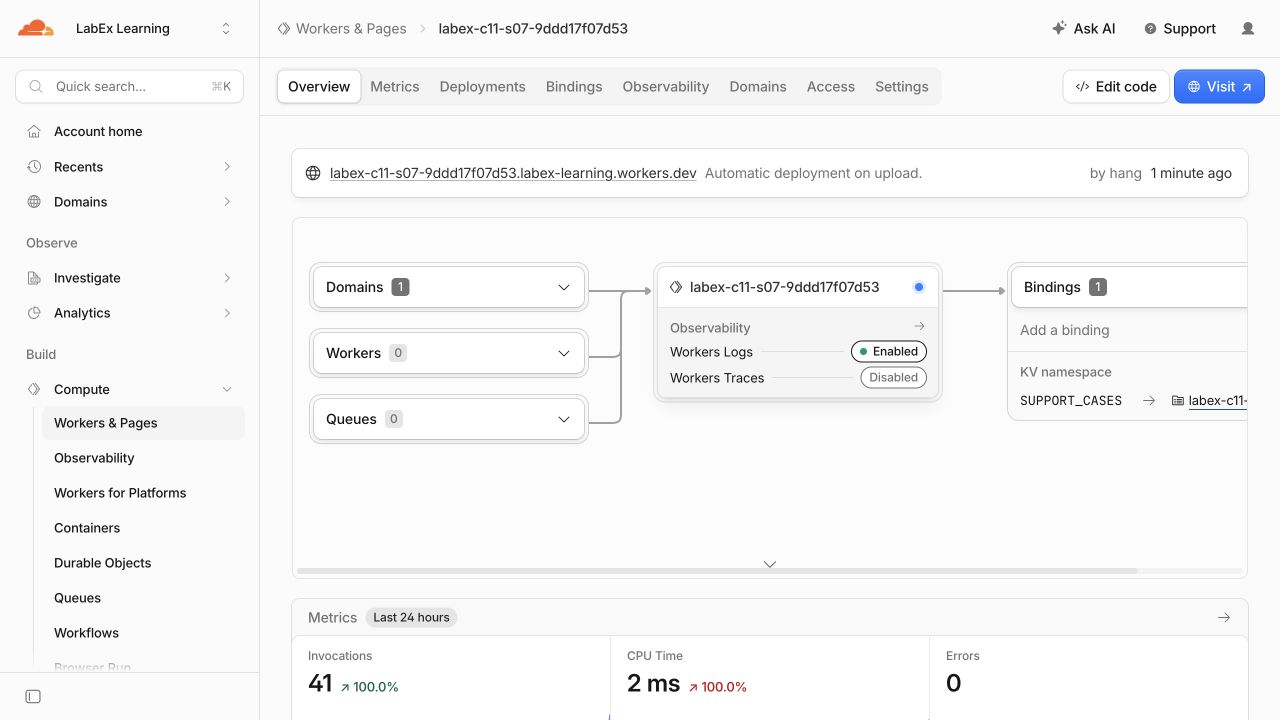
Open Workers & Pages and select the generated Worker. Its overview should connect the workers.dev domain to the Worker and show one SUPPORT_CASES KV binding. The values below are examples from the tested run; your unique resource names and counts will differ.
Inspect and Remove the Owned Resources
In this step, you will inspect the observable cloud state, then delete only this run's Worker and KV namespace while Wrangler is still authorized.
Open the Cloudflare Dashboard and select the same learning account. Under Workers & Pages, open the Worker whose name starts with labex-c11-s07-. Confirm that its latest deployment is healthy, observability is enabled and the SUPPORT_CASES binding points to the namespace ID in wrangler.jsonc.
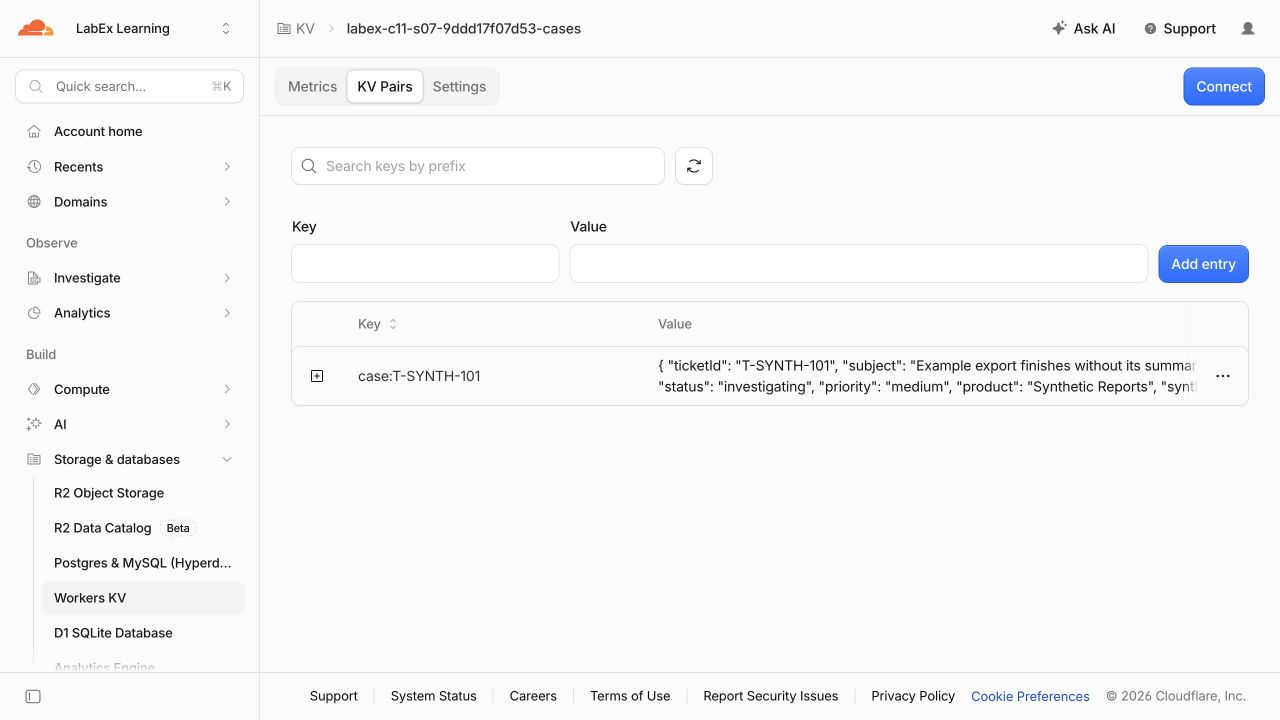
Open Storage & databases > KV, select the matching -cases namespace and inspect case:T-SYNTH-101. The value is the synthetic fixture; do not add personal information. These Dashboard views are useful orientation, while the client and verifier remain the authoritative functional evidence.
The KV Pairs view first shows the exact key and a preview of its JSON value:
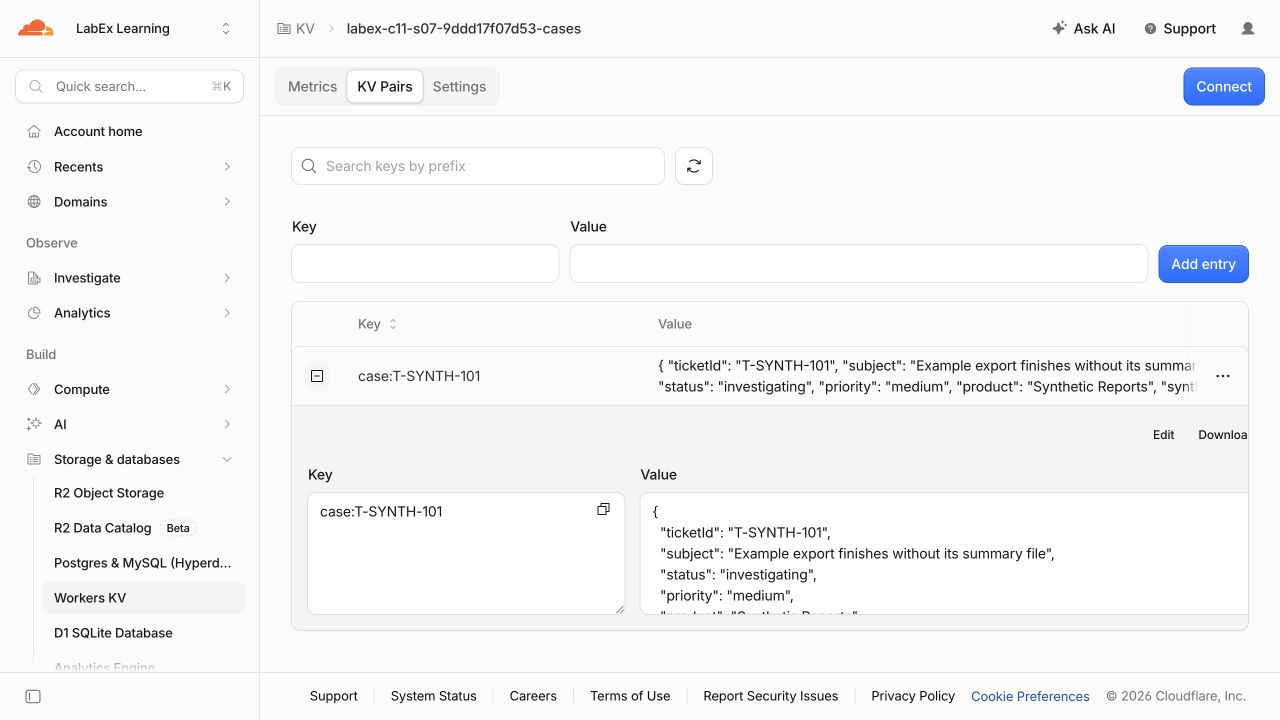
Expand the row to connect that key with the fields returned by the MCP tool. The tested fixture uses status: investigating, priority: medium and synthetic: true.
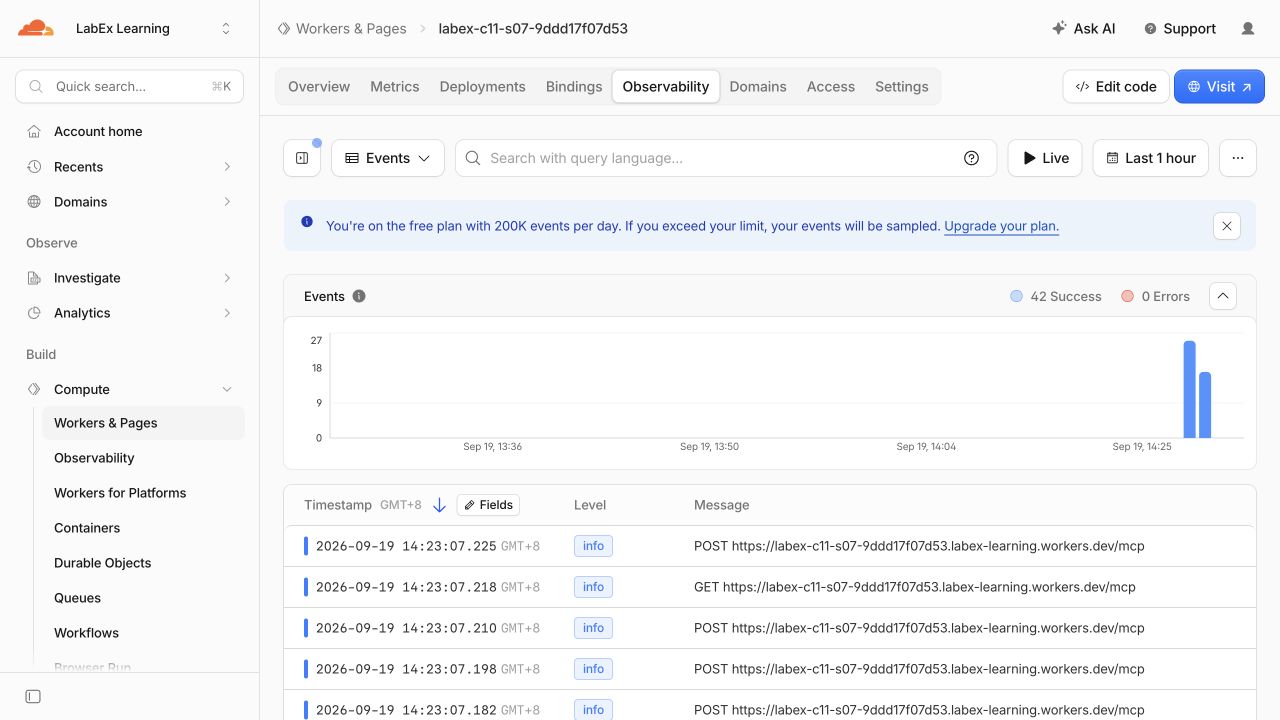
Return to the Worker and open Observability. Successful POST /mcp and transport GET /mcp events show that a real remote MCP client reached the deployed Worker. In the tested run, all 42 captured events succeeded and none produced a Worker error; your request count may differ.
Run one more independent observation check before deletion:
python3 .labex/verify.py observed
cat wrangler.jsonc
Confirm the exact unique Worker name and namespace ID, then delete the Worker:
npx wrangler delete
If prompted, verify the displayed Worker name and answer y. Delete only the namespace selected by the SUPPORT_CASES binding:
npx wrangler kv namespace delete --binding SUPPORT_CASES
npx wrangler kv namespace list
python3 .labex/verify.py deleted
Refresh the Dashboard Worker and KV lists. Both labex-c11-s07-... resources should be absent, while unrelated resources remain. A failed endpoint request is not proof of deletion; the verifier checks the authorized account inventories directly.
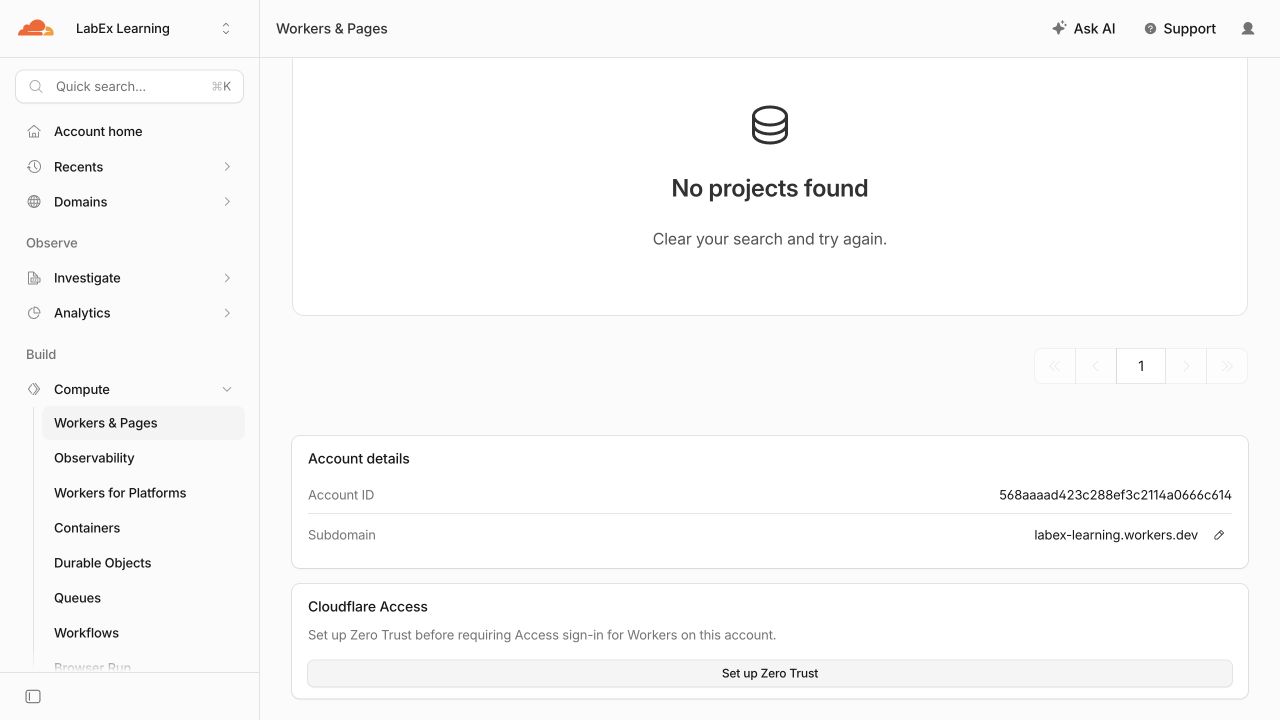
Search for the exact generated Worker name. An empty result confirms the Dashboard no longer lists it:
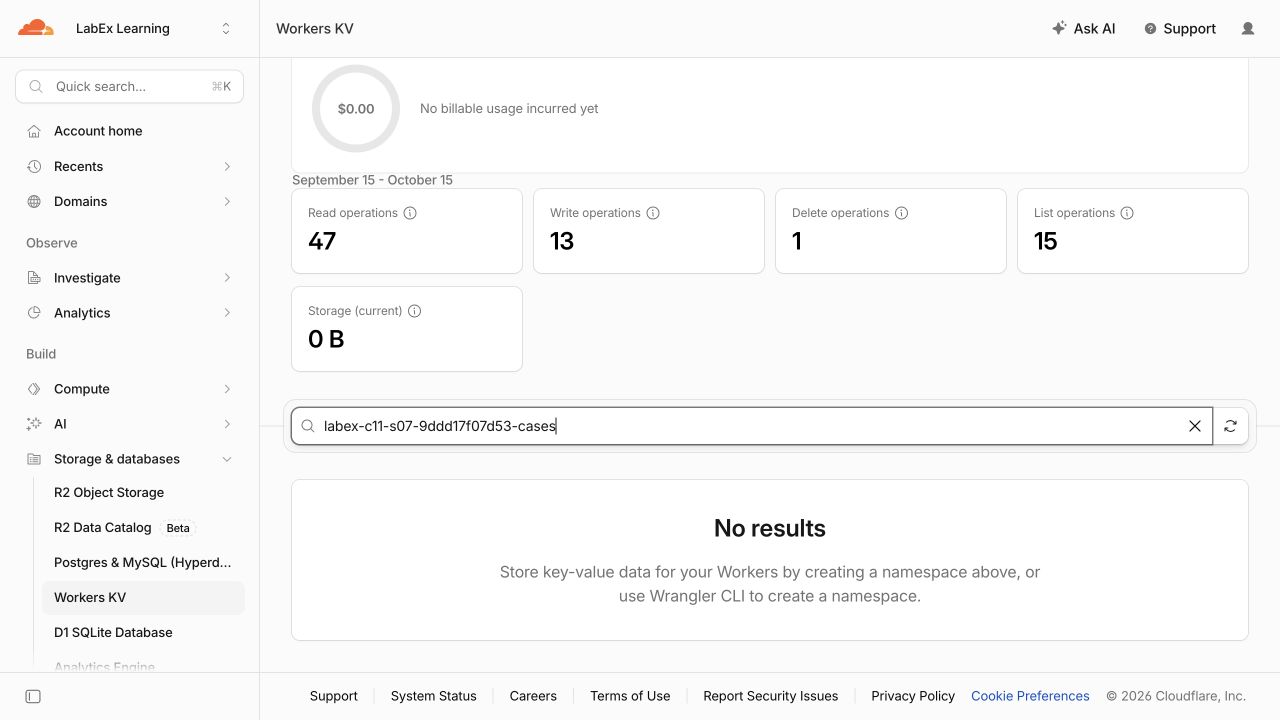
Search Workers KV for the exact -cases namespace. The empty state and 0 B current storage confirm that the disposable catalog has also been removed from this clean test account:
Revoke This VM's Authorization
In this step, you will revoke the temporary VM authorization after resource absence has been proven.
npx wrangler logout
npx wrangler whoami --json || true
The structured result should report loggedIn: false, or Wrangler may return a nonzero unauthenticated result. Logout is intentionally last: deletion verification needs read access to the selected account, while the disposable VM does not.
Summary
You published and removed a bounded read-only MCP service on Cloudflare. You:
- kept synthetic business data in a dedicated KV namespace instead of implicit MCP session state;
- registered a discoverable tool with strict input validation and read-only annotations;
- served it through the current stateless Streamable HTTP handler;
- used a real MCP client for discovery, valid lookup, missing-record and invalid-input tests;
- proved independent requests receive fresh server instances while reading the same explicit data;
- inspected the Worker and KV state, deleted both owned resources and revoked the VM authorization.
The key design lesson is that stateless transport does not mean data-free application. It means protocol requests do not depend on hidden session memory. Durable business data remains explicit, scoped and independently governed.


