



Introduction
A running JavaScript object can keep values in class properties, but those values disappear when the runtime restarts, crashes or removes an inactive object from memory. An activity log cannot accept that risk: a room member expects yesterday's event to remain visible after the application code is redeployed.
In this lab, each validated room name selects one Durable Object. That object owns a private SQLite database containing its activity events. The front-door Worker calls the object through RPC, so clients do not access storage directly. You will stop and restart the local runtime, then redeploy the cloud Worker and open a new connection. In both cases, previously written rows must remain available. A second room proves that storage belongs to one object identity rather than the whole namespace.
You will also compare two kinds of state:
- In-memory state lives in JavaScript properties and is useful only as a temporary cache.
- Durable state is written to the object's storage before the request completes and survives runtime replacement.
Before entering this course directly, complete Connect LabEx to Your Cloudflare Account. Every fresh VM needs its own Wrangler authorization. You should already understand Worker request handlers, Durable Object names, bindings and RPC from the preceding lab. Basic SQL keys and ordered queries are explained where they appear.
Cloudflare currently supports SQLite-backed Durable Objects on Workers Free. This lab creates one disposable class namespace, a few small named objects and only bounded requests. Setup installs Node.js 22.22.0 and project-local Wrangler 4.132.0 in /home/labex/project/room-activity-log; it does not authorize Cloudflare, create a namespace, deploy a Worker or write learner activity records.
Authorize the VM and Configure the Room Namespace
In this step, you will authorize this fresh VM, select your learning account and describe one SQLite-backed Durable Object class. Dashboard login and VM authorization are separate because the VM has no access to your browser session.
Enter the prepared project and confirm the pinned Wrangler version:
cd /home/labex/project/room-activity-log
npx wrangler --version
Expect 4.132.0. Start device authorization:
npx wrangler login --device --browser=false
Open the displayed URL in the browser, enter the short code, inspect the selected account and permissions, then authorize. Return to the terminal only after both browser and Wrangler report success. Never paste a password or token into the lab.
Read structured identity information and privately select the intended account ID:
WHOAMI="$(npx wrangler whoami --json)"
printf '%s\n' "$WHOAMI" | jq '{loggedIn, authType, accounts: [.accounts[] | {name}]}'
ACCOUNT_ID="$(printf '%s\n' "$WHOAMI" | jq -r '.accounts[] | select(.name == "LabEx Learning") | .id')"
test -n "$ACCOUNT_ID"
The first jq expression shows only safe identity fields. The second keeps the account ID in a shell variable instead of printing it. If your dedicated learning account has another display name, substitute the confirmed name.
Generate a unique Worker name:
RUN="labex-c10-o02-$(openssl rand -hex 6)"
printf '%s\n' "$RUN"
Create the configuration. The unquoted JSON delimiter expands $RUN and $ACCOUNT_ID; \$schema keeps the JSON key literal.
cat > wrangler.jsonc <<JSON
{
  "\$schema": "./node_modules/wrangler/config-schema.json",
  "name": "$RUN",
  "account_id": "$ACCOUNT_ID",
  "main": "src/index.js",
  "compatibility_date": "2026-09-18",
  "workers_dev": true,
  "preview_urls": false,
  "observability": {
    "enabled": true,
    "head_sampling_rate": 1
  },
  "durable_objects": {
    "bindings": [
      { "name": "ROOMS", "class_name": "RoomActivity" }
    ]
  },
  "exports": {
    "RoomActivity": { "type": "durable-object", "storage": "sqlite" }
  }
}
JSON
ROOMS is the Worker's handle for the namespace. The exports entry tells Cloudflare that every RoomActivity object uses its own SQLite database. This file still creates no cloud resource; deployment happens later.
Store Room Events in SQLite
In this step, you will implement the room-owned table and two RPC methods: one appends an event and one returns the ordered history.
An activity event has a stable text key, a short type, a human-readable detail and a server timestamp. The PRIMARY KEY constraint prevents two rows from using the same event ID inside one room. AUTOINCREMENT assigns a monotonically increasing sequence, which lets the read query preserve insertion order without relying on timestamps that could tie.
Create the Worker entrypoint:
cat > src/index.js <<'JS'
import { DurableObject } from "cloudflare:workers";

export class RoomActivity extends DurableObject {
  constructor(ctx, env) {
    super(ctx, env);
    ctx.blockConcurrencyWhile(async () => {
      this.ctx.storage.sql.exec(`
        CREATE TABLE IF NOT EXISTS activity_events (
          sequence INTEGER PRIMARY KEY AUTOINCREMENT,
          event_id TEXT NOT NULL UNIQUE,
          event_type TEXT NOT NULL,
          detail TEXT NOT NULL,
          created_at INTEGER NOT NULL
        )
      `);
    });
  }

  appendEvent(event) {
    const createdAt = Date.now();
    return this.ctx.storage.sql.exec(
      `INSERT INTO activity_events (event_id, event_type, detail, created_at)
       VALUES (?, ?, ?, ?)
       RETURNING sequence, event_id AS eventId, event_type AS type, detail, created_at AS createdAt`,
      event.eventId,
      event.type,
      event.detail,
      createdAt
    ).one();
  }

  listEvents() {
    return this.ctx.storage.sql.exec(
      `SELECT sequence, event_id AS eventId, event_type AS type, detail, created_at AS createdAt
       FROM activity_events
       ORDER BY sequence`
    ).toArray();
  }
}

function json(data, status = 200) {
  return Response.json(data, { status });
}

function roomRoute(pathname) {
  const match = pathname.match(/^\/rooms\/([^/]+)\/events$/);
  if (!match) return { error: "not_found", status: 404 };
  let room;
  try {
    room = decodeURIComponent(match[1]);
  } catch {
    return { error: "invalid_room_name", status: 400 };
  }
  if (!/^[a-z][a-z0-9-]{0,31}$/.test(room)) {
    return { error: "invalid_room_name", status: 400 };
  }
  return { room };
}

function validEvent(value) {
  return value &&
    /^[a-z][a-z0-9-]{2,31}$/.test(value.eventId) &&
    /^[a-z][a-z0-9_]{2,31}$/.test(value.type) &&
    typeof value.detail === "string" &&
    value.detail.length >= 1 && value.detail.length <= 160;
}

export default {
  async fetch(request, env) {
    const url = new URL(request.url);
    if (request.method === "GET" && url.pathname === "/health") {
      return json({ status: "ok" });
    }

    const parsed = roomRoute(url.pathname);
    if (parsed.error) return json({ error: parsed.error }, parsed.status);
    if (request.method !== "GET" && request.method !== "POST") {
      return json({ error: "method_not_allowed" }, 405);
    }

    const room = parsed.room;
    let body;
    if (request.method === "POST") {
      try {
        body = await request.json();
      } catch {
        return json({ error: "invalid_json" }, 400);
      }
      if (!validEvent(body)) return json({ error: "invalid_event" }, 400);
    }

    const stub = env.ROOMS.getByName(room);
    try {
      if (request.method === "POST") {
        const event = await stub.appendEvent(body);
        console.log(JSON.stringify({ event: "room_activity_appended", room, eventId: event.eventId, sequence: event.sequence }));
        return json({ room, event }, 201);
      }
      const events = await stub.listEvents();
      console.log(JSON.stringify({ event: "room_activity_listed", room, count: events.length }));
      return json({ room, events });
    } catch (error) {
      if (String(error).includes("UNIQUE constraint failed")) {
        return json({ error: "duplicate_event_id" }, 409);
      }
      throw error;
    }
  }
};
JS
blockConcurrencyWhile() is limited to schema creation. It delays requests until the table exists, but it does not wrap ordinary traffic or external I/O. The important application state is never stored only in a class property: appendEvent() writes the row to SQLite before returning it.
Run the supplied deterministic HTTP-routing tests and a real Wrangler bundle check:
NODE_NO_WARNINGS=1 node --experimental-loader ./test/cloudflare-loader.mjs --test test/worker.test.mjs
npx wrangler deploy --dry-run
Expect two passing tests and a successful dry run. These checks make no remote deployment.
Prove Local Persistence Across a Restart
In this step, you will write two planning-room events, stop the local Workers runtime completely, start a new runtime against the same local storage directory and read the rows again.
Wrangler normally places local binding data under .wrangler/state. This lab uses the explicit directory .labex/local-state so the persistence boundary is visible. The directory represents local development data only; it is separate from Cloudflare storage.
Start the first local runtime:
npx wrangler dev --port 8787 --persist-to .labex/local-state > .labex/dev.log 2>&1 &
echo $! > .labex/dev.pid
for attempt in $(seq 1 30); do
  curl --silent --fail http://127.0.0.1:8787/health && break
  sleep 1
done
Append two events to planning. --data sends the JSON body and the content-type header tells the Worker how to interpret it.
curl --silent --request POST http://127.0.0.1:8787/rooms/planning/events \
  --header 'content-type: application/json' \
  --data '{"eventId":"evt-opening","type":"room_opened","detail":"Planning room opened"}' | jq
curl --silent --request POST http://127.0.0.1:8787/rooms/planning/events \
  --header 'content-type: application/json' \
  --data '{"eventId":"evt-notes","type":"note_added","detail":"Release notes drafted"}' | jq
Read the room and observe sequences 1 and 2:
curl --silent http://127.0.0.1:8787/rooms/planning/events | jq
Now terminate that runtime and wait for its process to finish:
kill "$(cat .labex/dev.pid)"
wait "$(cat .labex/dev.pid)" 2>/dev/null || true
Start a new runtime process with the same persistence directory:
npx wrangler dev --port 8787 --persist-to .labex/local-state > .labex/dev-restarted.log 2>&1 &
echo $! > .labex/dev.pid
for attempt in $(seq 1 30); do
  curl --silent --fail http://127.0.0.1:8787/health && break
  sleep 1
done
Read planning again, then read a different room that has never received an event:
curl --silent http://127.0.0.1:8787/rooms/planning/events | jq
curl --silent http://127.0.0.1:8787/rooms/support/events | jq
The new runtime returns both planning events in order, while support returns an empty events array. Restarting removed every JavaScript class instance, but it did not remove the SQLite rows. The empty second room demonstrates that each named object owns private storage.
Deploy and Write Cloud Activity
In this step, you will stop the local process, deploy the class namespace and write a small cloud activity history.
Stop the restarted local runtime so later requests cannot be confused with cloud responses:
kill "$(cat .labex/dev.pid)"
wait "$(cat .labex/dev.pid)" 2>/dev/null || true
Deploy the Worker while saving the ordinary terminal output. tee /dev/tty keeps that output visible while $(...) captures it in a shell variable:
DEPLOY_OUTPUT="$(npx wrangler deploy 2>&1 | tee /dev/tty)"
The first deployment reconciles the RoomActivity export and creates its SQLite-backed namespace. Extract the printed workers.dev URL without assuming another learner has the same subdomain:
APP_URL="$(printf '%s\n' "$DEPLOY_OUTPUT" | grep -Eo 'https://[a-z0-9.-]+\.workers\.dev' | tail -1)"
test -n "$APP_URL"
printf '%s\n' "$APP_URL"
grep -Eo prints only matching URL text, and tail -1 selects the final address if other informational lines contain links.
A successful deployment can take a few seconds to make both the Worker code and its new Durable Object namespace reachable at every edge. Wait until a read from the still-empty support object returns the expected JSON before sending writes:
for attempt in $(seq 1 30); do
  if curl --silent --fail "$APP_URL/rooms/support/events" |
    jq -e '.room == "support" and .events == []' >/dev/null; then
    break
  fi
  sleep 1
done
curl --silent --fail "$APP_URL/rooms/support/events" |
  jq -e '.room == "support" and .events == []'
sleep 5
The final read makes readiness explicit: the lab stops here if the Durable Object route still does not return valid JSON, instead of piping an edge error page into later commands. The short settling window also avoids creating a second named object while a newly reconciled namespace is still propagating across the edge.
Write the same two logical planning events to cloud storage. Local and remote Durable Object databases are deliberately separate environments, so the cloud room starts empty.
curl --silent --request POST "$APP_URL/rooms/planning/events" \
  --header 'content-type: application/json' \
  --data '{"eventId":"evt-opening","type":"room_opened","detail":"Planning room opened"}' | jq
curl --silent --request POST "$APP_URL/rooms/planning/events" \
  --header 'content-type: application/json' \
  --data '{"eventId":"evt-notes","type":"note_added","detail":"Release notes drafted"}' | jq
Read both planning and the untouched support room:
curl --silent "$APP_URL/rooms/planning/events" | jq
curl --silent "$APP_URL/rooms/support/events" | jq
The cloud planning object contains two rows and support remains empty. This proves cloud identity and isolation before testing a deployment replacement.
Redeploy and Inspect Durable State
In this step, you will redeploy the same Worker name and class declaration, then read the existing rows through a new HTTP connection and connect that runtime evidence to the Dashboard.
Deploy the unchanged application again:
npx wrangler deploy
A code deployment can replace the running Durable Object instance and therefore clears class properties. It does not replace the namespace when the same live RoomActivity export remains declared. Open a new request and read the planning history:
curl --silent "$APP_URL/rooms/planning/events" | jq
The evt-opening and evt-notes rows must still appear in sequence order. This is the important difference between a temporary in-memory array and SQLite-backed durable state.
Open the Cloudflare Dashboard and select the same account. Go to Workers & Pages, find the exact labex-c10-o02-... Worker and confirm that its Durable Object binding is named ROOMS and targets RoomActivity. Then open Durable Objects, select that namespace and inspect its Overview. The namespace name identifies the deployed Worker and class, while Storage: SQL confirms the backend selected by wrangler.jsonc.
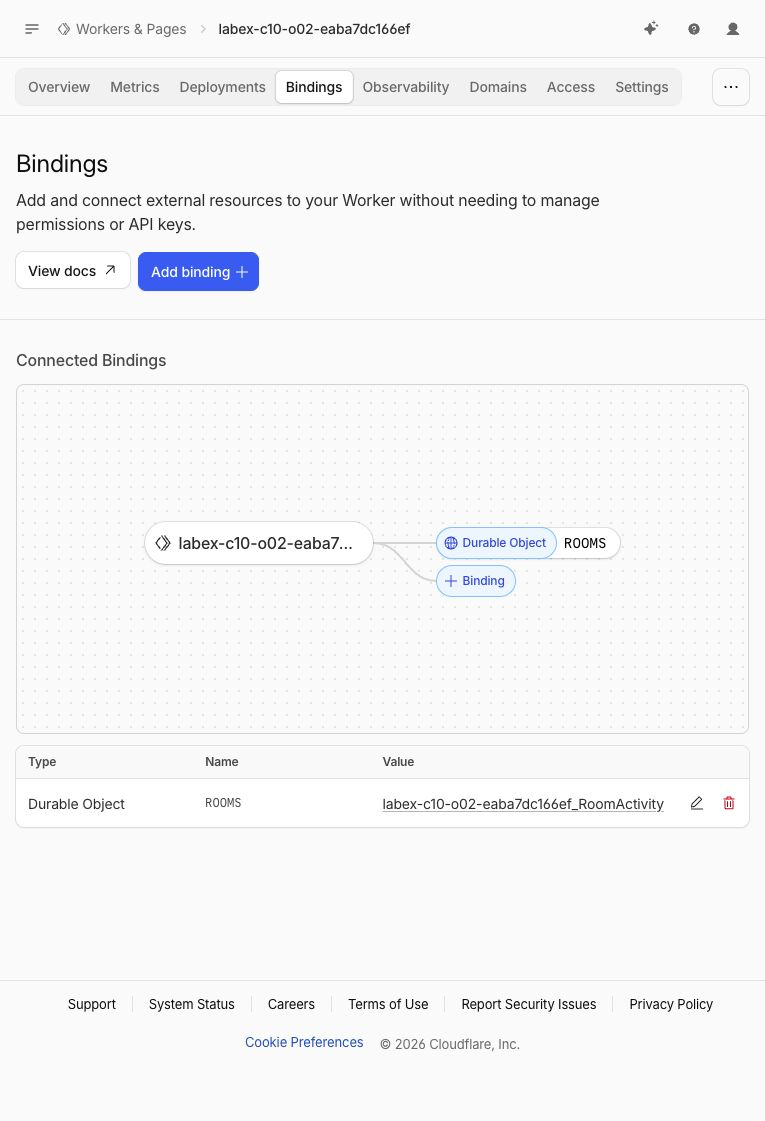
The screenshot shows the tested run. Your generated suffix will differ, but the binding type, name and target class should agree with your configuration.
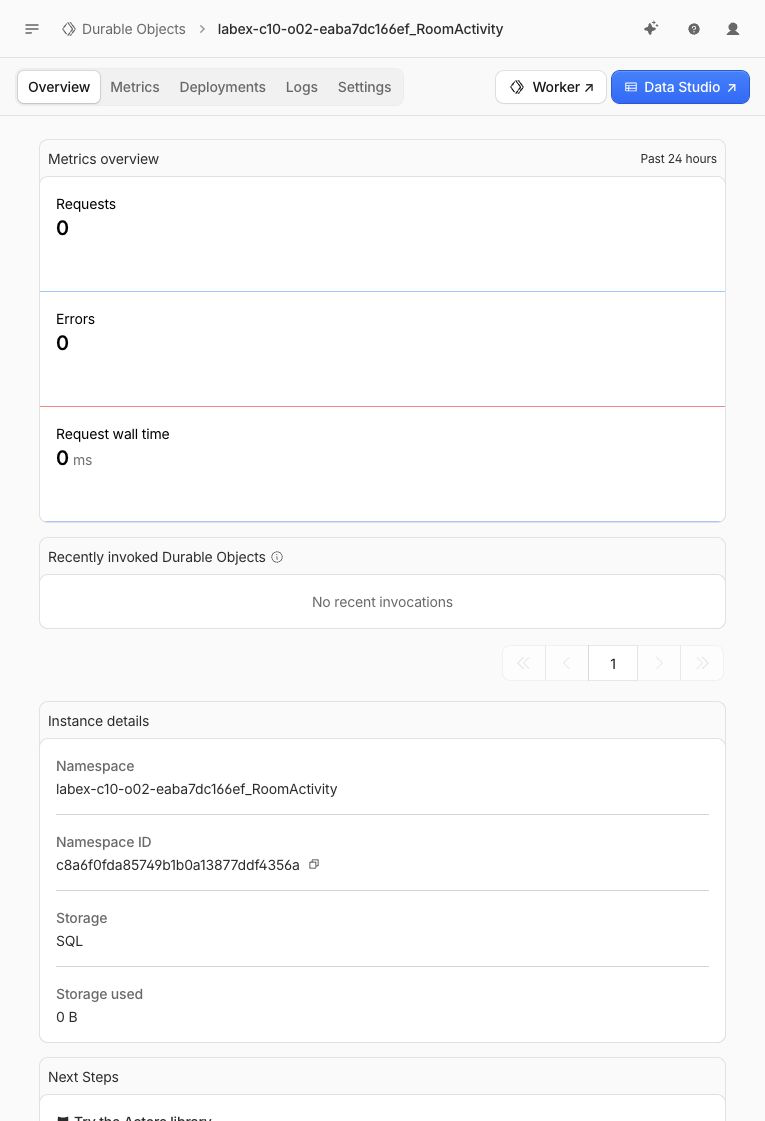
The Dashboard may aggregate namespace metrics after a delay, so the HTTP response remains the authoritative proof that the two rows survived. The Overview is an orientation checkpoint, not a replacement for the runtime read.
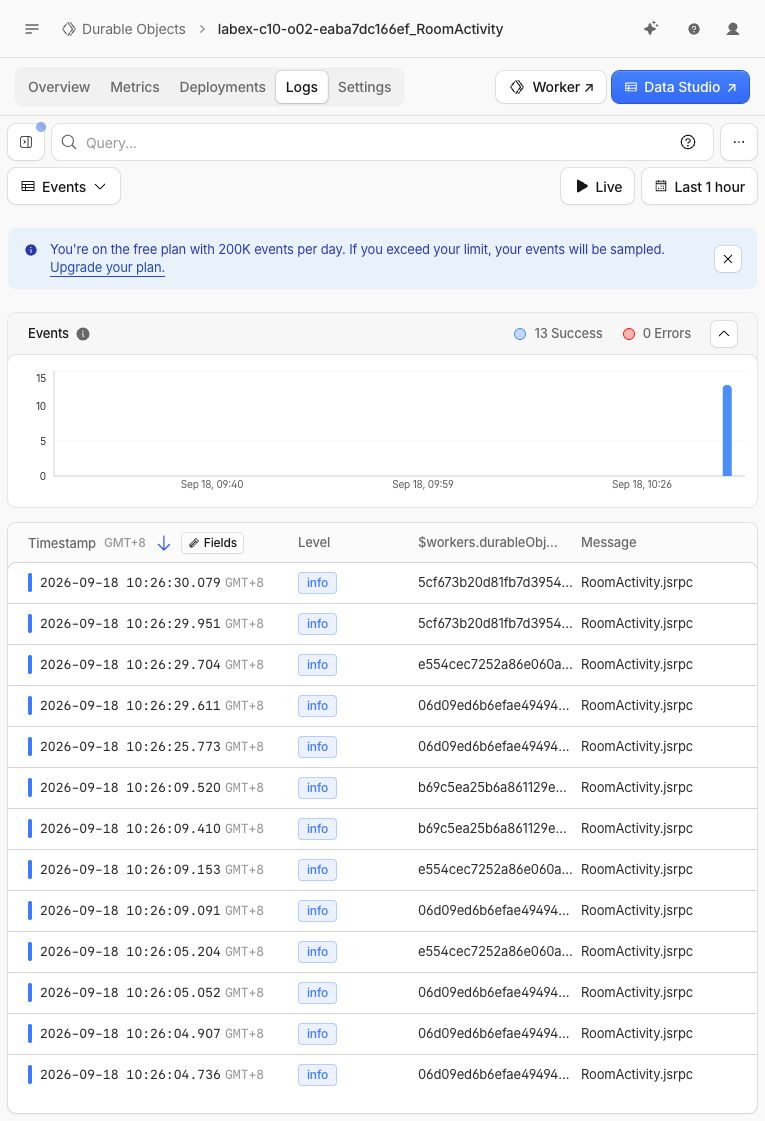
Open the namespace Logs view. Successful RoomActivity.jsrpc rows confirm that Cloudflare invoked the class through RPC. Repeated object IDs identify repeated calls to the same object, while other IDs come from the other room and the verifier's run-unique room. These IDs are Cloudflare-generated examples, not room names that you should copy. Logs prove invocations; the ordered HTTP response proves the stored activity content.
Run the independent deployed check once more. It verifies the binding and owned namespace, reads the preserved planning rows, confirms an empty support room and creates a separate uniquely named verification room:
python3 .labex/verify.py deployed
Delete the Namespace and Revoke VM Access
In this step, you will remove the Durable Object namespace and all of its room databases before deleting the remaining Worker and logging out.
A Worker deletion alone does not explicitly retire a Durable Object class. The declarative lifecycle uses a deleted tombstone. It permanently deletes this class namespace and has no Trash, so confirm that $RUN begins with labex-c10-o02- before continuing.
Create a stateless cleanup entrypoint:
cat > src/cleanup.js <<'JS'
export default {
  fetch() {
    return Response.json({ status: "cleanup" }, { status: 410 });
  }
};
JS
Build the cleanup configuration for the exact same Worker and account. It removes the binding and marks only RoomActivity as deleted:
ACCOUNT_ID="$(node -e 'console.log(JSON.parse(require("fs").readFileSync("wrangler.jsonc", "utf8")).account_id)')"
cat > wrangler.cleanup.jsonc <<JSON
{
  "\$schema": "./node_modules/wrangler/config-schema.json",
  "name": "$RUN",
  "account_id": "$ACCOUNT_ID",
  "main": "src/cleanup.js",
  "compatibility_date": "2026-09-18",
  "workers_dev": true,
  "preview_urls": false,
  "exports": {
    "RoomActivity": { "type": "durable-object", "state": "deleted" }
  }
}
JSON
Deploy the tombstone and inspect the reconciliation output:
npx wrangler deploy --config wrangler.cleanup.jsonc
It should report that RoomActivity was deleted. This removes planning, support, the verifier's temporary room and every SQLite row in that lab-owned namespace. Delete the remaining stateless Worker:
npx wrangler delete --config wrangler.cleanup.jsonc
Confirm only the exact generated Worker. Run the authenticated absence check while authorization is still available:
python3 .labex/verify.py deleted
Only after it prints PASS: deleted, log out and inspect structured logout state:
npx wrangler logout
npx wrangler whoami --json
The final output must report loggedIn: false. A network failure is not evidence of either resource deletion or logout.
Summary
You built a room activity service in which each stable room name selects one Durable Object and one private SQLite database. You created a keyed, ordered event table, exposed append and list operations through RPC, validated requests before object selection and proved that a second room does not inherit another room's history.
You also distinguished temporary JavaScript memory from durable storage by reading the same rows after a local runtime restart and a cloud redeployment. Finally, you inspected the binding, namespace, stored rows and logs in the Dashboard, then deleted the exact namespace and Worker before revoking the VM's authorization.


