



Introduction
A ticket must not close unless its resolution note is saved. You will use a D1 prepared batch to keep those writes together, then carry a Sessions API bookmark across requests so later reads can observe previously committed work.
This lab distinguishes atomic rollback from sequential session consistency. It uses one independent database and Worker, and does not require enabling read replicas or reproducing a replication race.
Use your own learning account and a fresh VM. Setup first prepares Node.js 22.22.0, then runs npm install for project-local Wrangler 4.131.1 and any assessment dependencies under /home/labex/project/ticket-database. Direct dependency versions are pinned; the installation creates its own lockfile. No cloud login or assessed database work runs in setup. On a personal machine, install the same Wrangler version with npm install --save-dev wrangler@4.131.1 in your project.
This exercise uses small synthetic records within the D1 Free allowances. Existing account usage counts toward those allowances. No purchased domain is needed. Keep this VM until resource deletion and logout have both been checked.
Authorize this VM and select the account
In this step, you connect this fresh terminal to your own learning account. A Dashboard login alone does not authorize the VM. D1 permission allows database creation, SQL changes and deletion; Workers permission allows deployment, and KV permission supports Wrangler cleanup inventory. Review the actual consent page, including Background Access, before authorizing.
Open the prepared project and inspect the pinned CLI:
cd /home/labex/project/ticket-database
npx wrangler --version
Expect 4.131.1. Start device authorization; --device displays a browser code, and --browser=false leaves the browser choice to you:
npx wrangler login --device --browser=false --scopes account:read user:read d1:write workers_scripts:write workers_kv:write
Open the displayed URL in your browser, enter the current code, confirm your learning account and the permissions, and authorize. Wait for the terminal to confirm success. Never paste passwords or tokens into project files.
npx wrangler whoami --json
Check loggedIn: true, then read the account name and id, even when only one account is listed. Copy the intended ID into the configuration below. The following shell variable uses 6 random bytes (12 hexadecimal characters) to avoid colliding with other learners. A here-document writes the JSON between JSON lines; $RUN expands inside it.
The backslash before $schema keeps that JSON key literal; $RUN still expands to this run’s unique name.
RUN=labex-c04-d05-$(openssl rand -hex 6)
cat > wrangler.jsonc <<JSON
{
  "\$schema": "./node_modules/wrangler/config-schema.json",
  "name": "$RUN",
  "account_id": "YOUR_ACCOUNT_ID",
  "main": "src/index.js",
  "compatibility_date": "2026-09-15",
  "workers_dev": true,
  "preview_urls": false
}
JSON
Replace YOUR_ACCOUNT_ID before running the block. Keep this terminal open so RUN remains available. name identifies this run; account_id selects the account for cloud operations. The file is ordinary JSON, which is also valid JSONC. No Worker is deployed by writing it.
Prepare tickets and resolution notes
In this step, you prepare two related tables. Closing a ticket should also save its resolution note. If only one write succeeds, staff may see a closed ticket with no explanation. Setup supplies the schema and HTTP router; you will implement the related SQL operations.
Create a disposable cloud database. --binding DB gives application code a short name, --update-config records its real name and UUID in wrangler.jsonc, and --use-remote=false keeps development local:
npx wrangler d1 create "$RUN-db" --binding DB --update-config --use-remote=false
Read the created name and ID, then inspect the saved binding:
cat wrangler.jsonc
The DB entry must name this run's database. A binding is a configured connection between code and a resource. Its UUID identifies the cloud database, while --local uses a separate SQLite database in this VM. Always include either --local or --remote in SQL commands.
cat schema.sql
npx wrangler d1 execute DB --local --file schema.sql
npx wrangler d1 execute DB --remote --file schema.sql
Ticket 1 is open and has no resolution. Ticket 2 is closed and owns resolution event 1. That occupied event ID provides a controlled failure case: inserting another event 1 must violate the primary key.
Keep writes atomic and reads sequential
In this step, you solve two separate consistency problems. Atomicity means either both related writes succeed or neither does. D1 batch() runs prepared statements as a transaction: a failure rolls back the entire batch. Two separately awaited writes do not provide that guarantee.
A session tracks the database state a sequence of queries has observed. The supplied router calls env.DB.withSession(...), beginning at first-primary when a client has no bookmark. It sends getBookmark() back in the x-d1-bookmark header. A later request can send that bookmark to continue from at least that database state. This is sequential consistency, not an all-or-nothing transaction across HTTP requests.
Implement both functions using the session passed by the router:
cat > src/store.js <<'JS'
export async function closeTicket(session, id, eventId, note) {
  await session.batch([
    session.prepare("UPDATE tickets SET status = 'closed' WHERE id = ?").bind(id),
    session.prepare('INSERT INTO resolutions(event_id, ticket_id, note) VALUES (?, ?, ?)').bind(eventId, id, note)
  ]);
}
export async function readTicket(session, id) {
  const ticket = await session.prepare('SELECT id, subject, status FROM tickets WHERE id = ?').bind(id).first();
  if (!ticket) return null;
  const { results } = await session.prepare('SELECT event_id, note FROM resolutions WHERE ticket_id = ? ORDER BY event_id').bind(id).all();
  return { ...ticket, resolutions: results };
}
JS
Read src/index.js to locate withSession, the incoming bookmark header, and the returned bookmark. All database operations for the request use that session. A bookmark is an opaque position: pass it back unchanged rather than trying to parse or invent it.
cat src/index.js
npx wrangler dev --ip 0.0.0.0 > dev.log 2>&1 &
cat dev.log
Wait for the local listening message. Local simulation can test batch rollback, but it does not demonstrate real remote replication or a cloud bookmark.
Observe rollback before a successful close
In this step, you deliberately submit the already occupied event ID. The first batch statement attempts to close ticket 1, but the second fails. Read the result after the failure:
curl -i http://localhost:8787/tickets/1/close -H 'Content-Type: application/json' -d '{"event_id":1,"note":"Must roll back"}'
curl -i http://localhost:8787/tickets/1
Expect 409 event_conflict, followed by ticket 1 still open with an empty resolutions array. A 409 alone is insufficient: the follow-up read proves no partial update remained.
Now use the unused event ID 2:
curl -i http://localhost:8787/tickets/1/close -H 'Content-Type: application/json' -d '{"event_id":2,"note":"Access restored"}'
curl -i http://localhost:8787/tickets/1
Expect HTTP 200, ticket 1 closed, and resolution event 2 with note Access restored. Both records now agree. Do not reset local data or change the remote database to manufacture a replication delay.
Continue a remote session with its bookmark
In this step, you exercise the same batch against D1 and carry a real bookmark between requests. The remote fixture is still in its initial state.
npx wrangler deploy
Copy your actual deployment URL. First repeat the failed batch and confirm rollback:
URL='YOUR_DEPLOYED_HTTPS_URL'
curl -i "$URL/tickets/1/close" -H 'Content-Type: application/json' -d '{"event_id":1,"note":"Must roll back"}'
curl -i "$URL/tickets/1"
Expect 409, then an open ticket with no resolutions. If deployment is still propagating, retry the read for up to a minute; do not mistake a platform error page for the application's JSON contract.
Submit the successful close:
curl -i "$URL/tickets/1/close" -H 'Content-Type: application/json' -d '{"event_id":2,"note":"Access restored"}'
Expect the closed ticket and its note. Copy the nonempty x-d1-bookmark response header, without extra whitespace, into the following variable:
BOOKMARK='YOUR_RESPONSE_BOOKMARK'
curl -i "$URL/tickets/1" -H "x-d1-bookmark: $BOOKMARK"
The follow-up must observe the closed ticket and resolution event 2. A bookmark constrains how old a read may be; it is not an authentication token. This workflow works without requiring a stale read or turning on read replication. We are verifying the session contract, not claiming a replica race occurred.
Open the exact Worker in Dashboard and confirm its DB binding points to this run's database. Finish functional verification before cleanup.
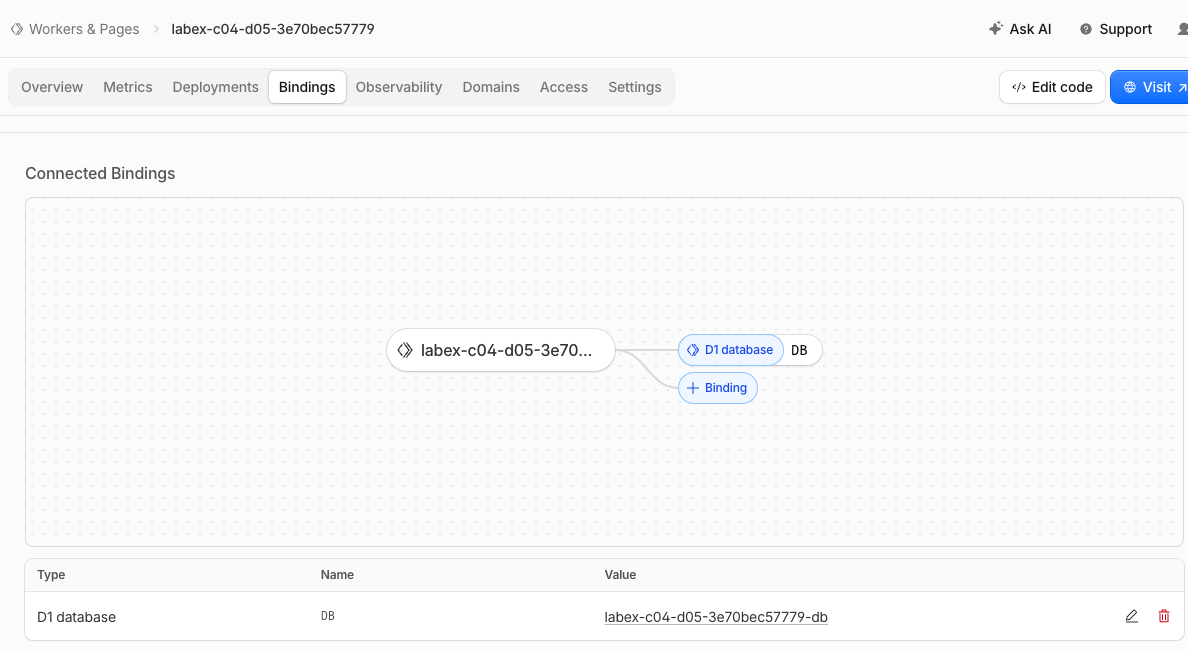
This example shows the Worker’s DB binding pointing to its D1 database. The generated resource prefix identifies this example run; your names will differ. The screenshot confirms only the binding. The HTTP checks above establish atomic rollback, the successful update, and bookmark continuation.
Delete the disposable resources
In this step, you remove only this lab's resources while the VM is still authorized. Finish all functional checks first. Keep configuration until deletion verification is complete.
npx wrangler delete
Confirm only the Worker name in this run’s configuration.
npx wrangler d1 delete DB
Inspect the prompt and confirm only this run's database. Then list databases:
npx wrangler d1 list --json
Your recorded database name and UUID must be absent from a successful response. Other resources may remain. An authentication or network error is inconclusive: resolve access and repeat the read before continuing. Run this step's verification while still logged in.
Stop the local development job too. List jobs and terminate only the wrangler dev job you started (replace %1 if its job number differs):
jobs
kill %1
End this VM authorization
In this step, you end the authorization only after the independent deletion check passes. Logout removes this VM's stored Wrangler authorization; closing a VM alone is not cloud cleanup.
npx wrangler logout
npx wrangler whoami --json
Expect loggedIn: false. This unauthenticated query can exit nonzero; that is expected only when the structured response explicitly says you are logged out. Complete verification, then close the lab environment.
Summary
You practiced keep related ticket updates consistent. You checked observable database results, kept the selected account and local state explicit, and removed the disposable resources before logging out.


