



Introduction
When a documentation site moves pages, old links should still lead visitors to the right place. A redirect is an HTTP response that tells the browser to request a different URL. In this lab, KV will hold a small catalog mapping old paths to new documentation paths.
You will inspect and validate a supplied JSON dataset before importing it, then read the catalog in multiple pages. Pagination means requesting a limited batch of results and using a continuation marker to fetch the next batch. Finally, you will change one destination and retire two entries while preserving an unrelated record in the same namespace. This is useful whenever you maintain a collection of settings instead of editing one key at a time.
Complete the preceding KV guided labs first. This fresh VM has Node.js 22.22.0 and project-local Wrangler 4.131.1 in /home/labex/project/redirect-catalog. Setup supplies five synthetic redirects, but does not import them or create cloud resources. Use your own learning account with the same account-read, Worker-write and KV-write permissions. One disposable Worker and namespace are sufficient; no paid upgrade or purchased domain is needed for this small dataset. The public catalog contains example paths only.
Connect a Redirect Namespace
In this step, you will connect an independent namespace for a small redirect catalog. The ROUTES binding will identify this namespace for both command-line operations and the Worker. Each lab starts with its own resources, so the catalog will not touch any previous namespace.
Enter the prepared project:
cd /home/labex/project/redirect-catalog
Generate a unique name once. openssl rand -hex 6 prints a random suffix; $(...) inserts it into the name. The shell variable keeps that name available for the following commands in this terminal.
WORKER_NAME="labex-routes-$(openssl rand -hex 6)"
printf '%s\n' "$WORKER_NAME"
Authorize this VM. In addition to reading your account identity, Workers Scripts Write allows deployment and deletion, and Workers KV Write allows managing this lab's namespace and keys.
npx wrangler login --device --browser=false --scopes account:read user:read workers_scripts:write workers_kv:write
Open the displayed device link in your browser, enter the current code, review the requested permissions and learning account, and authorize Wrangler. Background access may also appear on the consent page. Return to the terminal and wait for login to finish.
Review the same Worker and KV write permissions introduced in Create a Feature Flag Store. Confirm the learning account before authorizing.
npx wrangler whoami --json
Confirm loggedIn: true and the learning account's name, even if only one account is listed. Copy that account's id. Save it in the configuration below, replacing YOUR_ACCOUNT_ID before running the command. The cat here-document writes everything between the two JSON lines into a file; > replaces the file. The unquoted delimiter lets the shell insert $WORKER_NAME.
cat > wrangler.jsonc <<JSON
{
  "name": "$WORKER_NAME",
  "main": "src/index.js",
  "compatibility_date": "2026-07-30",
  "account_id": "YOUR_ACCOUNT_ID",
  "workers_dev": true
}
JSON
Create a namespace in that account. Its title shares the Worker's unique name so you can recognize the pair later. --update-config=false leaves the binding edit visible to you instead of changing the file automatically.
npx wrangler kv namespace create "$WORKER_NAME-routes" --update-config=false
The output includes the new namespace ID. Copy it, then replace YOUR_ACCOUNT_ID and YOUR_NAMESPACE_ID in this complete configuration. The ROUTES binding name is chosen for your code; the ID identifies the real Cloudflare resource.
cat > wrangler.jsonc <<JSON
{
  "name": "$WORKER_NAME",
  "main": "src/index.js",
  "compatibility_date": "2026-07-30",
  "account_id": "YOUR_ACCOUNT_ID",
  "workers_dev": true,
  "kv_namespaces": [
    { "binding": "ROUTES", "id": "YOUR_NAMESPACE_ID" }
  ]
}
JSON
npx wrangler kv namespace list
Find this lab's namespace title and compare its ID with the file. Other namespaces can be present; leave them alone. This configuration records which account and resource later commands should use. A binding is a reference to a namespace, not a copy of its data.
Validate and Import a Small Catalog
In this step, you will check a dataset before one command writes all its entries. A bulk operation saves repetitive work, but also repeats any mistake across the supplied data. Start by reading the prepared file:
cat redirects.json
Each object has a key such as route:/old-start and a value such as /docs/start. The route: prefix groups catalog records; it is part of the key, not a directory. The destination is a path on this same site, not an arbitrary external URL.
Write an ordinary Node.js validation script. It reads a filename, checks the array and fields, rejects duplicate keys, and prints a count only after all entries pass. The Set remembers keys already seen. The regular expressions keep this teaching dataset to simple old paths and documentation destinations; they are this application's rules, not restrictions imposed by KV.
cat > validate-redirects.mjs <<'JS'
import { readFile } from "node:fs/promises";

const filename = process.argv[2] ?? "redirects.json";
const entries = JSON.parse(await readFile(filename, "utf8"));
if (!Array.isArray(entries) || entries.length === 0 || entries.length > 20) {
  throw new Error("Use a non-empty teaching dataset of at most 20 entries.");
}
const seen = new Set();
for (const entry of entries) {
  if (!entry || typeof entry.key !== "string" || !/^route:\/old-[a-z-]+$/.test(entry.key)) {
    throw new Error("Every key must name an old route, such as route:/old-start.");
  }
  if (typeof entry.value !== "string" || !/^\/docs\/[a-z-]+$/.test(entry.value)) {
    throw new Error("Every destination must be a /docs/ path on this site.");
  }
  if (Object.keys(entry).some(key => !["key", "value"].includes(key))) {
    throw new Error("This dataset accepts only key and value fields.");
  }
  if (seen.has(entry.key)) throw new Error(`Duplicate key: ${entry.key}`);
  seen.add(entry.key);
}
console.log(`Validated ${entries.length} unique redirect entries.`);
JS
node validate-redirects.mjs redirects.json
Expect Validated 5 unique redirect entries. If validation fails, correct the file before importing. Rejecting duplicate keys matters because writing the same key again replaces its value.
First create a non-route fixture locally, then import the catalog. The fixture helps you check that later catalog maintenance preserves other data.
npx wrangler kv key put system:owner labex-redirect-demo --binding ROUTES --local
npx wrangler kv bulk put redirects.json --binding ROUTES --local
npx wrangler kv key list --binding ROUTES --local
Expect five route: entries plus system:owner. Bulk put writes the entries in the file; it does not replace the entire namespace or remove keys absent from the file. It also does not promise an atomic change visible everywhere at once.
Now import the same reviewed dataset into this lab's cloud namespace:
npx wrangler kv key put system:owner labex-redirect-demo --binding ROUTES --remote
npx wrangler kv bulk put redirects.json --binding ROUTES --remote
npx wrangler kv key list --binding ROUTES --remote
Confirm the six keys. The explicit target flags keep local practice and cloud writes separate. Run this step's check before changing any entries.
Read Every Page and Serve Redirects
In this step, you will build a Worker that lists all route keys and serves their redirects. A single KV list() call may return only part of a collection. The cursor is a continuation marker supplied by KV; pass it back unchanged to request the next part.
Write this handler. The deliberately small limit: 2 makes pagination visible with just five records. Production code usually uses a larger page size; this lab limits the data to twenty entries so the loop stays small.
cat > src/index.js <<'JS'
export default {
  async fetch(request, env) {
    const url = new URL(request.url);
    try {
      if (url.pathname === "/catalog") {
        const names = [];
        let cursor;
        let complete = false;
        let pages = 0;
        do {
          const page = await env.ROUTES.list({ prefix: "route:", limit: 2, cursor });
          names.push(...page.keys.map(key => key.name));
          pages += 1;
          complete = page.list_complete;
          cursor = complete ? undefined : page.cursor;
          if ((!complete && !cursor) || pages > 20) {
            return Response.json({ error: "Catalog could not be completed" }, { status: 503 });
          }
        } while (!complete);
        return Response.json({ keys: names, pages });
      }
      if (url.pathname.startsWith("/docs/")) {
        return new Response(`Example destination: ${url.pathname}`);
      }
      const target = await env.ROUTES.get(`route:${url.pathname}`);
      if (target === null) return new Response("Not found", { status: 404 });
      if (!/^\/docs\/[a-z-]+$/.test(target)) {
        return Response.json({ error: "Invalid redirect destination" }, { status: 500 });
      }
      return Response.redirect(new URL(target, url.origin).href, 302);
    } catch {
      return Response.json({ error: "Redirect storage unavailable" }, { status: 503 });
    }
  }
};
JS
The do...while loop requests at least one page and continues until list_complete is true. It keeps prefix: "route:" on every request, which prevents the owner fixture from entering the catalog. names.push(...) appends each page's key names to the result.
An empty keys array does not necessarily mean the listing is complete: deleted or expired entries can leave a page with no returned keys while more pages remain. That is why the loop uses list_complete, rather than the array length. The page bound and missing-cursor check produce a controlled error if this small demo cannot complete a listing. See KV listing and pagination.
For other paths, the Worker reads the matching route key. Missing routes return 404; a supported destination produces a 302 response with a Location header. The runtime checks destinations again so an incorrectly edited KV value cannot redirect visitors to another site. The /docs/ responses are simple placeholders showing the destination path, not a full documentation website.
npx wrangler dev --local --ip 0.0.0.0 --port 8080 > local.log 2>&1 &
DEV_PID=$!
cat local.log
Wait for the ready message, then inspect the full catalog:
curl -i http://127.0.0.1:8080/catalog
Expect five sorted route keys and at least three pages. Additional empty pages are possible; the important result is the complete set of keys, with no system:owner entry.
curl -i http://127.0.0.1:8080/old-start
Expect HTTP 302 and Location: http://127.0.0.1:8080/docs/start. By default curl shows the redirect response without following it. Keep the local dataset unchanged for comparison later.
Update Selected Routes and Preserve Other Data
In this step, you will change the cloud catalog without replacing its namespace. The new start page is /docs/getting-started, while two temporary pages should no longer redirect.
npx wrangler kv key put route:/old-start /docs/getting-started --binding ROUTES --remote
A selected-key write leaves the other routes alone. For multiple deletions, Wrangler accepts a JSON array of exact key names. Read this small retirement list before running the delete:
cat > retired-keys.json <<'JSON'
["route:/old-contact", "route:/old-event"]
JSON
cat retired-keys.json
npx wrangler kv bulk delete retired-keys.json --binding ROUTES --remote
If prompted, confirm that the binding and listed operation refer to this lab's disposable namespace. The list contains two route keys only; it does not contain system:owner.
npx wrangler kv key list --binding ROUTES --remote
npx wrangler kv key get system:owner --binding ROUTES --remote --text
Expect three remaining routes and the unchanged value labex-redirect-demo. Do not rerun the original bulk import now: its old values would undo the update and restore retired keys.
Deploy the Worker, confirm the ROUTES binding, and copy its actual public address:
npx wrangler deploy
WORKER_URL="https://YOUR_WORKER.YOUR_SUBDOMAIN.workers.dev"
curl -i "$WORKER_URL/catalog"
First confirm that /catalog returns HTTP 200 and the expected JSON keys. If a request returns a Cloudflare error page, wait briefly and repeat the read-only requests. A retired route counts as correct only when it returns HTTP 404 with the application body Not found; the status code alone is not enough.
The catalog should contain only route:/old-pricing, route:/old-start and route:/old-support. Test the changed and retired paths:
curl -i "$WORKER_URL/old-start"
curl -i "$WORKER_URL/old-contact"
curl -i "$WORKER_URL/old-event"
Expect the start path to redirect to /docs/getting-started; both retired paths should return 404. If new cloud data is not visible yet, allow for KV propagation and retry read-only checks. A failed connection is not a successful retirement result.
curl -i http://127.0.0.1:8080/catalog
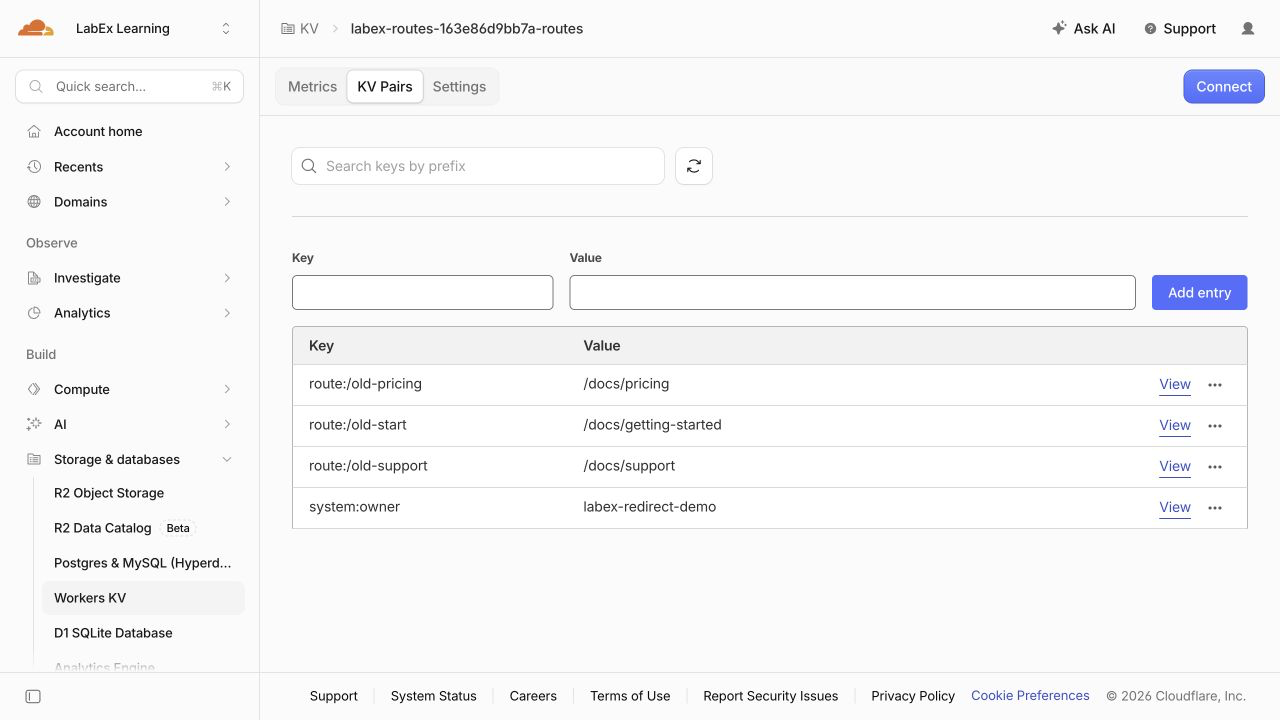
Local development still lists the original five routes. This difference confirms that the maintenance commands targeted the cloud store. In the Dashboard, select the same account, open Storage & databases → Workers KV, and inspect this lab's namespace. Compare its three route entries and retained owner fixture with the command output. This checkpoint is read-only; your generated namespace name and ID are specific to this run.
Select KV Pairs to see the records below. Use Refresh if you opened the namespace before the maintenance commands finished.
Delete the Disposable Cloud Resources
In this step, you will remove both resources while Wrangler is still authorized. A namespace can outlive its Worker, so deleting the application alone does not clean up its data.
Stop the local development process started in this terminal:
kill "$DEV_PID"
Inspect your saved resource references before deleting anything:
cat wrangler.jsonc
Confirm the labex-routes-... Worker name and the ROUTES namespace ID. Delete the Worker selected by this configuration:
npx wrangler delete
If prompted, check that the displayed name matches this lab and confirm with y. Then delete only the namespace referenced by ROUTES:
npx wrangler kv namespace delete --binding ROUTES
Review the namespace in any confirmation prompt before accepting. Keep wrangler.jsonc intact so the independent check can identify the resources that should be absent.
npx wrangler kv namespace list
This lab's namespace should be absent; unrelated namespaces should remain. Refresh the Dashboard lists to confirm the lab's Worker and namespace have disappeared. A failed request or an expired login does not prove deletion. Run this step's check before logging out so it can inspect an authorized inventory.
End the VM Authorization
In this step, you will disconnect Wrangler after the cleanup check has passed. Logging out ends this VM's saved Wrangler authorization; it does not delete cloud resources or sign you out of your ordinary Dashboard browser session.
npx wrangler logout
npx wrangler whoami --json
Confirm that the structured result reports "loggedIn": false. This unauthenticated command may finish with a nonzero exit status, which is expected here. If there is only a connection error and no explicit authentication state, retry when the connection works.
The remaining local files and local KV state belong to this disposable VM. They are separate from the cloud resources you already deleted. You can now finish the lab.
Summary
You validated a small redirect dataset before a bulk write, kept local and cloud targets explicit, and traversed every page of a prefixed KV listing. You changed one route and retired two exact keys while preserving an unrelated owner record. The deployed responses confirmed the new destination and missing retired routes, while the local catalog retained its original data.
Finally, you deleted the disposable Worker and namespace and logged out. Next, you will handle configuration reads that can temporarily return an earlier version.


