



Introduction
A help center can read its theme and welcome banner from KV so an editor can change those settings without deploying new code. Readers in different locations may briefly see different versions after an update. The application should remain usable during that transition instead of assuming that every read returns the newest settings.
You will build a versioned configuration reader with safe defaults, test a deliberately simulated sequence of old and new values, and then perform a real cloud update. A version is a label stored with the settings; it helps you identify the value you received. It does not turn KV into a strongly consistent database or guarantee that successive requests see increasing version numbers.
Complete the preceding KV labs first. This independent VM has Node.js 22.22.0 and project-local Wrangler 4.131.1 in /home/labex/project/delayed-config. Use your own learning account with the same account-read, Worker-write and KV-write permissions. The exercise creates one disposable Worker and namespace and exposes only synthetic display settings. No paid upgrade or purchased domain is required for the small dataset. These settings do not control authorization, payments or other decisions that require an immediate authoritative update.
Connect an Independent Configuration Store
In this step, you will connect a fresh namespace for display configuration. The CONFIG binding keeps the resource reference in standard Wrangler configuration. Use new lab resources so that deliberately invalid settings cannot affect another application.
Enter the prepared project:
cd /home/labex/project/delayed-config
Generate a unique name once. openssl rand -hex 6 prints a random suffix; $(...) inserts it into the name. The shell variable keeps that name available for the following commands in this terminal.
WORKER_NAME="labex-config-$(openssl rand -hex 6)"
printf '%s\n' "$WORKER_NAME"
Authorize this VM. In addition to reading your account identity, Workers Scripts Write allows deployment and deletion, and Workers KV Write allows managing this lab's namespace and keys.
npx wrangler login --device --browser=false --scopes account:read user:read workers_scripts:write workers_kv:write
Open the displayed device link in your browser, enter the current code, review the requested permissions and learning account, and authorize Wrangler. Background access may also appear on the consent page. Return to the terminal and wait for login to finish.
Review the same Worker and KV write permissions introduced earlier in this course, and confirm the learning account.
npx wrangler whoami --json
Confirm loggedIn: true and the learning account's name, even if only one account is listed. Copy that account's id. Save it in the configuration below, replacing YOUR_ACCOUNT_ID before running the command. The cat here-document writes everything between the two JSON lines into a file; > replaces the file. The unquoted delimiter lets the shell insert $WORKER_NAME.
cat > wrangler.jsonc <<JSON
{
  "name": "$WORKER_NAME",
  "main": "src/index.js",
  "compatibility_date": "2026-07-30",
  "account_id": "YOUR_ACCOUNT_ID",
  "workers_dev": true
}
JSON
Create a namespace in that account. Its title shares the Worker's unique name so you can recognize the pair later. --update-config=false leaves the binding edit visible to you instead of changing the file automatically.
npx wrangler kv namespace create "$WORKER_NAME-config" --update-config=false
The output includes the new namespace ID. Copy it, then replace YOUR_ACCOUNT_ID and YOUR_NAMESPACE_ID in this complete configuration. The CONFIG binding name is chosen for your code; the ID identifies the real Cloudflare resource.
cat > wrangler.jsonc <<JSON
{
  "name": "$WORKER_NAME",
  "main": "src/index.js",
  "compatibility_date": "2026-07-30",
  "account_id": "YOUR_ACCOUNT_ID",
  "workers_dev": true,
  "kv_namespaces": [
    { "binding": "CONFIG", "id": "YOUR_NAMESPACE_ID" }
  ]
}
JSON
npx wrangler kv namespace list
Find this lab's namespace title and compare its ID with the file. Other namespaces can be present; leave them alone. This configuration records which account and resource later commands should use. A binding is a reference to a namespace, not a copy of its data.
Read Versioned Settings with Safe Defaults
In this step, you will let both valid versions produce usable responses. Missing or damaged display settings fall back to a plain light theme and no banner. That keeps an optional presentation setting from breaking the help center.
Write the handler. The fixed defaults object contains no request-specific state and is never modified. Every request reads its own KV result.
cat > src/index.js <<'JS'
const defaults = { version: 0, theme: "light", banner: "", source: "default" };

export default {
  async fetch(request, env) {
    const url = new URL(request.url);
    if (url.pathname === "/health") return Response.json({ status: "ok" });
    const key = url.searchParams.get("key") ?? "config:current";
    if (url.pathname !== "/settings" || !/^config:[a-z0-9-]{1,20}$/.test(key)) {
      return new Response("Not found", { status: 404 });
    }
    let value;
    try {
      value = await env.CONFIG.get(key, { type: "text", cacheTtl: 60 });
    } catch {
      return Response.json({ error: "Settings temporarily unavailable" }, { status: 503 });
    }
    if (value === null) return Response.json(defaults);
    let settings;
    try {
      settings = JSON.parse(value);
    } catch {
      return Response.json(defaults);
    }
    if (!settings || !Number.isSafeInteger(settings.version) || settings.version < 1 ||
        !["light", "dark"].includes(settings.theme) ||
        typeof settings.banner !== "string" || settings.banner.length > 80) {
      return Response.json(defaults);
    }
    return Response.json({
      version: settings.version, theme: settings.theme,
      banner: settings.banner, source: "stored"
    });
  }
};
JS
The request to KV uses cacheTtl: 60, a read-cache duration in seconds. This does not expire the stored key. It also does not provide an instruction to force every location to fetch the newest value. Both existing values and missing-key results can be cached. Keep writes infrequent and design the application to tolerate an older valid configuration.
The handler validates the version, supported theme and banner length before using them. The /health route responds without reading optional settings. A storage failure still produces an explicit 503 on /settings; the application does not falsely report that it successfully loaded defaults from storage.
Create two small version files. Keeping each intended value in an ordinary file makes it easy to inspect before a write:
cat > config-v1.json <<'JSON'
{"version":1,"theme":"light","banner":"Welcome"}
JSON
cat > config-v2.json <<'JSON'
{"version":2,"theme":"dark","banner":"New help center"}
JSON
Write them to separate local fixture keys, plus a malformed value. These keys make the possible inputs reproducible; they do not simulate Cloudflare's network timing.
npx wrangler kv key put config:v1 --path config-v1.json --binding CONFIG --local
npx wrangler kv key put config:v2 --path config-v2.json --binding CONFIG --local
npx wrangler kv key put config:broken broken-json --binding CONFIG --local
npx wrangler dev --local --ip 0.0.0.0 --port 8080 > local.log 2>&1 &
DEV_PID=$!
cat local.log
Wait for the ready message. Then compare the two explicitly selected keys:
curl -i 'http://127.0.0.1:8080/settings?key=config:v1'
curl -i 'http://127.0.0.1:8080/settings?key=config:v2'
Both return HTTP 200 with source: "stored". Version 1 is light with Welcome; version 2 is dark with New help center. Neither version depends on a previous request's result.
curl -i 'http://127.0.0.1:8080/settings?key=config:missing'
curl -i 'http://127.0.0.1:8080/settings?key=config:broken'
Both should return {"version":0,"theme":"light","banner":"","source":"default"}. Version 0 is the application's default label; it is not a stored KV revision.
curl -i http://127.0.0.1:8080/health
Expect {"status":"ok"}. Keep the local server running until cleanup.
Exercise a Controlled Sequence of Older Reads
In this step, you will test the handler against a predictable sequence: old, new, old again, new, missing and invalid. This is a test fixture, a deliberately supplied input that makes an otherwise unpredictable situation repeatable. It is not evidence that a real Cloudflare request was stale.
Create a small Node.js test using the standard assertion library. It imports the handler you wrote and supplies the same CONFIG.get() interface with controlled return values:
cat > test-config.mjs <<'JS'
import assert from "node:assert/strict";
import worker from "./src/index.js";

const older = JSON.stringify({ version: 1, theme: "light", banner: "Welcome" });
const newer = JSON.stringify({ version: 2, theme: "dark", banner: "New help center" });
// A controlled fixture: these values simulate different reads, not a cloud outage.
const values = [older, newer, older, newer, null, "broken-json"];
const expectedVersions = [1, 2, 1, 2, 0, 0];
for (let i = 0; i < values.length; i += 1) {
  const env = { CONFIG: { get: async () => values[i] } };
  const response = await worker.fetch(new Request("https://example.test/settings"), env);
  assert.equal(response.status, 200);
  const body = await response.json();
  assert.equal(body.version, expectedVersions[i]);
  assert.ok(["light", "dark"].includes(body.theme));
  assert.equal(typeof body.banner, "string");
}
console.log("Controlled old/new/missing/invalid reads stayed usable.");
JS
node test-config.mjs
Expect Controlled old/new/missing/invalid reads stayed usable. A failed assertion stops the command with an error. The repeated older value is intentional: do not add a process-global "latest version" variable to hide it. Workers can run in different instances, so such a variable cannot establish an account-wide latest version.
A configuration update should keep older valid readers usable during the transition. This approach is appropriate for a banner or theme. It would not make KV suitable for immediately revoking someone's access. The real cloud test comes next; it may show the new value on the first request, and that is a valid result.
Deploy and Establish the First Cloud Version
In this step, you will establish a real remote baseline before changing it. Only the current configuration and the malformed fallback fixture belong in this lab's cloud namespace.
npx wrangler kv key put config:current --path config-v1.json --binding CONFIG --remote
npx wrangler kv key put config:broken broken-json --binding CONFIG --remote
npx wrangler deploy
Confirm the unique Worker name and CONFIG binding, then copy the actual public URL:
WORKER_URL="https://YOUR_WORKER.YOUR_SUBDOMAIN.workers.dev"
curl -i "$WORKER_URL/settings"
Expect version 1, theme light, banner Welcome, and source: "stored". Allow for hostname readiness and KV visibility if necessary; a network error is not a configuration response. Run this step's independent check before replacing version 1. It verifies the selected account, stored value, deployed binding, defaults and health response.
Observe a Real Update Without Requiring a Stale Read
In this step, you will update the stored configuration while leaving the Worker code unchanged. Inspect the intended new value, then write it to the same remote key:
cat config-v2.json
npx wrangler kv key put config:current --path config-v2.json --binding CONFIG --remote
npx wrangler kv key get config:current --binding CONFIG --remote --text
The management read should contain version 2. Now inspect what the application sees:
curl -i "$WORKER_URL/settings"
You may see version 2 immediately, or a valid earlier version while reads converge. Do not require a stale response to "prove" eventual consistency, and do not rapidly rewrite the key to provoke one. If needed, repeat the HTTP request at 15-second intervals for up to five minutes. This is a bounded exercise observation window, not a promise that every global location converges within five minutes.
Continue when the endpoint returns {"version":2,"theme":"dark","banner":"New help center","source":"stored"}. If it does not converge within that observation window, check the account and binding and report an inconclusive result. The independent check requires the real stored version and actual response to match; a local file or test fixture does not satisfy it.
curl -i "$WORKER_URL/settings?key=config:broken"
curl -i "$WORKER_URL/health"
The damaged display configuration still has a controlled default, and health remains ok. In the Dashboard, select the same account and inspect this lab's namespace under Storage & databases → Workers KV. Compare config:current with version 2 in your file. This read-only view shows the managed value; it cannot prove what every remote location currently has cached.
The controlled test covered tolerance of older values, while this real update covered deployment and observed convergence at your test endpoint. Keep those conclusions separate. See how KV works for its consistency model.
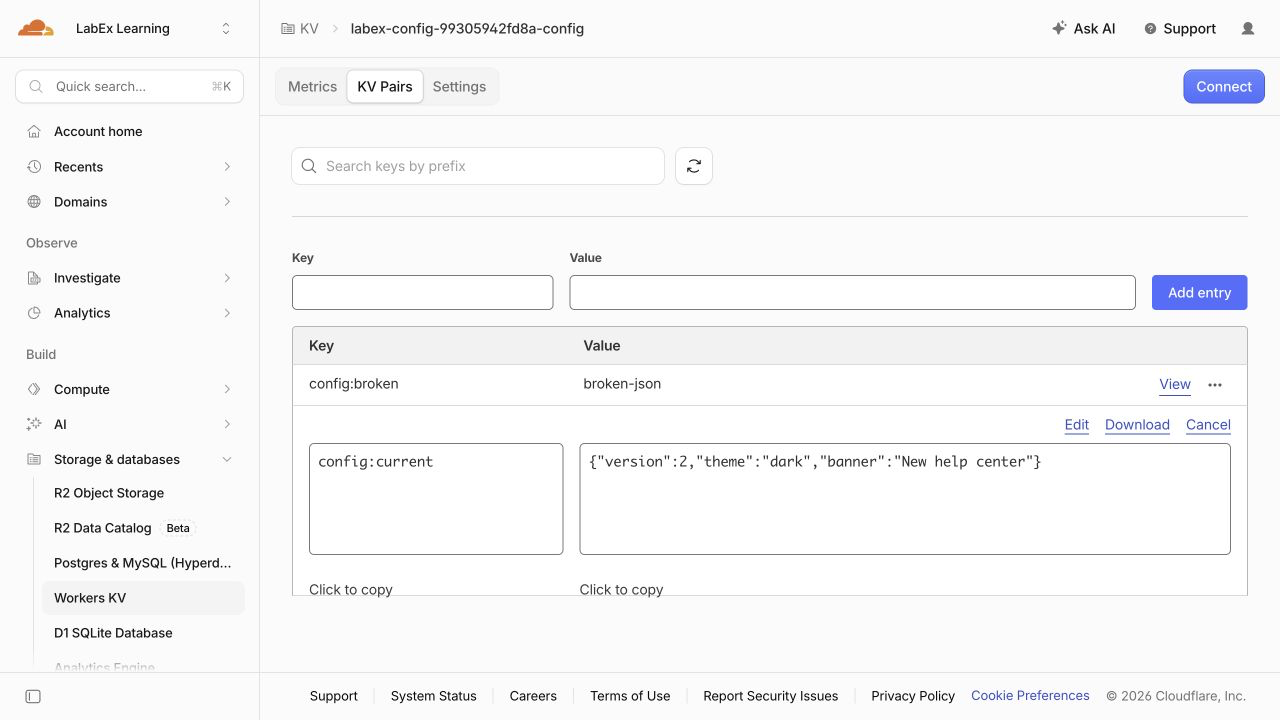
Select KV Pairs, then View beside config:current. Use Refresh if the list is older than your update. The example below shows version 2, theme dark and banner New help center; your generated namespace name will differ. Leave the value unchanged in this checkpoint.
Delete the Disposable Cloud Resources
In this step, you will remove both resources while Wrangler is still authorized. A namespace can outlive its Worker, so deleting the application alone does not clean up its data.
Stop the local development process started in this terminal:
kill "$DEV_PID"
Inspect your saved resource references before deleting anything:
cat wrangler.jsonc
Confirm the labex-config-... Worker name and the CONFIG namespace ID. Delete the Worker selected by this configuration:
npx wrangler delete
If prompted, check that the displayed name matches this lab and confirm with y. Then delete only the namespace referenced by CONFIG:
npx wrangler kv namespace delete --binding CONFIG
Review the namespace in any confirmation prompt before accepting. Keep wrangler.jsonc intact so the independent check can identify the resources that should be absent.
npx wrangler kv namespace list
This lab's namespace should be absent; unrelated namespaces should remain. Refresh the Dashboard lists to confirm the lab's Worker and namespace have disappeared. A failed request or an expired login does not prove deletion. Run this step's check before logging out so it can inspect an authorized inventory.
End the VM Authorization
In this step, you will disconnect Wrangler after the cleanup check has passed. Logging out ends this VM's saved Wrangler authorization; it does not delete cloud resources or sign you out of your ordinary Dashboard browser session.
npx wrangler logout
npx wrangler whoami --json
Confirm that the structured result reports "loggedIn": false. This unauthenticated command may finish with a nonzero exit status, which is expected here. If there is only a connection error and no explicit authentication state, retry when the connection works.
The remaining local files and local KV state belong to this disposable VM. They are separate from the cloud resources you already deleted. You can now finish the lab.
Summary
You built a configuration reader that accepts older and newer valid settings, uses safe defaults for missing or invalid values, and keeps its health endpoint independent of optional KV data. You exercised a controlled sequence of older reads, then changed a real remote key and observed the deployed response converge.
You learned that version labels describe returned data, while read-cache duration, expiration and strong consistency are different concerns. Finally, you deleted the disposable resources and logged out. The course challenge will combine correct namespace binding with safe notice handling.


