



Introduction
When an API depends on another service, the failure you see may begin somewhere else. A slow dependency can leave a caller waiting or produce an unhelpful exception. You will follow one request through a support API, use its logs to understand the failure, and return a clear error within a time limit while preserving healthy responses. The same technique helps you investigate a user report instead of guessing which part broke.
Start in this fresh VM with your own learning account. Prerequisites are ordinary Wrangler deployment, service bindings and local testing; no earlier Worker or VM is reused. Setup installs Node.js 22.22.0, Wrangler 4.131.1 and Miniflare 4.20260730.0 and supplies the broken caller and synthetic upstream. The upstream returns synthetic data, a controlled 503, or a 2.5-second delay. No database, purchased domain or high-load experiment is needed.
A runtime exception, a deliberate HTTP 504 and an execution-limit failure are different observations. You will inspect each kind of evidence without treating every 5xx response as a platform failure.
Reproduce and Correlate the Timeout
In this step, you will reproduce a slow dependency and connect its response to the corresponding log entry. A request ID labels one request so you can follow it among other activity. A deadline limits how long the handler waits: this caller allows 400 ms, while the fixture's slow mode takes 2.5 seconds. The starter does not catch the rejected fetch, so you will first observe that failure locally.
cd /home/labex/project/failure-diagnostics
cat src/index.js
cat upstream/index.js
Generate a unique resource base. The first unquoted EOF expands that variable into both configurations. The UPSTREAM service binding keeps the fixture private; a hostname in its request URL does not select a public service.
WORKER_NAME="labex-diagnose-$(node -p "require('node:crypto').randomBytes(6).toString('hex')")"
cat > wrangler.jsonc <<EOF
{
  "name": "$WORKER_NAME",
  "main": "src/index.js",
  "compatibility_date": "2026-07-30",
  "workers_dev": true,
  "preview_urls": false,
  "services": [{"binding": "UPSTREAM", "service": "$WORKER_NAME-upstream"}]
}
EOF
cat > upstream/wrangler.jsonc <<EOF
{
  "name": "$WORKER_NAME-upstream",
  "main": "index.js",
  "compatibility_date": "2026-07-30",
  "workers_dev": false,
  "preview_urls": false
}
EOF
Run both configurations in one local dev process. The background job keeps the terminal available; > and 2>&1 place output and errors in dev.log. Wait for Ready before requests.
npx wrangler dev -c wrangler.jsonc -c upstream/wrangler.jsonc --ip 0.0.0.0 --port 8080 > dev.log 2>&1 &
cat dev.log
Use -H to attach a small synthetic request ID. The handler only accepts a constrained ID format and otherwise generates one. --max-time bounds the curl client; it is separate from the handler's deadline.
curl -i --max-time 6 -H "X-Request-ID: healthy-one" "http://127.0.0.1:8080/api/check?mode=healthy"
curl -i --max-time 6 -H "X-Request-ID: slow-one" "http://127.0.0.1:8080/api/check?mode=slow"
cat dev.log
The healthy request returns 200 with synthetic upstream data. Slow mode should return a local 500 error and show the request_started record for slow-one followed by an uncaught timeout exception. The exact local error page and stack vary. This proves the deadline rejects; it does not prove a useful error response exists. Run verification before changing the caller.
Repair the Failure Response and Diagnostics
In this step, catch the bounded upstream failure and keep diagnostics useful without logging headers or credentials. Stop the current job using its actual number.
jobs
kill %1
Error handling makes a failure understandable; it does not make the dependency healthy. Your caller should say whether the dependency failed or took too long, while logs retain enough non-secret detail to investigate.
Replace the caller with the complete repaired handler below. The quoted delimiter preserves JavaScript literally. A 504 identifies the caller's dependency deadline; a 502 identifies a failed upstream response or protocol. Successful calls retain the upstream result. elapsed_ms is wall-clock elapsed time, not CPU usage. The log and response share a request ID so you can follow one request through the system.
cat > src/index.js <<'JS'
export default {
  async fetch(request, env) {
    const url = new URL(request.url);
    if (url.pathname === '/health') return Response.json({status: 'ok'});
    if (url.pathname !== '/api/check') return Response.json({error: 'not_found'}, {status: 404});
    if (request.method !== 'GET') return Response.json({error: 'method_not_allowed'}, {status: 405});
    const mode = url.searchParams.get('mode') || 'healthy';
    if (!['healthy', 'slow', 'fail'].includes(mode)) {
      return Response.json({error: 'invalid_mode'}, {status: 400});
    }
    const suppliedId = request.headers.get('X-Request-ID') || '';
    const requestId = /^[a-z0-9-]{1,64}$/.test(suppliedId) ? suppliedId : crypto.randomUUID();
    const headers = {'X-Request-ID': requestId, 'Cache-Control': 'no-store'};
    const started = Date.now();
    console.log(JSON.stringify({event: 'request_started', request_id: requestId, mode}));
    const upstreamUrl = new URL('https://diagnostic.internal/check');
    upstreamUrl.searchParams.set('mode', mode);
    upstreamUrl.searchParams.set('probe', requestId);
    const signal = AbortSignal.timeout(400);
    const failure = (event, status, detail = {}) => {
      console.error(JSON.stringify({event, request_id: requestId, mode, status,
        elapsed_ms: Date.now() - started, ...detail}));
      return Response.json({error: event, requestId}, {status, headers});
    };
    try {
      const response = await env.UPSTREAM.fetch(upstreamUrl, {signal});
      if (!response.ok) return failure('upstream_status', 502, {upstream_status: response.status});
      const data = await response.json();
      if (data.service !== 'labex-diagnostic-fixture' || data.status !== 'ok' || data.probe !== requestId) {
        return failure('upstream_protocol', 502);
      }
      console.log(JSON.stringify({event: 'request_complete', request_id: requestId,
        mode, status: 200, elapsed_ms: Date.now() - started}));
      return Response.json({status: 'ok', requestId, upstream: data}, {headers});
    } catch {
      return signal.aborted ? failure('upstream_timeout', 504) : failure('upstream_exception', 502);
    }
  }
};
JS
npx wrangler dev -c wrangler.jsonc -c upstream/wrangler.jsonc --ip 0.0.0.0 --port 8080 > dev.log 2>&1 &
cat dev.log
After Ready, compare all three modes and the unaffected health route. Each failure must terminate promptly; waiting longer for slow mode is not the repair.
curl -i --max-time 6 -H "X-Request-ID: healthy-two" "http://127.0.0.1:8080/api/check?mode=healthy"
curl -i --max-time 6 -H "X-Request-ID: slow-two" "http://127.0.0.1:8080/api/check?mode=slow"
curl -i --max-time 6 -H "X-Request-ID: fail-two" "http://127.0.0.1:8080/api/check?mode=fail"
curl -i http://127.0.0.1:8080/health
cat dev.log
Expect 200/504/502 for healthy/slow/fail. Each response carries its request ID in JSON and X-Request-ID. Logs pair request_started with request_complete, upstream_timeout or upstream_status. The last category records the upstream's 503 separately from the caller's 502. A caught failure can have a successful runtime outcome because the handler completed normally, even though its HTTP status is 504 or 502.
Compare that with the supplied execution-limit example:
cat evidence/execution-limit.json
This file is explicitly synthetic teaching evidence, not a capture from your Worker. Its exceededCpu outcome identifies an execution-limit failure; no application catch is guaranteed to run after the runtime stops execution. Waiting on this lab's asynchronous upstream is not equivalent to consuming CPU time. Investigate expensive computation or request work before considering limits; do not remove the deadline or generate load to imitate this example. The official error reference explains exception and limit categories, and runtime outcome documentation distinguishes outcome from HTTP status.
Run verification. It starts an isolated runtime with its own fixture and request IDs, checks healthy and failure contracts, and confirms a synthetic Authorization header does not appear in captured application logs. Learner log files are not the independent proof.
Verify Live Requests, Logs and Metrics
In this step, verify the repaired behavior in your learning account. Stop local development and authorize this fresh VM with the same scoped device flow taught earlier.
jobs
kill %1
npx wrangler login --device --browser=false --scopes account:read user:read workers_scripts:write workers_tail:read
Open the printed link, enter the code and approve the intended learning account in your browser. Confirm the actual account name and ID in standard Wrangler output.
npx wrangler whoami --json
Replace YOUR_ACCOUNT_ID with that actual ID. This ordinary Node command saves it in both project configurations, so each deployment is explicit about ownership.
node -e 'const fs=require("node:fs");for(const p of ["wrangler.jsonc","upstream/wrangler.jsonc"]){const c=JSON.parse(fs.readFileSync(p));c.account_id="YOUR_ACCOUNT_ID";fs.writeFileSync(p,JSON.stringify(c,null,2)+"\n");}'
cat wrangler.jsonc upstream/wrangler.jsonc
npx wrangler deploy -c upstream/wrangler.jsonc
npx wrangler deploy
The fixture has no public endpoint. Copy the caller's actual workers.dev URL below. If the account needs initial subdomain registration, use the procedure from Deploy Your First Cloudflare Worker before continuing.
APP_URL="https://YOUR_WORKER.YOUR_SUBDOMAIN.workers.dev"
Start a readable live stream. Wait until events.log says Connected before sending requests; the existence of the file alone is not readiness.
npx wrangler tail --format pretty > events.log 2> tail-errors.log &
cat events.log
curl -i --max-time 6 -H "X-Request-ID: cloud-healthy" "$APP_URL/api/check?mode=healthy"
curl -i --max-time 6 -H "X-Request-ID: cloud-slow" "$APP_URL/api/check?mode=slow"
curl -i --max-time 6 -H "X-Request-ID: cloud-fail" "$APP_URL/api/check?mode=fail"
cat events.log
Find the expected 200/504/502 responses and matching IDs in the live application logs. If an event has not arrived yet, inspect the same log again after a few seconds; do not change the application to manufacture it. Stop and inspect tail-errors.log if the stream ended. Readable output can mark the caught 504 invocation as Ok: that means the runtime completed, not that the upstream was healthy.
In Dashboard, open the exact caller in the selected account, confirm its UPSTREAM binding targets this fixture, and inspect Metrics. Available charts aggregate requests and invocation errors and can lag behind a short test; record what is actually visible rather than requiring an immediate nonzero total. Use live logs and HTTP responses for individual-request evidence. A caught 504 can appear in HTTP response status data without counting as an uncaught runtime exception. The metrics reference explains aggregation and invocation categories.
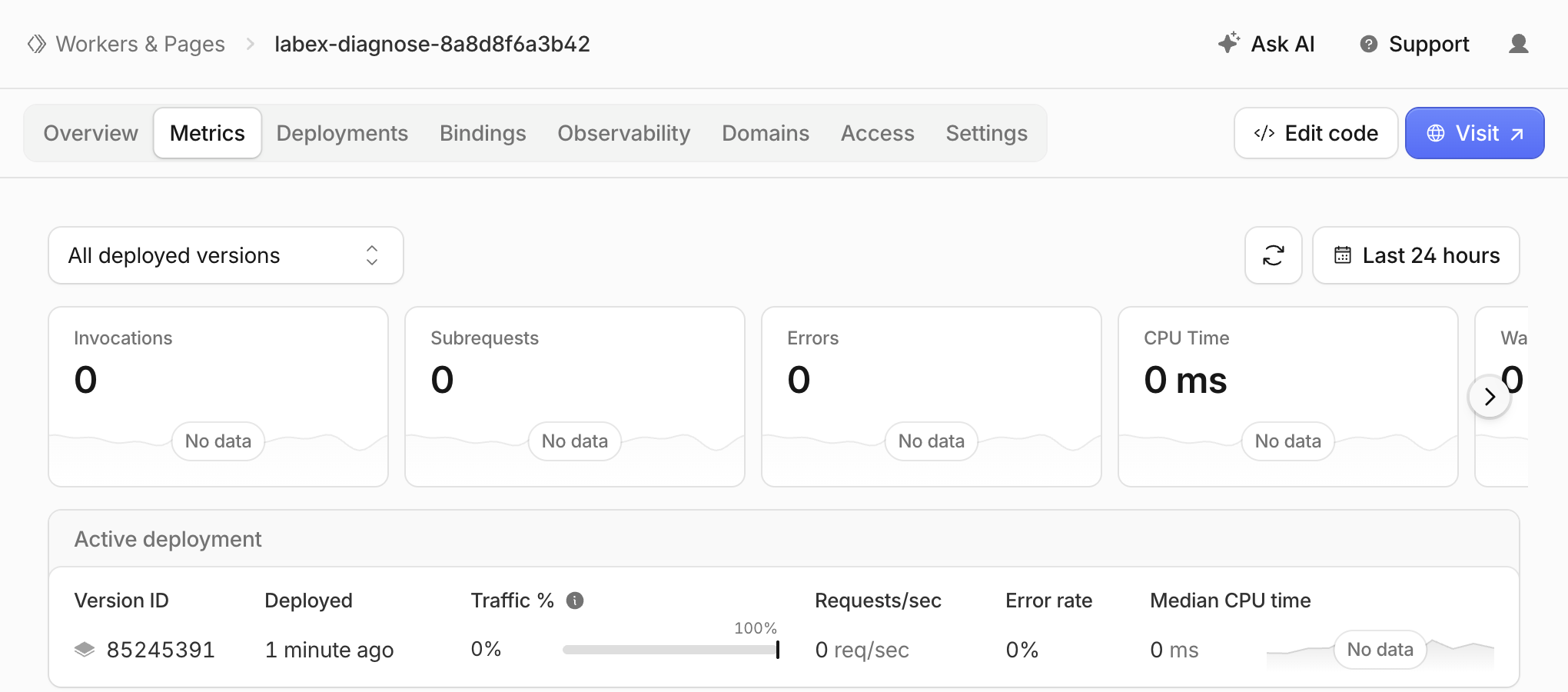
In Compute → Workers & Pages, open your exact caller and select Metrics. Check the Worker breadcrumb, the deployed-version filter and a time range covering your requests. The refresh button sits beside the time-range selector. The screenshot below was taken shortly after the synthetic healthy, slow and failed-upstream requests; the cards still showed No data. This is a valid observation of delayed analytics, not proof that no requests ran or that the repair failed. Your name, version ID and totals will differ. Do not generate extra load just to match a picture.
Run verification while authorized. It queries ownership and binding state, sends fresh independent requests and captures a separate live stream. Allow roughly a minute. An unavailable or incomplete stream is inconclusive; inspect connection readiness and retry, never treat missing logs as success. After verification passes, stop the learner tail using its current job number.
jobs
kill %1
Delete the Diagnostic Workers
In this step, remove only this lab's caller and fixture while still authorized. Review both names and their account before deleting the caller first.
cat wrangler.jsonc upstream/wrangler.jsonc
npx wrangler delete
npx wrangler delete -c upstream/wrangler.jsonc
At each matching name prompt press the single key y. The pinned CLI may report a legacy KV cleanup authentication diagnostic after deleting a Worker; do not widen permissions for it or assume arbitrary errors prove deletion. Refresh Dashboard and run verification. Both names must be absent from a successful authenticated inventory. Preserve the account, subdomain and unrelated resources.
Disconnect the VM
In this step, disconnect the VM after resource deletion is verified. Closing the terminal or logging out would not remove cloud resources.
npx wrangler logout
npx wrangler whoami --json
Expect loggedIn=false; the command may exit nonzero for that unauthenticated state. Run the final check. Your browser login and learning account can be reused by a later fresh lab.
Summary
You reproduced an unhandled timeout, repaired bounded dependency failures, and correlated request IDs across responses and structured logs. Healthy behavior stayed intact. You distinguished application HTTP failures from runtime outcomes and synthetic CPU-limit evidence, verified actual cloud behavior, then removed both Workers and disconnected.


