



Introduction
A Durable Object name is part of an application's data model. Calls that use the same name reach the same logical object and its SQLite database; different names select different coordination units. A routing regression can therefore expose one room's state through another room's URL even when the Durable Object class and its storage code are correct.
In this lab, you will deploy a small room journal with healthy planning and support histories, reproduce a faulty release that sends every room to the planning object, and use a route diagnostic to find the mismatch. You will repair only the name mapping, redeploy, and prove that both original histories were preserved. A supplied WebSocket probe then makes concurrent updates, disconnects, reconnects and confirms that new rooms remain isolated.
If you entered this course directly, complete Connect LabEx to Your Cloudflare Account first. It teaches the LabEx VM terminal, Wrangler device authorization, account confirmation and explicit account-ID configuration used here. This fresh VM still needs its own authorization.
Authorize the VM and Declare the Room Namespace
In this step, you will authorize this fresh VM, confirm the dedicated learning account and declare one SQLite-backed Durable Object namespace.
cd /home/labex/project/room-routing
npx wrangler --version
npx wrangler login --device --browser=false
Expect Wrangler 4.132.0. Open the displayed Cloudflare URL in the browser, enter the short code, confirm the intended learning account and authorize it. Device authorization grants this VM access without sending your password to the terminal.
Read only safe identity fields, select the confirmed account by name and create a disposable Worker name:
WHOAMI="$(npx wrangler whoami --json)"
printf '%s\n' "$WHOAMI" | jq '{loggedIn, authType, accounts: [.accounts[] | {name}]}'
ACCOUNT_ID="$(printf '%s\n' "$WHOAMI" | jq -r '.accounts[] | select(.name == "LabEx Learning") | .id')"
test -n "$ACCOUNT_ID"
RUN="labex-c10-o07-$(openssl rand -hex 6)"
printf '%s\n' "$RUN" | tee .labex/run-name
cat > wrangler.jsonc <<JSON
{
  "\$schema": "./node_modules/wrangler/config-schema.json",
  "name": "$RUN",
  "account_id": "$ACCOUNT_ID",
  "main": "src/index.js",
  "compatibility_date": "2026-09-18",
  "workers_dev": true,
  "preview_urls": false,
  "observability": { "enabled": true, "head_sampling_rate": 1 },
  "durable_objects": { "bindings": [
    { "name": "ROOMS", "class_name": "RoomJournal" }
  ] },
  "exports": {
    "RoomJournal": { "type": "durable-object", "storage": "sqlite" }
  }
}
JSON
ROOMS is a namespace binding: it can address many RoomJournal objects. The application-chosen name passed to getByName() decides which object's SQLite database and live connections receive a call.
Build a Journal With Explicit Object Names
In this step, you will implement the stateful class and keep identity selection in one small routing function. This separation matters during diagnosis: storage behavior can remain healthy while a caller selects the wrong object.
Create the initially correct mapper. A validated room name is already a stable, deterministic object name:
cat > src/router.js <<'JS'
export function objectNameFor(room) {
  return room;
}
JS
cat > test/router.test.mjs <<'JS'
import test from "node:test";
import assert from "node:assert/strict";
import { objectNameFor } from "../src/router.js";

test("each validated room keeps its own object identity", () => {
  assert.equal(objectNameFor("planning"), "planning");
  assert.equal(objectNameFor("support"), "support");
  assert.notEqual(objectNameFor("planning"), objectNameFor("support"));
});
JS
Create the Worker and Durable Object. ctx.id.name reports the stable name used to reach this object. The page logs only requested and selected synthetic room names; journal text is deliberately omitted from logs.
cat > src/index.js <<'JS'
import { DurableObject } from "cloudflare:workers";
import { objectNameFor } from "./router.js";

const ROOM = /^[a-z0-9](?:[a-z0-9-]{0,30}[a-z0-9])?$/;
const EVENT = /^[a-z0-9](?:[a-z0-9-]{0,46}[a-z0-9])?$/;
const json = (value, status = 200) => Response.json(value, { status });
const safeRoom = value => ROOM.test(value || "") ? value : null;

export class RoomJournal extends DurableObject {
  constructor(ctx, env) {
    super(ctx, env);
    ctx.blockConcurrencyWhile(async () => {
      ctx.storage.sql.exec(`CREATE TABLE IF NOT EXISTS events (
        sequence INTEGER PRIMARY KEY AUTOINCREMENT,
        event_id TEXT NOT NULL UNIQUE,
        text TEXT NOT NULL
      )`);
    });
  }

  state() {
    return {
      objectName: this.ctx.id.name,
      events: this.ctx.storage.sql.exec(
        "SELECT sequence, event_id AS eventId, text FROM events ORDER BY sequence"
      ).toArray()
    };
  }

  append(eventId, text) {
    if (!EVENT.test(eventId || "") || typeof text !== "string" || text.length < 1 || text.length > 80) {
      throw new Error("invalid_event");
    }
    this.ctx.storage.sql.exec("INSERT OR IGNORE INTO events (event_id, text) VALUES (?, ?)", eventId, text);
    return this.state();
  }

  async fetch(request) {
    if (request.headers.get("Upgrade")?.toLowerCase() !== "websocket") return json({ error: "upgrade_required" }, 426);
    const pair = new WebSocketPair();
    const [client, server] = Object.values(pair);
    this.ctx.acceptWebSocket(server);
    server.send(JSON.stringify({ type: "ready", ...this.state() }));
    return new Response(null, { status: 101, webSocket: client });
  }

  async webSocketMessage(socket, raw) {
    try {
      const message = JSON.parse(raw);
      if (message.type !== "append") throw new Error("invalid_event");
      const state = this.append(message.eventId, message.text);
      const frame = JSON.stringify({ type: "event", ...state });
      for (const peer of this.ctx.getWebSockets()) peer.send(frame);
    } catch {
      socket.send(JSON.stringify({ type: "error", error: "invalid_event" }));
    }
  }
}

async function roomState(env, room) {
  return env.ROOMS.getByName(objectNameFor(room)).state();
}

function inspectPage(planning, support) {
  const rows = [planning, support].map(([requested, state]) => `<tr><td>${requested}</td><td>${state.objectName}</td><td>${state.events.map(x => x.eventId).join(", ")}</td></tr>`).join("");
  return `<!doctype html><html lang="en"><meta charset="utf-8"><title>Room routing inspector</title>
  <style>body{font:18px system-ui;max-width:900px;margin:48px auto;color:#17212b}h1{color:#5b8c00}table{border-collapse:collapse;width:100%}th,td{border:1px solid #ccd5df;padding:14px;text-align:left}th{background:#eef7dc}.ok{padding:12px;background:#eef7dc;border-left:5px solid #78aa00}</style>
  <h1>Room routing inspector</h1><p class="ok">Each requested room resolves to the matching Durable Object name.</p>
  <table><thead><tr><th>Requested room</th><th>Object name</th><th>Preserved event IDs</th></tr></thead><tbody>${rows}</tbody></table></html>`;
}

export default {
  async fetch(request, env) {
    const url = new URL(request.url);
    if (url.pathname === "/inspect") {
      const states = await Promise.all(["planning", "support"].map(async room => [room, await roomState(env, room)]));
      return new Response(inspectPage(...states), { headers: { "content-type": "text/html; charset=utf-8" } });
    }
    const debug = url.pathname.match(/^\/debug\/route\/([^/]+)$/);
    if (debug) {
      const room = safeRoom(debug[1]);
      if (!room) return json({ error: "invalid_room" }, 400);
      return json({ requestedRoom: room, objectName: objectNameFor(room) });
    }
    const match = url.pathname.match(/^\/rooms\/([^/]+)\/(events|connect)$/);
    if (!match) return json({ error: "not_found" }, 404);
    const room = safeRoom(match[1]);
    if (!room) return json({ error: "invalid_room" }, 400);
    const objectName = objectNameFor(room);
    console.log(JSON.stringify({ event: "routing_decision", requestedRoom: room, objectName, operation: match[2] }));
    const stub = env.ROOMS.getByName(objectName);
    if (match[2] === "connect") return stub.fetch(request);
    if (request.method === "GET") return json(await stub.state());
    if (request.method === "POST") {
      try {
        const body = await request.json();
        return json(await stub.append(body.eventId, body.text), 201);
      } catch (error) {
        return json({ error: error.message === "invalid_event" ? "invalid_event" : "invalid_json" }, 400);
      }
    }
    return json({ error: "method_not_allowed" }, 405);
  }
};
JS
npm test
The test checks the identity boundary directly. The Durable Object uses its runtime-owned name for diagnostics and stores journal rows in SQLite before returning them.
Deploy Two Healthy Room Histories
In this step, you will deploy the healthy release first and create one recognizable event in each room. These rows are the preservation evidence: later repair is successful only if both rows return from their original objects.
rm -f .labex/deploy.log .labex/app-url .labex/baseline.json
npx wrangler deploy | tee .labex/deploy.log
APP_URL="$(grep -Eo 'https://[^ ]+\.workers\.dev' .labex/deploy.log | tail -1)"
test -n "$APP_URL"
printf '%s\n' "$APP_URL" | tee .labex/app-url
for attempt in $(seq 1 30); do READY="$(curl --silent "$APP_URL/debug/route/planning" || true)"; test "$(jq -r '.objectName // empty' <<<"$READY" 2>/dev/null)" = planning && break; sleep 2; done
test "$(jq -r .objectName <<<"$READY")" = planning
sleep 5
curl --silent --fail -X POST "$APP_URL/rooms/planning/events" -H 'content-type: application/json' --data '{"eventId":"plan-start","text":"Planning kickoff"}' >/dev/null
curl --silent --fail -X POST "$APP_URL/rooms/support/events" -H 'content-type: application/json' --data '{"eventId":"support-start","text":"Support handoff"}' >/dev/null
jq -n --argjson planning "$(curl --silent --fail "$APP_URL/rooms/planning/events")" --argjson support "$(curl --silent --fail "$APP_URL/rooms/support/events")" '{planning:$planning,support:$support}' | tee .labex/baseline.json
The two objectName fields must differ. planning contains only plan-start, while support contains only support-start. The Worker name is disposable, but these object histories must survive the release regression and repair.
Reproduce and Trace the Faulty Release
In this step, you will simulate a release regression supplied with the lab. The faulty function ignores its argument and always returns planning. Running the identity test is expected to fail; capturing that controlled failure makes the defect observable before deployment.
cp fixtures/router-bug.js src/router.js
rm -f .labex/bug-test.log .labex/bug.json
set -o pipefail
if npm test 2>&1 | tee .labex/bug-test.log; then TEST_STATUS=0; else TEST_STATUS=$?; fi
set +o pipefail
printf '%s\n' "$TEST_STATUS" > .labex/bug-test-status
test "$TEST_STATUS" -ne 0
npx wrangler deploy
APP_URL="$(cat .labex/app-url)"
for attempt in $(seq 1 30); do
  BUG_ROUTE="$(curl --silent "$APP_URL/debug/route/support" || true)"
  BUG_READ="$(curl --silent "$APP_URL/rooms/support/events" || true)"
  test "$(jq -r '.objectName // empty' <<<"$BUG_ROUTE" 2>/dev/null)" = planning && test "$(jq -r '.objectName // empty' <<<"$BUG_READ" 2>/dev/null)" = planning && break
  sleep 2
done
test "$(jq -r .objectName <<<"$BUG_ROUTE")" = planning
test "$(jq -r .objectName <<<"$BUG_READ")" = planning
jq -n \
  --argjson planningRoute "$(curl --silent --fail "$APP_URL/debug/route/planning")" \
  --argjson supportRoute "$BUG_ROUTE" \
  --argjson supportRead "$BUG_READ" \
  '{planningRoute:$planningRoute,supportRoute:$supportRoute,supportRead:$supportRead}' | tee .labex/bug.json
The diagnostic separates requested room from selected object name. A request for support now reports objectName: planning, and its read exposes plan-start. You did not delete or overwrite the original support object; the bad release merely stopped addressing it.
Repair the Mapper and Prove Reconnect Isolation
In this step, you will repair only the identity mapping. No storage reset or data replay is needed because the original named objects still exist.
cat > src/router.js <<'JS'
export function objectNameFor(room) {
  return room;
}
JS
npm test
cat > tools/isolation.mjs <<'JS'
import WebSocket from "ws";
const [base, prefix] = process.argv.slice(2);
const wsBase = base.replace(/^http/, "ws");
const rooms = [`${prefix}-planning`, `${prefix}-support`];
const open = room => new Promise((resolve, reject) => {
  const ws = new WebSocket(`${wsBase}/rooms/${room}/connect`);
  const inbox = [];
  ws.on("message", raw => { const value = JSON.parse(raw); inbox.push(value); if (value.type === "ready") resolve({ ws, inbox, ready:value }); });
  ws.on("error", reject);
});
const waitFor = (client, eventId) => new Promise((resolve, reject) => {
  const timer = setTimeout(() => reject(new Error("event timeout")), 5000);
  const inspect = value => { if (value.type === "event" && value.events.some(x => x.eventId === eventId)) { clearTimeout(timer); client.ws.off("message", listener); resolve(value); } };
  const listener = raw => inspect(JSON.parse(raw));
  client.ws.on("message", listener); client.inbox.forEach(inspect);
});
const close = client => new Promise(resolve => { client.ws.once("close", resolve); client.ws.close(1000, "reconnect"); });
const [planning, support] = await Promise.all(rooms.map(open));
planning.ws.send(JSON.stringify({ type:"append", eventId:`${prefix}-plan`, text:"Plan update" }));
support.ws.send(JSON.stringify({ type:"append", eventId:`${prefix}-support`, text:"Support update" }));
await Promise.all([waitFor(planning, `${prefix}-plan`), waitFor(support, `${prefix}-support`)]);
await Promise.all([close(planning), close(support)]);
const [planningAgain, supportAgain] = await Promise.all(rooms.map(open));
const result = { planning:planningAgain.ready, support:supportAgain.ready };
console.log(JSON.stringify(result, null, 2));
await Promise.all([close(planningAgain), close(supportAgain)]);
JS
rm -f .labex/repaired.json .labex/reconnect.json
npx wrangler deploy
APP_URL="$(cat .labex/app-url)"
for attempt in $(seq 1 30); do REPAIRED_READY="$(curl --silent "$APP_URL/debug/route/support" || true)"; test "$(jq -r '.objectName // empty' <<<"$REPAIRED_READY" 2>/dev/null)" = support && break; sleep 2; done
test "$(jq -r .objectName <<<"$REPAIRED_READY")" = support
sleep 5
jq -n --argjson planning "$(curl --silent --fail "$APP_URL/rooms/planning/events")" --argjson support "$(curl --silent --fail "$APP_URL/rooms/support/events")" '{planning:$planning,support:$support}' | tee .labex/repaired.json
node tools/isolation.mjs "$APP_URL" cloud | tee .labex/reconnect.json
The repaired read finds both original event IDs in their original objects. The WebSocket probe then updates two new objects concurrently, closes both connections and reconnects. Each ready frame contains only its own event, proving that routing—not a database reset—fixed the leak.
Inspect and Redeploy the Repaired Service
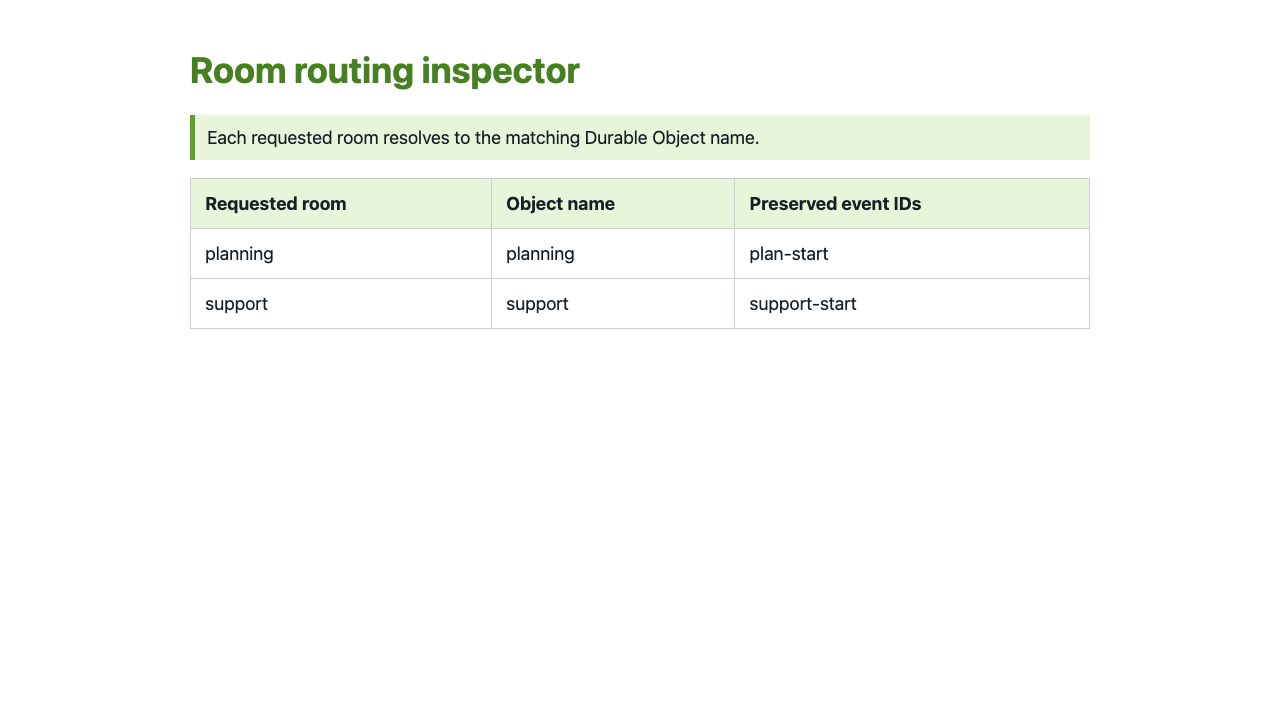
In this step, you will connect the runtime evidence to beginner-friendly browser and Dashboard views. Open the URL stored in .labex/app-url with /inspect. The green statement and table should show planning → planning, support → support, and the two preserved event IDs.
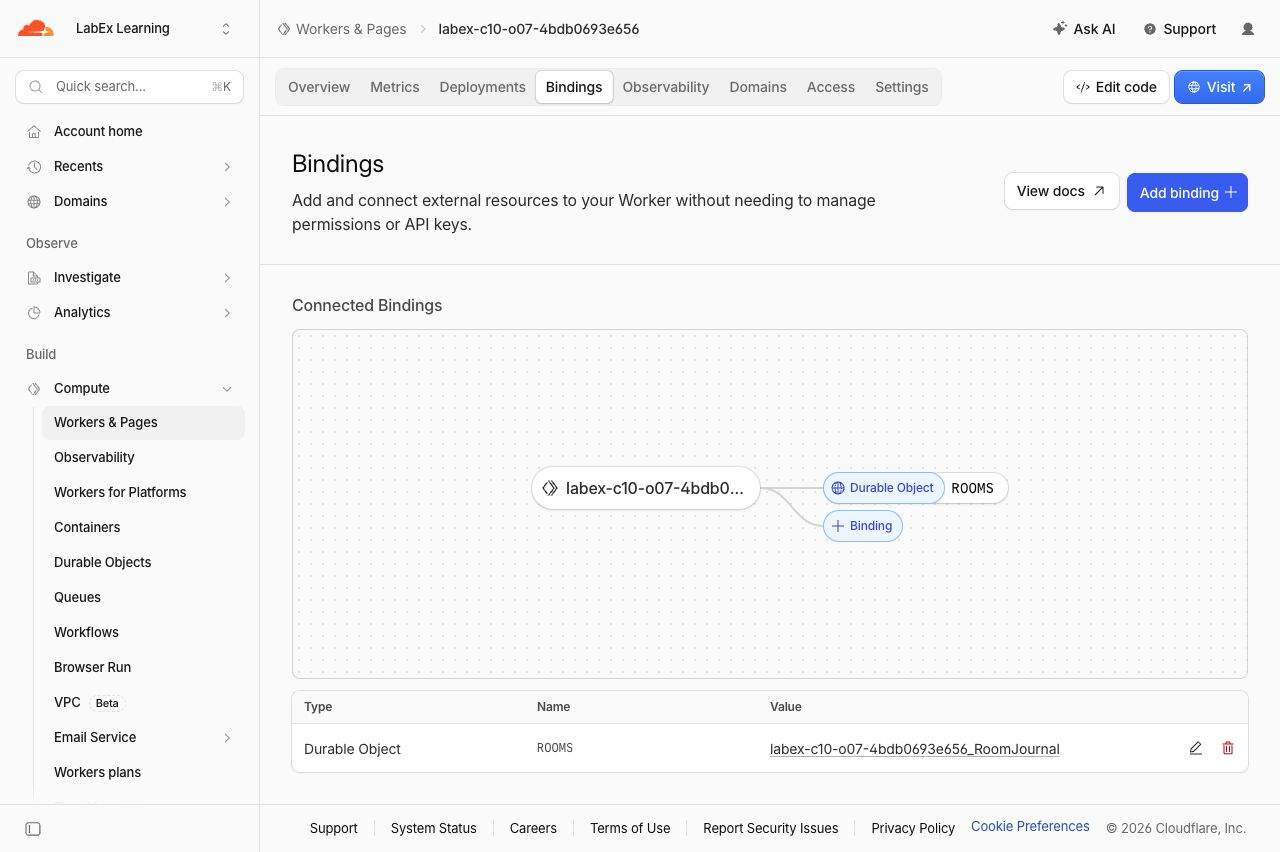
Open Workers & Pages, select the exact Worker name in .labex/run-name, and open Bindings. ROOMS should connect to RoomJournal.
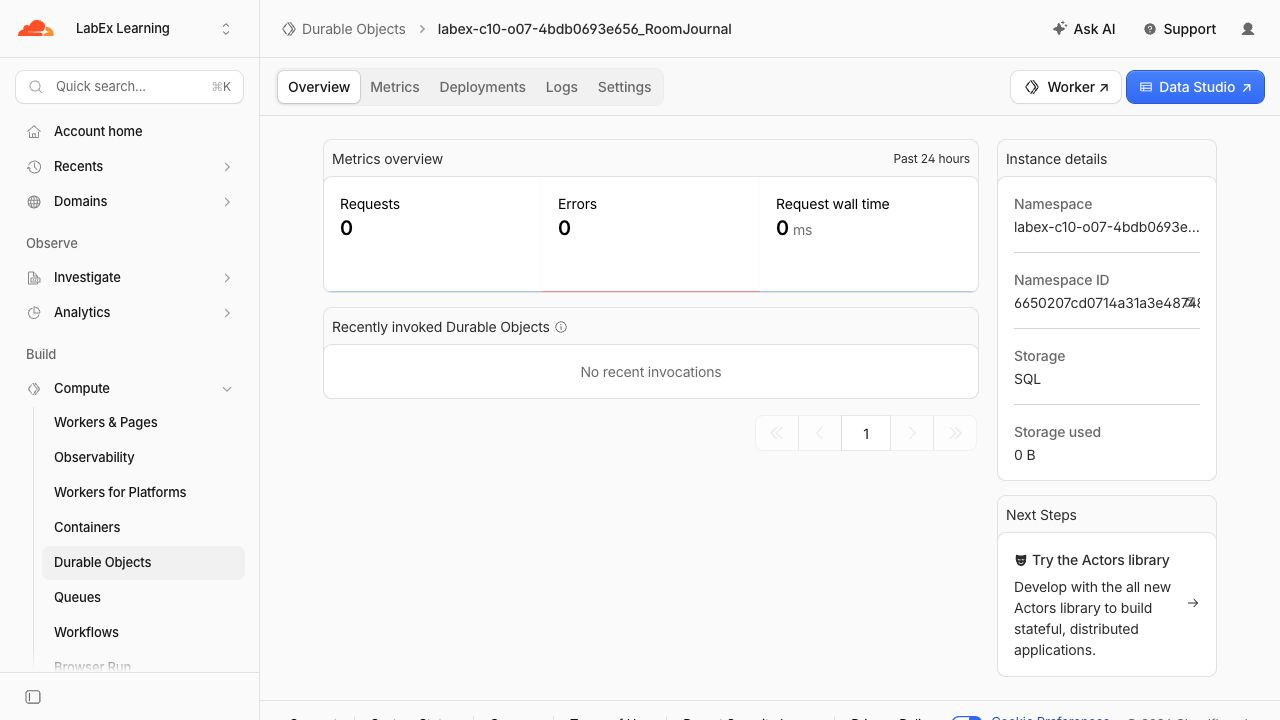
Open Durable Objects, select <your-worker>_RoomJournal, and confirm Storage: SQL. One namespace can contain many named objects; the name selects the isolated object inside it.
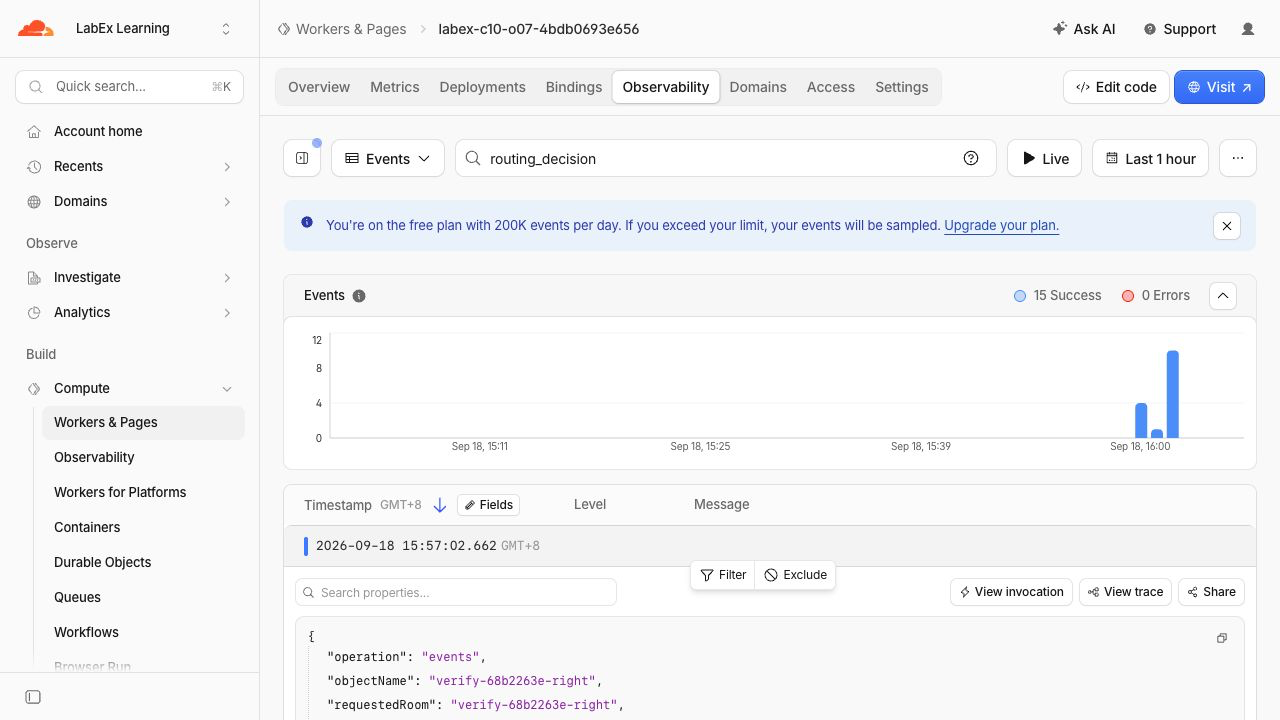
Return to the Worker in Workers & Pages, open Observability, and search the stored events for routing_decision. Expand one event from a room operation. This decision is recorded by the stateless Worker before it calls the Durable Object, so it appears in the Worker's logs rather than the namespace's logs. The safe fields should show the same requested and selected synthetic room name, without journal text.
Finally, redeploy unchanged code and read the original rooms again:
npx wrangler deploy
APP_URL="$(cat .labex/app-url)"
curl --silent --fail "$APP_URL/rooms/planning/events" | jq
curl --silent --fail "$APP_URL/rooms/support/events" | jq
Both original histories remain. An unchanged deployment does not create new object identities because the same validated names still select the same namespace entries.
Delete the Room Journal Namespace
In this step, you will delete only this lab's Worker and generated namespace while the VM is still authorized. The declarative tombstone removes the class namespace before Wrangler deletes the script.
RUN="$(cat .labex/run-name)"
case "$RUN" in labex-c10-o07-*) ;; *) echo "Unexpected Worker name" >&2; exit 1;; esac
cat > src/cleanup.js <<'JS'
export default { fetch() { return Response.json({ status: "cleanup" }, { status: 410 }); } };
JS
ACCOUNT_ID="$(node -e 'console.log(JSON.parse(require("fs").readFileSync("wrangler.jsonc", "utf8")).account_id)')"
cat > wrangler.cleanup.jsonc <<JSON
{
  "\$schema": "./node_modules/wrangler/config-schema.json",
  "name": "$RUN",
  "account_id": "$ACCOUNT_ID",
  "main": "src/cleanup.js",
  "compatibility_date": "2026-09-18",
  "workers_dev": true,
  "preview_urls": false,
  "exports": { "RoomJournal": { "type": "durable-object", "state": "deleted" } }
}
JSON
npx wrangler deploy --config wrangler.cleanup.jsonc
npx wrangler delete --config wrangler.cleanup.jsonc
Confirm the prompt displays your exact $RUN, type y, and expect Successfully deleted. Keep the VM authorized for the independent absence check:
npx wrangler whoami --json | jq '{loggedIn, authType}'
The JSON must contain "loggedIn": true; a network or authentication failure is not evidence of deletion.
Revoke This VM's Wrangler Authorization
In this step, you will remove only this VM's OAuth authorization after deletion has been verified independently:
npx wrangler logout
npx wrangler whoami --json
The final JSON must contain "loggedIn": false. Your learning account remains signed in to the browser.
Summary
You diagnosed a Durable Object defect at the identity-routing boundary rather than resetting healthy storage. A controlled faulty release proved that support was selecting the planning object; the route diagnostic made the requested and selected names visible. Restoring direct name mapping immediately recovered both original SQLite histories. Concurrent WebSocket updates, disconnects, reconnects and an unchanged redeployment then proved that new and existing rooms remained isolated. Finally, you inspected the repaired deployment and removed its exact disposable resources before logging out.


