



Introduction
An AI agent is often described as a model that can reason or use tools. Before adding a model, however, an application needs a reliable answer to a simpler question: which ongoing session should receive this request? A support application must send every interaction for planning back to the same logical session while keeping billing separate.
Cloudflare's Agents SDK supplies a higher-level Agent class for that job. Every named Agent is backed by one SQLite Durable Object instance. The SDK manages the saved state and request routing, while Durable Objects provide the stable identity and storage underneath. You will see both layers rather than treating the SDK as magic.
You will build a small, deliberately non-LLM support application:
SupportAgentdefines what one support session stores and does.- The
SupportAgentbinding represents the class namespace. /agents/support-agent/planningselects the instance namedplanning.initialState,this.stateandsetState()let the SDK persist that instance's small state.
You will write two notes to one named session, prove that another session stays isolated, stop and restart the complete local runtime, deploy the same code to Cloudflare, inspect its real binding and namespace in the Dashboard, and remove every disposable resource.
Before starting this course, complete Connect LabEx to Your Cloudflare Account. It teaches the LabEx VM terminal, Wrangler device authorization, account confirmation and account-ID configuration. You should already understand a small TypeScript Worker and the Durable Object identity model from O01–O06. No Agents SDK, React or model knowledge is assumed.
Official documentation currently makes SQLite-backed Durable Objects available on Workers Free. This lab creates one disposable class namespace, a few tiny Agent instances and only bounded requests. It does not call a model and does not require Workers Paid. Setup installs Node.js 22.22.0, Agents SDK 0.23.0 and project-local Wrangler 4.134.0 in /home/labex/project/named-support-agent; it does not log in, create cloud state, deploy code or complete the learner implementation.
Authorize the VM and Configure the Agent
In this step, you will authorize Wrangler, confirm the intended learning account and describe one Agent class without deploying anything yet. This fresh VM has its own filesystem, so being signed in to the Cloudflare Dashboard does not authorize its terminal.
Enter the prepared project and confirm the pinned versions:
cd /home/labex/project/named-support-agent
node --version
npx wrangler --version
npm list agents --depth=0
Expect Node.js v22.22.0, Wrangler 4.134.0 and agents@0.23.0. Pinning matters because the Agents SDK changes more quickly than basic Worker APIs.
Start the device authorization flow:
npx wrangler login --device --browser=false
Wrangler prints a browser URL and a short device code. Open that URL, enter the code, confirm that the selected account is your dedicated learning account and inspect the requested permissions before authorizing. Never type a Cloudflare password or API token into the terminal.
After the browser reports success, return to the terminal and wait for Wrangler to finish. Request structured identity information:
npx wrangler whoami --json
Confirm loggedIn: true. Then display only account names and privately select the ID belonging to LabEx Learning:
WHOAMI="$(npx wrangler whoami --json)"
printf '%s\n' "$WHOAMI" | jq '{loggedIn, authType, accounts: [.accounts[] | {name}]}'
ACCOUNT_ID="$(printf '%s\n' "$WHOAMI" | jq -r '.accounts[] | select(.name == "LabEx Learning") | .id')"
test -n "$ACCOUNT_ID"
If your dedicated learning account has a different display name, replace LabEx Learning only after confirming the correct name. The account ID is configuration, not a secret, but this command avoids printing it unnecessarily.
Create a unique disposable Worker name:
RUN="labex-c11-s01-$(openssl rand -hex 6)"
printf '%s\n' "$RUN"
Create wrangler.jsonc:
cat > wrangler.jsonc <<JSON
{
  "\$schema": "./node_modules/wrangler/config-schema.json",
  "name": "$RUN",
  "account_id": "$ACCOUNT_ID",
  "main": "src/index.ts",
  "compatibility_date": "2026-09-18",
  "compatibility_flags": ["nodejs_compat"],
  "workers_dev": true,
  "preview_urls": false,
  "observability": {
    "enabled": true,
    "head_sampling_rate": 1
  },
  "durable_objects": {
    "bindings": [
      { "name": "SupportAgent", "class_name": "SupportAgent" }
    ]
  },
  "migrations": [
    { "tag": "v1", "new_sqlite_classes": ["SupportAgent"] }
  ]
}
JSON
The SupportAgent binding is the Worker's handle to the class namespace. The v1 migration tells Cloudflare to create that class with SQLite storage. Agents use the Durable Object substrate; the SDK does not remove this resource layer. nodejs_compat is currently required by the SDK. None of these declarations creates cloud resources until deployment.
Implement the Named Support Agent
In this step, you will implement the state and HTTP behavior shared by every named support session. An Agent class is the reusable behavior, while an Agent instance is one named session such as planning. Cloudflare can run many instances of the same class, and each instance owns independent state.
Create src/index.ts:
cat > src/index.ts <<'TS'
import { Agent, routeAgentRequest } from "agents";

export interface SupportState {
  status: "new" | "active";
  noteCount: number;
  lastNote: string | null;
}

interface Env {
  SupportAgent: DurableObjectNamespace<SupportAgent>;
}

function json(value: unknown, init: ResponseInit = {}): Response {
  const headers = new Headers(init.headers);
  headers.set("content-type", "application/json; charset=utf-8");
  return new Response(JSON.stringify(value, null, 2), { ...init, headers });
}

export class SupportAgent extends Agent<Env, SupportState> {
  initialState: SupportState = {
    status: "new",
    noteCount: 0,
    lastNote: null
  };

  async onRequest(request: Request): Promise<Response> {
    if (request.method === "GET") {
      console.log(JSON.stringify({ event: "support_agent_read", instance: this.name, noteCount: this.state.noteCount }));
      return json({ instance: this.name, ...this.state });
    }

    if (request.method === "POST") {
      const body = await request.json<{ note?: unknown }>().catch(() => null);
      const note = typeof body?.note === "string" ? body.note.trim() : "";
      if (note.length < 1 || note.length > 120) {
        return json({ error: "note must contain 1-120 characters" }, { status: 400 });
      }

      this.setState({
        status: "active",
        noteCount: this.state.noteCount + 1,
        lastNote: note
      });
      console.log(JSON.stringify({ event: "support_agent_updated", instance: this.name, noteCount: this.state.noteCount }));
      return json({ instance: this.name, ...this.state });
    }

    return json({ error: "method not allowed" }, { status: 405 });
  }
}

export default {
  async fetch(request: Request, env: Env): Promise<Response> {
    const url = new URL(request.url);
    if (url.pathname === "/health") {
      return json({ status: "ok" });
    }

    const agentResponse = await routeAgentRequest(request, env, {
      onBeforeRequest(incoming, { name }) {
        if (!/^[a-z][a-z0-9-]{1,31}$/.test(name)) {
          return json({ error: "invalid support session name" }, { status: 400 });
        }
        return incoming;
      }
    });
    return agentResponse ?? json({ error: "not found" }, { status: 404 });
  }
} satisfies ExportedHandler<Env>;
TS
Read the important parts from the inside out:
initialStateis the value seen by a brand-new named instance.this.statereads that instance's current SDK-managed state.setState()synchronously validates and saves the replacement state in the instance's SQLite storage; later labs will also synchronize it to connected clients.this.nameis the stable instance name selected by routing. It is not a class name or random process ID.routeAgentRequest()maps/agents/<binding>/<name>to the correct Agent. TheSupportAgentbinding becomessupport-agentin the URL.onBeforeRequestrejects malformed names before a Durable Object instance is selected, avoiding unwanted durable identities.
The log records only a synthetic instance name and count. It deliberately excludes note text so the later Dashboard exercise does not retain support content.
Generate Types and Build Before Running
In this step, you will generate configuration-aware types and build the Worker without deploying it. Generated Worker types connect configuration to TypeScript, catching a misspelled binding or class before a local process or cloud deployment consumes time.
Generate types from wrangler.jsonc:
npx wrangler types
Wrangler writes worker-configuration.d.ts. Confirm that it includes the configured Agent binding without printing unrelated generated content:
grep -n "SupportAgent" worker-configuration.d.ts | head
Run the TypeScript compiler:
npm run check
No output after the script header means the compiler found no errors. Now ask Wrangler to build the deployment bundle without contacting Cloudflare or creating a resource:
npx wrangler deploy --dry-run --outdir .labex/dry-run
Expect a successful upload-size summary and the SupportAgent Durable Object binding. A dry run validates bundling and configuration locally; it does not prove authorization, remote storage or edge behavior.
Prove Local Identity and Restart Persistence
In this step, you will demonstrate three different properties: repeated use of one name reaches one state, a different name stays isolated, and saved state survives a complete development-process restart.
Start the local Workers runtime in the background:
npm run dev > .labex/dev.log 2>&1 &
echo $! > .labex/dev.pid
for attempt in $(seq 1 30); do
  if curl --silent --fail http://127.0.0.1:8787/health; then
    break
  fi
  sleep 1
done
Expect {"status":"ok"}. Read the new planning Agent:
curl --silent http://127.0.0.1:8787/agents/support-agent/planning | jq
It begins with status: "new", noteCount: 0 and lastNote: null. Add two synthetic notes:
curl --silent --request POST --header 'content-type: application/json' \
  --data '{"note":"Customer cannot open the invoice"}' \
  http://127.0.0.1:8787/agents/support-agent/planning | jq
curl --silent --request POST --header 'content-type: application/json' \
  --data '{"note":"Asked customer to retry"}' \
  http://127.0.0.1:8787/agents/support-agent/planning | jq
The second response reports instance: "planning", status: "active", noteCount: 2 and the second note. Both requests used the same URL name, so they reached the same logical Agent.
Read a different instance:
curl --silent http://127.0.0.1:8787/agents/support-agent/support | jq
support still has its own initial state with count 0. The two names share class behavior but not stored values.
Reject a malformed name:
curl --silent --write-out '\nHTTP %{http_code}\n' \
  http://127.0.0.1:8787/agents/support-agent/INVALID
Expect invalid support session name and HTTP 400.
Stop the exact process you started, then launch a new process against the same local persistence directory:
kill "$(cat .labex/dev.pid)"
wait "$(cat .labex/dev.pid)" 2>/dev/null || true
npm run dev > .labex/dev-restart.log 2>&1 &
echo $! > .labex/dev.pid
for attempt in $(seq 1 30); do
  if curl --silent --fail http://127.0.0.1:8787/health; then
    break
  fi
  sleep 1
done
curl --silent http://127.0.0.1:8787/agents/support-agent/planning | jq
curl --silent http://127.0.0.1:8787/agents/support-agent/support | jq
After a complete Wrangler restart, planning remains at 2 while support remains at 0. This is stronger evidence than reading twice inside one JavaScript process: the data came back from the local Durable Object persistence directory.
Deploy and Exercise Cloud Agent Instances
In this step, you will deploy the unchanged application and exercise real cloud-owned Agent instances. Local evidence cannot prove that the selected Cloudflare account owns the resource or that the edge runtime provides the same named identity.
Stop the local process and deploy:
kill "$(cat .labex/dev.pid)"
wait "$(cat .labex/dev.pid)" 2>/dev/null || true
npx wrangler deploy
Wrangler applies migration v1, creates the SQLite-backed SupportAgent class namespace and prints a public workers.dev URL. Save that exact URL by replacing the example:
WORKER_URL="https://YOUR_WORKER_URL"
Wait for the stateless health route:
for attempt in $(seq 1 30); do
  if curl --silent --fail "$WORKER_URL/health"; then
    break
  fi
  sleep 2
done
Now exercise cloud-owned instances with synthetic data:
curl --silent --request POST --header 'content-type: application/json' \
  --data '{"note":"Cloud planning note one"}' \
  "$WORKER_URL/agents/support-agent/planning" | jq
curl --silent --request POST --header 'content-type: application/json' \
  --data '{"note":"Cloud planning note two"}' \
  "$WORKER_URL/agents/support-agent/planning" | jq
curl --silent --request POST --header 'content-type: application/json' \
  --data '{"note":"Independent support note"}' \
  "$WORKER_URL/agents/support-agent/support" | jq
Read both instances:
curl --silent "$WORKER_URL/agents/support-agent/planning" | jq
curl --silent "$WORKER_URL/agents/support-agent/support" | jq
The cloud planning Agent has count 2; the independent support Agent has count 1. Local and cloud storage are intentionally separate, but both environments implement the same name-to-instance contract.
The verifier also creates two run-unique Agent names and repeats initial state, same-name persistence, different-name isolation and invalid-name rejection. It never treats a local file or command history as proof of remote behavior.
Connect Runtime Evidence to the Dashboard
In this step, you will connect terminal behavior to the binding, namespace and logs visible in the Dashboard. Names, timestamps and totals in the screenshots are examples from the tested run; use the unique labex-c11-s01-... name from your own terminal.
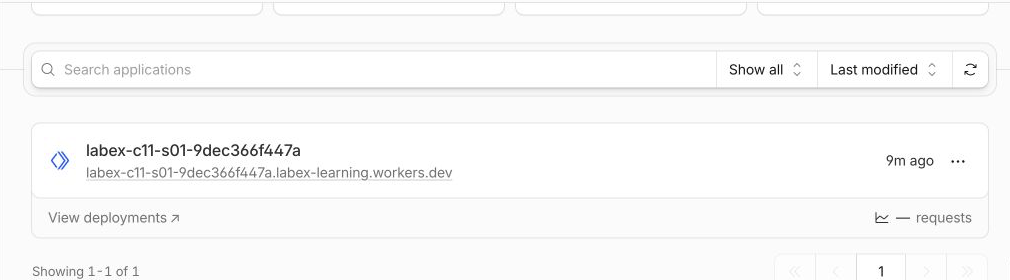
Open Workers & Pages in the Cloudflare Dashboard and select your disposable Worker. Its overview identifies the deployed application and recent traffic.
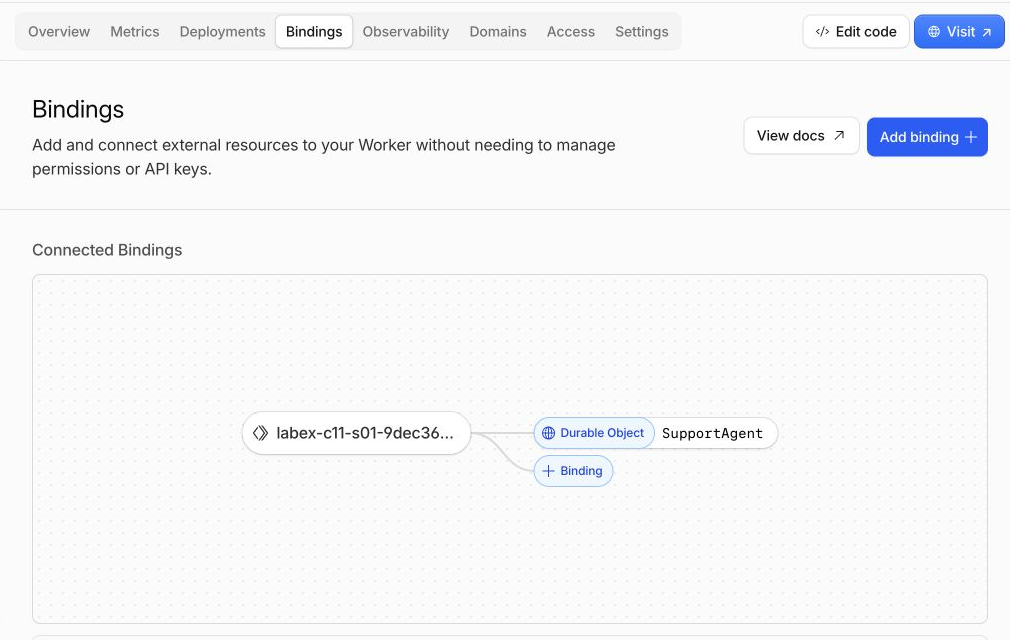
Open the Worker's Bindings tab. Find SupportAgent connected to the SupportAgent Durable Object class. The first label is the name visible to Worker code and routing; the class name identifies the implementation exported from src/index.ts.
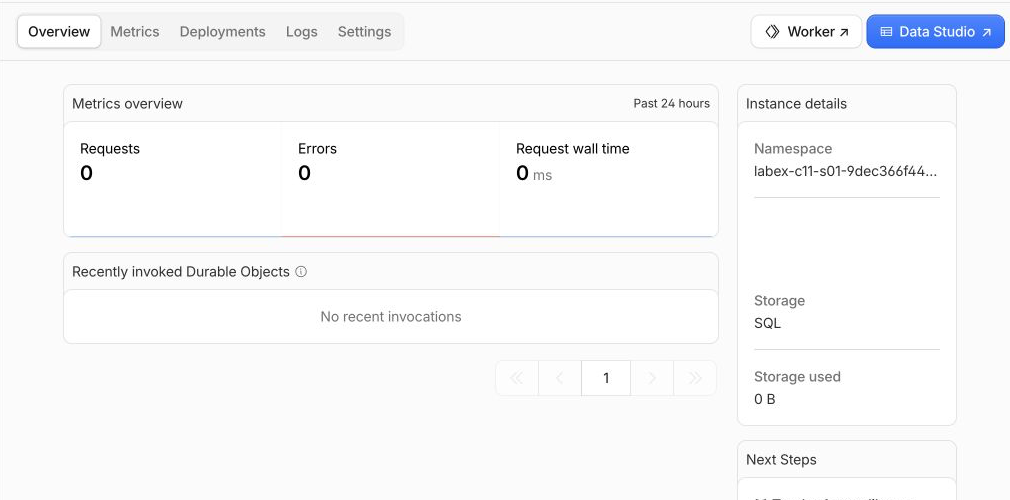
Open Durable Objects from the Developer Platform navigation and select the namespace owned by your exact Worker. Confirm class SupportAgent and Storage: SQL. The namespace is the class-level collection; planning, support and verifier names are individual instances inside it. The example image omits its run-specific namespace ID for privacy.
Return to the Worker and open Observability → Logs. Find and expand a support_agent_read or support_agent_updated application event. Match its synthetic instance and noteCount to a bounded request. The application intentionally logs no note text.
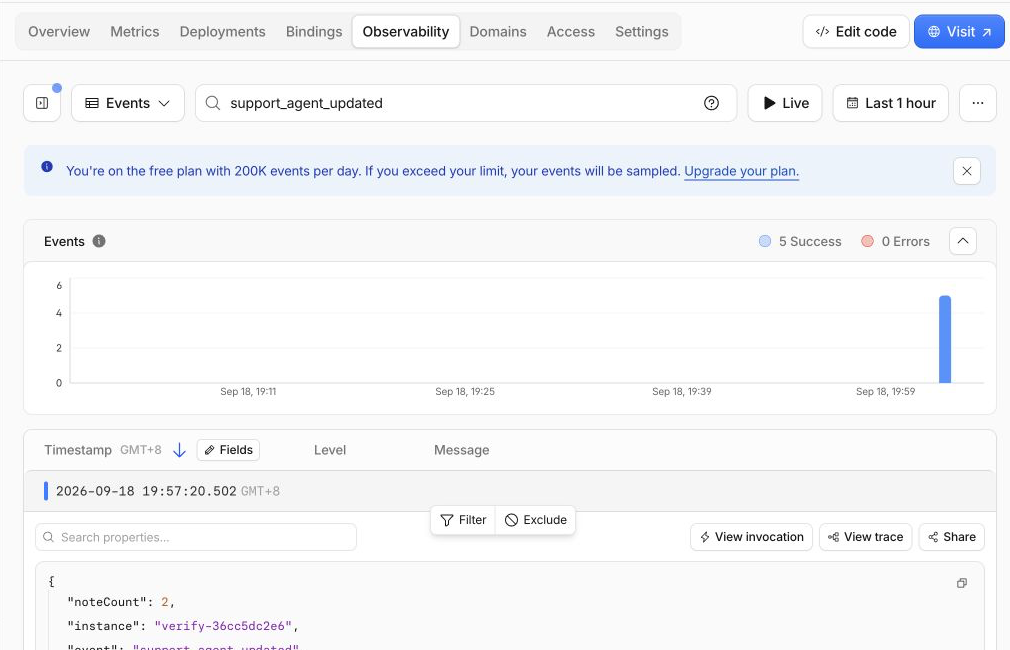
Dashboard metrics and logs can arrive late, so an empty recent chart is inconclusive. The authenticated API, namespace ownership and live runtime checks remain authoritative. The screenshots teach where the same relationships appear visually; they are not learner submissions.
Remove the Agent Namespace and Worker
In this step, you will permanently remove the exact Agent namespace and Worker while the VM is still authorized. Agent state belongs to the Durable Object class namespace, so deleting only the Worker script is not an explicit request to erase that stored state. Cloudflare migrations are append-only: keep v1, then add a v2 deletion migration for the exact class.
Create a tiny cleanup entrypoint with no Agent export:
cat > src/cleanup.ts <<'TS'
export default {
  fetch() {
    return Response.json({ status: "cleanup" }, { status: 410 });
  }
};
TS
Read the exact name and account from the original configuration, then create wrangler.cleanup.jsonc:
RUN="$(node -e 'console.log(JSON.parse(require("fs").readFileSync("wrangler.jsonc", "utf8")).name)')"
ACCOUNT_ID="$(node -e 'console.log(JSON.parse(require("fs").readFileSync("wrangler.jsonc", "utf8")).account_id)')"
cat > wrangler.cleanup.jsonc <<JSON
{
  "\$schema": "./node_modules/wrangler/config-schema.json",
  "name": "$RUN",
  "account_id": "$ACCOUNT_ID",
  "main": "src/cleanup.ts",
  "compatibility_date": "2026-09-18",
  "compatibility_flags": ["nodejs_compat"],
  "workers_dev": true,
  "preview_urls": false,
  "migrations": [
    { "tag": "v1", "new_sqlite_classes": ["SupportAgent"] },
    { "tag": "v2", "deleted_classes": ["SupportAgent"] }
  ]
}
JSON
Keeping v1 matters: migration history is a sequence, not a description that should be rewritten. v2 permanently removes the class namespace and every disposable named instance in it.
Deploy the deletion migration:
npx wrangler deploy --config wrangler.cleanup.jsonc
Read the migration output and confirm only SupportAgent from your unique Worker is deleted. Then delete the remaining stateless cleanup Worker:
npx wrangler delete --config wrangler.cleanup.jsonc --force
Confirm the exact labex-c11-s01-... application if prompted. In Workers & Pages, confirm that the exact Worker is absent. This test account contains no unrelated applications, so the accepted run shows the whole list becoming empty. An account with other projects should retain those unrelated rows.

Open Durable Objects and confirm that the namespace owned by the deleted Worker is also absent. The accepted test account has no unrelated namespaces, so its list reports no Durable Objects. Do not delete a namespace belonging to another project merely to match this example.
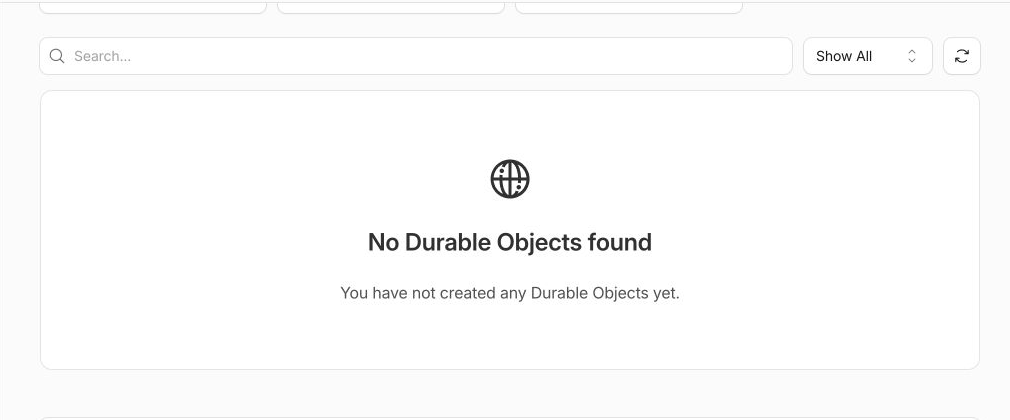
Historical logs can remain temporarily and are not active resources.
Run the authenticated absence check before logging out:
python3 .labex/verify.py deleted
Only PASS: deleted proves that the selected account no longer contains either owned resource. A 404 caused by lost authorization or a network error is not accepted as deletion evidence.
Revoke This VM's Authorization
In this step, you will remove the OAuth authorization stored in this disposable VM. Cloud resource cleanup and local credential cleanup solve different problems; the Worker and namespace are already gone.
Log out:
npx wrangler logout
Ask Wrangler for structured status:
npx wrangler whoami --json
The result must explicitly contain "loggedIn": false. That structured value is stronger than a friendly message because the tested Wrangler version can produce ordinary output in several authentication states. A network failure is inconclusive and should be retried rather than interpreted as logout.
You have removed both types of state created by this lab: the remote support Agent namespace and Worker, and the VM's local authorization.
Summary
You built the course's first Cloudflare Agent without hiding the foundation behind AI terminology. You learned that one Agent class defines behavior, its binding exposes a SQLite Durable Object namespace, a stable URL name selects one logical instance, and the Agents SDK persists initialState updates through this.state and setState().
You proved same-name persistence, different-name isolation and process-restart durability locally, repeated the contract in your Cloudflare learning account, connected runtime evidence to the binding, namespace and privacy-bounded logs in the Dashboard, and removed both cloud resources and VM authorization. The next lab will connect browser clients to this state and introduce controlled real-time synchronization.


