



Introduction
A workshop has four seats left, but ten people can click Reserve at nearly the same time. If every request first reads reserved = 0, pauses, and then writes reserved = 1, the application loses successful reservations. A different broken design can approve more seats than the workshop owns. This overlap between unfinished asynchronous tasks is called interleaving.
In this lab, each validated workshop name selects one Durable Object. That object owns a capacity row and a durable record for every attempt. Its reservation method performs the capacity check, counter update and attempt record inside one synchronous SQLite transaction. Concurrent callers can arrive together, but none can observe a half-finished transition.
You will learn three related boundaries:
- Concurrency means multiple operations are in progress during the same period; it does not require multiple JavaScript threads.
- Atomicity means other operations observe either the complete state change or none of it.
- Safe initialization creates a missing row without overwriting a row that already contains reservations.
You will send concurrent local and cloud fixtures, compare accepted and rejected totals with durable state, restart the local runtime, redeploy the cloud Worker, inspect the Dashboard and remove every disposable resource.
Before entering this course directly, complete Connect LabEx to Your Cloudflare Account. Every fresh VM needs its own Wrangler authorization. You should already understand stable Durable Object names, RPC and SQLite-backed state from O01–O02.
Cloudflare currently supports SQLite-backed Durable Objects on Workers Free. This lab creates one disposable class namespace, several tiny named objects and bounded request batches. Setup installs Node.js 22.22.0 and project-local Wrangler 4.132.0 in /home/labex/project/concurrent-reservations; it does not authorize Cloudflare, create a namespace, deploy a Worker or make a reservation.
Authorize the VM and Configure the Workshop Namespace
In this step, you will authorize the fresh VM and declare one SQLite-backed Durable Object class. Each workshop name will select a different object in this namespace.
Enter the project, confirm the pinned Wrangler version and start device authorization:
cd /home/labex/project/concurrent-reservations
npx wrangler --version
npx wrangler login --device --browser=false
Expect Wrangler 4.132.0. Open the displayed Cloudflare URL in the browser, enter the short code, confirm the intended learning account and authorize. Return only after Wrangler reports success. Never paste a password or token into the lab.
Read safe identity fields, select the confirmed account ID without printing it and generate a unique Worker name:
WHOAMI="$(npx wrangler whoami --json)"
printf '%s\n' "$WHOAMI" | jq '{loggedIn, authType, accounts: [.accounts[] | {name}]}'
ACCOUNT_ID="$(printf '%s\n' "$WHOAMI" | jq -r '.accounts[] | select(.name == "LabEx Learning") | .id')"
test -n "$ACCOUNT_ID"
RUN="labex-c10-o03-$(openssl rand -hex 6)"
printf '%s\n' "$RUN"
If your dedicated learning account has another display name, substitute the name you confirmed. Create the configuration:
cat > wrangler.jsonc <<JSON
{
  "\$schema": "./node_modules/wrangler/config-schema.json",
  "name": "$RUN",
  "account_id": "$ACCOUNT_ID",
  "main": "src/index.js",
  "compatibility_date": "2026-09-18",
  "workers_dev": true,
  "preview_urls": false,
  "observability": {
    "enabled": true,
    "head_sampling_rate": 1
  },
  "durable_objects": {
    "bindings": [
      { "name": "WORKSHOPS", "class_name": "WorkshopReservations" }
    ]
  },
  "exports": {
    "WorkshopReservations": { "type": "durable-object", "storage": "sqlite" }
  }
}
JSON
WORKSHOPS is the front-door Worker's namespace binding. The class export gives every named workshop a private SQLite database. No cloud resource exists until deployment.
Implement an Atomic Reservation Transition
In this step, you will create durable capacity and attempt tables, then implement one atomic reservation transition.
The constructor runs whenever Cloudflare creates or restarts an in-memory class instance. CREATE TABLE IF NOT EXISTS safely recreates missing schema. The INSERT ... ON CONFLICT DO NOTHING statement inserts the four-seat capacity row only when it is absent; it never resets an existing reserved value to zero.
Create the Worker entrypoint:
cat > src/index.js <<'JS'
import { DurableObject } from "cloudflare:workers";

export class WorkshopReservations extends DurableObject {
  constructor(ctx, env) {
    super(ctx, env);
    ctx.blockConcurrencyWhile(async () => {
      this.ctx.storage.sql.exec(`
        CREATE TABLE IF NOT EXISTS workshop_state (
          singleton INTEGER PRIMARY KEY CHECK (singleton = 1),
          capacity INTEGER NOT NULL CHECK (capacity > 0),
          reserved INTEGER NOT NULL CHECK (reserved >= 0 AND reserved <= capacity)
        )
      `);
      this.ctx.storage.sql.exec(`
        CREATE TABLE IF NOT EXISTS reservation_attempts (
          request_id TEXT PRIMARY KEY,
          seats INTEGER NOT NULL CHECK (seats > 0),
          status TEXT NOT NULL CHECK (status IN ('accepted', 'rejected')),
          reserved_after INTEGER NOT NULL,
          created_at INTEGER NOT NULL
        )
      `);
      this.ctx.storage.sql.exec(`
        INSERT INTO workshop_state (singleton, capacity, reserved)
        VALUES (1, 4, 0)
        ON CONFLICT(singleton) DO NOTHING
      `);
    });
  }

  reserve(requestId, seats) {
    return this.ctx.storage.transactionSync(() => {
      const previous = this.ctx.storage.sql.exec(
        `SELECT request_id AS requestId, seats, status, reserved_after AS reserved
         FROM reservation_attempts WHERE request_id = ?`,
        requestId
      ).toArray()[0];
      if (previous) {
        const state = this.ctx.storage.sql.exec(
          `SELECT capacity FROM workshop_state WHERE singleton = 1`
        ).one();
        return { ...previous, capacity: state.capacity, replayed: true };
      }

      const updated = this.ctx.storage.sql.exec(
        `UPDATE workshop_state
         SET reserved = reserved + ?
         WHERE singleton = 1 AND reserved + ? <= capacity
         RETURNING capacity, reserved`,
        seats,
        seats
      ).toArray();
      const accepted = updated.length === 1;
      const state = accepted ? updated[0] : this.ctx.storage.sql.exec(
        `SELECT capacity, reserved FROM workshop_state WHERE singleton = 1`
      ).one();
      const status = accepted ? "accepted" : "rejected";

      this.ctx.storage.sql.exec(
        `INSERT INTO reservation_attempts
         (request_id, seats, status, reserved_after, created_at)
         VALUES (?, ?, ?, ?, ?)`,
        requestId,
        seats,
        status,
        state.reserved,
        Date.now()
      );
      return { requestId, seats, status, capacity: state.capacity, reserved: state.reserved, replayed: false };
    });
  }

  getStatus() {
    return this.ctx.storage.sql.exec(`
      SELECT
        s.capacity,
        s.reserved,
        COUNT(CASE WHEN a.status = 'accepted' THEN 1 END) AS acceptedRequests,
        COUNT(CASE WHEN a.status = 'rejected' THEN 1 END) AS rejectedRequests,
        COALESCE(SUM(CASE WHEN a.status = 'accepted' THEN a.seats ELSE 0 END), 0) AS acceptedSeats
      FROM workshop_state AS s
      LEFT JOIN reservation_attempts AS a ON 1 = 1
      WHERE s.singleton = 1
      GROUP BY s.capacity, s.reserved
    `).one();
  }
}

function json(data, status = 200) {
  return Response.json(data, { status });
}

function workshopRoute(pathname) {
  const match = pathname.match(/^\/workshops\/([^/]+)\/(reservations|status)$/);
  if (!match) return { error: "not_found", status: 404 };
  let workshop;
  try {
    workshop = decodeURIComponent(match[1]);
  } catch {
    return { error: "invalid_workshop_name", status: 400 };
  }
  if (!/^[a-z][a-z0-9-]{0,31}$/.test(workshop)) {
    return { error: "invalid_workshop_name", status: 400 };
  }
  return { workshop, action: match[2] };
}

function validReservation(value) {
  return value &&
    /^[a-z][a-z0-9-]{2,47}$/.test(value.requestId) &&
    Number.isInteger(value.seats) &&
    value.seats >= 1 && value.seats <= 4;
}

export default {
  async fetch(request, env) {
    const url = new URL(request.url);
    if (request.method === "GET" && url.pathname === "/health") {
      return json({ status: "ok" });
    }

    const parsed = workshopRoute(url.pathname);
    if (parsed.error) return json({ error: parsed.error }, parsed.status);

    if (request.method === "GET" && parsed.action === "status") {
      const stub = env.WORKSHOPS.getByName(parsed.workshop);
      const state = await stub.getStatus();
      return json({ workshop: parsed.workshop, ...state });
    }
    if (request.method === "POST" && parsed.action === "reservations") {
      let body;
      try {
        body = await request.json();
      } catch {
        return json({ error: "invalid_json" }, 400);
      }
      if (!validReservation(body)) return json({ error: "invalid_reservation" }, 400);
      const stub = env.WORKSHOPS.getByName(parsed.workshop);
      const result = await stub.reserve(body.requestId, body.seats);
      console.log(JSON.stringify({ event: "reservation_decided", workshop: parsed.workshop, requestId: body.requestId, status: result.status, reserved: result.reserved }));
      return json({ workshop: parsed.workshop, ...result }, result.status === "accepted" ? 201 : 409);
    }
    return json({ error: "method_not_allowed" }, 405);
  }
};
JS
transactionSync() accepts only synchronous storage work. The guarded UPDATE changes the counter only when the requested seats still fit, and RETURNING reads the value produced by that same statement. The attempt row is committed in the same transaction. A repeated requestId returns its first decision instead of consuming capacity twice.
Run the deterministic routing tests and a real bundle check:
NODE_NO_WARNINGS=1 node --experimental-loader ./test/cloudflare-loader.mjs --test test/worker.test.mjs
npx wrangler deploy --dry-run
Expect two passing tests and a successful dry run. No remote resource is created.
Send Ten Local Requests Concurrently
In this step, ten reservation commands will be in progress together for one four-seat workshop. xargs -P 10 starts up to ten shell processes concurrently; the order in which they finish is intentionally unspecified.
Start the local runtime with an explicit persistence directory:
npx wrangler dev --port 8787 --persist-to .labex/local-state > .labex/dev.log 2>&1 &
echo $! > .labex/dev.pid
for attempt in $(seq 1 30); do
  curl --silent --fail http://127.0.0.1:8787/health && break
  sleep 1
done
Send ten one-seat attempts to the same stable object. Each process writes a separate response file, so concurrent terminal output cannot become mixed together:
rm -f .labex/local-response-*.json
seq 1 10 | xargs -P 10 -I{} sh -c '
  curl --silent \
    --request POST http://127.0.0.1:8787/workshops/launch-day/reservations \
    --header "content-type: application/json" \
    --data "{\"requestId\":\"request-$1\",\"seats\":1}" \
    > ".labex/local-response-$1.json"
' _ {}
HTTP 409 is the expected application response for a rejected reservation. curl --silent still saves its JSON body, letting you inspect every decision without treating a full workshop as a transport failure. Inspect all decisions as one array:
jq -s 'sort_by(.requestId)' .labex/local-response-*.json
jq -s '{
  accepted: map(select(.status == "accepted")) | length,
  rejected: map(select(.status == "rejected")) | length,
  highestReserved: map(.reserved) | max
}' .labex/local-response-*.json
The exact request IDs accepted can vary, because arrival order is not guaranteed. The invariant cannot vary: exactly four are accepted, six are rejected and no response reports more than four reserved seats.
Read durable totals from the object:
curl --silent http://127.0.0.1:8787/workshops/launch-day/status | jq
Expect capacity 4, reserved 4, four accepted requests, six rejected requests and four accepted seats. The response files explain individual outcomes; the status row proves that their totals agree with durable state.
Restart Without Resetting Capacity
In this step, you will remove the in-memory class instance by stopping Wrangler, start a new runtime against the same database and prove that initialization does not restore capacity.
Stop and restart the process:
kill "$(cat .labex/dev.pid)"
wait "$(cat .labex/dev.pid)" 2>/dev/null || true
npx wrangler dev --port 8787 --persist-to .labex/local-state > .labex/dev-restarted.log 2>&1 &
echo $! > .labex/dev.pid
for attempt in $(seq 1 30); do
  curl --silent --fail http://127.0.0.1:8787/health && break
  sleep 1
done
Read the workshop before making another decision:
curl --silent http://127.0.0.1:8787/workshops/launch-day/status | jq
It must still report reserved: 4. The constructor ran again, but ON CONFLICT DO NOTHING preserved the existing row.
Replay the first request ID, then submit one new request while the workshop is full:
curl --silent --request POST http://127.0.0.1:8787/workshops/launch-day/reservations \
  --header 'content-type: application/json' \
  --data '{"requestId":"request-1","seats":1}' | jq
curl --silent --request POST http://127.0.0.1:8787/workshops/launch-day/reservations \
  --header 'content-type: application/json' \
  --data '{"requestId":"request-after-restart","seats":1}' | jq
curl --silent http://127.0.0.1:8787/workshops/launch-day/status | jq
The replay has replayed: true and does not add another attempt. The new ID is rejected once. Final totals remain four accepted seats and become seven rejected requests.
Exercise Cloud Concurrency
In this step, you will stop the local runtime, deploy the namespace and repeat the bounded concurrency test against Cloudflare.
Stop the local process and deploy:
kill "$(cat .labex/dev.pid)"
wait "$(cat .labex/dev.pid)" 2>/dev/null || true
DEPLOY_OUTPUT="$(npx wrangler deploy 2>&1 | tee /dev/tty)"
APP_URL="$(printf '%s\n' "$DEPLOY_OUTPUT" | grep -Eo 'https://[a-z0-9.-]+\.workers\.dev' | tail -1)"
test -n "$APP_URL"
printf '%s\n' "$APP_URL"
The Worker route and its newly reconciled Durable Object namespace can become available at different moments. Poll a real object read for its expected JSON contract, then allow the tested short settling window before creating another object:
for attempt in $(seq 1 30); do
  if curl --silent --fail "$APP_URL/workshops/readiness/status" |
    jq -e '.capacity == 4 and .reserved == 0' >/dev/null; then
    break
  fi
  sleep 1
done
curl --silent --fail "$APP_URL/workshops/readiness/status" |
  jq -e '.capacity == 4 and .reserved == 0'
sleep 5
Send ten concurrent cloud attempts to cloud-launch:
rm -f .labex/cloud-response-*.json
seq 1 10 | xargs -P 10 -I{} sh -c '
  curl --silent \
    --request POST "$0/workshops/cloud-launch/reservations" \
    --header "content-type: application/json" \
    --data "{\"requestId\":\"cloud-request-$1\",\"seats\":1}" \
    > ".labex/cloud-response-$1.json"
' "$APP_URL" {}
Compare response totals and durable state:
jq -s '{
  accepted: map(select(.status == "accepted")) | length,
  rejected: map(select(.status == "rejected")) | length,
  highestReserved: map(.reserved) | max
}' .labex/cloud-response-*.json
curl --silent "$APP_URL/workshops/cloud-launch/status" | jq
The cloud invariant matches the local result: four accepted, six rejected, reserved: 4. Run the independent check. It inspects the owned binding and namespace, verifies cloud-launch, then sends twelve concurrent requests to a separate run-unique workshop:
python3 .labex/verify.py deployed
Redeploy and Inspect Reservation Coordination
In this step, you will redeploy the unchanged Worker. That can replace the in-memory class instance, so the constructor may run again. The durable capacity row must remain full.
Redeploy and read cloud-launch through a new request:
npx wrangler deploy
curl --silent "$APP_URL/workshops/cloud-launch/status" | jq
Expect the same capacity 4, reserved 4, four accepted requests and six rejected requests. This cloud restart check reaches the same conclusion as the local restart: safe initialization creates missing state but never overwrites established state.
Open the Cloudflare Dashboard and select the same account. Go to Workers & Pages, open the exact labex-c10-o03-... Worker and select Bindings. Confirm that WORKSHOPS targets the tested WorkshopReservations namespace.
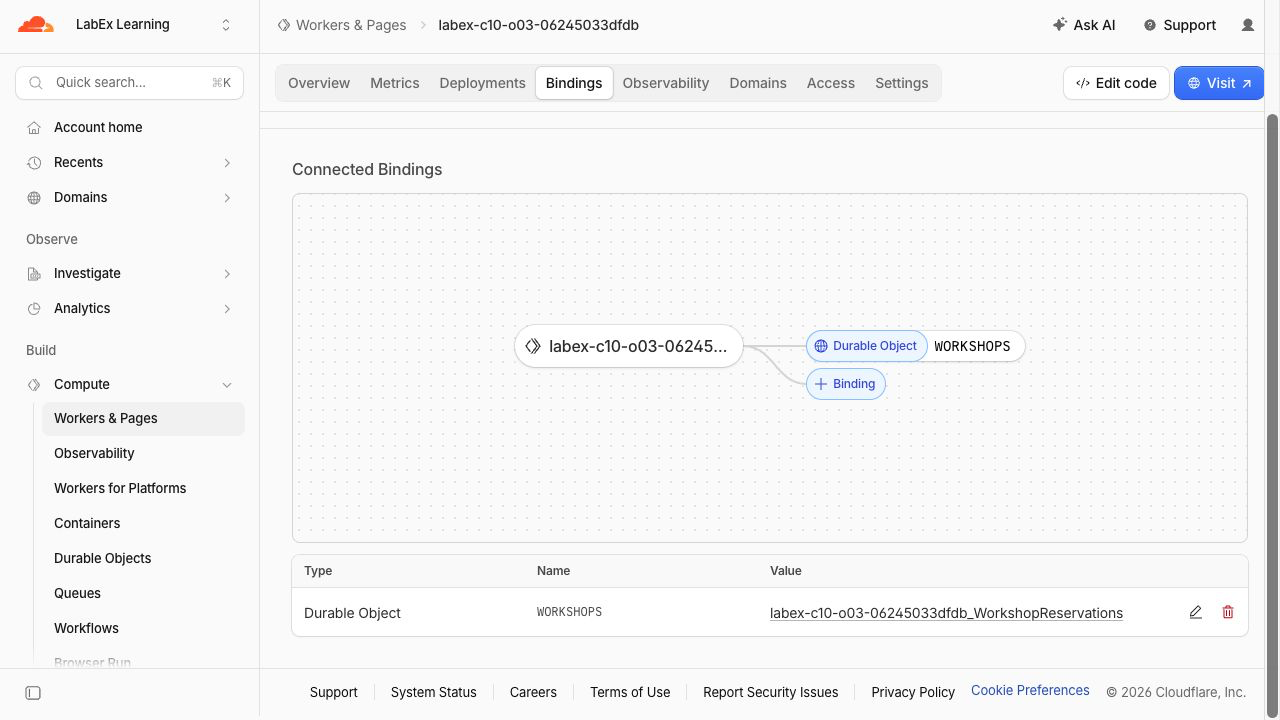
The suffix shown in the screenshot belongs to the accepted authoring run. Your generated suffix will differ; the binding name, type and target class are the fields that must match.
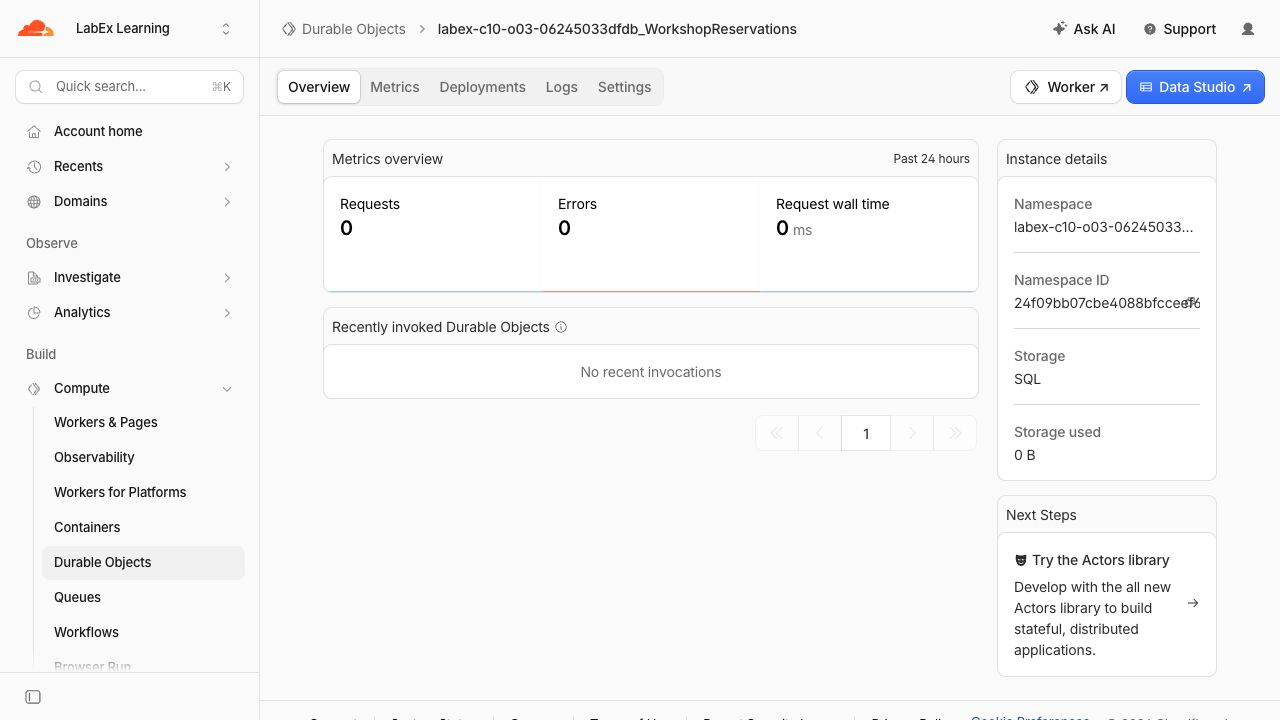
Open the namespace and select Overview. Storage: SQL identifies the backend that owns the capacity and attempt tables.
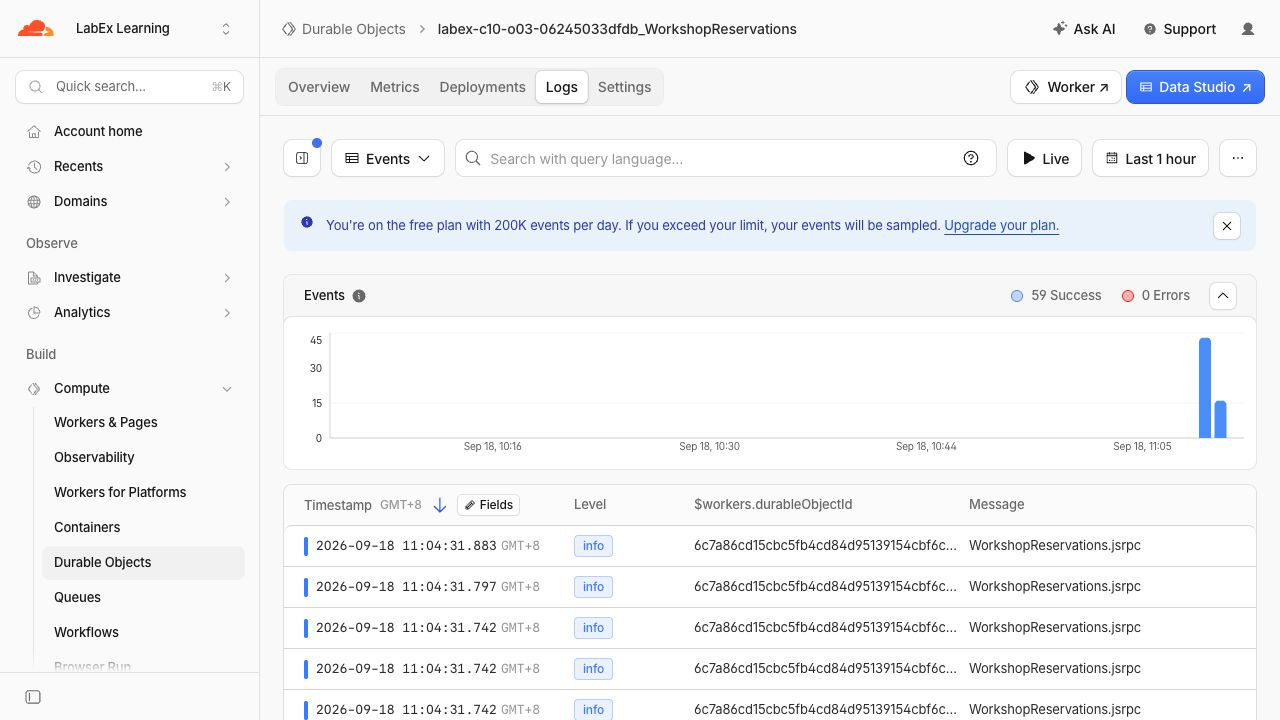
Now open Logs. Successful WorkshopReservations.jsrpc rows are the object-method calls made by the concurrent batches and verifier. Several object IDs appear because readiness, cloud-launch and run-unique verifier workshops are deliberately isolated. Logs show invocations and errors; the HTTP totals remain the authoritative evidence that capacity was respected.
Run the independent cloud check once more after redeployment:
python3 .labex/verify.py deployed
Delete the Reservation Namespace and Log Out
In this step, you will permanently remove the disposable namespace and its workshop databases, delete the remaining Worker and revoke this VM's authorization.
Confirm that $RUN begins with labex-c10-o03-. Create a stateless cleanup entrypoint:
cat > src/cleanup.js <<'JS'
export default {
  fetch() {
    return Response.json({ status: "cleanup" }, { status: 410 });
  }
};
JS
Create a cleanup configuration for the exact same Worker and account. The state: "deleted" tombstone permanently removes only the WorkshopReservations class namespace:
ACCOUNT_ID="$(node -e 'console.log(JSON.parse(require("fs").readFileSync("wrangler.jsonc", "utf8")).account_id)')"
cat > wrangler.cleanup.jsonc <<JSON
{
  "\$schema": "./node_modules/wrangler/config-schema.json",
  "name": "$RUN",
  "account_id": "$ACCOUNT_ID",
  "main": "src/cleanup.js",
  "compatibility_date": "2026-09-18",
  "workers_dev": true,
  "preview_urls": false,
  "exports": {
    "WorkshopReservations": { "type": "durable-object", "state": "deleted" }
  }
}
JSON
npx wrangler deploy --config wrangler.cleanup.jsonc
The reconciliation output should report Deleted: WorkshopReservations. Delete the remaining stateless Worker and confirm only the exact generated name:
npx wrangler delete --config wrangler.cleanup.jsonc
Prove authenticated absence before logging out:
python3 .labex/verify.py deleted
Only after PASS: deleted, revoke the VM authorization and inspect structured state:
npx wrangler logout
npx wrangler whoami --json
The final JSON must contain "loggedIn": false. A network or authentication error is not cleanup evidence.
Summary
You built a bounded reservation service in which each workshop name selects one Durable Object. A synchronous SQLite transaction combined the capacity guard, counter change and attempt record into one indivisible transition. Ten concurrent callers could finish in any order, but exactly four seats were accepted and no response exceeded capacity.
You also made initialization safe with ON CONFLICT DO NOTHING, replayed one stable request ID without double-booking, and proved the same durable totals after local restart and cloud redeployment. Finally, you connected runtime evidence to the binding, SQL namespace and RPC logs in the Dashboard, then deleted the exact namespace and Worker before logging out.


