



Introduction
A support API needs a catalog maintained by another Worker. A service binding gives one Worker a named connection to another, so the catalog can serve the API without needing its own public URL. This is useful when several parts of an application share an internal service. You will connect the two Workers, learn what a missing binding looks like, and deploy the public API with its internal catalog.
Use your own Cloudflare learning account and the authorization, configuration and deployment knowledge from earlier labs. This independent VM starts at /home/labex/project/service-binding with Node.js 22.22.0, project-local Wrangler 4.131.1 and a synthetic catalog fixture. No prior VM or resource is reused. The exercise needs no purchased domain, database or paid upgrade; the small requests count toward normal account usage.
Keep one terminal open. You will use two local processes, create two uniquely named disposable cloud Workers, verify their connection, delete the caller and dependency, then log out before ending the VM.
Reproduce a Missing Service Binding
In this step, you will create a public API whose catalog dependency is deliberately unconfigured. A separate supplied Worker owns two synthetic catalog entries. Both processes run only in this VM for now.
cd /home/labex/project/service-binding
node --version
npx wrangler --version
cat catalog/index.js
Expect Node v22.22.0 and Wrangler 4.131.1. Setup installed project-local dependencies; on another machine use npm ci with this project's lockfile. The fixture returns a public service label, two entries and an optional synthetic probe query value to trace a request. It stores nothing.
A binding connects project configuration to the handler's env object. The code uses a name such as env.CATALOG, and configuration identifies which Worker that name reaches. A running catalog alone is not enough: the caller also needs this connection.
Generate one disposable base name and record both resource identities in ordinary configuration. Keep this terminal open so WORKER_NAME remains available. The catalog's main is relative to its own configuration directory.
WORKER_NAME="labex-binding-$(openssl rand -hex 6)"
cat > wrangler.jsonc <<CONFIG
{
  "name": "$WORKER_NAME",
  "main": "src/index.js",
  "compatibility_date": "2026-09-14",
  "workers_dev": true,
  "preview_urls": false,
  "services": []
}
CONFIG
cat > catalog/wrangler.jsonc <<CONFIG
{
  "name": "$WORKER_NAME-catalog",
  "main": "index.js",
  "compatibility_date": "2026-09-14",
  "workers_dev": false,
  "preview_urls": false,
  "routes": [],
  "vars": {"SERVICE_ID": "$WORKER_NAME-catalog"}
}
CONFIG
The catalog disables both workers.dev and preview URLs and has no routes. Local development still exposes a loopback port for testing; that does not create a public cloud endpoint. The public API's empty services list is the defect you will diagnose.
Write the public handler. /health remains independent. /catalog checks that the binding exists before making an internal call. catalog.internal is a fully qualified placeholder URL, not a DNS name to register: env.CATALOG selects the destination. We construct a new GET request with only the intended query value instead of forwarding arbitrary client headers.
cat > src/index.js <<'JS'
export default {
  async fetch(request, env) {
    const url = new URL(request.url);
    if (url.pathname === '/health' && request.method === 'GET') {
      return Response.json({status: 'ok'});
    }
    if (url.pathname !== '/catalog') return Response.json({error: 'not_found'}, {status: 404});
    if (request.method !== 'GET') {
      return Response.json({error: 'method_not_allowed'}, {status: 405, headers: {Allow: 'GET'}});
    }
    if (!env.CATALOG) return Response.json({error: 'catalog_binding_missing'}, {status: 503});
    // This hostname completes the Request URL. The binding selects the target Worker.
    const target = new URL('https://catalog.internal/catalog');
    target.searchParams.set('probe', url.searchParams.get('probe') || '');
    try {
      return await env.CATALOG.fetch(new Request(target, {method: 'GET'}));
    } catch {
      return Response.json({error: 'catalog_unavailable'}, {status: 502});
    }
  }
};
JS
Start the supplied catalog and API as separate background jobs with distinct HTTP and inspector ports. Logs make startup visible; & returns the shell prompt.
npx wrangler dev --config catalog/wrangler.jsonc --ip 127.0.0.1 --port 8081 --inspector-port 9230 > catalog.log 2>&1 &
npx wrangler dev --config wrangler.jsonc --ip 127.0.0.1 --port 8080 --inspector-port 9231 > api.log 2>&1 &
cat catalog.log
cat api.log
Wait for readiness in both logs, repeating cat as needed, then inspect the responses:
curl -i http://127.0.0.1:8081/catalog
curl -i http://127.0.0.1:8080/health
curl -i http://127.0.0.1:8080/catalog
The catalog returns 200 and its two entries; health returns 200 {"status":"ok"}; the API catalog route returns 503 {"error":"catalog_binding_missing"}. The dependency is running, but the caller has no configured capability to reach it. Use verification while this missing-binding state is present.
Declare and Test the Internal Connection
In this step, you will connect the name the API code expects to the catalog Worker that supplies the data. This repair belongs in configuration because the handler already knows how to use env.CATALOG. Inspect the actual background jobs and stop only the API process; the example assumes it is job 2.
jobs
kill %2
cat > wrangler.jsonc <<CONFIG
{
  "name": "$WORKER_NAME",
  "main": "src/index.js",
  "compatibility_date": "2026-09-14",
  "workers_dev": true,
  "preview_urls": false,
  "services": [{"binding": "CATALOG", "service": "$WORKER_NAME-catalog"}]
}
CONFIG
binding is the property name available as env.CATALOG. service is the exact target Worker's configured name. A spelling mismatch in either part is a different problem: a missing property triggers the explicit 503, while an unavailable target can trigger 502 or a startup/deployment error. Avoid replacing the binding call with a public fetch URL.
npx wrangler dev --config wrangler.jsonc --ip 127.0.0.1 --port 8080 --inspector-port 9231 > api.log 2>&1 &
cat api.log
Wait for readiness and inspect the binding table. Wrangler discovers the running catalog by name and reports its connection status. If disconnected, confirm the catalog process and both configured names, then retry.
curl -i "http://127.0.0.1:8080/catalog?probe=local-check"
curl -i -X POST http://127.0.0.1:8080/catalog
curl -i http://127.0.0.1:8080/missing
The first response is 200, with the catalog's exact service label, both items and probe: local-check. The method check returns 405, and the unknown route returns 404. Use verification with both servers running; it sends a fresh probe through the public API and checks the complete contract.
Bindings belong to configuration environments. If you later use --env preview, declare the complete services array under env.preview and point it to the intended deployed target; service bindings are not inherited from the top level. This lab uses one unnamed environment and never passes --env. See Wrangler environments and the HTTP service binding interface.
Deploy the Internal Service and Public API
In this step, you will deploy the same connection to your own learning account. Stop both actual local jobs shown by jobs; the example assumes they are jobs 1 and 2.
jobs
kill %1 %2
npx wrangler login --device --browser=false --scopes account:read user:read workers_scripts:write workers_tail:read
Open the displayed device link in your signed-in browser, enter its current code, review Wrangler's permissions and Background Access, and select only your learning account as taught earlier. Wait for the terminal to finish.
npx wrangler whoami --json
Confirm loggedIn: true and the actual account name and ID even if only one account is listed. Replace YOUR_ACCOUNT_ID in both commands below with that same ID; keep the original generated names and binding.
cat > catalog/wrangler.jsonc <<CONFIG
{
  "name": "$WORKER_NAME-catalog",
  "main": "index.js",
  "compatibility_date": "2026-09-14",
  "account_id": "YOUR_ACCOUNT_ID",
  "workers_dev": false,
  "preview_urls": false,
  "routes": [],
  "vars": {"SERVICE_ID": "$WORKER_NAME-catalog"}
}
CONFIG
cat > wrangler.jsonc <<CONFIG
{
  "name": "$WORKER_NAME",
  "main": "src/index.js",
  "compatibility_date": "2026-09-14",
  "account_id": "YOUR_ACCOUNT_ID",
  "workers_dev": true,
  "preview_urls": false,
  "services": [{"binding": "CATALOG", "service": "$WORKER_NAME-catalog"}]
}
CONFIG
Deploy the target first so the public Worker's declared dependency already exists. These are two independent deployments, not one atomic release.
npx wrangler deploy --config catalog/wrangler.jsonc
npx wrangler deploy --config wrangler.jsonc
The catalog should have no public route. The API prints its workers.dev URL and its CATALOG binding. Copy that exact API URL into the variable below; reuse the account's existing workers.dev subdomain. A first-time account can follow Wrangler's available-subdomain prompt without changing an existing subdomain.
API_URL="https://YOUR_WORKER.YOUR_SUBDOMAIN.workers.dev"
curl -i "$API_URL/health"
curl -i "$API_URL/catalog?probe=remote-check"
Expect 200 health and the catalog result with probe: remote-check. Initial deployment/hostname propagation may require a short retry; persistent 503 or 502 requires inspecting binding configuration and target deployment.
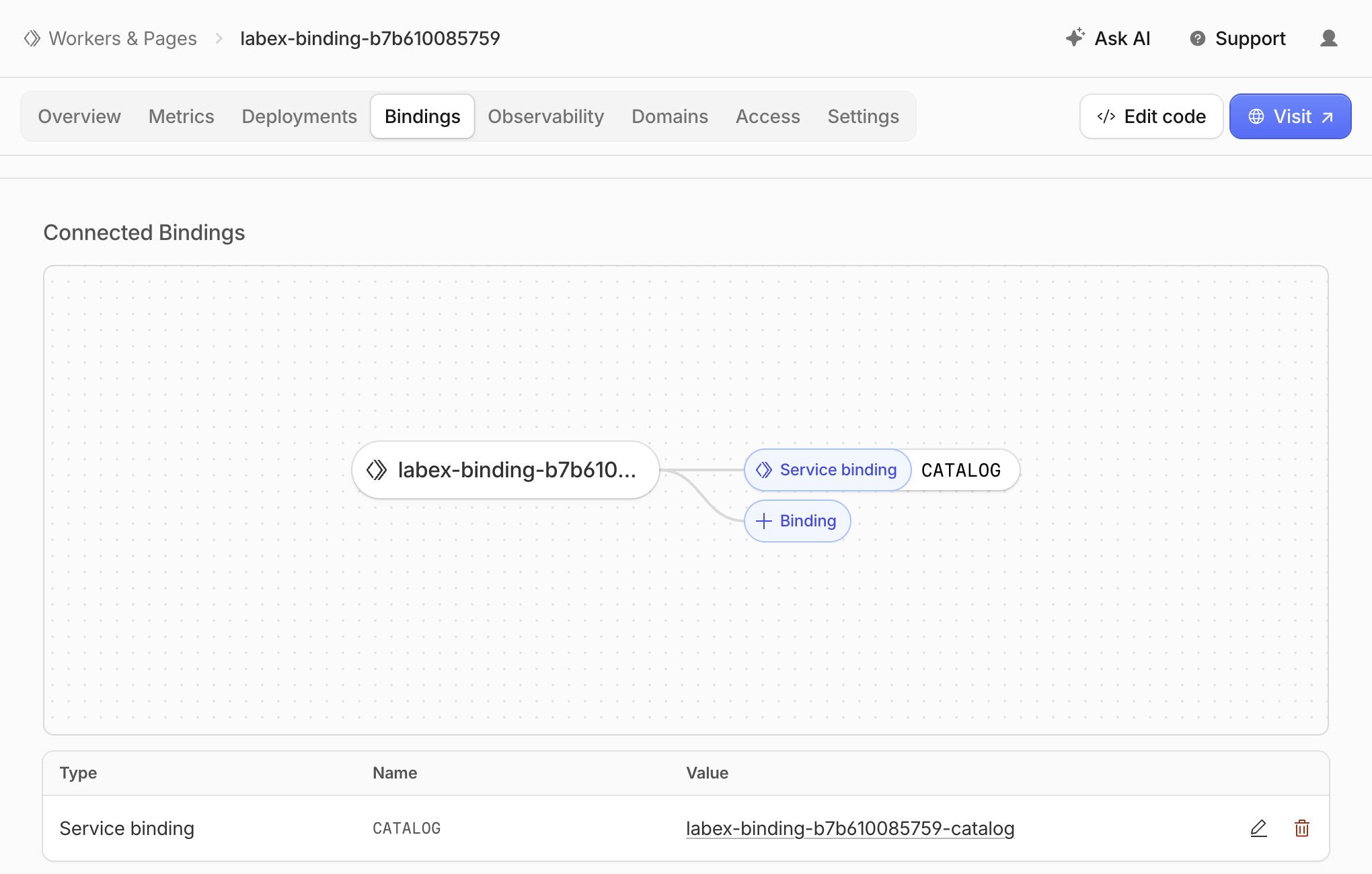
Open the same learning account in Dashboard, go to Compute → Workers & Pages, and locate both exact names. Open the public API's Bindings tab. The diagram identifies the CATALOG binding; in the table below it, compare Name (CATALOG) and Value (your matching -catalog Worker). The binding name becomes env.CATALOG in the handler, while its value identifies the deployed dependency.
Follow the catalog Worker link in that table, then select its Domains tab. Confirm the top breadcrumb now ends in -catalog. Under Worker URL, both Production and Preview switches should be off. Under Custom Domains and Routes, there should be no entries, as shown below.
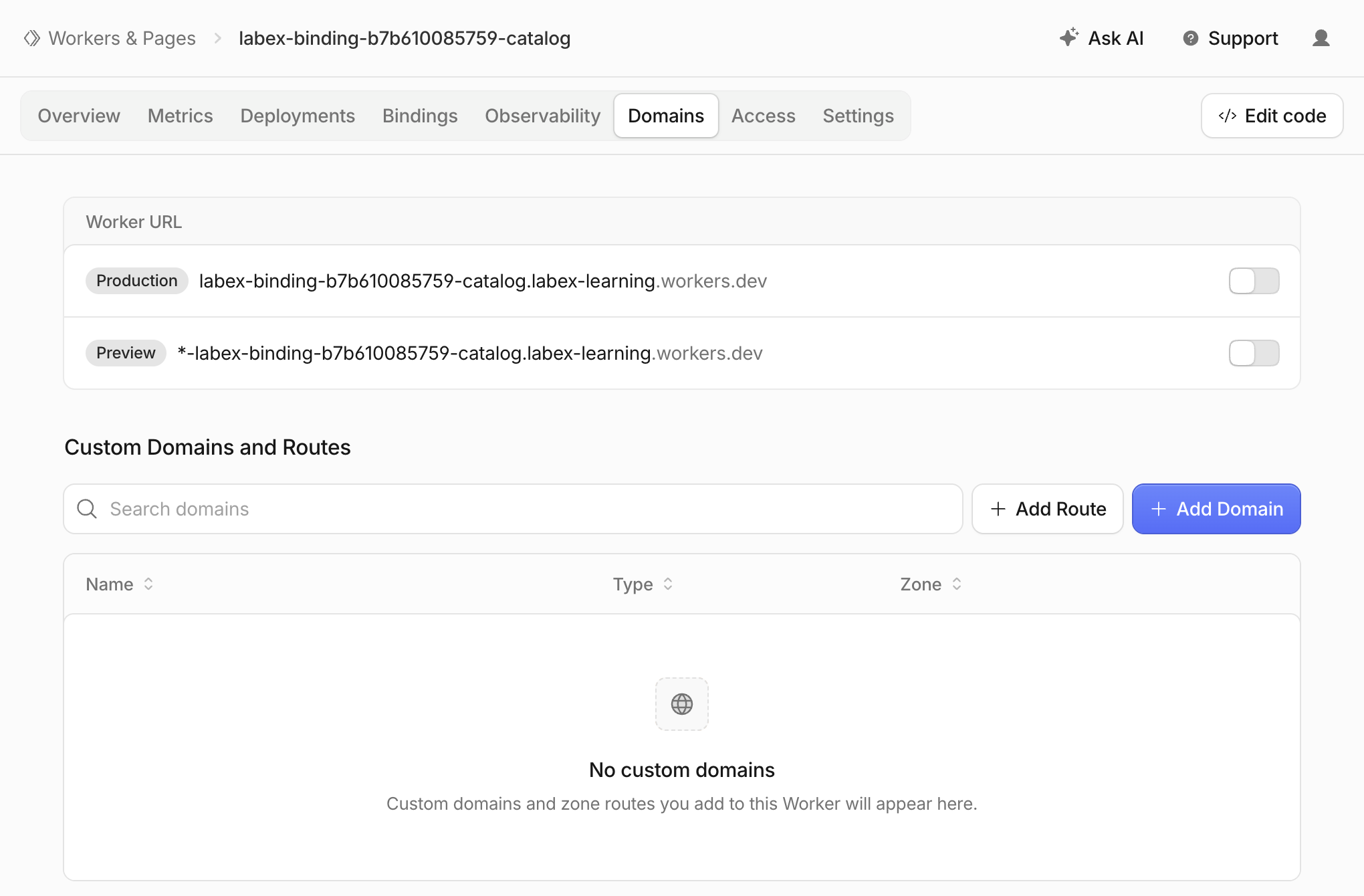
These are example names; use your generated suffix and account subdomain. A disabled switch means the displayed address is not an enabled public entrypoint. The working API request above reaches this Worker through its service binding. Keep this check read-only: do not enable a public endpoint, add a route or duplicate the binding to make the internal call work. Use verification: it independently checks account ownership, the deployed service binding, endpoint settings and the remote response with a new probe. Disabling these endpoints does not prevent authorized account operators from binding to or changing the service; it is not a user login system.
Delete the Caller Before Its Dependency
In this step, you will remove the two disposable cloud Workers while still authorized. The configuration files are your resource inventory. Confirm their generated names and account ID before deleting.
cat wrangler.jsonc
cat catalog/wrangler.jsonc
Delete the public caller first, then the internal catalog. This avoids leaving a deployed caller pointed at a removed service. At each prompt, check the exact lab name and press the single key y.
npx wrangler delete --config wrangler.jsonc
npx wrangler delete --config catalog/wrangler.jsonc
Wrangler 4.131.1 can report a legacy Workers Sites KV authentication error after deleting the script. Do not broaden permissions or treat that diagnostic as proof of deletion. Refresh Workers & Pages and use verification: a successful authorized inventory must show both exact names absent. Network/authentication failures are inconclusive. Preserve other Workers, the account and its existing subdomain.
Disconnect the Lab VM
In this step, you will remove the VM's authorization after both cloud deletions have been verified.
npx wrangler logout
npx wrangler whoami --json
Expect explicit "loggedIn": false. The unauthenticated status command may exit nonzero; its structured result is the important evidence. Use verification and then end the VM. The Dashboard browser login is separate and can remain signed in for another lab. Ending the VM does not substitute for cloud deletion or logout.
Summary
You diagnosed a running dependency that was missing from the caller's bindings, declared its exact service name, and sent requests through env.CATALOG.fetch(). Local and deployed probes returned the catalog's identity and data. You inspected the deployed connection and kept the internal service's public endpoints disabled, then deleted the caller before its dependency and disconnected the VM.
Service bindings make internal Worker connections explicit. Named environments require their own declarations, and local connectivity does not by itself prove remote ownership or endpoint configuration.


