



Introduction
A website's support form needs somewhere to send its subject. An API is an interface that another program calls: the form sends an HTTP request, and your Worker returns data describing the result. You will build that backend, distinguish valid input from bad JSON or an unknown route, and handle an unavailable ticket service. After local tests, you will deploy it with a disposable upstream Worker.
Use your own Cloudflare learning account and the device authorization knowledge from the connection lab. This lab starts in a fresh VM with Node.js 22.22.0 and project-local Wrangler 4.131.1 installed in /home/labex/project/support-api. Basic JavaScript functions, objects and modules are prerequisites; HTTP behavior and asynchronous requests are explained here. The two public Workers use synthetic data only. The supplied upstream acknowledges requests but stores nothing: this is not a durable ticket system. Workers Free and a workers.dev subdomain are sufficient; no database, purchased domain or paid upgrade is needed for this small exercise. Requests count toward your account's Workers usage.
You will remove both Workers and log out before ending the lab. Keep the same terminal open to preserve the shell variables used for resource names and URLs.
Route Requests by Path and Method
In this step, you will give each supported URL an explicit method and response. A route matches an incoming request to the operation that should handle it. The path names the operation, while the HTTP method describes the action: GET /health asks for status, and POST /requests will submit a support request. Defining both prevents an unintended request from entering the wrong operation.
Enter the prepared project and confirm the tools:
cd /home/labex/project/support-api
node --version
npx wrangler --version
Expect Node v22.22.0 and Wrangler 4.131.1. Installation is already complete; on your own computer, install Node and use npm install --save-dev wrangler@4.131.1 in a project. Use npm ci when reproducing a project with its lockfile.
Generate a unique disposable name. openssl rand -hex 6 emits 12 random hexadecimal characters; $(...) inserts that output and the shell assignment saves it for later commands.
WORKER_NAME="labex-support-$(openssl rand -hex 6)"
Write standard Wrangler configuration. cat > file <<MARKER writes the following lines until the closing marker; the unquoted marker lets the shell substitute $WORKER_NAME.
cat > wrangler.jsonc <<CONFIG
{
  "name": "$WORKER_NAME",
  "main": "src/index.js",
  "compatibility_date": "2026-09-14",
  "workers_dev": true,
  "preview_urls": false,
  "vars": {"UPSTREAM_URL": "http://127.0.0.1:8081"}
}
CONFIG
main identifies the handler, compatibility_date selects runtime behavior, and vars provides a non-secret upstream address through env. For now it points to a local fixture started later. Public preview URLs are disabled to keep the resource inventory simple.
An HTTP response includes a numeric status, optional headers describing it, and a body containing the returned data. For example, a 404 status means the route was not found; the JSON body can give the caller a readable error name.
Write the handler. The quoted JS marker preserves JavaScript literally. new URL(...).pathname extracts the route. The ternary expression chooses the permitted method; HTTP 405 also advertises that method in Allow. Response.json serializes an object and sets its content type. The async handler can await asynchronous work in later steps.
cat > src/index.js <<'JS'
export default {
  async fetch(request, env) {
    const path = new URL(request.url).pathname;
    if (path !== '/health' && path !== '/requests') {
      return Response.json({error: 'not_found'}, {status: 404});
    }
    const allowed = path === '/health' ? 'GET' : 'POST';
    if (request.method !== allowed) {
      return Response.json({error: 'method_not_allowed'}, {
        status: 405, headers: {Allow: allowed}
      });
    }
    if (path === '/health') return Response.json({status: 'ok'});
    return Response.json({error: 'not_implemented'}, {status: 501});
  }
};
JS
Start local Wrangler in the background: > redirects output, 2>&1 includes errors, and & returns the terminal prompt while the server runs.
npx wrangler dev --port 8080 > api.log 2>&1 &
cat api.log
Wait until the log reports readiness on port 8080. Re-run cat api.log if it is still starting. curl -i includes the HTTP status and headers:
curl -i http://127.0.0.1:8080/health
curl -i http://127.0.0.1:8080/missing
curl -i http://127.0.0.1:8080/requests
Expect 200 with {"status":"ok"}, 404 with {"error":"not_found"}, and 405 with {"error":"method_not_allowed"} plus Allow: POST, respectively. These error responses are intentional. Use the verification button while the server is still running.
Parse and Validate JSON Input
In this step, you will check incoming data before passing it to another service. Parsing asks whether the body is valid JSON; validation asks whether that JSON contains a usable support subject. A number can be valid JSON and still be the wrong input for this form. Here the subject must be a string containing 1–80 characters after trimming whitespace. HTTP 415 rejects an unsupported media type, 400 rejects unparseable JSON, and 422 rejects data that does not meet the subject rule.
Replace the handler with this complete version. headers.get reads the declared media type; splitting at ; permits a charset parameter. await request.json() waits for parsing and consumes the body once. A try/catch converts a parse exception to a predictable response. JSON can also represent null, arrays or numbers, so validation checks shape before using string methods. trim() normalizes the accepted subject.
cat > src/index.js <<'JS'
export default {
  async fetch(request, env) {
    const path = new URL(request.url).pathname;
    if (path !== '/health' && path !== '/requests') {
      return Response.json({error: 'not_found'}, {status: 404});
    }
    const allowed = path === '/health' ? 'GET' : 'POST';
    if (request.method !== allowed) {
      return Response.json({error: 'method_not_allowed'}, {
        status: 405, headers: {Allow: allowed}
      });
    }
    if (path === '/health') return Response.json({status: 'ok'});
    const mediaType = (request.headers.get('content-type') || '').split(';')[0].trim().toLowerCase();
    if (mediaType !== 'application/json') {
      return Response.json({error: 'unsupported_media_type'}, {status: 415});
    }
    let body;
    try {
      body = await request.json();
    } catch {
      return Response.json({error: 'invalid_json'}, {status: 400});
    }
    if (!body || Array.isArray(body) || typeof body.subject !== 'string' ||
        body.subject.trim().length < 1 || body.subject.trim().length > 80) {
      return Response.json({error: 'invalid_subject'}, {status: 422});
    }
    const subject = body.subject.trim();
    return Response.json({subject}, {status: 201});
  }
};
JS
Wrangler reloads when the source changes. Check cat api.log for compilation errors. Send a valid request: -H supplies a header and --data supplies the body and selects POST. Single quotes preserve JSON double quotes in the shell.
curl -i http://127.0.0.1:8080/requests -H "Content-Type: application/json" --data '{"subject":" Printer offline "}'
Expect 201 and {"subject":"Printer offline"}. This is an in-memory acknowledgment, not a saved ticket. Exercise three different rejection paths:
curl -i http://127.0.0.1:8080/requests -H "Content-Type: application/json" --data '{'
curl -i http://127.0.0.1:8080/requests -H "Content-Type: application/json" --data '{"subject":" "}'
curl -i http://127.0.0.1:8080/requests -H "Content-Type: text/plain" --data 'hello'
Expect 400 invalid_json, 422 invalid_subject, and 415 unsupported_media_type. Also try JSON null, [], and {"subject":5}; each must return 422 rather than throw. Use the verification button; it checks these boundaries and preserves the health and routing behavior.
Call an Upstream and Contain Its Errors
In this step, you will connect the API to a supplied ticket-service simulator. An upstream is a dependency called by your service. The simulator returns one synthetic ticket for normal subjects and HTTP 503 for the special subject simulate-outage; it never stores requests.
The simulator is a fixture: prepared example behavior that lets you practice normal and failed calls predictably. In a real application, the upstream might create a ticket in a support system. Here it only acknowledges synthetic data, so you can learn the connection without creating real tickets.
Inspect the supplied source to understand the fixture, then configure its own unique Worker identity:
cat upstream/index.js
cat > upstream/wrangler.jsonc <<CONFIG
{
  "name": "${WORKER_NAME}-upstream",
  "main": "index.js",
  "compatibility_date": "2026-09-14",
  "workers_dev": true,
  "preview_urls": false
}
CONFIG
--config selects this second configuration. Use port 8081 and a separate inspector port so both local Workers can run together:
npx wrangler dev --config upstream/wrangler.jsonc --port 8081 --inspector-port 9230 > upstream.log 2>&1 &
cat upstream.log
curl -i http://127.0.0.1:8081/health
Wait for readiness and expect 200 with {"service":"support-upstream","status":"ok"}. Now replace the main handler with the complete integration. The global fetch function makes an outbound request; JSON.stringify encodes the validated subject. await pauses this handler's next operation until the response is ready; the network request is asynchronous rather than an immediate return value. The exported fetch handler receives incoming requests, while the global fetch(...) function here sends an outgoing one. HTTP errors do not throw, so upstream.ok explicitly checks the status; catch separately handles a failed connection or unreadable JSON response. HTTP 502 tells our client the dependency failed without exposing its internal response body.
cat > src/index.js <<'JS'
export default {
  async fetch(request, env) {
    const path = new URL(request.url).pathname;
    if (path !== '/health' && path !== '/requests') {
      return Response.json({error: 'not_found'}, {status: 404});
    }
    const allowed = path === '/health' ? 'GET' : 'POST';
    if (request.method !== allowed) {
      return Response.json({error: 'method_not_allowed'}, {
        status: 405, headers: {Allow: allowed}
      });
    }
    if (path === '/health') return Response.json({status: 'ok'});
    const mediaType = (request.headers.get('content-type') || '').split(';')[0].trim().toLowerCase();
    if (mediaType !== 'application/json') {
      return Response.json({error: 'unsupported_media_type'}, {status: 415});
    }
    let body;
    try {
      body = await request.json();
    } catch {
      return Response.json({error: 'invalid_json'}, {status: 400});
    }
    if (!body || Array.isArray(body) || typeof body.subject !== 'string' ||
        body.subject.trim().length < 1 || body.subject.trim().length > 80) {
      return Response.json({error: 'invalid_subject'}, {status: 422});
    }
    const subject = body.subject.trim();
    try {
      const upstream = await fetch(`${env.UPSTREAM_URL}/tickets`, {
        method: 'POST',
        headers: {'Content-Type': 'application/json'},
        body: JSON.stringify({subject})
      });
      if (!upstream.ok) {
        return Response.json({error: 'upstream_unavailable'}, {status: 502});
      }
      const ticket = await upstream.json();
      return Response.json({ticket: ticket.ticket, subject}, {status: 201});
    } catch {
      return Response.json({error: 'upstream_unavailable'}, {status: 502});
    }
  }
};
JS
curl -i http://127.0.0.1:8080/requests -H "Content-Type: application/json" --data '{"subject":"Printer offline"}'
curl -i http://127.0.0.1:8080/requests -H "Content-Type: application/json" --data '{"subject":"simulate-outage"}'
Expect 201 with {"ticket":"demo-1001","subject":"Printer offline"}, then 502 with {"error":"upstream_unavailable"}. The simulator's internal diagnostic must not appear. The subject is synthetic, and this endpoint has no durable side effects. Use the verification button with both local servers running.
This lab uses ordinary HTTP to practice an external-service boundary. A later lab teaches service bindings for internal Worker-to-Worker calls. Bounded timeouts and richer diagnostics are taught in Diagnose Worker Failures. The fixture returns small bounded responses; a production API must also bound untrusted request and response sizes.
Deploy and Exercise the Public API
In this step, you will deploy both Workers to the same learning account and replace the local upstream address with its public URL. Stop both local jobs first. Inspect jobs and use each actual job number; the examples assume API is 1 and upstream is 2.
jobs
kill %1 %2
Authorize this fresh VM. The grant identifies your account and permits Worker deployment and deletion. The tail permission matches the deployment lesson's grant, though this lab does not require a log stream.
npx wrangler login --device --browser=false --scopes account:read user:read workers_scripts:write workers_tail:read
Open the displayed browser link, enter the current device code, review Wrangler's permissions (including required Background Access), select only your learning account, and authorize. Return to the terminal and wait for completion.
npx wrangler whoami --json
Confirm loggedIn: true, the account name, and its actual ID in accounts. Replace YOUR_ACCOUNT_ID below with that ID. Retain the names generated in step 1; if a variable was lost, read the saved configuration and restore it rather than generating another resource name.
cat > upstream/wrangler.jsonc <<CONFIG
{
  "name": "${WORKER_NAME}-upstream",
  "main": "index.js",
  "compatibility_date": "2026-09-14",
  "workers_dev": true,
  "preview_urls": false,
  "account_id": "YOUR_ACCOUNT_ID"
}
CONFIG
npx wrangler deploy --config upstream/wrangler.jsonc
Copy the exact workers.dev URL from deployment output. Reuse the account's existing subdomain. If Wrangler offers first-time subdomain registration, choose an available name and follow its confirmation; do not change an existing account subdomain.
Now rewrite the main configuration, replacing both placeholders with your account ID and the upstream URL (without a trailing slash). global_fetch_strictly_public makes outbound fetch() use public Internet routing, including the other Worker on this account's workers.dev subdomain. Without it, this same-zone HTTP call can fail even though both Workers work independently. This flag belongs in the deployed API configuration; the earlier local loopback fixture does not need it. See the Fetch API guidance.
cat > wrangler.jsonc <<CONFIG
{
  "name": "$WORKER_NAME",
  "main": "src/index.js",
  "compatibility_date": "2026-09-14",
  "compatibility_flags": ["global_fetch_strictly_public"],
  "workers_dev": true,
  "preview_urls": false,
  "account_id": "YOUR_ACCOUNT_ID",
  "vars": {"UPSTREAM_URL": "YOUR_UPSTREAM_URL"}
}
CONFIG
cat wrangler.jsonc
npx wrangler deploy
Copy the main API URL from its deployment output into the variable below:
API_URL="https://YOUR_API.YOUR_SUBDOMAIN.workers.dev"
curl -i "$API_URL/health"
curl -i "$API_URL/requests" -H "Content-Type: application/json" --data '{"subject":"Printer offline"}'
curl -i "$API_URL/requests" -H "Content-Type: application/json" --data '{"subject":"simulate-outage"}'
curl -i "$API_URL/requests" -H "Content-Type: application/json" --data '{'
Expect the same contracts as locally: 200 health, 201 synthetic ticket, 502 upstream error and 400 malformed JSON. Allow hostname propagation before retrying connectivity errors. In the Dashboard, select the same learning account and open Compute → Workers & Pages. Find both exact names and compare their addresses with the deployment output. This is a read-only checkpoint; do not create duplicate applications there.
The example below shows the main API and its matching -upstream service. In the left sidebar, expand Compute and choose Workers & Pages. Use Search applications if your account contains other projects. Compare the full generated names and the addresses beneath them with your two deployment outputs; your random suffix and account subdomain will differ from this example.
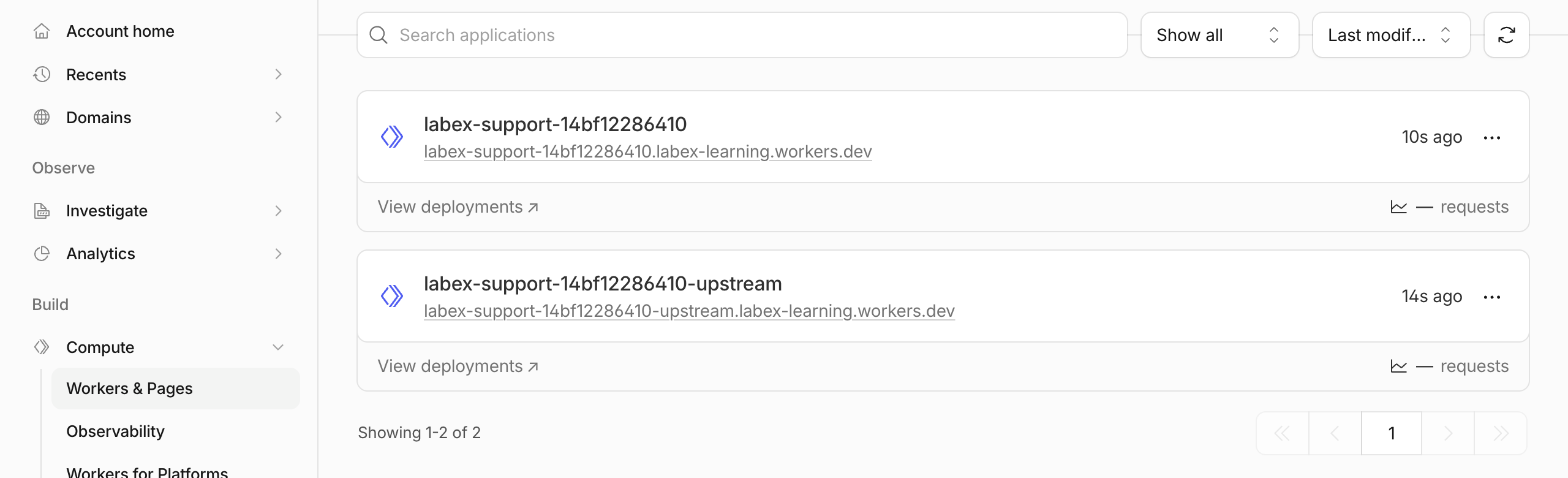
Both resources should appear in the same selected account. Their presence confirms where they were deployed; the HTTP responses above establish whether the API works. If either name is missing, check the account selector and deployment output before retrying. Do not use Create application to duplicate a CLI deployment.
Use the verification button. It independently checks ownership of both Workers, the deployed upstream binding, and positive and negative public responses. It sends only synthetic stateless requests to this lab's simulator.
Remove Both Disposable Workers
In this step, you will remove the API and its upstream while authorization is still available to verify the result. These are the only cloud resources created by this lab. Inspect both configurations before deletion:
cat wrangler.jsonc
cat upstream/wrangler.jsonc
Confirm the main labex-support-... name and matching -upstream suffix, with the same learning account ID. Delete the main API first and then the upstream. At each prompt, check the exact name and press the single key y.
npx wrangler delete
npx wrangler delete --config upstream/wrangler.jsonc
Wrangler 4.131.1 can remove a Worker and then print an authentication error when checking legacy Workers Sites KV data, because this grant has no KV access. That specific diagnostic does not prove either success or failure of deletion. Do not grant more permissions just to silence it. Refresh Workers & Pages and use the verification button: a successful authorized inventory must confirm that both names are absent. Network or authorization errors are inconclusive; resolve them before proceeding. Preserve other applications, your learning account and its subdomain.
Disconnect the VM
In this step, you will remove this VM's Wrangler authorization after the two-resource cleanup check passes. Logging out does not delete Workers, which is why cleanup came first.
npx wrangler logout
npx wrangler whoami --json
Expect explicit "loggedIn": false. An unauthenticated status command may exit nonzero; that is expected when its structured result clearly reports logout. A network error is not equivalent. Use the verification button, then end the LabEx environment. Your browser login and learning account remain available for later labs; each new VM will request its own authorization.
Summary
You built a method-aware HTTP API, parsed and validated JSON, normalized accepted data, and translated an upstream failure into a predictable public error. You tested normal and rejected requests locally and on Cloudflare, checked ownership of both deployments, removed the disposable resources, and disconnected the VM.
For reference, see the official Request API, Response API and Fetch API.


