



Introduction
An ordinary HTTP request opens, receives one response and ends. A WebSocket upgrades that first HTTP request into a two-way connection that stays open, so a server can send an update as soon as something changes. Chat messages, collaborative cursors and live order boards all benefit from that real-time path.
A Durable Object gives every room one coordination point. The front-door Worker converts a validated room name such as planning into a stable object identity. The selected object accepts that room's WebSocket connections, validates every incoming message and broadcasts one approved update only to its own connected clients. A different name selects a different object, so support cannot receive planning traffic.
This lab deliberately uses the standard WebSocket API and keeps the active socket set in memory. That makes connection and broadcast behavior visible before O06 introduces WebSocket Hibernation and connection attachments. SQLite stores a small message history so you can prove malformed input did not change durable state; it does not make an open socket itself durable.
You will implement the protocol, connect two supplied clients to one room and a third client to another, observe a valid broadcast, reject malformed input, repeat the test on Cloudflare, inspect the browser client and Dashboard, then remove the exact disposable resources.
Every fresh VM needs its own Wrangler authorization. You should already understand stable Durable Object names, bindings, RPC and SQLite-backed state from O01–O04. Setup installs Node.js 22.22.0, project-local Wrangler 4.132.0 and the ws test client in /home/labex/project/room-broadcast. It supplies the browser and test clients, but it does not write your Worker, authorize Cloudflare or deploy anything.
Authorize the VM and Declare the Room Namespace
In this step, you will authorize the fresh VM and declare one SQLite-backed Durable Object class for real-time rooms.
Enter the prepared project, confirm the pinned Wrangler version and authorize this VM:
cd /home/labex/project/room-broadcast
npx wrangler --version
npx wrangler login --device --browser=false
Expect Wrangler 4.132.0. Open the displayed Cloudflare URL in the browser, enter the short code, confirm the intended learning account and authorize it. The browser grants Wrangler access; it never sends your password to the VM.
Read only safe identity fields, select the account you confirmed and generate a unique disposable Worker name:
WHOAMI="$(npx wrangler whoami --json)"
printf '%s\n' "$WHOAMI" | jq '{loggedIn, authType, accounts: [.accounts[] | {name}]}'
ACCOUNT_ID="$(printf '%s\n' "$WHOAMI" | jq -r '.accounts[] | select(.name == "LabEx Learning") | .id')"
test -n "$ACCOUNT_ID"
RUN="labex-c10-o05-$(openssl rand -hex 6)"
printf '%s\n' "$RUN" | tee .labex/run-name
If your dedicated learning account has another display name, substitute the name you confirmed. Now write the configuration:
cat > wrangler.jsonc <<JSON
{
  "\$schema": "./node_modules/wrangler/config-schema.json",
  "name": "$RUN",
  "account_id": "$ACCOUNT_ID",
  "main": "src/index.js",
  "compatibility_date": "2026-09-18",
  "workers_dev": true,
  "preview_urls": false,
  "observability": { "enabled": true, "head_sampling_rate": 1 },
  "durable_objects": { "bindings": [
    { "name": "ROOMS", "class_name": "RoomBroadcast" }
  ] },
  "exports": {
    "RoomBroadcast": { "type": "durable-object", "storage": "sqlite" }
  }
}
JSON
The ROOMS binding is the Worker's route into the class namespace. Calling getByName("planning") will always select the same logical room, while getByName("support") selects an independent object. The export gives each selected room private SQLite storage. No cloud resource exists until deployment.
Implement the Validated WebSocket Protocol
In this step, you will define a small message contract and implement the room object that accepts and broadcasts WebSocket messages.
The initial request must contain Upgrade: websocket. After the upgrade, messages are frames rather than new HTTP requests. A client can send any text inside a frame, so parsing JSON is only the first check. Validation must also require the expected type, one nonempty bounded text field and no surprise fields before durable state changes.
Create the shared protocol helpers:
cat > src/protocol.js <<'JS'
const ROOM_PATTERN = /^[a-z0-9](?:[a-z0-9-]{0,38}[a-z0-9])?$/;

export function parseRoomPath(pathname) {
  const match = pathname.match(/^\/rooms\/([^/]+)\/(connect|state)$/);
  if (!match || !ROOM_PATTERN.test(match[1])) return null;
  return { room: match[1], action: match[2] };
}

export function parseClientMessage(raw) {
  if (typeof raw !== "string" || raw.length > 512) return { ok: false };
  let value;
  try { value = JSON.parse(raw); } catch { return { ok: false }; }
  if (!value || typeof value !== "object" || Array.isArray(value)) return { ok: false };
  const keys = Object.keys(value).sort();
  if (keys.length !== 2 || keys[0] !== "text" || keys[1] !== "type") return { ok: false };
  if (value.type !== "update" || typeof value.text !== "string") return { ok: false };
  const text = value.text.trim();
  if (text.length < 1 || text.length > 80) return { ok: false };
  return { ok: true, text };
}
JS
Create the front-door Worker and the Durable Object class:
cat > src/index.js <<'JS'
import { DurableObject } from "cloudflare:workers";
import { CLIENT_HTML } from "./client-html.js";
import { parseClientMessage, parseRoomPath } from "./protocol.js";

const json = (body, status = 200) => Response.json(body, { status });

export class RoomBroadcast extends DurableObject {
  constructor(ctx, env) {
    super(ctx, env);
    this.sessions = new Set();
    this.ctx.blockConcurrencyWhile(async () => {
      this.ctx.storage.sql.exec(`
        CREATE TABLE IF NOT EXISTS messages (
          sequence INTEGER PRIMARY KEY AUTOINCREMENT,
          text TEXT NOT NULL,
          created_at INTEGER NOT NULL
        )
      `);
    });
  }

  async fetch(request) {
    if ((request.headers.get("Upgrade") || "").toLowerCase() !== "websocket") {
      return json({ error: "websocket_upgrade_required" }, 426);
    }
    const pair = new WebSocketPair();
    const [client, server] = Object.values(pair);
    server.accept();
    this.sessions.add(server);
    server.addEventListener("message", event => this.receive(server, event.data));
    const forget = () => this.sessions.delete(server);
    server.addEventListener("close", forget);
    server.addEventListener("error", forget);
    server.send(JSON.stringify({ type: "ready" }));
    return new Response(null, { status: 101, webSocket: client });
  }

  receive(sender, raw) {
    const message = parseClientMessage(raw);
    if (!message.ok) {
      sender.send(JSON.stringify({
        type: "error",
        code: "invalid_message",
        detail: "Send only {type: update, text: 1-80 characters}."
      }));
      return;
    }
    const createdAt = Date.now();
    const row = this.ctx.storage.sql.exec(`
      INSERT INTO messages (text, created_at)
      VALUES (?, ?)
      RETURNING sequence
    `, message.text, createdAt).one();
    const update = JSON.stringify({
      type: "update",
      sequence: row.sequence,
      text: message.text,
      createdAt
    });
    for (const socket of this.sessions) {
      try { socket.send(update); } catch { this.sessions.delete(socket); }
    }
    console.log(JSON.stringify({ event: "room_update", sequence: row.sequence, connected: this.sessions.size }));
  }

  async getState() {
    const messages = this.ctx.storage.sql.exec(`
      SELECT sequence, text, created_at AS createdAt
      FROM messages ORDER BY sequence
    `).toArray();
    return {
      messageCount: messages.length,
      latestSequence: messages.at(-1)?.sequence ?? 0,
      messages
    };
  }
}

export default {
  async fetch(request, env) {
    const url = new URL(request.url);
    if (url.pathname === "/" && request.method === "GET") {
      return new Response(CLIENT_HTML, { headers: { "content-type": "text/html; charset=utf-8" } });
    }
    const route = parseRoomPath(url.pathname);
    if (!route) return json({ error: "not_found" }, 404);
    if (route.action === "connect") {
      if (request.method !== "GET" || (request.headers.get("Upgrade") || "").toLowerCase() !== "websocket") {
        return json({ error: "websocket_upgrade_required" }, 426);
      }
      return env.ROOMS.getByName(route.room).fetch(request);
    }
    if (request.method !== "GET") return json({ error: "method_not_allowed" }, 405);
    const state = await env.ROOMS.getByName(route.room).getState();
    return json({ room: route.room, ...state });
  }
};
JS
WebSocketPair creates the client and server ends of one connection. Returning the client end with HTTP 101 completes the upgrade, while server.accept() starts the standard server-side socket. The in-memory sessions set is intentionally scoped to one object instance, and the stable room name is what keeps the set from becoming global across rooms.
Run the deterministic protocol tests and ask Wrangler to build without deploying:
npm test
npx wrangler deploy --dry-run
Expect four passing tests. The dry run checks the Worker module and binding configuration, while later live steps prove actual socket behavior.
Broadcast an Update Inside One Room
In this step, you will run the Worker locally and prove that one update reaches two clients sharing a room but not a client in another room.
Start Wrangler as a background job. Redirecting its output keeps the terminal readable, and the saved job ID lets you stop the exact process later:
mkdir -p .labex/local-state
npx wrangler dev --local --ip 127.0.0.1 --port 8787 --persist-to .labex/local-state > .labex/dev.log 2>&1 &
echo $! > .labex/dev.pid
for attempt in $(seq 1 30); do
  curl --silent --fail http://127.0.0.1:8787/ >/dev/null && break
  sleep 1
done
curl --silent --fail http://127.0.0.1:8787/ | grep -o '<title>[^<]*</title>'
The supplied client program opens three real WebSocket connections: two named planning, one named support. It sends one update from the first planning client and waits for bounded evidence from all three:
node tools/room-clients.mjs http://127.0.0.1:8787 planning support broadcast | tee .labex/local-broadcast.json
The sender and peer objects should contain the same sequence: 1 and text. otherUpdates must be 0. The state section independently shows one durable planning message and zero support messages. This demonstrates both halves of the design: the shared stable name joins the first two clients, and the different name keeps the third client outside the broadcast boundary.
Reject a Malformed Message Before State Changes
In this step, you will send a frame that is valid JSON but invalid application input, then compare durable state before and after it.
The empty text field is the important distinction: JSON parsing succeeds, but the room protocol rejects it. Run the second supplied phase against the same local objects:
node tools/room-clients.mjs http://127.0.0.1:8787 planning support invalid | tee .labex/local-invalid.json
Only the sending client receives an error with code invalid_message; peerErrors remains 0. The before and after histories are identical with one message. An invalid client therefore cannot add a row, advance the sequence or turn an error into a room-wide broadcast.
Read the two room states directly:
curl --silent --fail http://127.0.0.1:8787/rooms/planning/state | jq
curl --silent --fail http://127.0.0.1:8787/rooms/support/state | jq
The first response reports one message and the second reports none. HTTP state reads remain authoritative even if a client disconnects after the test.
Deploy and Exercise Cloud WebSocket Clients
In this step, you will stop the local runtime, deploy the same code and repeat the three-client contract through Cloudflare.
Stop only the local job recorded earlier, then deploy:
kill "$(cat .labex/dev.pid)"
wait "$(cat .labex/dev.pid)" 2>/dev/null || true
npx wrangler deploy | tee .labex/deploy.log
APP_URL="$(grep -Eo 'https://[^ ]+\.workers\.dev' .labex/deploy.log | tail -1)"
test -n "$APP_URL"
printf '%s\n' "$APP_URL" | tee .labex/app-url
The deployment first creates the Worker and reconciles the RoomBroadcast namespace. A successful home page does not by itself prove the stateful route is ready, so poll a harmless empty room state for the exact JSON contract and then allow a short settling window:
for attempt in $(seq 1 30); do
  READY="$(curl --silent --show-error "$APP_URL/rooms/cloud-observer/state" || true)"
  test "$(printf '%s' "$READY" | jq -r '.messageCount // -1' 2>/dev/null)" = 0 && break
  sleep 2
done
test "$(printf '%s' "$READY" | jq -r .messageCount)" = 0
sleep 5
Run the same real WebSocket client against unique cloud rooms:
node tools/room-clients.mjs "$APP_URL" cloud-planning cloud-support broadcast | tee .labex/cloud-broadcast.json
node tools/room-clients.mjs "$APP_URL" cloud-planning cloud-support invalid | tee .labex/cloud-invalid.json
The cloud output must show the same behavior as local development: two planning clients receive sequence 1, the support client receives no update and malformed input leaves the history unchanged.
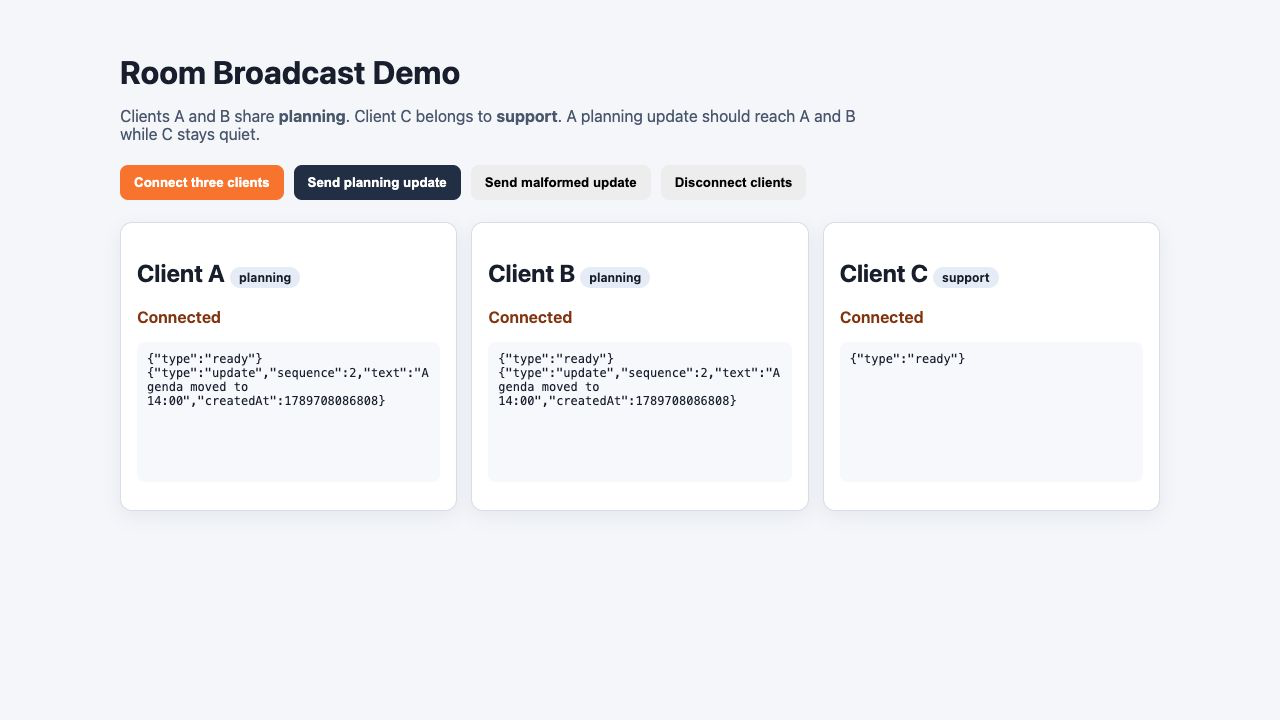
Open the printed APP_URL in a browser. Choose Connect three clients, then Send planning update. Clients A and B should show the same new update, while Client C shows only its ready message. Choose Send malformed update and confirm the error appears only for Client A. When you finish observing the result, choose Disconnect clients and wait for all three cards to report Closed; this completes the WebSocket closing handshake before you leave the page. This page is a supplied observation client; the Node probe and backend checks remain the authoritative acceptance evidence.
Inspect the Browser Client and Durable Object
In this step, you will connect runtime evidence to the Cloudflare Dashboard and prove the durable room history remains after an unchanged redeployment.
Keep the browser demo connected long enough to inspect its three cards. The two planning cards are visible evidence of a room-scoped broadcast; the quiet support card is equally important because it shows what did not cross the identity boundary.
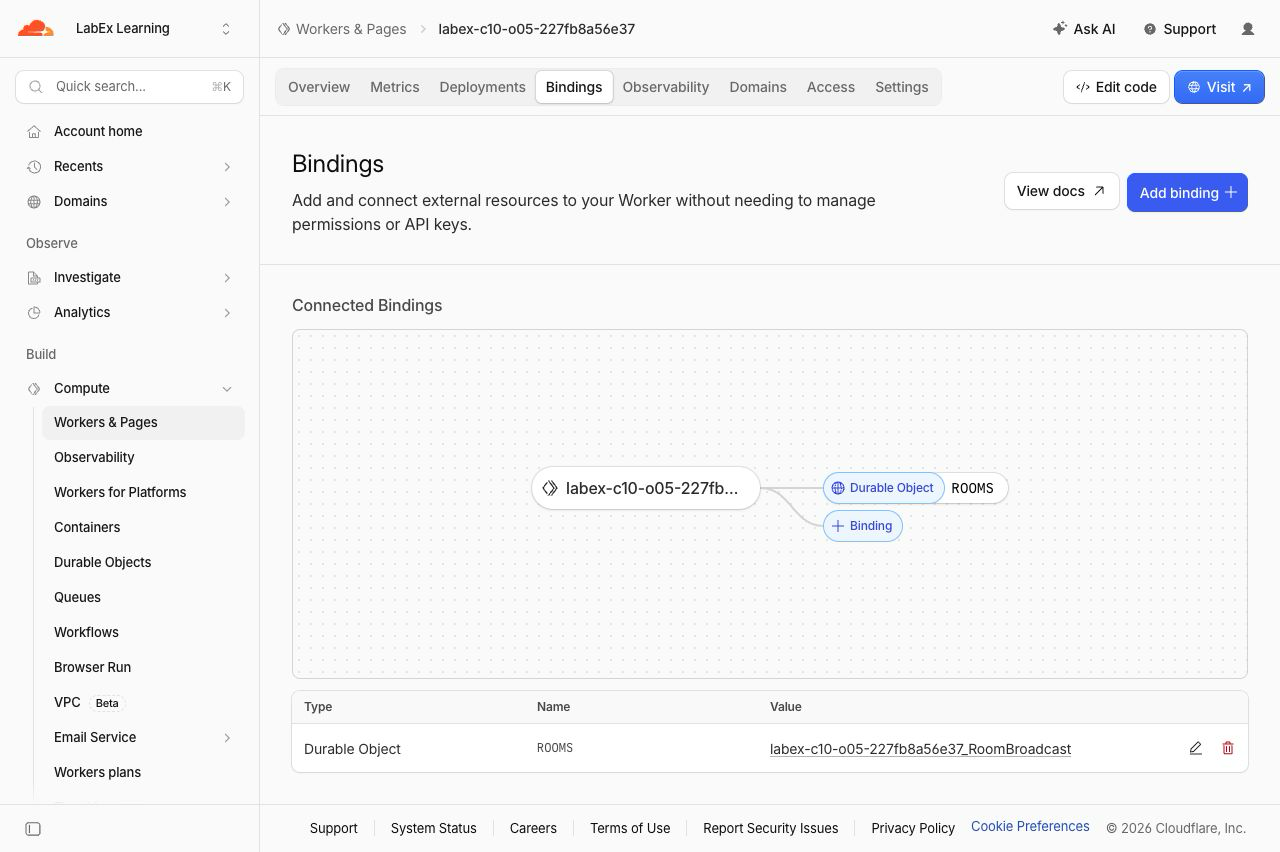
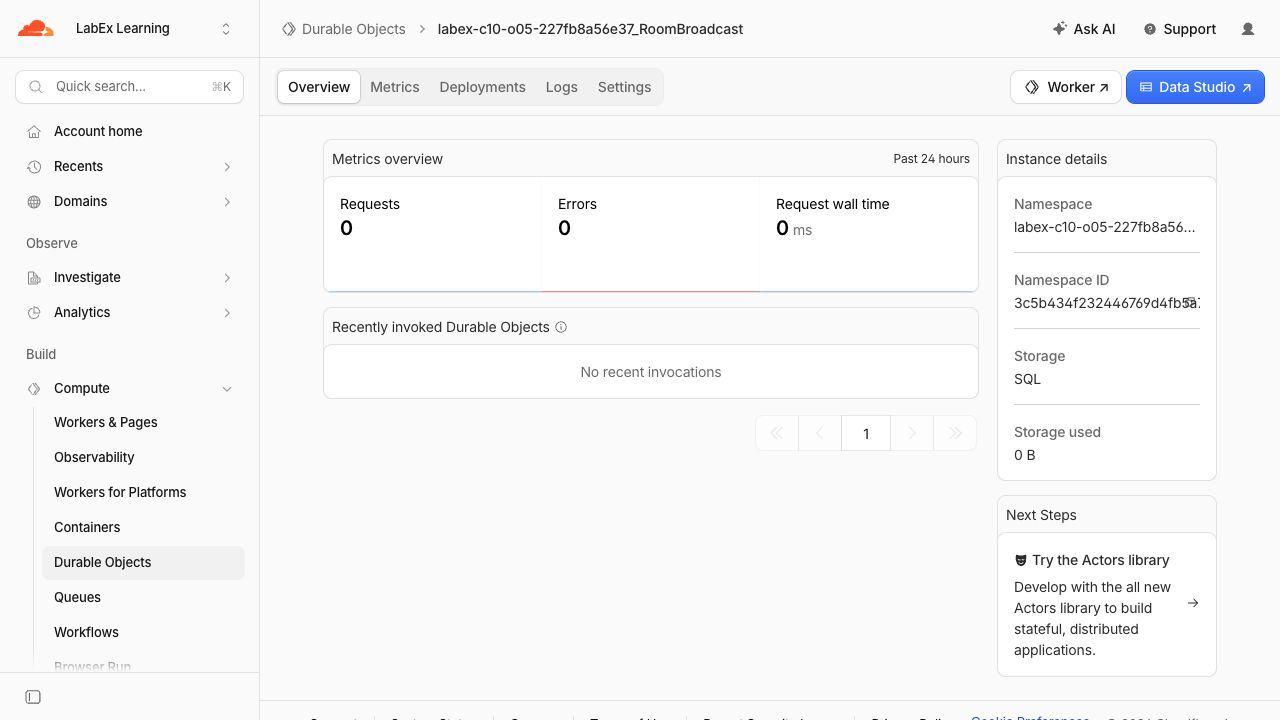
In the Cloudflare Dashboard, open Workers & Pages, select the exact name stored in .labex/run-name, and inspect its bindings. ROOMS should point to RoomBroadcast. Then open Durable Objects, select the namespace named <your-worker>_RoomBroadcast, and confirm Storage: SQL on Overview.
Open the namespace's Logs tab. Choose a recent successful row associated with the browser or Node probe. A structured room_update application message reports its sequence and current connected count without recording message text. The Dashboard may deliver logs after the request; runtime responses and the independent checks remain authoritative.
Redeploy unchanged code. Open WebSocket connections are live transport and are not promised to survive a deployment, but the SQLite history belongs to the named object and should remain:
npx wrangler deploy
APP_URL="$(cat .labex/app-url)"
curl --silent --fail "$APP_URL/rooms/cloud-planning/state" | jq
curl --silent --fail "$APP_URL/rooms/cloud-support/state" | jq
The planning room still reports one message with sequence 1; support remains empty. Your generated suffix, timestamps and Dashboard traffic totals will differ from the tested examples.
Delete the Room Namespace
In this step, you will delete the exact disposable Durable Object namespace and Worker, then keep the VM authorized long enough for LabEx to prove both resources are absent.
Confirm that the saved name begins with labex-c10-o05-. Create a stateless cleanup entrypoint:
RUN="$(cat .labex/run-name)"
case "$RUN" in labex-c10-o05-*) ;; *) echo "Unexpected Worker name" >&2; exit 1;; esac
cat > src/cleanup.js <<'JS'
export default {
  fetch() {
    return Response.json({ status: "cleanup" }, { status: 410 });
  }
};
JS
Create a cleanup configuration for the same Worker and account. The state: "deleted" tombstone removes only this lab's class namespace, including its disposable histories:
ACCOUNT_ID="$(node -e 'console.log(JSON.parse(require("fs").readFileSync("wrangler.jsonc", "utf8")).account_id)')"
cat > wrangler.cleanup.jsonc <<JSON
{
  "\$schema": "./node_modules/wrangler/config-schema.json",
  "name": "$RUN",
  "account_id": "$ACCOUNT_ID",
  "main": "src/cleanup.js",
  "compatibility_date": "2026-09-18",
  "workers_dev": true,
  "preview_urls": false,
  "exports": {
    "RoomBroadcast": { "type": "durable-object", "state": "deleted" }
  }
}
JSON
npx wrangler deploy --config wrangler.cleanup.jsonc
The reconciliation output should report Deleted: RoomBroadcast. Delete the remaining stateless Worker. Wrangler asks for confirmation because deletion cannot be undone; confirm only after the displayed name exactly matches your $RUN value:
npx wrangler delete --config wrangler.cleanup.jsonc
At the prompt, type y and press Enter. The command should finish with Successfully deleted followed by your generated Worker name.
Keep this VM authorized for the check at the end of this step. Confirm that Wrangler still reports an authenticated session:
npx wrangler whoami --json | jq '{loggedIn, authType}'
The JSON must contain "loggedIn": true. LabEx can now query the selected account and prove both the Worker and its Durable Object namespace are absent. A network or authentication error is not proof of cleanup.
Revoke This VM's Wrangler Authorization
In this step, you will revoke the OAuth authorization stored only in this fresh VM after cloud-resource deletion has been verified.
wrangler logout removes the local authorization. The structured whoami --json check is important because ordinary human-readable output can be ambiguous; the loggedIn field is the authoritative result:
npx wrangler logout
npx wrangler whoami --json
The final JSON must contain "loggedIn": false. This does not delete or sign out your Cloudflare learning account in the browser; it only prevents this VM from making further authenticated Wrangler requests.
Summary
You upgraded HTTP requests into WebSockets, routed validated room names to independent Durable Objects, broadcast one approved update to two same-room clients and kept another room isolated. You separated JSON parsing from application validation, proved malformed input changed neither broadcast state nor SQLite history, repeated the behavior on Cloudflare, inspected the browser and Dashboard views, verified history after redeployment and removed the exact disposable namespace.
The reusable design rule is: validate before selecting state or changing it, coordinate each real-time group through its own stable object identity, and treat active connections separately from durable application history.


