



Introduction
A language model can suggest what to do, but a tool lets it request a specific server-side operation. That boundary deserves more care than ordinary chat: model-generated arguments are untrusted input, and a correctly shaped request can still target the wrong support queue or overwrite newer work.
In this lab, you will give one AIChatAgent two deliberately small tools:
lookupSupportCasereads one synthetic case from the named Agent's own SQLite storage.setSupportPrioritychanges only that synthetic record.- Zod schemas reject malformed arguments before either operation runs.
- Server-side checks enforce the Agent name, ticket identity and expected revision.
- A bounded Workers AI turn may call the tools, while an independent probe proves the same operations deterministically.
The writable record is synthetic and disposable; no real help-desk system is connected. This matters because schema validation answers “is the input shaped correctly?”, while authorization and scope checks answer “may this Agent change that record?”. The next lab adds a separate human-approval boundary before an effect.
The supplied React page and short-lived session token keep the focus on tool design rather than frontend or authentication boilerplate. Workers AI free allocations are shared with other account activity. If the account has no allocation remaining, stop rather than enabling a paid plan.
Before entering this course directly, complete Connect LabEx to Your Cloudflare Account. Every fresh LabEx VM needs its own Wrangler authorization. Earlier course labs are recommended, but their VMs and resources are never reused here.
Authorize the VM and Declare the Tool Worker
In this step, you will authorize the fresh VM and declare the resources used by the tool-capable Agent.
Open a terminal and enter the prepared project:
cd /home/labex/project/validated-support-tools
Authorize this VM:
npx wrangler login
Open the displayed link, approve the documented Wrangler permissions for your dedicated learning account, then return to the terminal. Confirm the structured result:
npx wrangler whoami --json
Look for "loggedIn": true, confirm the account name, and copy that account's actual ID. Save it with a unique disposable Worker name:
ACCOUNT_ID="paste-your-confirmed-account-id"
RUN="labex-c11-s05-$(openssl rand -hex 6)"
cat > wrangler.jsonc <<JSON
{
  "\$schema": "./node_modules/wrangler/config-schema.json",
  "name": "$RUN",
  "account_id": "$ACCOUNT_ID",
  "main": "src/server.ts",
  "compatibility_date": "2026-09-18",
  "compatibility_flags": ["nodejs_compat"],
  "workers_dev": true,
  "preview_urls": false,
  "observability": { "enabled": true },
  "ai": { "binding": "AI", "remote": true },
  "durable_objects": {
    "bindings": [
      { "name": "SupportToolsAgent", "class_name": "SupportToolsAgent" }
    ]
  },
  "migrations": [
    { "tag": "v1", "new_sqlite_classes": ["SupportToolsAgent"] }
  ]
}
JSON
python3 .labex/verify.py authorization
The AI binding provides model inference without embedding an API key. The Durable Object binding gives every named SupportToolsAgent its own SQLite storage. The browser will use the name planning; a separate name receives a separate instance and cannot see planning data. Nothing has been deployed yet.
Define the Tool Contracts
In this step, you will describe exactly which arguments each tool accepts.
A tool schema is a runtime contract. TypeScript types help while compiling, but model output arrives at runtime and must be checked again. Create src/cases.ts:
cat > src/cases.ts <<'TS'
import { z } from "zod";

const queue = z.string()
  .min(3)
  .max(40)
  .regex(/^[a-z0-9-]+$/, "queue must use lowercase letters, digits or hyphens");

export const lookupCaseInput = z.object({
  queue,
  ticketId: z.literal("T-SYNTH-101")
}).strict();

export const updatePriorityInput = lookupCaseInput.extend({
  priority: z.enum(["low", "medium", "high"]),
  expectedRevision: z.number().int().nonnegative()
}).strict();

export type LookupCaseInput = z.infer<typeof lookupCaseInput>;
export type UpdatePriorityInput = z.infer<typeof updatePriorityInput>;
export type SupportCase = {
  queue: string;
  ticketId: "T-SYNTH-101";
  summary: string;
  priority: "low" | "medium" | "high";
  revision: number;
};

export function parseInput<T>(schema: z.ZodType<T>, input: unknown): T {
  const result = schema.safeParse(input);
  if (!result.success) {
    const issue = result.error.issues[0];
    throw new Error(`invalid tool input: ${issue.path.join(".") || "request"} ${issue.message}`);
  }
  return result.data;
}
TS
python3 .labex/verify.py schemas
The read contract accepts only a valid queue name and the one synthetic ticket. The update contract adds an enum priority and a nonnegative integer revision. .strict() also rejects unexpected fields, reducing ambiguity and preventing a caller from smuggling unsupported instructions into the operation.
expectedRevision is an optimistic concurrency check. The caller says which version it observed; the server refuses the update if someone has already changed that version. Validation does not itself grant access—the Agent will separately compare queue with its own durable name.
Implement Scoped Server-Side Tools
In this step, you will connect both schemas to one Agent-local record and expose the same implementation to the model and the deterministic verifier.
Create src/server.ts:
cat > src/server.ts <<'TS'
import { AIChatAgent, type OnChatMessageOptions } from "@cloudflare/ai-chat";
import { callable, routeAgentRequest } from "agents";
import { convertToModelMessages, stepCountIs, streamText, tool } from "ai";
import { createWorkersAI } from "workers-ai-provider";
import {
  lookupCaseInput,
  parseInput,
  type LookupCaseInput,
  type SupportCase,
  type UpdatePriorityInput,
  updatePriorityInput
} from "./cases";
import { verifySessionRequest } from "./session-auth";

export class SupportToolsAgent extends AIChatAgent<Cloudflare.Env> {
  maxPersistedMessages = 12;

  private ensureCase(): void {
    this.sql`CREATE TABLE IF NOT EXISTS support_cases (
      ticket_id TEXT PRIMARY KEY,
      queue TEXT NOT NULL,
      case_summary TEXT NOT NULL,
      priority TEXT NOT NULL,
      revision INTEGER NOT NULL
    )`;
    this.sql`INSERT OR IGNORE INTO support_cases
      (ticket_id, queue, case_summary, priority, revision)
      VALUES ('T-SYNTH-101', ${this.name}, 'Synthetic customer cannot open a sample invoice', 'medium', 0)`;
  }

  private scopedCase(input: LookupCaseInput): SupportCase {
    if (input.queue !== this.name) throw new Error("queue is outside this Agent scope");
    this.ensureCase();
    const rows = this.sql<{
      queue: string;
      ticketId: "T-SYNTH-101";
      summary: string;
      priority: "low" | "medium" | "high";
      revision: number;
    }>`SELECT queue, ticket_id AS ticketId, case_summary AS summary, priority, revision
       FROM support_cases WHERE ticket_id = ${input.ticketId}`;
    const record = rows[0];
    if (!record || record.queue !== this.name) throw new Error("case not found in this Agent scope");
    return record;
  }

  @callable()
  inspectCase(input: unknown): SupportCase {
    return this.scopedCase(parseInput(lookupCaseInput, input));
  }

  @callable()
  setPriority(input: unknown): SupportCase {
    const parsed: UpdatePriorityInput = parseInput(updatePriorityInput, input);
    const current = this.scopedCase(parsed);
    if (parsed.expectedRevision !== current.revision) {
      throw new Error(`revision conflict: current revision is ${current.revision}`);
    }
    this.sql`UPDATE support_cases
      SET priority = ${parsed.priority}, revision = ${current.revision + 1}
      WHERE ticket_id = ${parsed.ticketId} AND queue = ${this.name}`;
    const changed = this.scopedCase(parsed);
    console.log(JSON.stringify({
      event: "tool_event",
      tool: "setSupportPriority",
      instance: this.name,
      revision: changed.revision
    }));
    return changed;
  }

  async onChatMessage(_onFinish: unknown, options?: OnChatMessageOptions) {
    const tools = {
      lookupSupportCase: tool({
        description: "Read synthetic ticket T-SYNTH-101 only from the current named support queue.",
        inputSchema: lookupCaseInput,
        execute: async (input) => this.inspectCase(input)
      }),
      setSupportPriority: tool({
        description: "Set low, medium or high priority on synthetic ticket T-SYNTH-101 in the current queue, using its observed revision.",
        inputSchema: updatePriorityInput,
        execute: async (input) => this.setPriority(input)
      })
    };
    const workersai = createWorkersAI({ binding: this.env.AI });
    const result = streamText({
      model: workersai("@cf/zai-org/glm-4.7-flash", {
        reasoning_effort: null,
        chat_template_kwargs: { enable_thinking: false }
      }),
      system: `You assist only the synthetic ${this.name} queue. Use tools for case facts or changes. Never invent tool results, other queues or credentials. Keep the final answer to one short sentence.`,
      messages: await convertToModelMessages(this.messages),
      tools,
      stopWhen: stepCountIs(4),
      maxOutputTokens: 96,
      temperature: 0,
      abortSignal: options?.abortSignal
    });
    return result.toUIMessageStreamResponse();
  }
}

export default {
  async fetch(request: Request, env: Cloudflare.Env): Promise<Response> {
    const authorize = (candidate: Request, route: { name: string }) =>
      verifySessionRequest(candidate, route.name, env.SESSION_SIGNING_KEY);
    return (await routeAgentRequest(request, env, {
      onBeforeConnect: authorize,
      onBeforeRequest: authorize
    })) ?? new Response("Not found", { status: 404 });
  }
};
TS
python3 .labex/verify.py server
The model never receives direct database access. It proposes typed arguments; execute invokes code in the Durable Object, where the server checks the current Agent name again. The two @callable() methods reuse those exact code paths so the verifier can test malformed, cross-scope and stale requests without depending on nondeterministic model choices.
The database is created lazily inside each named Agent. INSERT OR IGNORE supplies one bounded fixture without overwriting a prior update. Only metadata—tool name, Agent instance and revision—is logged; the case text is not.
Connect the Tool-Aware Chat Page
In this step, you will connect the supplied page shell and show tool activity separately from assistant text.
Create the TypeScript and Vite configuration:
cat > tsconfig.json <<'JSON'
{
  "extends": "agents/tsconfig",
  "compilerOptions": {
    "jsx": "react-jsx",
    "lib": ["ES2022", "DOM", "DOM.Iterable"],
    "types": ["@cloudflare/workers-types", "vite/client", "node"]
  },
  "include": ["src/**/*.ts", "src/**/*.tsx", "vite.config.ts", "worker-configuration.d.ts"]
}
JSON

cat > vite.config.ts <<'TS'
import { cloudflare } from "@cloudflare/vite-plugin";
import react from "@vitejs/plugin-react";
import agents from "agents/vite";
import { defineConfig } from "vite";

export default defineConfig({ plugins: [react(), agents(), cloudflare()] });
TS
Create src/client.tsx:
cat > src/client.tsx <<'TSX'
import { useAgentChat } from "@cloudflare/ai-chat/react";
import { useAgent } from "agents/react";
import { Suspense } from "react";
import { createRoot } from "react-dom/client";

function ToolsChat() {
  const parameters = new URLSearchParams(window.location.search);
  const session = parameters.get("session") ?? "";
  const token = parameters.get("token") ?? "";
  if (!session || !token) {
    return <main><h1>Signed session required</h1><p className="help">Open the complete URL printed by the token command.</p></main>;
  }

  const agent = useAgent({
    agent: "SupportToolsAgent",
    name: session,
    host: window.location.host,
    query: { token }
  });
  const { messages, sendMessage, status, error } = useAgentChat({ agent });

  return (
    <main>
      <p className="eyebrow">Validated server-side tools</p>
      <h1>Synthetic Support Console</h1>
      <p className="scope">Allowed queue: <strong>{session}</strong> · allowed ticket: <strong>T-SYNTH-101</strong></p>
      <p className="status">Status: <strong>{status}</strong></p>
      <section className="messages" aria-live="polite">
        {messages.length === 0 && <p className="empty">No tool requests in this signed session yet.</p>}
        {messages.map((message) => (
          <article className={`message ${message.role}`} key={message.id}>
            <span className="role">{message.role}</span>
            {message.parts.map((part, index) => {
              if (part.type === "text") return <span key={index}>{part.text}</span>;
              if (part.type.startsWith("tool-")) {
                return <span className="tool" key={index}>{part.type.replace("tool-", "tool: ")}</span>;
              }
              return null;
            })}
          </article>
        ))}
      </section>
      <form => {
        event.preventDefault();
        const input = event.currentTarget.elements.namedItem("message") as HTMLInputElement;
        const text = input.value.trim();
        if (!text) return;
        sendMessage({ text });
        input.value = "";
      }}>
        <input name="message" defaultValue={`Look up T-SYNTH-101 in ${session}, then set its priority to high using the current revision. Briefly confirm the result.`} maxLength={220} aria-label="Tool request" />
        <button type="submit" disabled={status === "streaming" || status === "submitted"}>Send</button>
      </form>
      <p className="notice">Training fixture only: this page cannot reach a real support system.</p>
      {error && <p className="error" role="alert">{error.message}</p>}
    </main>
  );
}

createRoot(document.getElementById("root")!).render(
  <Suspense fallback={<main><p>Restoring the signed tool session…</p></main>}><ToolsChat /></Suspense>
);
TSX
python3 .labex/verify.py client
useAgent() connects to exactly one named Agent with its short-lived token. useAgentChat() renders the durable conversation and streamed response. Tool parts are labeled as activity rather than flattened into assistant prose, helping the learner distinguish “the model requested an operation” from “the model wrote text.” The browser still cannot bypass server-side validation.
Build and Prove the Boundaries Locally
In this step, you will compile the application and exercise the actual tool implementation without spending a model call.
Generate exact environment types, type-check and build both bundles:
npx wrangler types
npm run check
npm run build
python3 .labex/verify.py build
Wrangler derives Cloudflare.Env from the real bindings. This prevents a hand-written environment interface from drifting away from wrangler.jsonc.
Workers AI is a remote binding, so the local runtime needs the OAuth access already stored by Wrangler. Pass it only to the child process and immediately clear the shell copy:
DEV_PROXY_TOKEN="$(npx wrangler auth token --json | node -e 'let data="";process.stdin.on("data",chunk=>data+=chunk).on("end",()=>process.stdout.write(JSON.parse(data).token))')"
CLOUDFLARE_API_TOKEN="$DEV_PROXY_TOKEN" CI=true npm run dev > .labex/dev.log 2>&1 < /dev/null &
echo $! > .labex/dev.pid
unset DEV_PROXY_TOKEN
for attempt in $(seq 1 40); do
  curl --silent --fail http://127.0.0.1:5173/ > /dev/null && break
  sleep 1
done
tail -n 12 .labex/dev.log
python3 .labex/verify.py local
Do not print the temporary OAuth value or save it in .dev.vars. The independent probe uses a random named Agent and calls the same inspectCase() and setPriority() methods used by the model tools. It proves:
- the initial priority is
mediumat revision0; - malformed and cross-queue reads fail;
- one valid update becomes
highat revision1; - replaying revision
0fails; and - another named Agent retains its isolated revision
0record.
This deterministic test answers whether the operations are safe. Model selection is demonstrated separately after deployment because it is probabilistic.
Deploy and Observe a Bounded Tool Turn
In this step, you will deploy, prove the boundaries again against Cloudflare and observe one bounded live model turn.
Deploy the production bundle and upload the generated signing key as a secret:
npm run deploy
npx wrangler secret bulk .dev.vars
The secret command sends the value without placing it in the configuration or bundle. Do not print .dev.vars.
Save the exact origin printed by the deployment, then create a ten-minute token for planning:
WORKER_URL="https://paste-the-workers-dev-origin-printed-by-deploy"
TOKEN="$(node scripts/create-session-token.mjs planning)"
printf '%s/?session=planning&token=%s\n' "${WORKER_URL%/}" "$TOKEN"
Open the complete URL in the LabEx browser. Send the prepared request. The status moves through submitted and streaming; tool badges show that the model requested a read and update, and the final sentence confirms priority high with the new revision.
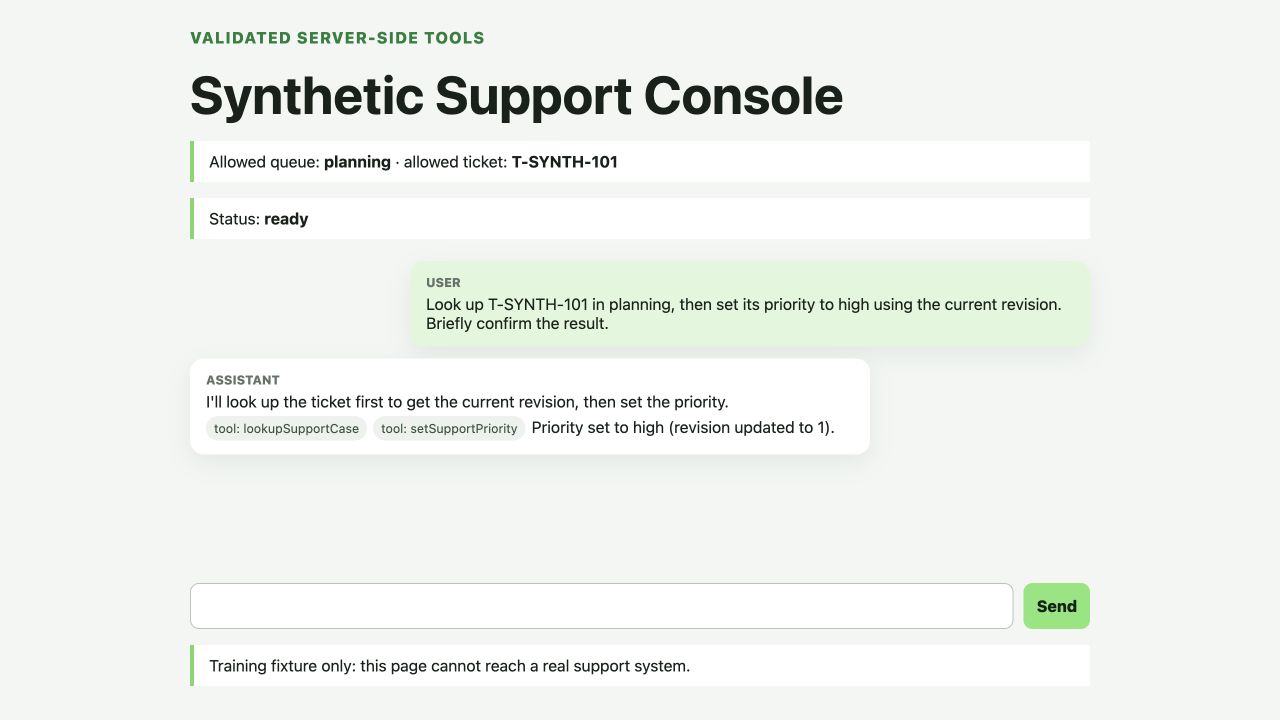
The exact wording is model-generated and may differ. The queue, ticket and record are synthetic examples. A successful sentence is useful UI evidence, but it is not the authoritative safety check.
Send a second request: Set T-SYNTH-101 to low using expected revision 0. The stale revision must not silently overwrite revision 1; the tool activity should surface a conflict instead.
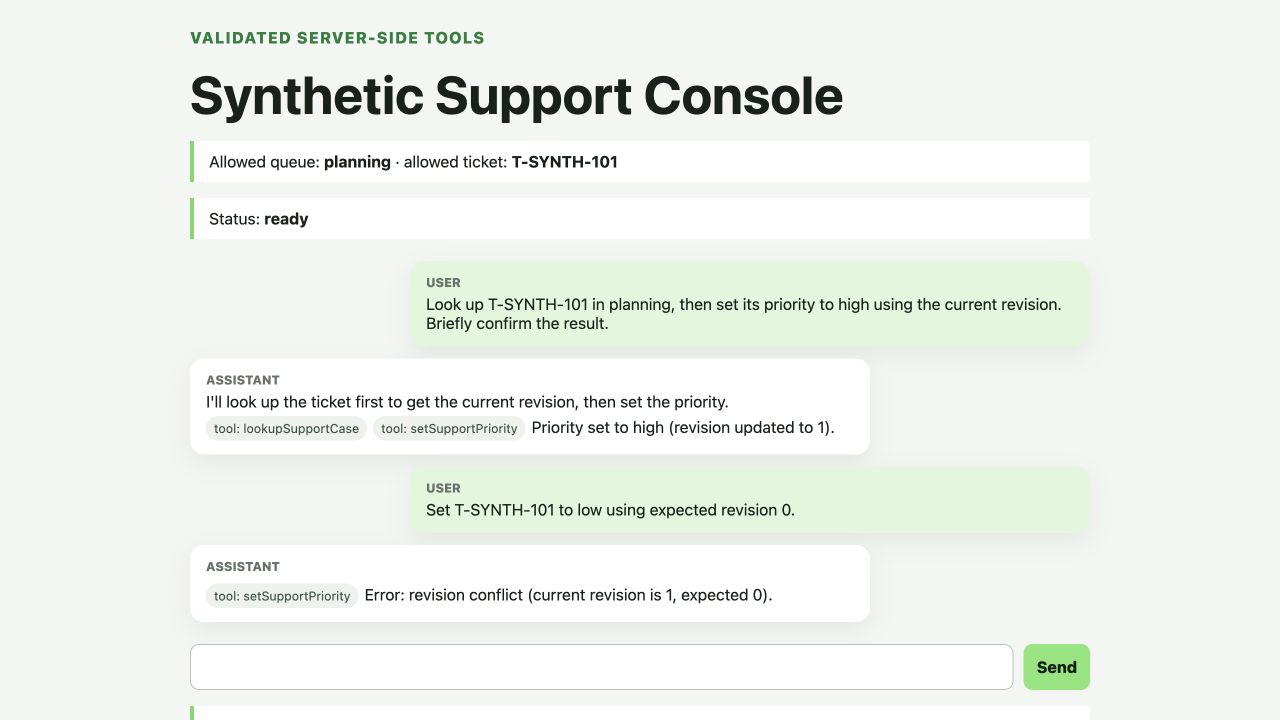
Run a fresh, independently named cloud probe. It does not consume another model call:
python3 .labex/verify.py deployed
The probe checks the exact deployed bindings and namespace, then repeats schema rejection, scope rejection, one successful revision change, stale replay rejection and named-Agent isolation against the remote Worker.
Inspect and Remove the Tool Resources
In this step, you will connect the runtime behavior to Cloudflare's resource views, then delete only this lab's resources.
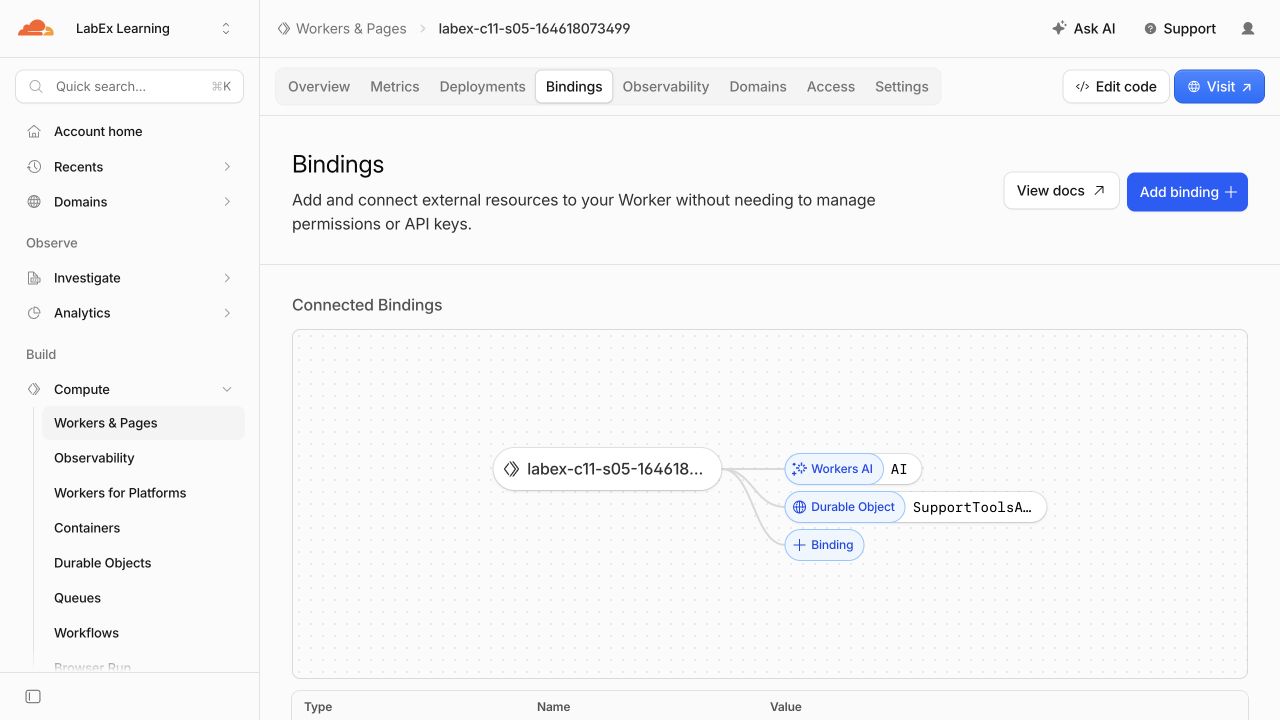
In the Cloudflare Dashboard, open Workers & Pages, select your exact labex-c11-s05-... Worker and inspect Bindings. You should see the AI Workers AI binding and the SupportToolsAgent Durable Object binding. Then open Settings > Variables and Secrets to confirm that SESSION_SIGNING_KEY is stored as an encrypted secret rather than plain text:
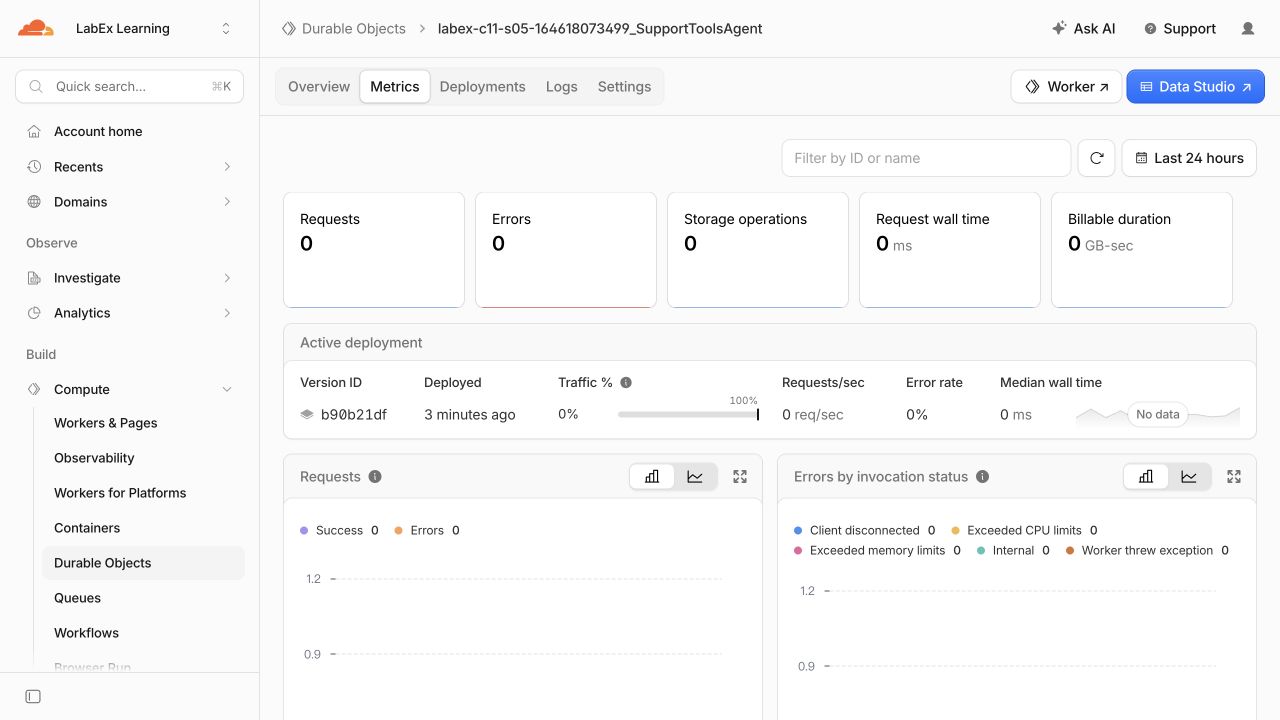
Open Durable Objects and select the SQL-backed namespace owned by this Worker. planning and verifier names are separate object instances inside this one class namespace:
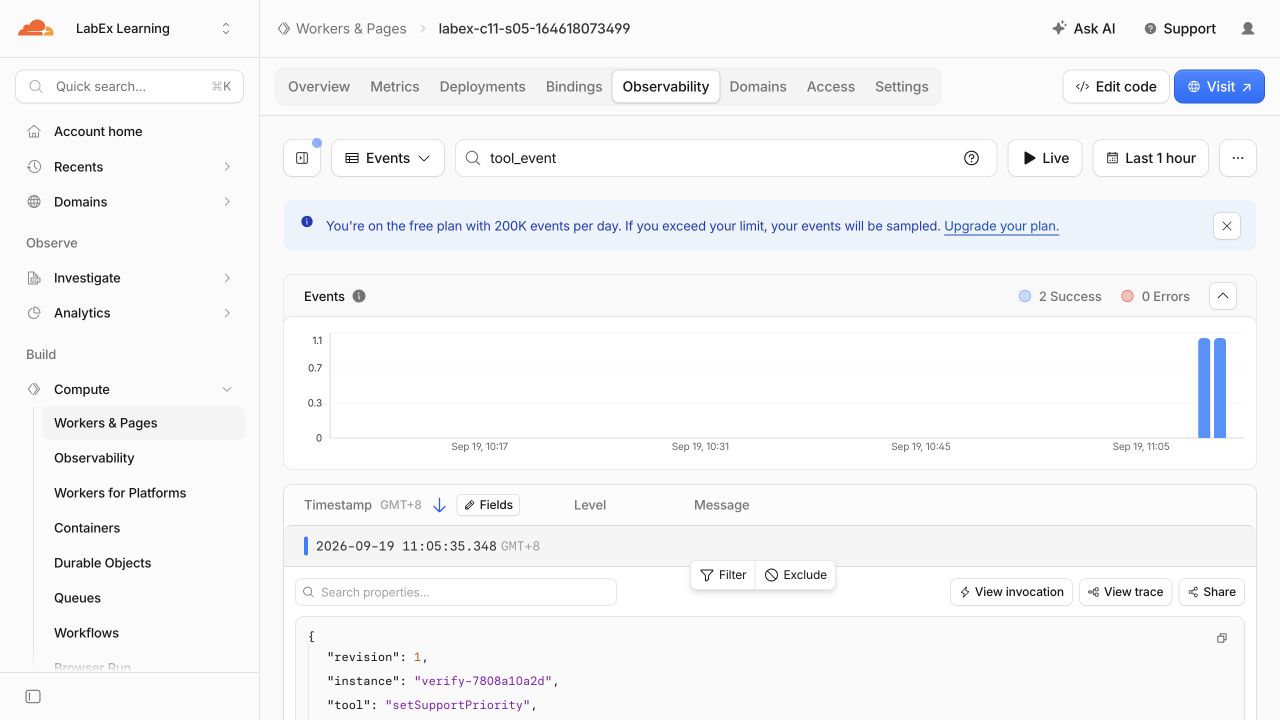
Open the Worker's logs or observability view and find tool_event. The structured entry contains the tool name, Agent instance and revision, but not the synthetic case summary or chat text:
After inspection, create an explicit class-deletion migration and remove the exact Worker:
python3 - <<'PY'
import json
from pathlib import Path
path = Path('wrangler.jsonc')
data = json.loads(path.read_text())
data.pop('durable_objects', None)
data['migrations'].append({'tag': 'v2', 'deleted_classes': ['SupportToolsAgent']})
Path('wrangler.cleanup.jsonc').write_text(json.dumps(data, indent=2) + '\n')
PY
npx wrangler deploy --config wrangler.cleanup.jsonc
npx wrangler delete --config wrangler.cleanup.jsonc --force
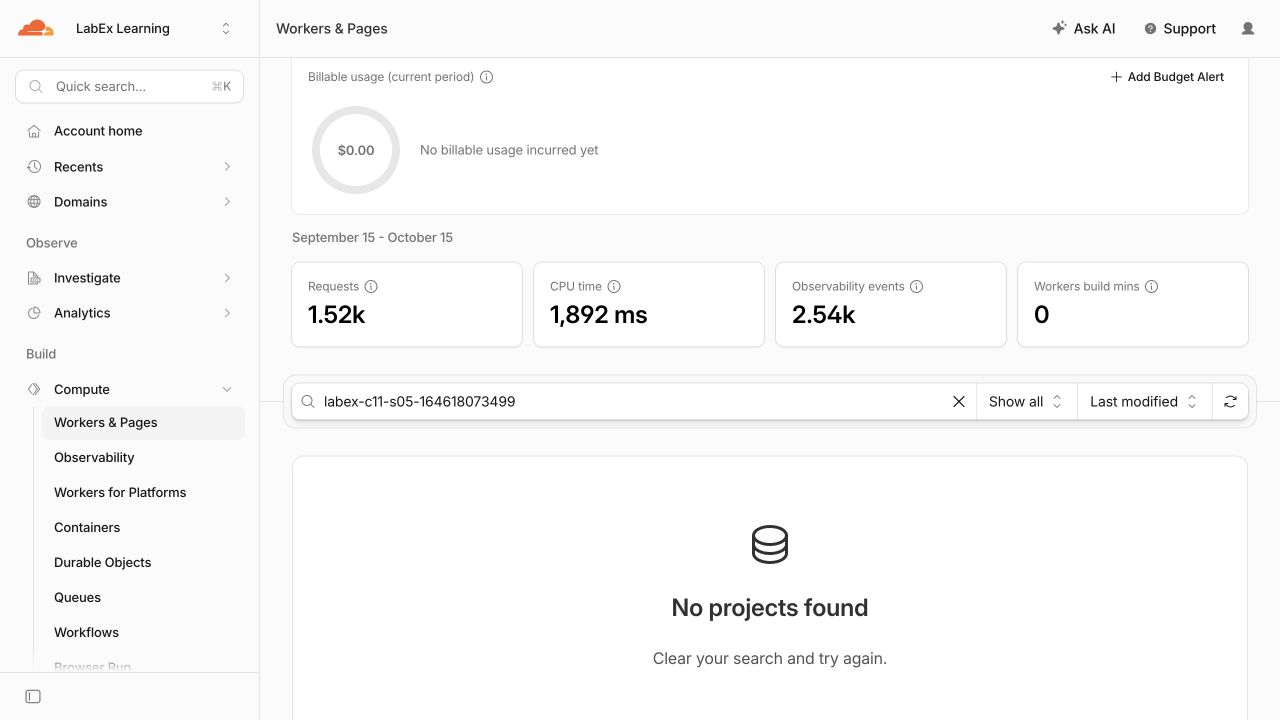
Confirm that the disposable Worker is absent:
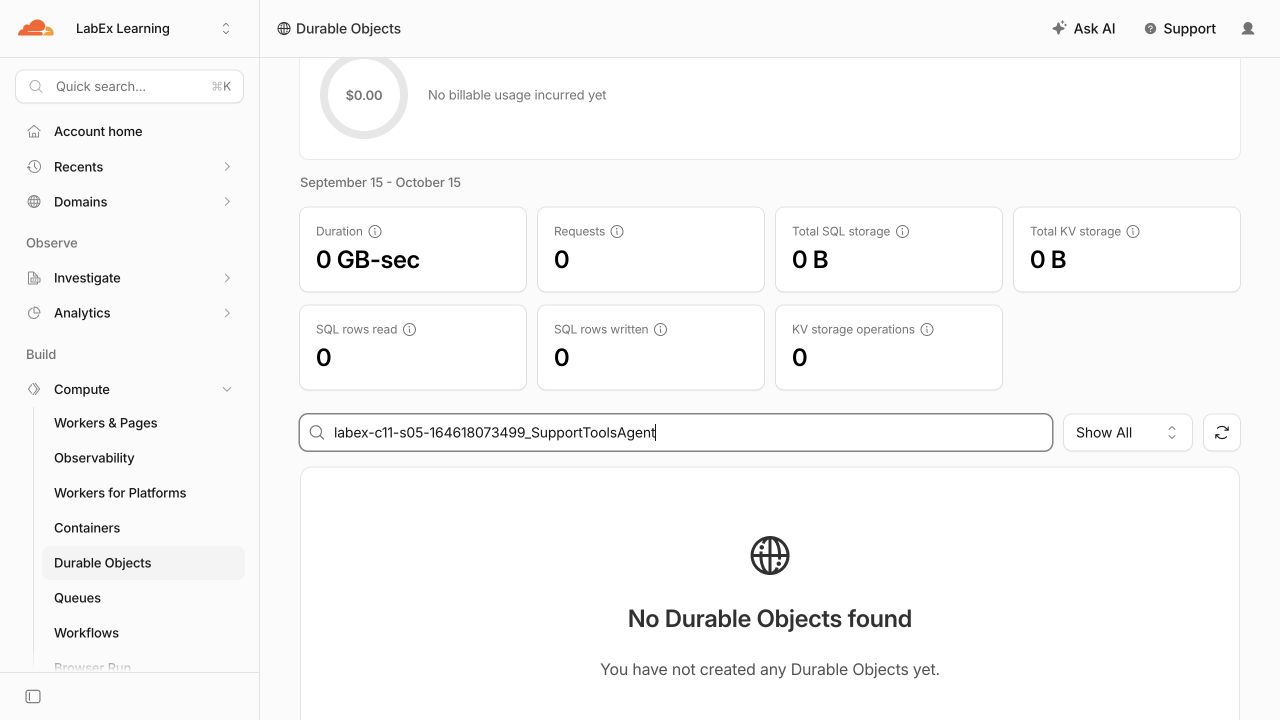
Then confirm that its SupportToolsAgent namespace is absent:
Prove both absences while this VM is still authorized:
python3 .labex/verify.py deleted
Deleting only the Worker would leave the stateful class lifecycle ambiguous. Migration v2 explicitly removes this lab's namespace and its synthetic records before the Worker deletion is verified.
Revoke This VM's Authorization
In this step, you will revoke the temporary VM authorization after cloud cleanup is proven.
npx wrangler logout
npx wrangler whoami --json || true
The structured result should report "loggedIn": false, or Wrangler may return a nonzero unauthenticated result. Logout is intentionally last: the deletion verifier needs valid read access, while the discarded VM does not.
Summary
You added two bounded server-side tools to a Cloudflare AIChatAgent. You:
- defined strict Zod contracts for a read and a synthetic update;
- kept authorization separate by enforcing the named Agent scope on the server;
- rejected malformed input, cross-queue access and stale revisions;
- reused the exact implementation for model tools and deterministic callable probes;
- observed one bounded Workers AI tool turn and privacy-limited logs; and
- deleted the exact SQLite class namespace and Worker before logging out.
These controls make a direct synthetic update small and testable, but they do not ask a person to approve the effect. The next lab adds that approval boundary and makes approval, denial and duplicate delivery explicit.


