



Introduction
A document viewer often needs only the next few bytes or a confirmation that its cached copy is still current. Downloading the entire file for every request wastes work. You will add HTTP validators and single byte-range downloads to a protected Worker backed by private R2 storage.
Complete Stream Documents Through a Worker first. This lab starts in a new VM with Node.js 22.22.0, Wrangler 4.131.1 and a supplied token-check module; you create a new bucket and deploy a new Worker. Your R2 subscription and learning-account permissions must already be ready. Review R2 pricing for operations and storage. No custom domain is needed. Only synthetic text is stored; clean up before leaving.
Connect the application bucket
In this step, you authorize this VM and create an independent private bucket for the application. Device authorization confirms your learning account. R2 bucket management uses a separate API token restricted to that account.
Start Bash for the command syntax used below, then move to the prepared project and check its tools. Keep this same terminal open so your resource-name variables remain available:
bash
cd /home/labex/project/r2-lab
export PATH="$PWD/.tools/node-v22.22.0-linux-x64/bin:$PATH"
node --version
npx wrangler --version
Authorize the displayed device code in your own browser. Confirm the learning account and the requested account and user read scopes before granting consent:
npx wrangler login --device --browser=false --scopes account:read user:read workers_scripts:write workers_kv:write
npx wrangler whoami --json
Require loggedIn: true. Read the account name even if only one is listed. Replace YOUR_ACCOUNT_ID below with that account's actual 32-character ID. openssl rand -hex 6 generates twelve random hexadecimal characters so this lab cannot collide with a previous run. The here-document writes a standard configuration file; the shell substitutes your variables into it.
ACCOUNT_ID=YOUR_ACCOUNT_ID
RUN_ID=$(openssl rand -hex 6)
NAME="labex-c05-r03-$RUN_ID"
BUCKET="$NAME-docs"
cat > wrangler.jsonc <<JSON
{"name":"$NAME","account_id":"$ACCOUNT_ID","main":"src/index.js","workers_dev":true,"compatibility_date":"2026-07-30","r2_buckets":[{"binding":"DOCUMENTS","bucket_name":"$BUCKET"}]}
JSON
For bucket management, open your Cloudflare profile's API Tokens page and create a custom token named after this lab. Grant Account → Workers R2 Storage → Edit, and restrict Account Resources to the learning account whose ID you saved. Set a short expiry. Do not include other accounts or unrelated permissions. This management token is for bucket administration, including creation and deletion. In this lab, the Worker accesses R2 objects through its DOCUMENTS binding.
Copy the token once into this hidden VM prompt. umask 077 restricts the file to your user; read -s hides input. The file uses Wrangler's standard token variable and is excluded from Git.
umask 077
read -r -s -p 'R2 management API token: ' R2_MANAGEMENT_TOKEN; printf '\n'
printf 'CLOUDFLARE_API_TOKEN=%s\n' "$R2_MANAGEMENT_TOKEN" > .env.management
unset R2_MANAGEMENT_TOKEN
Use --env-file=.env.management only for R2 management commands; ordinary whoami continues to check the VM's device authorization.
Put --env-file at the end of each Wrangler command so its list of file arguments does not consume the command name. After creating each bucket, if Wrangler asks whether to add a binding to your configuration, type n and press Enter. The configuration already contains the intended binding.
npx wrangler r2 bucket create "$BUCKET" --env-file=.env.management
List your buckets and find the exact generated name. Other buckets belong to other work; leave them alone.
npx wrangler r2 bucket list --env-file=.env.management
In Dashboard, open Storage & databases → R2 → Overview, select this exact bucket, and inspect its empty object list. In its settings, leave the public development URL and custom domains disabled. A bucket name in Dashboard confirms identity; later download checks prove the stored bytes.
Worker script permission supports deployment. KV permission supports Wrangler’s deletion bookkeeping; this lab creates no KV namespace. The R2 management token remains a separate account-scoped credential.
Implement conditional and partial reads
In this step, you use R2 metadata to decide whether a body is needed. An ETag acts like a file version label. When a client already has a copy, it sends the label in If-None-Match to ask whether the file has changed. A match produces 304 Not Modified with no body, avoiding another download of the same bytes. A Range request lets a viewer fetch one portion of a large file or resume an interrupted download. It asks for inclusive byte positions and produces 206 Partial Content, including a Content-Range header describing the slice.
Use this handler. head() reads metadata without bytes. The later get() includes onlyIf.etagMatches so an object changed between those calls cannot be returned under stale metadata. This endpoint supports a single range and ETag-based If-Range; unsupported multiple-range syntax returns 400. When an If-Range ETag differs, a full 200 response lets the client replace its old copy.
cat > src/index.js <<'JS'
import { authorized } from "./auth.js";
export default {
  async fetch(request, env) {
    const path = new URL(request.url).pathname;
    if (path === "/health") return new Response("ok");
    if (!await authorized(request, env)) return new Response("Unauthorized", { status: 401 });
    if (request.method !== "GET") return new Response("Method not allowed", { status: 405 });
    if (path !== "/documents/report.txt") return new Response("Not found", { status: 404 });
    const key = path.slice(1);
    const metadata = await env.DOCUMENTS.head(key);
    if (!metadata) return new Response("Not found", { status: 404 });
    const headers = new Headers({ "ETag": metadata.httpEtag,
      "Last-Modified": metadata.uploaded.toUTCString(), "Accept-Ranges": "bytes",
      "Cache-Control": "private, no-store" });
    metadata.writeHttpMetadata(headers);
    // GET validators use weak comparison: W/"value" and "value" can match.
    const noneMatch = request.headers.get("If-None-Match");
    if (noneMatch && noneMatch.split(",").some(tag => tag.trim() === "*" || tag.trim().replace(/^W\//, "") === metadata.httpEtag))
      return new Response(null, { status: 304, headers });
    const since = Date.parse(request.headers.get("If-Modified-Since") || "");
    const uploadedSeconds = Math.floor(metadata.uploaded.getTime() / 1000) * 1000;
    if (!noneMatch && Number.isFinite(since) && uploadedSeconds <= since)
      return new Response(null, { status: 304, headers });
    let range = request.headers.get("Range");
    const ifRange = request.headers.get("If-Range");
    if (ifRange && ifRange !== metadata.httpEtag) range = null;
    let start = 0, end = metadata.size - 1;
    if (range) {
      const match = /^bytes=(\d*)-(\d*)$/.exec(range);
      // This endpoint supports exactly one range, not multipart ranges.
      if (!match || (!match[1] && !match[2]))
        return new Response("Invalid range", { status: 400 });
      if (!match[1]) { start = Math.max(0, metadata.size - Number(match[2])); }
      else { start = Number(match[1]); if (match[2]) end = Math.min(Number(match[2]), end); }
      if (!Number.isSafeInteger(start) || !Number.isSafeInteger(end) || start > end || start >= metadata.size) {
        headers.set("Content-Range", `bytes */${metadata.size}`);
        return new Response("Range not satisfiable", { status: 416, headers });
      }
      headers.set("Content-Range", `bytes ${start}-${end}/${metadata.size}`);
    }
    // Do not mix a HEAD result with bytes from an object replaced in between.
    const object = await env.DOCUMENTS.get(key, { onlyIf: { etagMatches: metadata.etag },
      ...(range ? { range: { offset: start, length: end - start + 1 } } : {}) });
    if (!object) return new Response("Not found", { status: 404 });
    if (!("body" in object)) return new Response("Object changed; retry", { status: 412 });
    headers.set("Content-Length", String(range ? end - start + 1 : metadata.size));
    return new Response(object.body, { status: range ? 206 : 200, headers });
  }
};
JS
The requested start position is zero-based. A suffix such as bytes=-3 means the last three bytes. A starting position beyond the object produces 416 with Content-Range: bytes */SIZE. Conditional validation takes precedence over range selection. If-None-Match takes precedence over date validation when both are present.
Create the local application secret and check the bundle:
umask 077
printf "ACCESS_TOKEN=%s\n" "$(openssl rand -hex 24)" > .dev.vars
npx wrangler deploy --dry-run
Compare full and ranged local bodies
In this step, you seed only local storage and inspect real HTTP headers. A local object is separate from the later remote object even though both use the same key.
npx wrangler r2 object put "$BUCKET/documents/report.txt" --local --file document.txt --content-type text/plain
npx wrangler dev --ip 127.0.0.1 --port 8787 > dev.log 2>&1 &
DEV_PID=$!
Wait for the ready message in dev.log, then load the synthetic application secret:
cat dev.log
set -a
source .dev.vars
set +a
Save the full response headers and body separately. -D writes headers to a file:
curl -fsS -D full.headers -H "Authorization: Bearer $ACCESS_TOKEN" http://127.0.0.1:8787/documents/report.txt -o full.txt
cmp document.txt full.txt
cat full.headers
Require 200, the stored content type, a quoted ETag, and Accept-Ranges: bytes. Copy the exact ETag, including its double quotes, into ETAG inside the single shell quotes shown below:
ETAG='"COPY_ETAG_HERE"'
curl -i -H "Authorization: Bearer $ACCESS_TOKEN" -H "If-None-Match: $ETAG" http://127.0.0.1:8787/documents/report.txt
Require 304 with no body. A fresh validator avoids a full transfer; it does not make the bucket public.
curl -sS -D range.headers -H "Authorization: Bearer $ACCESS_TOKEN" -H "Range: bytes=0-4" http://127.0.0.1:8787/documents/report.txt -o range.txt
head -c 5 document.txt > expected-range.txt
cmp expected-range.txt range.txt
cat range.headers
Require 206, Content-Range: bytes 0-4/SIZE and exactly five matching bytes. Now request an unsatisfiable start:
curl -i -H "Authorization: Bearer $ACCESS_TOKEN" -H "Range: bytes=99999-" http://127.0.0.1:8787/documents/report.txt
Require 416, the bytes */SIZE header and Range not satisfiable. The platform check repeats these reads independently.
Verify remote conditional delivery
In this step, you provision the remote fixture independently and publish the handler. Stop the local server, then upload the same synthetic file using the explicit --remote flag:
kill "$DEV_PID"
wait "$DEV_PID" 2>/dev/null || true
npx wrangler r2 object put "$BUCKET/documents/report.txt" --remote --file document.txt --content-type text/plain --env-file=.env.management
npx wrangler deploy
npx wrangler secret bulk .dev.vars
Copy the deployed URL into BASE_URL. Wait for health to return ok; retry reads for up to one minute if the new deployment is still propagating.
BASE_URL=https://YOUR_WORKER.YOUR_SUBDOMAIN.workers.dev
curl -i "$BASE_URL/health"
curl -fsS -D remote.headers -H "Authorization: Bearer $ACCESS_TOKEN" "$BASE_URL/documents/report.txt" -o remote.txt
cmp document.txt remote.txt
cat remote.headers
Use the remote ETag from remote.headers, not a remembered local value. Repeat conditional and partial requests:
ETAG='"COPY_REMOTE_ETAG_HERE"'
curl -i -H "Authorization: Bearer $ACCESS_TOKEN" -H "If-None-Match: $ETAG" "$BASE_URL/documents/report.txt"
curl -i -H "Authorization: Bearer $ACCESS_TOKEN" -H "Range: bytes=0-4" "$BASE_URL/documents/report.txt"
curl -i -H "Authorization: Bearer $ACCESS_TOKEN" -H "Range: bytes=99999-" "$BASE_URL/documents/report.txt"
Require 304 with no body, 206 with the first five fixture bytes, and 416 with the correct size boundary. In Dashboard, inspect the exact Worker binding and bucket object. Keep the bucket's public URL and custom domains disabled; HTTP headers and body comparisons are the authoritative range evidence.
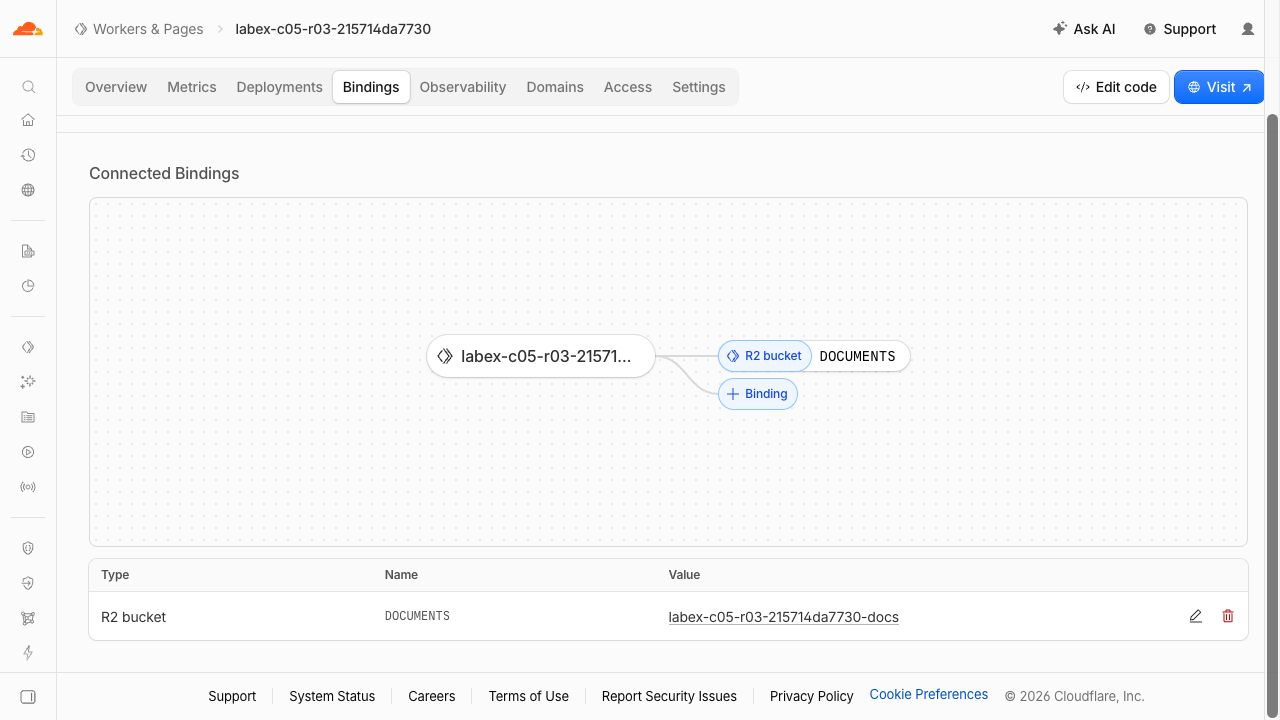
This example shows DOCUMENTS connected to the exact private bucket. Your generated name suffix will differ.
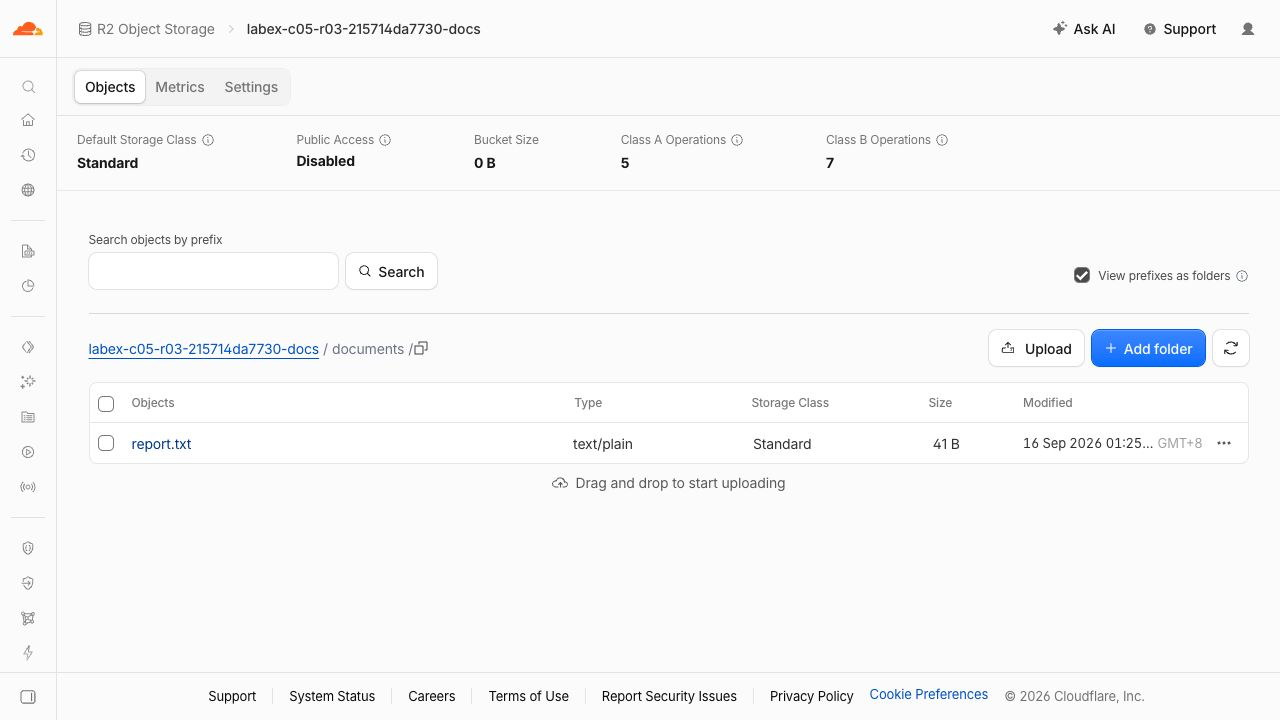
The object row shows report.txt as text/plain, Standard and 41 B, while Public Access remains Disabled. Generated names and dates are examples. The aggregate Bucket Size can lag at 0 B; the object row and byte comparison establish that the file exists. HTTP headers and body comparisons establish conditional and range behavior.
Remove the remote application and bucket
In this step, you delete only this lab's Worker and objects while still authorized. The private bucket does not disappear when its Worker is deleted.
npx wrangler delete
Confirm the exact generated Worker name. Delete the one uploaded object explicitly, then delete the bucket:
BUCKET=$(node -p "JSON.parse(require('fs').readFileSync('wrangler.jsonc')).r2_buckets[0].bucket_name")
npx wrangler r2 object delete "$BUCKET/documents/report.txt" --remote --env-file=.env.management
npx wrangler r2 bucket delete "$BUCKET" --env-file=.env.management
Only documents/report.txt was created remotely. If other objects exist, inspect this exact bucket and establish ownership before removing them.
Refresh the Worker and bucket lists in Dashboard, and run the platform cleanup check. Authentication/network failures are inconclusive, not successful deletion.
Close remaining credentials
In this step, you revoke this lab's management token on your profile API Tokens page, remove the local application secret and close VM authorization. Do this only after the previous cleanup check passes.
rm .env.management .dev.vars
unset ACCESS_TOKEN
npx wrangler logout
npx wrangler whoami --json || true
Require loggedIn: false. Revocation of the management token is a separate manual Dashboard checkpoint; deleting the local file alone does not revoke it. Keep the ordinary Dashboard login and other labs' tokens untouched.
Summary
Use R2 metadata for conditional responses, stream single byte ranges, handle unsatisfiable requests, and clean up the private download service.


