
はじめに
HTML テキストフォーマットの実験へようこそ!この実践的なセッションでは、基本的な HTML タグを使用して、ウェブページ上のテキストを構造化およびフォーマットする方法を学びます。適切にフォーマットされたテキストは、読みやすく、アクセスしやすく、整理されたウェブコンテンツを作成するために不可欠です。
単一の HTML ファイル index.html を使用し、以下のタグの使い方を学びます。
<h1>: メインの見出しに使用します。<p>: 段落に使用します。<strong>: テキストに強い重要性を与えるために使用し、通常は太字で表示されます。<em>: テキストを強調するために使用し、通常は斜体で表示されます。<br>: 改行を挿入するために使用します。
実験中、ファイルを保存してワークスペースの「Web 8080」タブで表示することにより、変更をリアルタイムで確認できます。
メインタイトルに h1 見出しタグを追加する
このステップでは、ウェブページにメインタイトルを追加します。HTML では、見出しは <h1> から <h6> タグで定義されます。<h1> は最も重要な見出しを定義し、通常はページのメインタイトルに使用されます。
まず、WebIDE の左側にあるファイルエクスプローラーを使用して、~/project ディレクトリにある index.html ファイルを開きます。
次に、index.html ファイルの <body> セクション内に <h1> タグを追加します。コメント <!-- Content will be added here --> を以下のコード行で置き換えてください。
<h1>Welcome to My Web Page</h1>
これで、<body> セクションは以下のようになります。
<body>
  <h1>Welcome to My Web Page</h1>
</body>
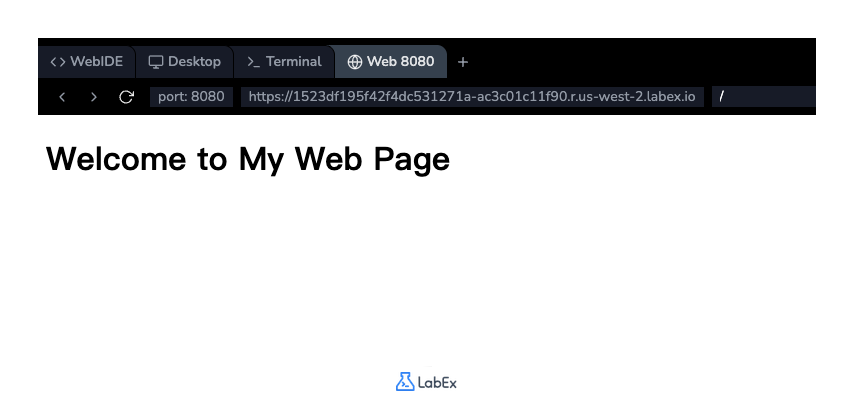
コードを追加したら、ファイルを保存します(Ctrl+S または Cmd+S)。結果を確認するには、インターフェースの上部にある「Web 8080」タブをクリックします。ページにヘディングが表示されているはずです。
段落テキストに p タグを挿入する
このステップでは、見出しの下に段落テキストを追加します。<p> タグは、HTML で段落を定義するために使用されます。ブラウザは、段落の前後に自動的に空白(マージン)を追加します。
index.html ファイルで、<h1> タグの後に新しい行を追加し、以下の <p> タグを挿入してください。
<p>
  This is a paragraph of text. It contains some introductory information about
  this page. HTML is great for structuring content, and this paragraph is an
  example of that. It also contains some important information.
</p>
これで、<body> セクションには見出しと新しい段落の両方が含まれるようになります。
<body>
  <h1>Welcome to My Web Page</h1>
  <p>
    This is a paragraph of text. It contains some introductory information about
    this page. HTML is great for structuring content, and this paragraph is an
    example of that. It also contains some important information.
  </p>
</body>
index.html ファイルを保存し、「Web 8080」タブを更新して、見出しの下に新しく追加された段落が表示されていることを確認してください。
太字テキストに strong タグを使用する
このステップでは、テキストを太字で表示する方法を学びます。<strong> タグは、テキストが強い重要性、真剣さ、または緊急性を持っていることを示すために使用されます。ブラウザは通常、<strong> タグ内のコンテンツを太字でレンダリングします。
前のステップで追加した段落を修正して、「important information」というフレーズを強調しましょう。このフレーズを <strong> と </strong> タグで囲みます。
index.html ファイルの <p> タグを次のように変更してください。
<p>
  This is a paragraph of text. It contains some introductory information about
  this page. HTML is great for structuring content, and this paragraph is an
  example of that. It also contains some <strong>important information</strong>.
</p>
これで、ファイルの完全な <body> は次のようになります。
<body>
  <h1>Welcome to My Web Page</h1>
  <p>
    This is a paragraph of text. It contains some introductory information about
    this page. HTML is great for structuring content, and this paragraph is an
    example of that. It also contains some
    <strong>important information</strong>.
  </p>
</body>
ファイルを保存し、「Web 8080」タブを確認してください。「important information」というテキストが太字になっていることに気づくでしょう。
斜体テキストに em タグを適用する
このステップでは、通常 italic で表示されるテキストを強調する方法を学びます。この目的のために <em> タグ("emphasis" の略)が使用されます。これは、囲まれたテキストを強調または強調すべきであることを示します。
強調されたテキストを含む新しい段落を追加しましょう。index.html の既存の段落の下に以下のコードを追加してください。
<p>
  You can also use other tags to format text. For example, the em tag is used
  for <em>emphasized</em> text.
</p>
これで、<body> セクションは次のようになります。
<body>
  <h1>Welcome to My Web Page</h1>
  <p>
    This is a paragraph of text. It contains some introductory information about
    this page. HTML is great for structuring content, and this paragraph is an
    example of that. It also contains some
    <strong>important information</strong>.
  </p>
  <p>
    You can also use other tags to format text. For example, the em tag is used
    for <em>emphasized</em> text.
  </p>
</body>
ファイルを保存し、「Web 8080」タブを表示してください。新しい段落が表示され、「emphasized」という単語が italic になっているのがわかります。
改行のために br タグを挿入する
このステップでは、テキストブロック内で強制的に改行する方法を学びます。<br> タグは単一の改行を挿入します。これは空のタグであり、閉じタグはありません。
作成した 2 番目の段落の途中に改行を追加しましょう。これは、新しい段落を開始せずに新しい行を開始したい場合に便利です。
index.html ファイルの 2 番目の <p> タグを修正して、<br> タグを含めてください。
<p>
  You can also use other tags to format text. <br />For example, the em tag is
  used for <em>emphasized</em> text.
</p>
最終的な <body> の内容は次のようになります。
<body>
  <h1>Welcome to My Web Page</h1>
  <p>
    This is a paragraph of text. It contains some introductory information about
    this page. HTML is great for structuring content, and this paragraph is an
    example of that. It also contains some
    <strong>important information</strong>.
  </p>
  <p>
    You can also use other tags to format text. <br />For example, the em tag is
    used for <em>emphasized</em> text.
  </p>
</body>
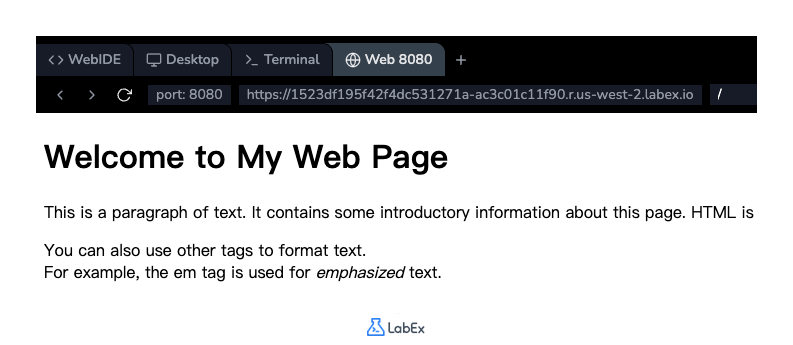
ファイルを保存し、「Web 8080」タブを更新してください。2 番目の段落が 2 行に分割されているのがわかります。
まとめ
実験完了おめでとうございます!HTML テキストフォーマットの基本を習得しました。
この実験では、以下のタグを使用しました。
<h1>:メインの見出しを作成します。<p>:コンテンツを段落に構造化します。<strong>:テキストに強い重要性(太字)を与えます。<em>:テキストを強調します(イタリック)。<br>:改行を挿入します。
これらのタグは、あらゆるウェブページで構造化され、読みやすいコンテンツを作成するための基本的な構成要素です。引き続き練習し、他の HTML タグを探求して、ウェブ開発スキルを向上させてください。