



Introduction
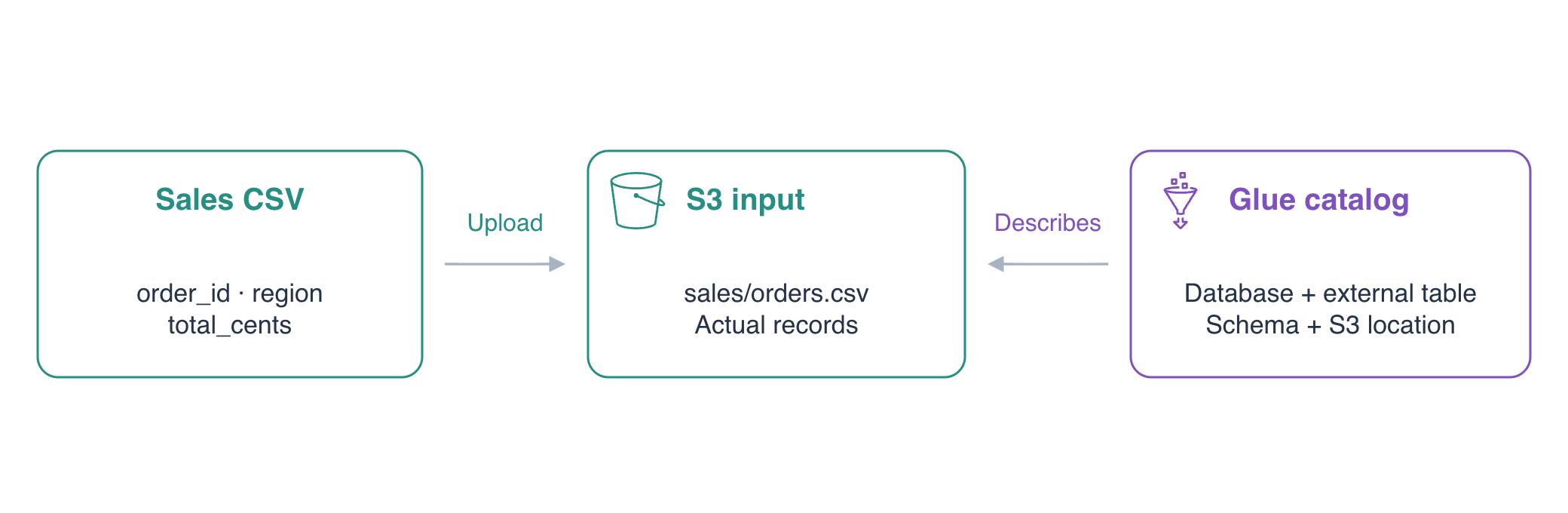
A small shop exports its sales as CSV files. An analyst needs to query those files without copying them into a database server. Put the file in Amazon S3 and describe it in the AWS Glue Data Catalog, a metadata directory that tells query services where data lives and how to read it.
Complete AWS Foundations for Beginners, basic S3 object operations and IAM identity basics first. This independent environment supplies empty S3 buckets, CSV fixtures and a configured AWS CLI identity. You do not need a personal AWS account or resources from another lab. Use Terminal for commands and AWS View to observe actual objects and catalog entries. The catalog describes files; it does not copy, transform or query their contents. Athena queries come in the next lab.
Certification Relevance
| Certification | Exam task | Practice |
|---|---|---|
| Cloud Practitioner (CLF-C02) | Task 3.7 | Identify AWS Glue's catalog role in file-based analytics and distinguish it from storing data in S3. |
Upload the Sales File
In this step, inspect the supplied data and upload it to the prepared S3 bucket. A CSV file represents one record per line, with comma-separated fields. Its first line names the fields. A schema will describe their names, order and types so a query can interpret each record correctly.
Move to the project directory and check your configured identity:
cd /home/labex/project
aws sts \
  get-caller-identity
The ARN ends in labex-an01-operator. This is the identity whose S3 and Glue resources you will use.
Inspect the supplied September file:
cat september.csv
The three sales records have fields order_id, region and total_cents. IDs and regions are strings; total_cents is an integer amount in cents. The values are 1000, 2000 and 500, for a total of 3500 cents. The file uses ordinary unquoted values and one header line.
The fresh environment supplies a uniquely named input bucket. jq -r extracts a JSON field as plain text, and $(...) saves its output in a shell variable. Save and display the bucket name:
INPUT_BUCKET=$(jq -r .input_bucket resources.json)
echo "$INPUT_BUCKET"
Upload the file to sales/orders.csv. The sales/ prefix groups the data that the table will read:
aws s3 \
  cp september.csv "s3://$INPUT_BUCKET/sales/orders.csv"
Inspect the uploaded object by reading it back directly:
aws s3 \
  cp "s3://$INPUT_BUCKET/sales/orders.csv" -
The trailing - prints the S3 object to the terminal. Its header and three records should match september.csv. Open AWS View, expand the S3 object and compare its contents. The unrelated reference/notes.txt object is outside the sales/ prefix; leave it unchanged.
Create a Catalog Database
In this step, create the namespace that will hold your table definition. A Glue database groups catalog tables. It stores metadata rather than running a database server, and creating it does not move the S3 file.
Read the prepared database name from the resource inventory:
DATABASE=$(jq -r .database resources.json)
echo "$DATABASE"
Create that database. --database-input accepts the ordinary JSON definition of its name and description:
aws glue \
  create-database \
  --database-input "{\"Name\":\"$DATABASE\",\"Description\":\"Sales CSV catalog\"}"
A successful create command has no printed body. Query the database to prove it exists:
aws glue \
  get-database \
  --name "$DATABASE" \
  --query 'Database.{Name:Name,Description:Description}'
The name is labex_sales, with the description you supplied. AWS View now shows the database and an empty table state. Your S3 file remains at its original location.
Describe the File with an External Table
In this step, create a catalog table that maps each CSV field to a named type and points to the actual S3 prefix. An external table describes data stored outside the catalog. Removing its definition does not itself remove the S3 objects.
The storage descriptor records columns, location and file-reading configuration. A SerDe is a serializer/deserializer: it explains how to translate file records into table fields. LazySimpleSerDe reads this file's unquoted, comma-delimited records. The header is not a sale, so skip.header.line.count tells the reader to ignore the first line.
Save and display the prefix to use as the table location:
SALES_LOCATION=$(jq -r .input_location resources.json)
echo "$SALES_LOCATION"
Write the table definition. cat > table.json <<EOF writes the following text into table.json until the closing EOF. This unquoted delimiter expands $SALES_LOCATION into your bucket's actual prefix:
cat > table.json <<EOF
{
  "Name": "sales",
  "TableType": "EXTERNAL_TABLE",
  "StorageDescriptor": {
    "Columns": [
      {"Name": "order_id", "Type": "string"},
      {"Name": "region", "Type": "string"},
      {"Name": "total_cents", "Type": "int"}
    ],
    "Location": "$SALES_LOCATION",
    "InputFormat": "org.apache.hadoop.mapred.TextInputFormat",
    "OutputFormat": "org.apache.hadoop.hive.ql.io.HiveIgnoreKeyTextOutputFormat",
    "SerdeInfo": {
      "SerializationLibrary": "org.apache.hadoop.hive.serde2.lazy.LazySimpleSerDe",
      "Parameters": {"field.delim": ","}
    }
  },
  "PartitionKeys": [],
  "Parameters": {"skip.header.line.count": "1", "classification": "csv"}
}
EOF
PartitionKeys is empty because this first table reads a single unpartitioned prefix. You will introduce monthly partitions in a later lab. The two format classes describe text input and ordinary Hive-compatible output; you do not need to install or run them yourself.
Create the table from that JSON file. The file:// form loads CLI input from a local file:
aws glue \
  create-table \
  --database-name "$DATABASE" \
  --table-input file://table.json
Read the definition back from Glue:
aws glue \
  get-table \
  --database-name "$DATABASE" \
  --name sales \
  --query 'Table.{Name:Name,Columns:StorageDescriptor.Columns,Location:StorageDescriptor.Location,Parameters:Parameters}'
Confirm that the column order matches the CSV header, total_cents is int, the location ends in /sales/, and the header setting is 1. AWS View shows the S3 object and its Glue definition side by side.
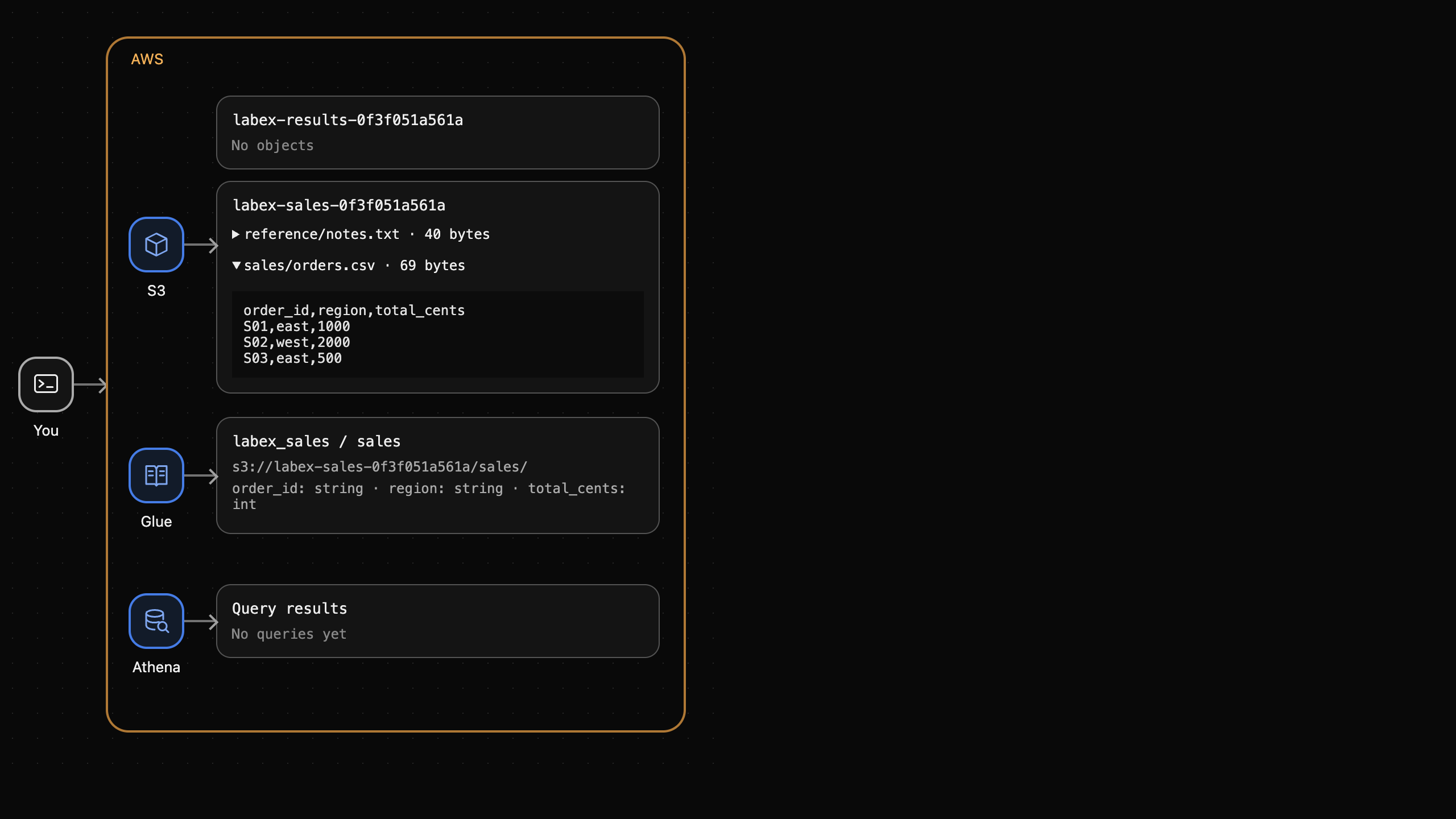
Catalog creation has not changed the CSV or produced an Athena result. A wrong schema or location would make later queries fail or read the wrong records; matching the metadata now gives those queries a correct foundation.
Summary
You uploaded real sales records to S3, created a Glue catalog database and defined an external table with matching columns, CSV format and storage location. S3 holds the data; Glue holds the metadata. The next lab uses Athena to query independently prepared data through this catalog model.
For further reading, see the AWS reference on Define catalog metadata manually; Unquoted CSV fields and header handling.


