



はじめに
Python の itertools モジュールは、効率的なループ処理のためのイテレータを作成するための高速でメモリ効率の良いツール群を提供しています。このモジュールの中でも特に便利な関数の 1 つが combinations() で、これを使うと、アイテムのコレクションから指定された長さのすべての可能な組み合わせを生成することができます。
この実験では、itertools.combinations() 関数を使って要素の組み合わせを作成する方法を学び、そのパラメータを理解し、実用的なアプリケーションを探索します。この知識は、あなたの Python プログラミングのツールキットを充実させ、組み合わせ演算を伴う複雑な問題を解決するのに役立ちます。
itertools.combinations の使い始め方
まずは、組み合わせ (combinations) とは何か、そして Python で itertools.combinations() 関数をどう使うかを理解しましょう。
組み合わせとは何か?
数学において、組み合わせ (combination) とは、コレクションからアイテムを選ぶことで、その順序は重要ではありません。たとえば、集合 {1, 2, 3} から 2 つのアイテムを選ぶ場合、可能な組み合わせは {1, 2}、{1, 3}、{2, 3} です。
必要なモジュールのインストール
Python の itertools モジュールは標準ライブラリの一部なので、追加で何かをインストールする必要はありません。combinations 関数を試すために新しい Python ファイルを作成しましょう。
WebIDE で、エクスプローラーパネルの「新しいファイル」アイコンをクリックするか、キーボードショートカット Ctrl+N を使って新しいファイルを作成します。
ファイルを
/home/labex/projectディレクトリにcombinations_intro.pyとして保存します。ここで、
itertools.combinationsの基本的な使い方を示す簡単な Python スクリプトを書きましょう。
## Import the combinations function from itertools module
import itertools

## Create a simple list of elements
fruits = ['apple', 'banana', 'orange']

## Generate all combinations of 2 fruits from the list
fruit_combinations = itertools.combinations(fruits, 2)

## Convert the iterator to a list to display all combinations
combinations_list = list(fruit_combinations)

## Print the result
print("All possible combinations of 2 fruits:")
print(combinations_list)

## Count the total number of combinations
print(f"Total number of combinations: {len(combinations_list)}")
- ターミナルが開いていなければ開き、次のコマンドを実行してスクリプトを実行します。
python3 combinations_intro.py
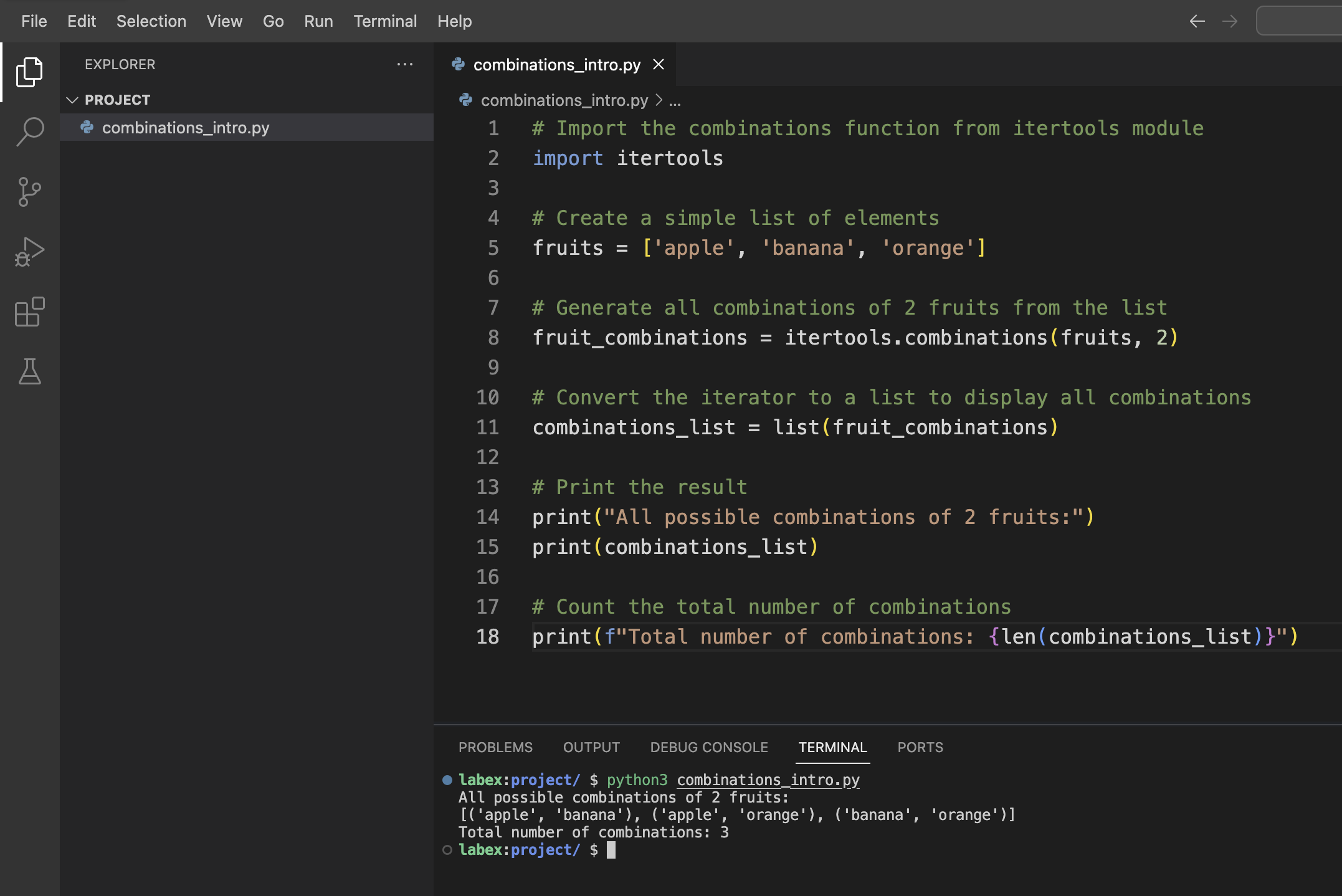
次のような出力が表示されるはずです。
All possible combinations of 2 fruits:
[('apple', 'banana'), ('apple', 'orange'), ('banana', 'orange')]
Total number of combinations: 3
出力の理解
出力は、果物のリストから選ばれた 2 つの要素のすべての可能な組み合わせを示しています。各組み合わせはタプルとして表されます。
- ('apple', 'banana')
- ('apple', 'orange')
- ('banana', 'orange')
('banana', 'apple') のような組み合わせが含まれていないことに注意してください。組み合わせでは順序は重要ではないため、('apple', 'banana') と ('banana', 'apple') は同じ組み合わせとみなされます。
パラメータと構文の理解
では、itertools.combinations() 関数についてもっと深く掘り下げ、そのパラメータと構文を詳しく調べてみましょう。
関数シグネチャ
itertools.combinations() 関数の構文は次の通りです。
itertools.combinations(iterable, r)
ここで、
iterable:シーケンス、イテレータ、またはイテレーションをサポートする他のオブジェクト(リスト、タプル、文字列など)r:生成する各組み合わせの長さ
様々な例を調べるために、もう 1 つ Python ファイルを作成しましょう。
/home/labex/projectディレクトリにcombinations_parameters.pyという名前の新しいファイルを作成します。ファイルに次のコードを追加します。
import itertools

## Example 1: Combinations from a string
letters = "ABCD"
print("Example 1: Combinations from a string 'ABCD', r=2")
letter_combinations = list(itertools.combinations(letters, 2))
print(letter_combinations)
print(f"Number of combinations: {len(letter_combinations)}\n")

## Example 2: Different values of r
numbers = [1, 2, 3, 4]

## r=1 (individual elements)
print("Example 2a: Combinations with r=1")
combinations_r1 = list(itertools.combinations(numbers, 1))
print(combinations_r1)
print(f"Number of combinations: {len(combinations_r1)}\n")

## r=2 (pairs)
print("Example 2b: Combinations with r=2")
combinations_r2 = list(itertools.combinations(numbers, 2))
print(combinations_r2)
print(f"Number of combinations: {len(combinations_r2)}\n")

## r=3 (triplets)
print("Example 2c: Combinations with r=3")
combinations_r3 = list(itertools.combinations(numbers, 3))
print(combinations_r3)
print(f"Number of combinations: {len(combinations_r3)}\n")

## r=4 (all elements)
print("Example 2d: Combinations with r=4")
combinations_r4 = list(itertools.combinations(numbers, 4))
print(combinations_r4)
print(f"Number of combinations: {len(combinations_r4)}\n")

## Example 3: Empty result when r is larger than the iterable length
print("Example 3: Empty result when r > len(iterable)")
too_large_r = list(itertools.combinations(numbers, 5))
print(too_large_r)
print(f"Number of combinations: {len(too_large_r)}")
- スクリプトを実行します。
python3 combinations_parameters.py
次のような出力が表示されるはずです。
Example 1: Combinations from a string 'ABCD', r=2
[('A', 'B'), ('A', 'C'), ('A', 'D'), ('B', 'C'), ('B', 'D'), ('C', 'D')]
Number of combinations: 6

Example 2a: Combinations with r=1
[(1,), (2,), (3,), (4,)]
Number of combinations: 4

Example 2b: Combinations with r=2
[(1, 2), (1, 3), (1, 4), (2, 3), (2, 4), (3, 4)]
Number of combinations: 6

Example 2c: Combinations with r=3
[(1, 2, 3), (1, 2, 4), (1, 3, 4), (2, 3, 4)]
Number of combinations: 4

Example 2d: Combinations with r=4
[(1, 2, 3, 4)]
Number of combinations: 1

Example 3: Empty result when r > len(iterable)
[]
Number of combinations: 0
重要な洞察
これらの例から、itertools.combinations() 関数のいくつかの重要な特性を観察することができます。
- さまざまな種類のイテラブル(文字列、リストなど)で動作します。
rの値が各組み合わせのサイズを決定します。- 組み合わせの数は数学的な公式 n! / (r! * (n-r)!) に従います。ここで、n はイテラブルの長さです。
rがイテラブルの長さと等しい場合、組み合わせは 1 つだけ(イテラブル全体)になります。rがイテラブルの長さより大きい場合、空のリストが返されます。
このパラメータに関する理解は、Python プログラムで itertools.combinations() 関数を効果的に適用するのに役立ちます。
組み合わせの実用的なアプリケーション
では、itertools.combinations() 関数のいくつかの実用的なアプリケーションを探ってみましょう。この関数が一般的な問題を解くためにどのように使用できるかを示すために、いくつかの現実世界の例を実装します。
例 1: チーム編成
あるグループの人々から特定の人数のチームを編成する必要があると想像してみてください。すべての可能なチームを編成するのに役立つプログラムを作成しましょう。
/home/labex/projectディレクトリにteam_formation.pyという名前の新しいファイルを作成します。次のコードを追加します。
import itertools

def form_teams(members, team_size):
    """Generate all possible teams of the specified size from the list of members."""
    teams = list(itertools.combinations(members, team_size))
    return teams

## List of team members
team_members = ["Alice", "Bob", "Charlie", "David", "Eva", "Frank"]

## Form teams of different sizes
pairs = form_teams(team_members, 2)
trios = form_teams(team_members, 3)

## Display the results
print(f"Total members: {len(team_members)}")
print(f"Members: {team_members}\n")

print(f"Possible pairs (teams of 2): {len(pairs)}")
for i, pair in enumerate(pairs, 1):
    print(f"Team {i}: {' and '.join(pair)}")

print(f"\nPossible trios (teams of 3): {len(trios)}")
for i, trio in enumerate(trios, 1):
    print(f"Team {i}: {', '.join(trio)}")
- スクリプトを実行します。
python3 team_formation.py
6 人のチームメンバーから編成できるすべての可能なペアとトリオがリストされた出力が表示されるはずです。
例 2: すべての部分集合の検索
もう 1 つの一般的なアプリケーションは、与えられた集合のすべての可能な部分集合(べき集合とも呼ばれます)を生成することです。これを実装しましょう。
/home/labex/projectディレクトリにgenerate_subsets.pyという名前の新しいファイルを作成します。次のコードを追加します。
import itertools

def generate_all_subsets(items):
    """Generate all possible subsets of the given items."""
    all_subsets = []

    ## Empty set is always a subset
    all_subsets.append(())

    ## Generate subsets of all possible lengths
    for r in range(1, len(items) + 1):
        subsets_of_length_r = list(itertools.combinations(items, r))
        all_subsets.extend(subsets_of_length_r)

    return all_subsets

## Sample set of items
items = ['A', 'B', 'C']

## Generate all subsets
subsets = generate_all_subsets(items)

## Display the results
print(f"Original set: {items}")
print(f"Total number of subsets: {len(subsets)}")
print("All subsets (including the empty set):")

for i, subset in enumerate(subsets):
    if len(subset) == 0:
        print(f"{i+1}. Empty set {{}}")
    else:
        print(f"{i+1}. {set(subset)}")
- スクリプトを実行します。
python3 generate_subsets.py
出力には、空集合を含む集合 {A, B, C} のすべての可能な部分集合が表示されます。
例 3: メニュー組み合わせ生成器
レストランがメニューアイテムからすべての可能な食事の組み合わせを生成するのに役立つ実用的なアプリケーションを作成しましょう。
/home/labex/projectディレクトリにmenu_combinations.pyという名前の新しいファイルを作成します。次のコードを追加します。
import itertools

def generate_meal_combinations(appetizers, main_courses, desserts):
    """Generate all possible meal combinations with one item from each category."""
    meal_combinations = []

    for app in appetizers:
        for main in main_courses:
            for dessert in desserts:
                meal_combinations.append((app, main, dessert))

    return meal_combinations

def generate_combo_deals(menu_items, combo_size):
    """Generate all possible combo deals of the specified size."""
    return list(itertools.combinations(menu_items, combo_size))

## Menu categories
appetizers = ["Salad", "Soup", "Bruschetta"]
main_courses = ["Pasta", "Steak", "Fish"]
desserts = ["Ice Cream", "Cake", "Fruit"]

## All menu items
all_items = appetizers + main_courses + desserts

## Generate all possible three-course meals
meals = generate_meal_combinations(appetizers, main_courses, desserts)

## Generate all possible 2-item combo deals from the entire menu
combos = generate_combo_deals(all_items, 2)

## Display the results
print("Restaurant Menu Planner\n")

print("Menu Items:")
print(f"Appetizers: {appetizers}")
print(f"Main Courses: {main_courses}")
print(f"Desserts: {desserts}\n")

print(f"Total possible three-course meals: {len(meals)}")
print("Sample meals:")
for i in range(min(5, len(meals))):
    app, main, dessert = meals[i]
    print(f"Meal option {i+1}: {app} + {main} + {dessert}")

print(f"\nTotal possible 2-item combo deals: {len(combos)}")
print("Sample combo deals:")
for i in range(min(5, len(combos))):
    print(f"Combo {i+1}: {' + '.join(combos[i])}")
- スクリプトを実行します。
python3 menu_combinations.py
出力には、メニューアイテムから作成できるさまざまな食事の組み合わせとコンボメニューが表示されます。
これらの例は、itertools.combinations() 関数がアイテムの組み合わせに関する現実世界の問題を解くためにどのように適用できるかを示しています。この関数を効果的に使用する方法を理解することで、より大きな集合からアイテムのグループを選択する問題に対して、より効率的な解決策を開発することができます。
組み合わせを使った問題解決
このステップでは、itertools.combinations() の知識を活用して、一般的なプログラミング問題を解いてみましょう。与えられた合計値になるすべてのアイテムの選び方を見つける問題、つまり「部分集合の和(Subset Sum)」問題の解決策を実装します。
問題:目標とする合計値になる部分集合を見つける
ある数の集合があり、特定の目標とする合計値になるすべての部分集合を見つけたいとします。これは組み合わせを使って解くことができる古典的な問題です。
解決策を実装しましょう。
/home/labex/projectディレクトリにsubset_sum.pyという名前の新しいファイルを作成します。次のコードを追加します。
import itertools

def find_subsets_with_sum(numbers, target_sum):
    """Find all subsets of numbers that add up to the target sum."""
    results = []

    ## Try combinations of different lengths
    for r in range(1, len(numbers) + 1):
        ## Generate all combinations of length r
        combinations = itertools.combinations(numbers, r)

        ## Check each combination
        for combo in combinations:
            if sum(combo) == target_sum:
                results.append(combo)

    return results

## Example usage
numbers = [3, 5, 2, 7, 4, 9, 1, 8]
target_sum = 10

## Find subsets with sum equal to target_sum
matching_subsets = find_subsets_with_sum(numbers, target_sum)

## Display results
print(f"Numbers: {numbers}")
print(f"Target sum: {target_sum}")
print(f"Number of matching subsets: {len(matching_subsets)}")

if matching_subsets:
    print("Subsets that add up to the target sum:")
    for i, subset in enumerate(matching_subsets, 1):
        print(f"Subset {i}: {subset} (Sum: {sum(subset)})")
else:
    print("No subsets found that add up to the target sum.")

## Let's find subsets for another target sum
second_target = 15
matching_subsets_2 = find_subsets_with_sum(numbers, second_target)

print(f"\nTarget sum: {second_target}")
print(f"Number of matching subsets: {len(matching_subsets_2)}")

if matching_subsets_2:
    print("Subsets that add up to the target sum:")
    for i, subset in enumerate(matching_subsets_2, 1):
        print(f"Subset {i}: {subset} (Sum: {sum(subset)})")
else:
    print("No subsets found that add up to the target sum.")
- スクリプトを実行します。
python3 subset_sum.py
出力には、リスト内の数の組み合わせで合計が 10 になるもの、そして 15 になるものがすべて表示されます。
拡張:対話型バージョン
この解決策を拡張して、ユーザーが自分の数のリストと目標とする合計値を入力できる対話型にしましょう。
/home/labex/projectディレクトリにinteractive_subset_sum.pyという名前の新しいファイルを作成します。次のコードを追加します。
import itertools

def find_subsets_with_sum(numbers, target_sum):
    """Find all subsets of numbers that add up to the target sum."""
    results = []

    ## Try combinations of different lengths
    for r in range(1, len(numbers) + 1):
        ## Generate all combinations of length r
        combinations = itertools.combinations(numbers, r)

        ## Check each combination
        for combo in combinations:
            if sum(combo) == target_sum:
                results.append(combo)

    return results

def main():
    ## Get user input
    try:
        input_str = input("Enter a list of numbers separated by spaces: ")
        numbers = [int(num) for num in input_str.split()]

        target_sum = int(input("Enter the target sum: "))

        ## Find matching subsets
        matching_subsets = find_subsets_with_sum(numbers, target_sum)

        ## Display results
        print(f"\nNumbers: {numbers}")
        print(f"Target sum: {target_sum}")
        print(f"Number of matching subsets: {len(matching_subsets)}")

        if matching_subsets:
            print("Subsets that add up to the target sum:")
            for i, subset in enumerate(matching_subsets, 1):
                print(f"Subset {i}: {subset} (Sum: {sum(subset)})")
        else:
            print("No subsets found that add up to the target sum.")

    except ValueError:
        print("Invalid input. Please enter integers only.")

if __name__ == "__main__":
    main()
- 対話型スクリプトを実行します。
python3 interactive_subset_sum.py
- 指示に従って、数のリスト(例:
3 5 2 7 4 9 1 8)と目標とする合計値(例:10)を入力します。
スクリプトは、入力された数の組み合わせで指定された目標とする合計値になるものを見つけて表示します。
解決策の理解
この解決策では、itertools.combinations() を使って、入力された数のリストからさまざまなサイズの部分集合を生成します。各部分集合について、合計が目標値と等しいかどうかをチェックし、等しければ結果に追加します。
このアプローチは、一般的なアルゴリズム問題を解く際の組み合わせの強力な応用例を示しています。itertools.combinations() の効率性により、中小規模の入力に対して部分集合の和問題を効率的に解くことができます。
実際には、非常に大きなリストの場合は、より最適化されたアルゴリズムが必要になるかもしれませんが、多くの現実世界のシナリオでは、この組み合わせベースのアプローチがシンプルで理解しやすい解決策を提供します。
まとめ
この実験(Lab)では、Python の itertools.combinations() 関数を使って、アイテムのコレクションから組み合わせを生成する方法を学びました。以下が要点です。
基本的な使い方:
itertools.combinations(iterable, r)関数は、入力されたiterableから長さがrのすべての可能な組み合わせを生成します。関数のパラメータ:この関数は 2 つのパラメータを取ります。
iterable:シーケンス、イテレータ、またはイテレーションをサポートするその他のオブジェクトr:生成する各組み合わせの長さ
重要な特性:
- 組み合わせでは順序は関係ありません。
- 組み合わせの中で同じ要素が 2 回以上出現することはありません。
- この関数は、組み合わせを 1 つずつ生成するイテレータを返します。
実用的なアプリケーション:
combinations()関数を使ってさまざまな問題を解く方法を学びました。- グループの人々からチームを編成する
- 与えられた集合のすべての部分集合を生成する
- 食事の組み合わせやコンボメニューを作成する
- 目標とする合計値になる部分集合を見つける
itertools.combinations() 関数は、より大きなコレクションからアイテムのグループを選択する問題を解くための強力なツールです。この関数を活用することで、Python で組み合わせ演算を扱うためのよりクリーンで効率的なコードを書くことができます。
将来の Python プロジェクトでは、itertools モジュールにはイテレータを扱うための他にも多くの便利な関数が用意されており、よりエレガントで効率的なコードを書くのに役立つことを忘れないでください。


